🎨 AI Manga Artist: Create Your First 4-Panel Comic with Piclumen Anime V2
Have you ever had a funny story idea but couldn't draw? The 4-Panel Comic (Yonkoma) is the perfect format—short, punchy, and shareable.
But the hardest part of AI manga is Consistency. You don't want your main character changing hair color or clothes in every panel.
The solution? The "Actor First" Workflow. Just like a movie director, we need to cast our actor (Character Sheet) before we start filming the scenes.
In this tutorial, we will use PicLumen Anime V2 to create a character and star them in a comic.
Phase 1: Casting Your "Actor" (The Character Sheet)
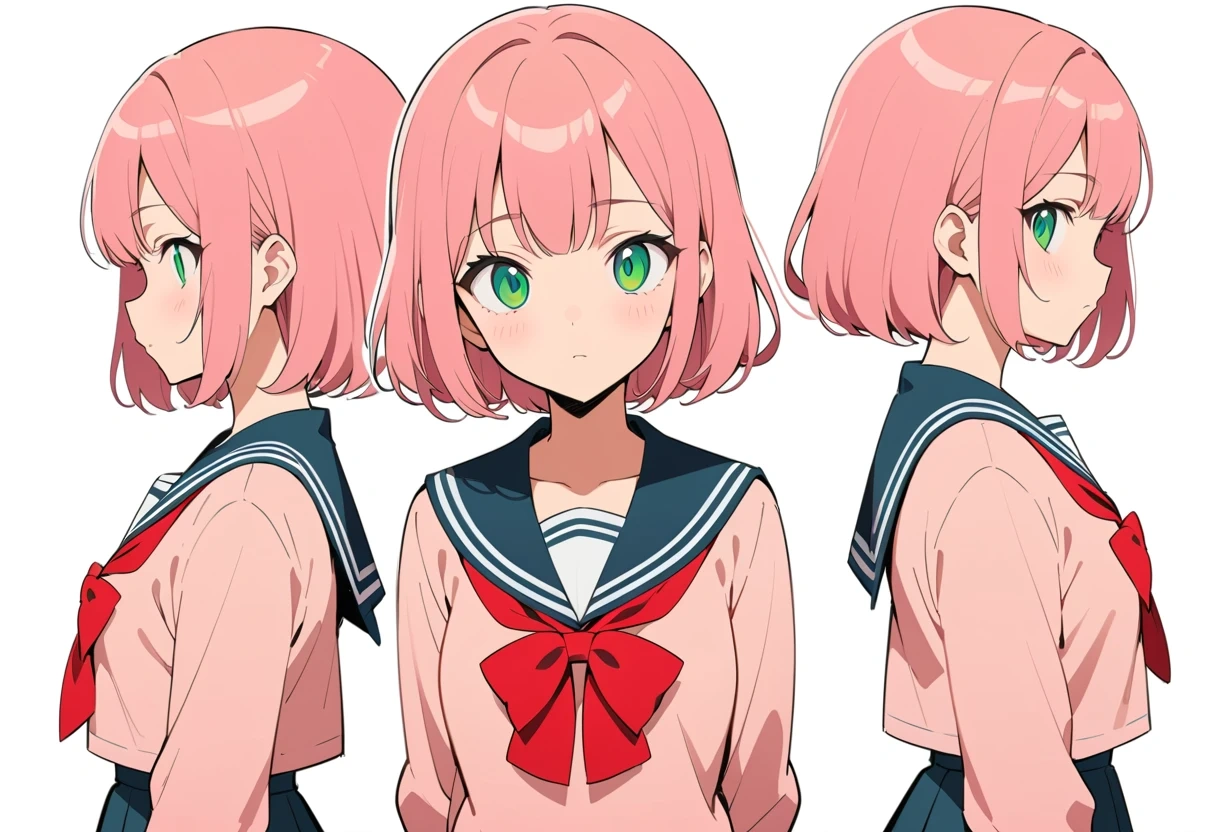
You cannot just type "cute girl" every time. You need a Reference Sheet to define exactly what she looks like. This image will serve as your guide for all future prompts.
Recommended Settings:
Ratio: 3:2 (Horizontal)
Copy & Paste Prompt:
(Masterpiece, best quality), anime character design sheet of 1girl, pink bob hair, green eyes, wearing sailor school uniform with red bow. Three views: front view, side view, back view. White background, flat color, clean lines, studio anime style.
(💡 Pro Tip: Save this image! If you use PicLumen's Image-to-Image feature later, upload this image to help the AI remember her face.)
Phase 2: The Story Board (Ki-Sho-Ten-Ketsu)
We will create a classic "Late for School" story using the standard 4-panel structure.
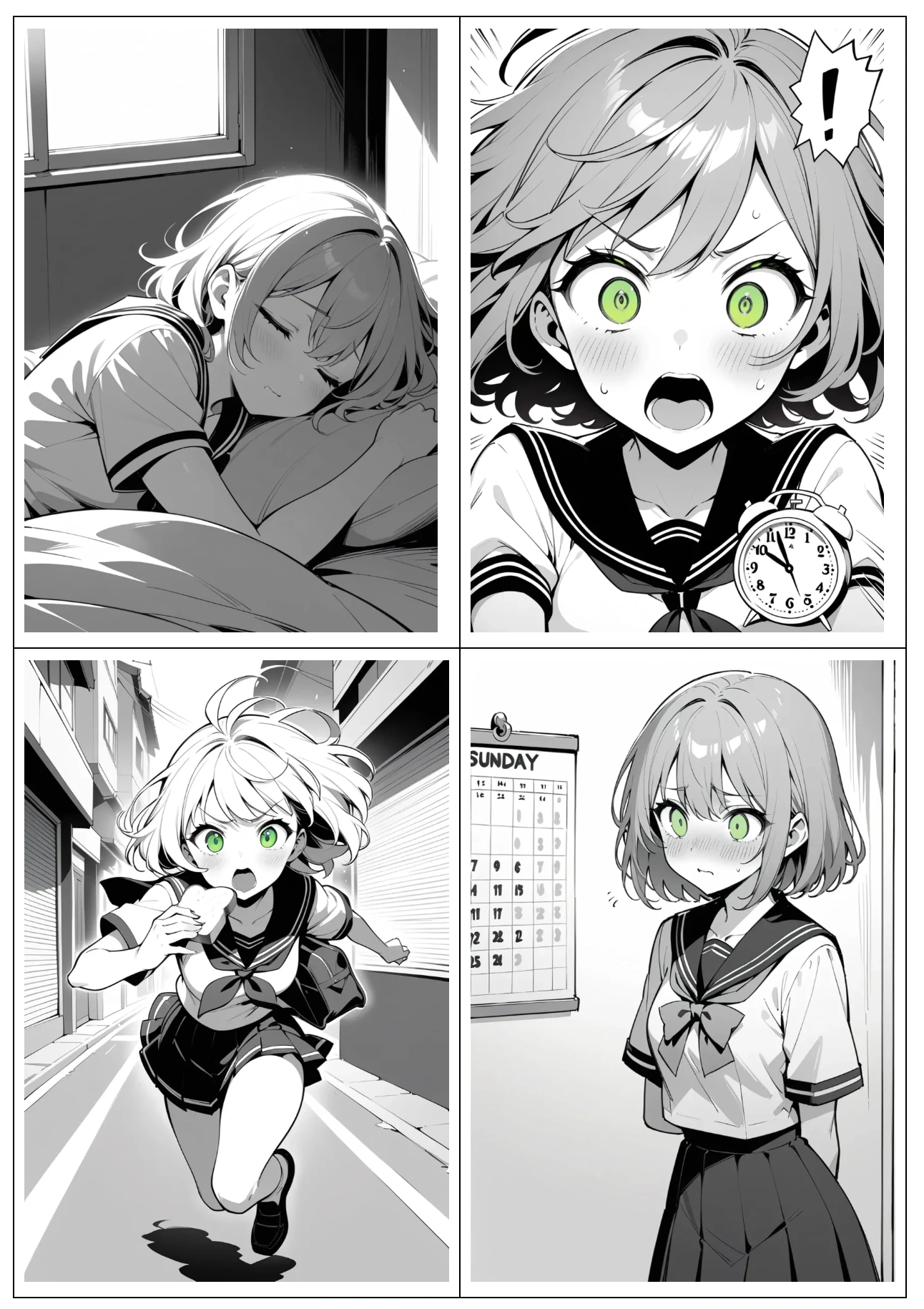
Panel 1 (Intro): Sleeping peacefully.
Panel 2 (Development): Waking up in panic.
Panel 3 (Twist): Running with toast.
Panel 4 (Conclusion): Realizing it's Sunday.
Phase 3: "Filming" The Panels
Now, switch your Aspect Ratio to 2:3 (Vertical) to match the shape of a comic book panel.
The Golden Rule: You must copy the Character Tags (1girl, pink bob hair, green eyes, sailor school uniform) from your Phase 1 character sheet into every single prompt below. This ensures she looks the same in every shot.
Panel 1: The Setup (Ki)
Camera: Medium Shot | Vibe: Peaceful
(Masterpiece, best quality), anime manga panel, monochrome, screentones.1girl, pink bob hair, green eyes, sailor school uniform.Sleeping soundly in a messy bedroom, eyes gently closed, relaxed sleeping expression,slightly drooling in a cute, innocent way, morning sun rays through the window.Peaceful, cozy atmosphere.eyes fully closed
Panel 2: The Conflict (Sho)
Camera: Extreme Close-up | Vibe: Chaotic & Dutch Angle
(Masterpiece, best quality),anime manga panel, monochrome, screentones, speed lines.1girl, pink bob hair, green eyes, sailor school uniform.Extreme close-up of face, startled and flustered expression,eyes wide open, mouth open in panic but cute.Alarm clock thrown into the air beside her,dynamic angle, comedic tension, lively manga style.
Panel 3: The Action (Ten)
Camera: Wide Angle | Vibe: Fast & Dynamic
(Masterpiece, best quality), anime manga panel, monochrome, screentones, action lines. 1girl, pink bob hair, green eyes, sailor school uniform. Running fast down a Japanese street with toast in mouth, school bag flying. Wide angle, motion blur.
Panel 4: The Punchline (Ketsu)
Camera: Full Body Shot | Vibe: Static & Defeated
(Masterpiece, best quality), anime manga panel, monochrome, screentones, gloom lines. 1girl, pink bob hair, green eyes, sailor school uniform. Standing frozen looking at a wall calendar that says "SUNDAY". Blank expression, comedic defeat, white background.
📋 Manga Prompt Script
Model: PicLumen Anime V2 | Ratio: 2:3
💡 How to Fix Mistakes (Inpainting)
Even the best AI models make mistakes (like drawing 6 fingers or the wrong bow color).
Instead of regenerating the whole image, use Inpainting:
Select the "Inpaint" (or Edit) tool on your generated panel.
Paint over the messy area (e.g., the hand).
Type a specific prompt like "perfect anime hand" and generate.
This fixes the glitch without changing your character's face!
🚀 Assemble Your Comic
You have the panels. Now, simply stack them vertically using any photo editor and add your dialogue.