I didn’t expect my first AI animation to be about MBTI.
I always think about generating my animation, but I'm stuck at the first step: How can I describe my character without distorting it? Which tool can bring my vision to life?
I wanted to see if AI could capture personality — not just visuals.
Could it show focus? Subtle annoyance? Quiet satisfaction?
All in 15 seconds?
So I opened Kling 3.0 and decided to find out, even though I have zero prior animation experience with it.
The Idea: A 15-Second Personality Story
The concept was simple:
🎬INTJ is working in a perfectly organized study room.
📺A cheerful ENFP friend walks in with milk tea.
🔊Conflict happens.
📉A schedule board settles everything.
Fifteen seconds. Two personalities. One silent punchline.
I decided to merge everything into a single 15-second animation — because Kling currently limits total duration per generation to 15 seconds (even in multi-shot mode).
And that’s where I started learning things the hard way.
How I Structured the Animation
Instead of writing one long cinematic paragraph, I broke it down into three layers:
Elements (characters & environment)
Shot structure
Motion logic inside 15 seconds
That structure turned out to be crucial.
What I Learned While Using Kling 3.0
Here are the practical things I wish I knew before starting:
1️⃣ Every Element Needs 2–4 Images
When creating elements (like your INTJ character, ENFP friend, study room), you can’t just upload one reference.
Each element requires 2–4 images.
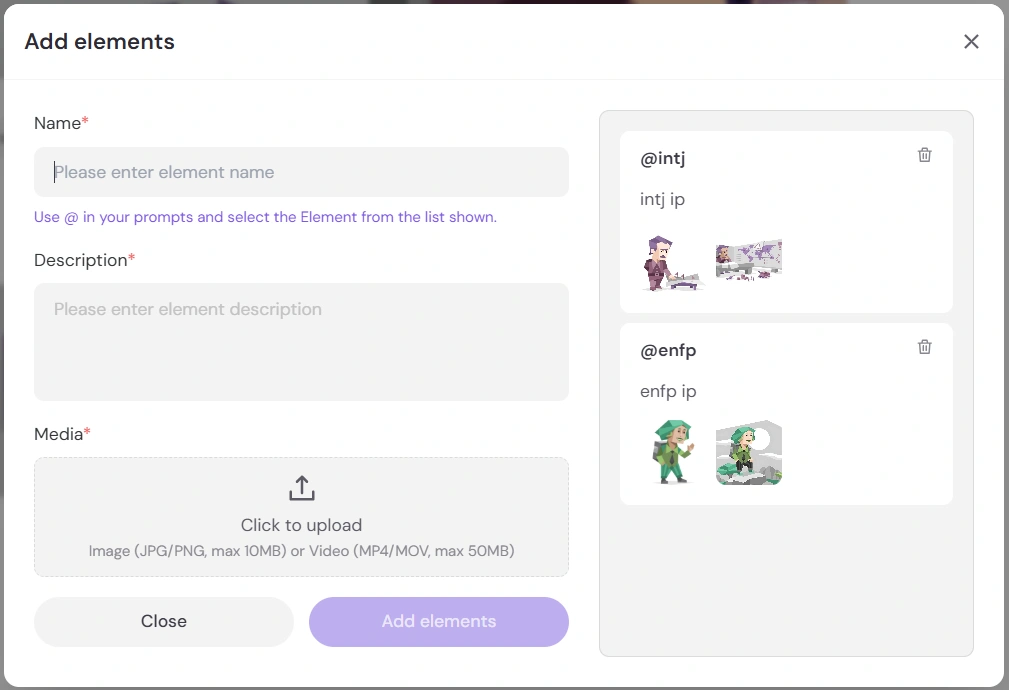
I guess this is for improving consistency in:
character proportions
color stability
facial structure
outfit details
If you only upload one image, the model may “drift” across shots.
Think of elements like building actors for your film — they need multiple reference angles.
2️⃣ Each Shot Can Only @Mention an Element 5 Times
This one surprised me.
Inside your text prompt, each shot can reference (@) an element up to 5 times.
If you wana one more, you'll see nothing happens after you enter the 6th "@".
So instead of repeating:
@INTJ looks at @INTJ's smartwatch while @INTJ types...
You should simplify:
@INTJ types calmly and checks his smartwatch.
Clean prompts work better.
3️⃣ Multi-Shot Still Means 15 Seconds Total
Even if you structure it as:
Shot 1 – 4 seconds
Shot 2 – 7 seconds
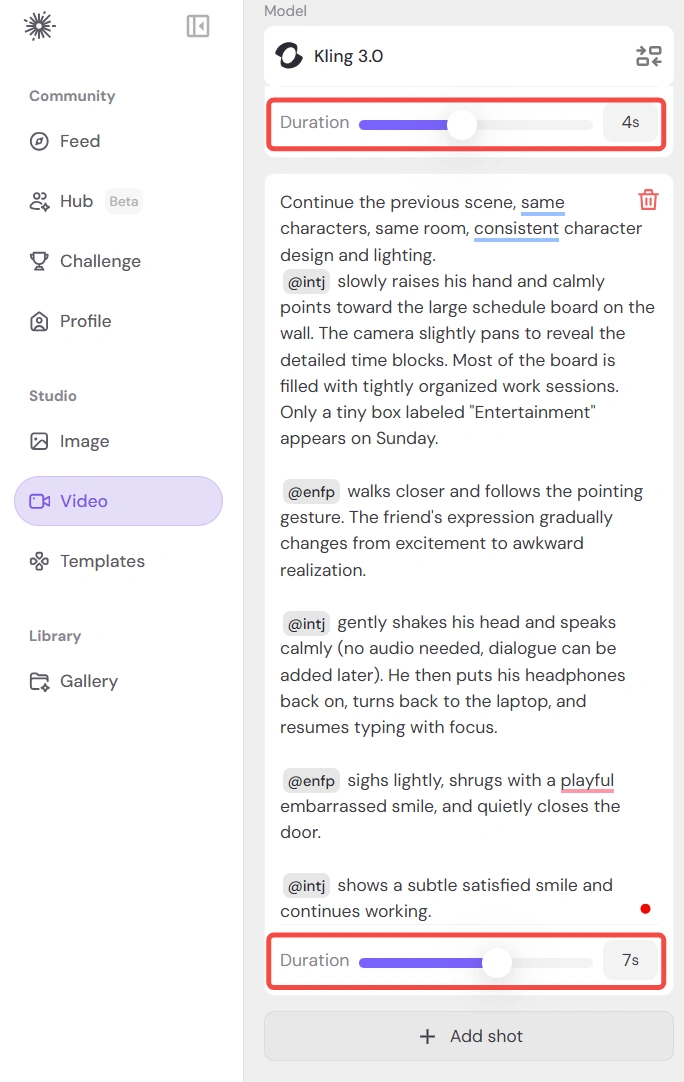
The total video duration cannot exceed 15 seconds.
Multi-shot does not increase total time.
This forced me to rethink pacing.
I had to:
remove unnecessary walking
avoid slow transitions
compress emotional beats
It actually made the story stronger.
4️⃣ If You Add Elements, You Must Add a First Frame
This is easy to overlook.
Once you use elements, Kling automatically expects a first frame image.
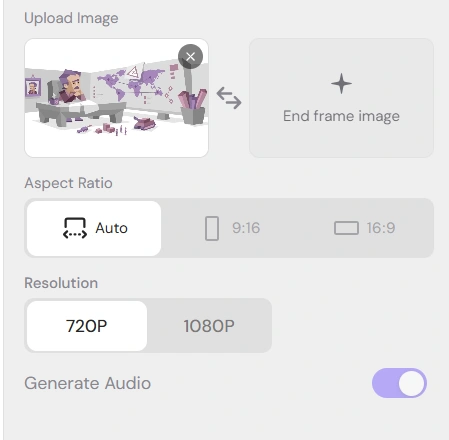
The first frame acts like:
a visual anchor
a camera reference
a scene stabilizer
In my case, I used a clean frame of the INTJ sitting at the desk.
That ensured:
correct camera angle
correct character placement
consistent lighting
After that, the animation flowed much more smoothly.
Why I Chose Kling 3.0 for This
Even though I’ve tested other models before, Kling 3.0 stood out for this project because:
Character anatomy was stable
No disappearing limbs
Facial expressions were subtle and readable
It supports structured shot design
Yes, it’s more complex to operate.
Yes, it takes time to understand elements and shot logic.
But once it clicks, it feels like directing rather than just prompting.
The Most Important Lesson
AI animation isn’t just about writing a “cool prompt.”
It’s about:
Structuring visual assets
Thinking in shots
Respecting time limits
Controlling motion density
Once I treated it like filmmaking instead of image generation, everything improved.
And honestly?
Seeing the INTJ calmly point at the schedule board while the ENFP slowly realizes… that moment felt weirdly satisfying.
All in 15 seconds.
What I’d Do Differently Next Time
Experiment with stronger comedic timing
Try dynamic camera movement
Test faster cuts inside multi-shot
Add light background audio for the mood
Now that I understand the mechanics, I want to push it further.
Your Turn
If you could generate a 15-second AI animation right now:
What kind of story would you tell?
Another personality scenario?
A mini sci-fi scene?
A romantic misunderstanding?
Something chaotic and funny?
I’m genuinely curious what you’d create next.
Let me know — I might turn one of your ideas into my next experiment.