Recently, anime to realistic ai has become a popular topic across social media, especially among people who love anime, fan art, and character-based creative trends. For many fans of anime culture, seeing a favorite character reimagined as a real person is not just visually interesting, but also a fun form of reinterpretation. This growing interest is also why anime to real life ai content keeps showing up in videos, posts, and image-sharing communities.
In simple terms, anime to realistic ai refers to using AI to transform anime, illustrated, or cartoon-style characters into realistic human-looking portraits. Instead of removing the original design completely, the goal is usually to keep recognizable details such as hairstyle, expression, and clothing while giving the image a more lifelike appearance.
If you have been wondering how to convert anime image to realistic photo ai, the process is now much easier than before. With the right tool, a clear reference image, and a focused prompt, you can turn an anime character into a believable human portrait in just a few steps.
📚A Simple Way to Convert Anime Images into Realistic Photos
One practical option is to use PicLumen and its AI image generation workspace. The workflow is simple enough for beginners, but flexible enough for people who want more polished results.
Step 1: Open PicLumen’s AI Image Workspace
Go to PicLumen and open the AI image workspace. This is where you can upload a character image, choose a model, enter your prompt, and generate a realistic version of the original design.
Step 2: Choose the Right Model
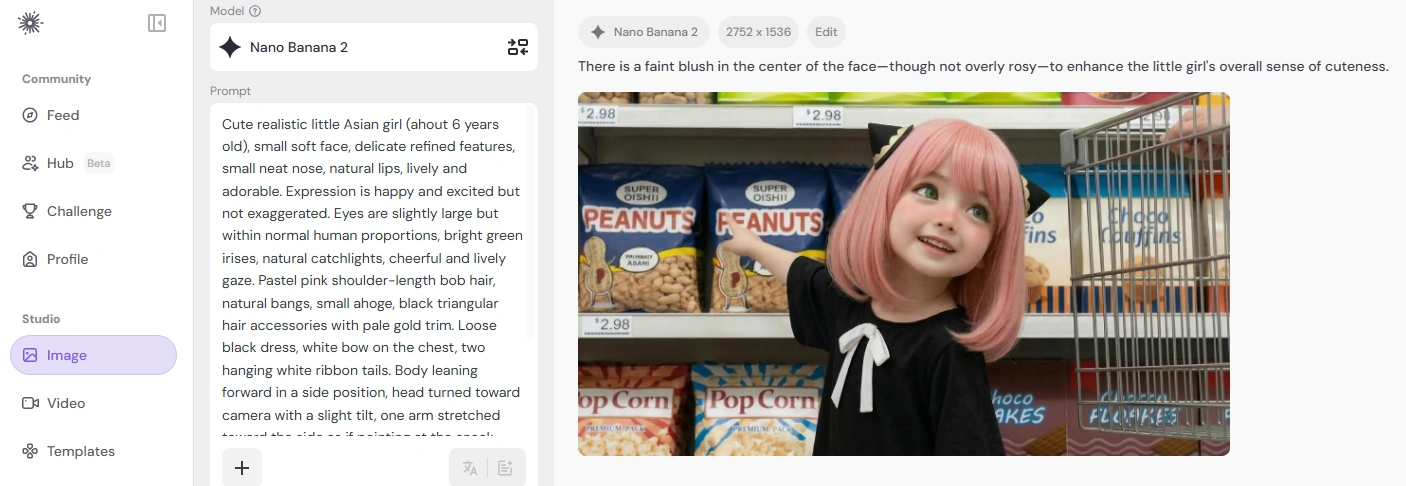
For this type of transformation, Nano Banana pro and Nano Banana 2 are especially worth trying in PicLumen. These models are generally better at handling portrait details, natural-looking skin, and more believable facial structure, which makes them a good fit for anime to realistic ai results.
Step 3: Upload the Anime Character Image and Enter a Prompt
Upload the anime character image you want to transform. A clear image with a visible face, hairstyle, and outfit usually works best.
Then enter a prompt that tells the AI to preserve the character’s identity while making the result look more realistic.
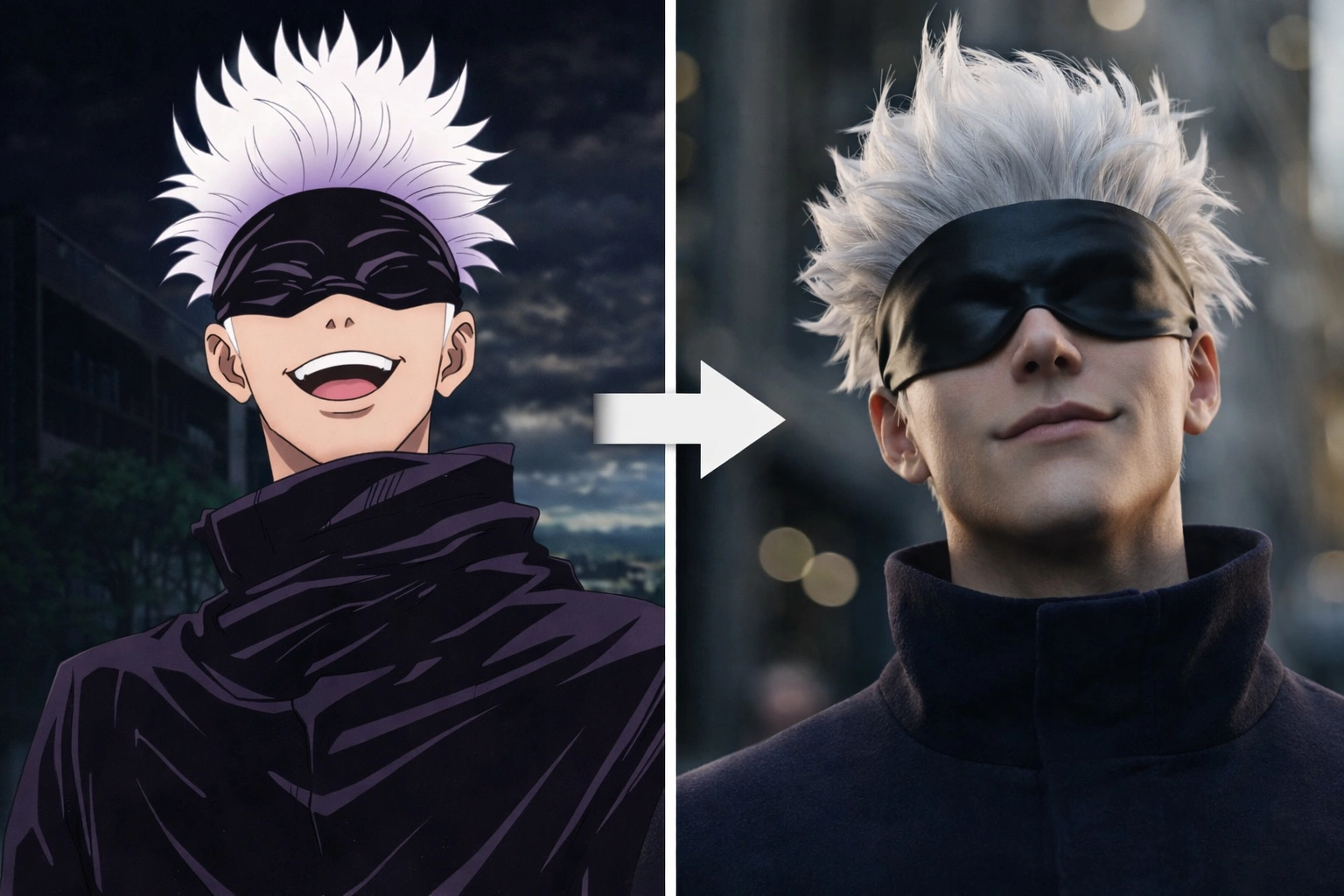
Prompt Example 1 - Satoru Gojo(Jujutsu Kaisen)
Young adult man, realistic live-action style, fair clean skin, sharp jawline, refined facial features, straight nose, subtle confident smile. Voluminous spiky white short hair with airy layered texture, black silky blindfold covering the eyes. Dark high-collar top or coat with realistic heavy folds. Close-up front portrait with slight low-angle view, head slightly tilted back, relaxed but powerful and mysterious presence. Ultra realistic photography, cinematic lighting, realistic skin texture, realistic hair strands, blurred background, highly detailed, not cosplay.
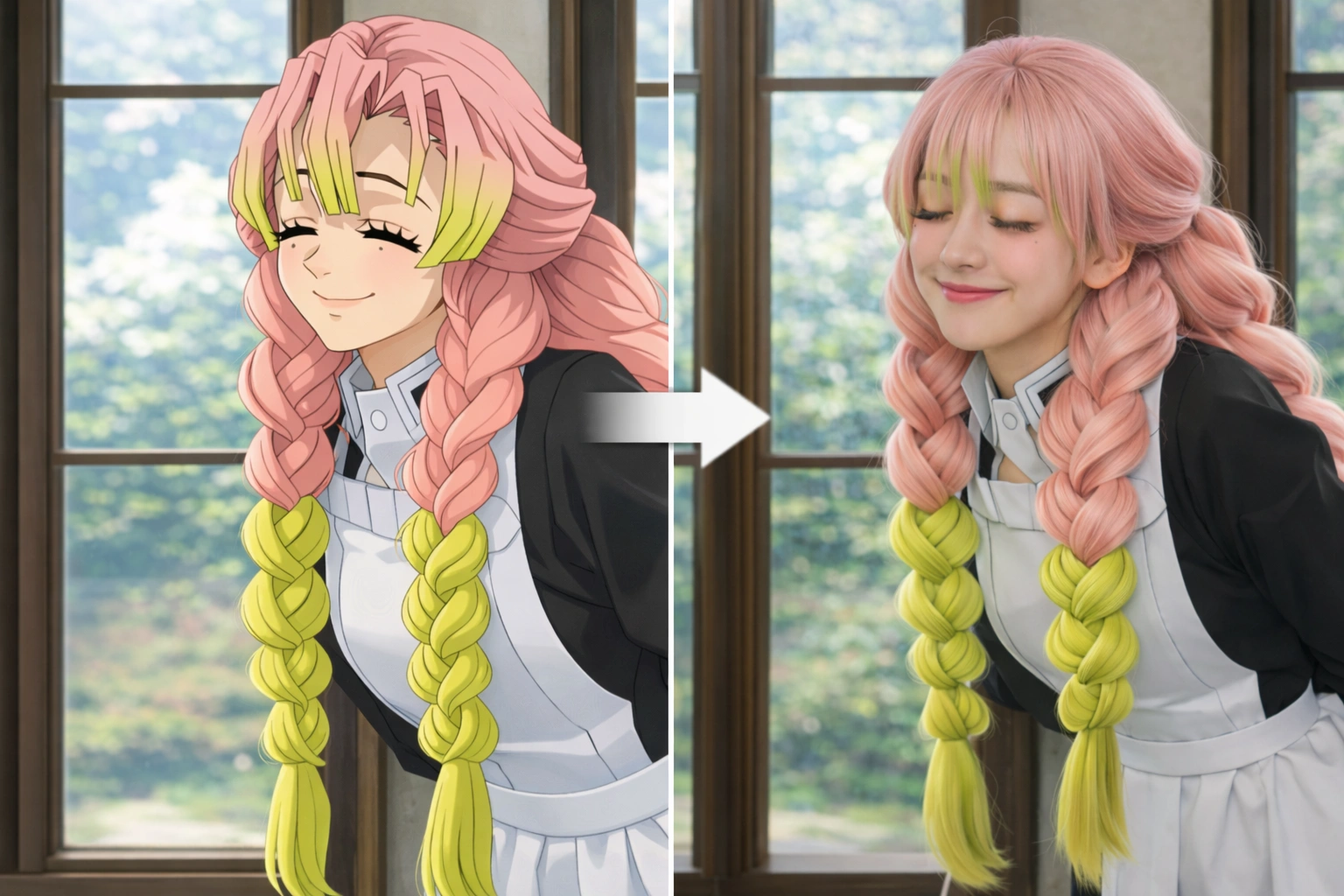
Prompt Example 2 - Kanroji Mitsuri (Demon Slayer: Kimetsu no Yaiba)
Turn this anime female character into a realistic live-action young woman while preserving her original iconic design exactly. She has long pastel pink hair with lime-green gradient tips on the bangs and at the ends of her twin braids. Her hairstyle is very distinctive: thick, fluffy, long twin braids hanging over the front of her body, soft layered bangs, smooth and airy hair texture. Her expression is sweet and gentle, smiling softly with closed crescent eyes, long eyelashes, and two small beauty marks under her eyes. Her face is youthful, delicate, soft, and pretty, with fair luminous skin. She wears a white high-neck inner garment, a pale structured front bodice, and a dark outer robe-like layer, accurately reflecting the anime costume design. The scene is indoors near a window, lit by soft natural daylight, with a blurred background, Japanese cinematic portrait photography style, realistic human skin, natural hair strands, soft natural tones, dreamy but photorealistic, no 3D modeling look, no plastic skin, no exaggerated western facial structure, no fashion redesign, high character fidelity.
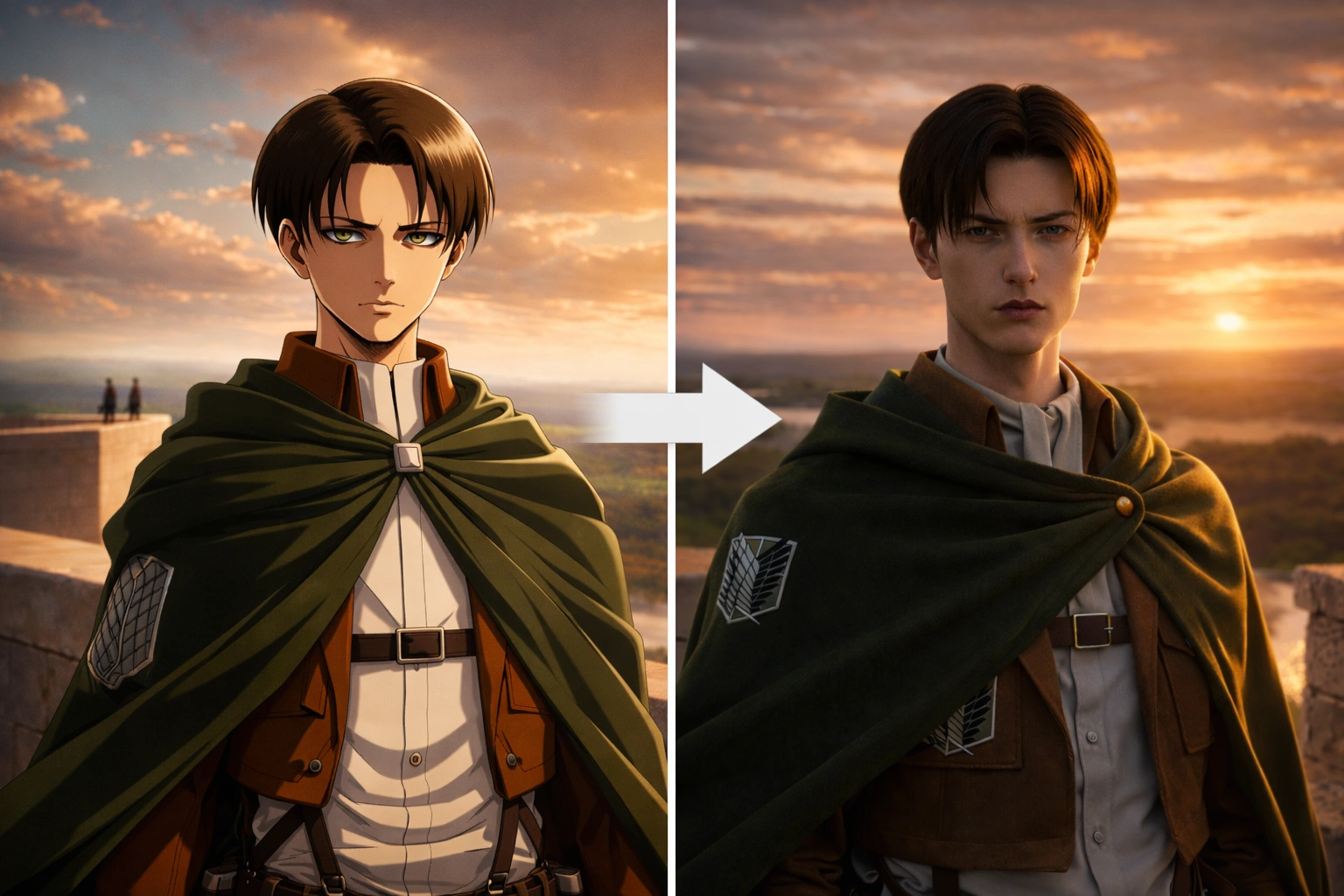
Prompt Example 3 - Levi Ackerman (Attack on Titan)
Real actor style live-action male character, young adult man, narrow face, defined jawline, cool fair natural skin, straight nose, thin lips, sharp narrow eyes, calm restrained detached expression with strong intensity. Dark brown near-black short hair, center-parted, smooth and neat, with strands falling naturally at the sides of the face. Light high-collar inner shirt, brown military-style cropped jacket, heavy dark green cloak fastened at the chest with realistic folds and weight. Chest-up cinematic portrait, standing on a high stone rampart, body slightly turned, head subtly turned toward the camera, upright controlled posture, as if observing the distant horizon. Background strictly matches the original image: vast valley plains, winding river, forests and open land, golden sunset cloud-filled sky, warm side-back sunset light, and two tiny distant figures on the far left edge of the wall. Ultra realistic photography, cinematic film still, epic atmosphere, realistic skin texture, realistic hair strands, realistic fabric texture, highly detailed, not cosplay.
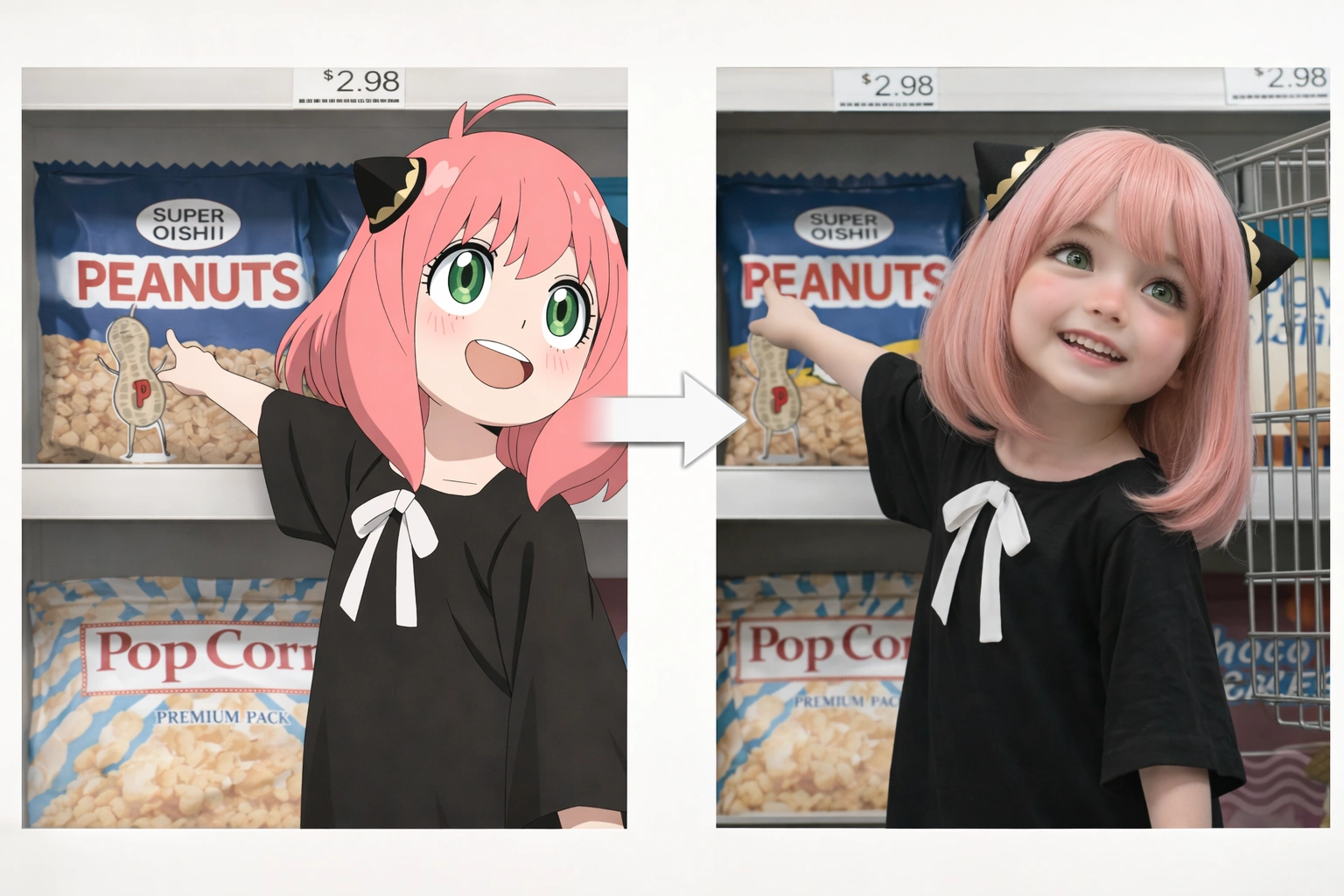
Prompt Example 4 - Anya Forger (Spy x Family)
Cute realistic little girl, small soft face, delicate refined features, small neat nose, natural lips, lively and adorable. Expression is happy and excited but not exaggerated. Eyes are slightly large but within normal human proportions, bright green irises, natural catchlights, cheerful and lively gaze. Pastel pink shoulder-length bob hair, natural bangs, small ahoge, black triangular hair accessories with pale gold trim. Loose black dress, white bow on the chest, two hanging white ribbon tails. Body leaning forward in a side position, head turned toward camera with a slight tilt, one arm stretched toward the side as if pointing at the snack shelf. Background is a realistic supermarket snack aisle with peanuts, popcorn, chocolate snacks, price labels, and metal shelf structure. Ultra realistic photography, bright indoor light, realistic skin, realistic hair, realistic store background, highly detailed.
Prompt Example 5 - Nezuko Kamado(Demon Slayer: Kimetsu no Yaiba)
Create a highly faithful live-action human version of Nezuko: a young East Asian woman with fair smooth skin, a soft youthful oval face, large round pink-violet eyes, very long thick black hair with a subtle warm brown-orange gradient at the ends, a pink bow hair accessory on the right side, and a green bamboo gag in her mouth. She wears a light pink asanoha-pattern kimono, layered white and red obi details, a dark oversized haori, layered white inner hem, dark crisscross leg wraps, and pink-white wooden sandals. Innocent, quiet, ethereal, slightly mysterious mood. Ultra realistic photography, Japanese cinematic style, realistic skin texture, realistic hair strands, realistic fabric folds, full body standing pose, clean background, high detail, faithful adaptation.
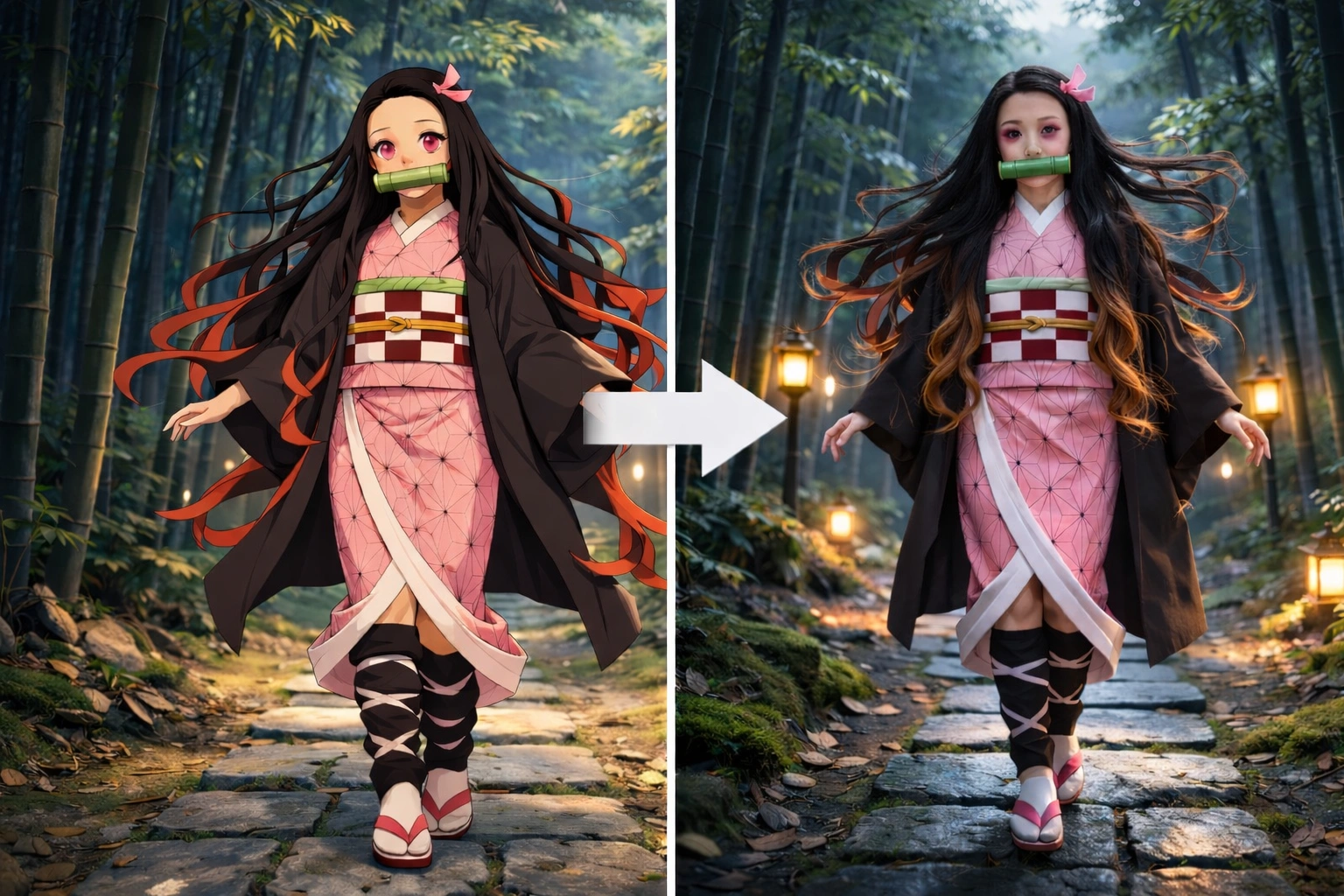
If you want to convert anime style image to realistic photo ai, it helps to keep the prompt focused on two things: preserving character identity and improving realism. That balance usually produces a more natural result.
Step 4: Choose Resolution and Aspect Ratio
Next, select the resolution and image ratio that fit your needs. Portrait formats work well for close-up character images, while wider layouts may be better for covers or social media visuals. Higher resolution is usually the better choice if you want more visible detail.
Step 5: Generate and Download
Click Generate and review the results. If the first image does not feel natural enough, adjust the prompt by adding details like realistic skin texture, preserved hairstyle, or natural facial proportions, then try again. This is often the easiest way to get a better anime to real life ai result without overcomplicating the workflow. If you are not satisfied with the result, you can edit the prompt based on the already generated image.
💡Tips for More Natural Results
If you want the final image to look more convincing, start with a clean anime image and avoid references with heavy blur or extreme stylization. It also helps to ask the AI to keep the hairstyle, outfit, and expression consistent.
Good results usually come from prompts that are short, clear, and specific. Overloading the prompt with too many visual instructions can make the output less stable. In many cases, anime to realistic ai works best when the image still feels connected to the original character rather than becoming a completely different person.
FAQs
Why is this type of content so popular?
Because it combines anime culture with visual experimentation. For many fans, it is exciting to see a fictional character reimagined in a realistic way. That is also why anime to real life ai continues to attract attention on social platforms.
What kind of image works best?
A clean character image with a visible face, hairstyle, and clothing details usually works best.
Do I need a very detailed prompt?
Not necessarily. A short but focused prompt is often more effective than one overloaded with too many instructions.
Can I keep the character recognizable?
Yes. In most cases, the best results come from prompts that ask the AI to preserve key character features while making the face and skin look more realistic. This is also where ai cartoon to real life workflows tend to work best.
Why use PicLumen for this workflow?
PicLumen offers a simple process: open the AI image workspace, choose a model, upload a character image, enter a prompt, adjust the size, and generate the final result.
Final Thoughts
The popularity of anime to realistic ai reflects a broader creative trend: people enjoy seeing stylized fictional characters interpreted through a more realistic lens. For anime fans, it is both a visual experiment and a new way to connect with familiar character designs.
With a clear reference image, a well-written prompt, and tools like PicLumen, creating an anime to real life ai result is much more accessible than it used to be.
Bring your favorite anime characters to real life on Piclumen!