I keep seeing funny AI animal videos on social media, but AI cat dance clips still get me every time. A cat dancing should feel silly, but when the movement is clear and the expression is right, it becomes the kind of short video people actually want to replay.
For this tutorial, I wanted to make a simple AI cat dance meme in PicLumen: a cute cat copying Michael Jackson’s classic dance moves, with a tiny moonwalk, sharp paw movements, and a proud little face at the end. I used Seedance 2.0 because this type of clip needs smooth motion, clear rhythm, and a character that stays consistent through the whole video.
Why I Used Seedance 2.0 for This AI Cat Dance
For an AI cat dance video, the movement matters more than the background. The cat needs to slide, pose, wave its paws, and still look like a real cat. If the motion is too random, the video does not feel funny. If the cat becomes too human-like, it starts to look strange.
That is why I chose Seedance 2.0 inside PicLumen’s AI video tool. It works well for short videos where the subject needs to perform a specific action. For a 6-second social media clip, that is exactly what I need.
The Prompt I Used
Prompt:
A cute little cat doing a hilarious but impressive imitation of Michael Jackson’s classic dance, including a moonwalk, dramatic foot slides, sharp pose changes, and a signature toe stand. The cat acts like a tiny pop legend, with adorable confidence, meme energy, and smooth movement
I kept the prompt short, but I made sure the important parts were clear: the cat, the dance style, the facial expression, and the final pose. That is usually better than writing a long prompt full of random details.
How to Make Cat Dance AI Videos in PicLumen
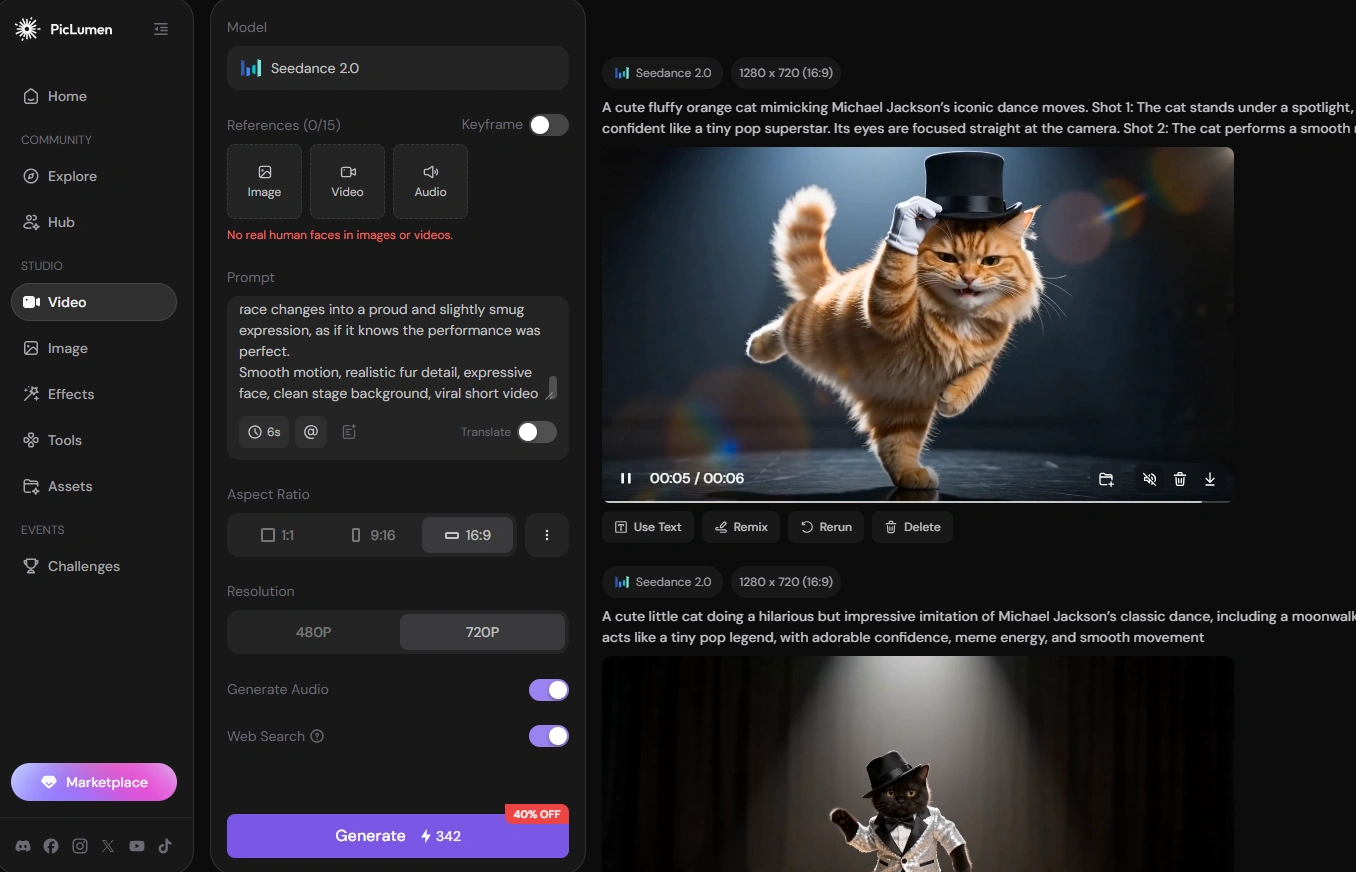
Step 1: Choose Seedance 2.0 in AI Video
First, I go to the AI video generation area in PicLumen and choose Seedance 2.0 as the model. Since this video depends on dance movement, the model choice matters. I want the cat to move in a way that feels readable, not random.
Step 2: Enter a Prompt or Upload a Cat Image
Next, I enter the prompt directly. If I just want a funny meme-style cat, text-to-video is enough.
If I want to make my cat dance AI style content, I upload my own cat photo instead. In that case, I add a simple line like:
Keep the cat’s natural face, fur, and body shape while making it dance.
That helps the result feel more personal and keeps the cat from changing too much.
Step 3: Choose Ratio, Duration, and Quality
Then I choose the video settings. For TikTok, Reels, and Shorts, I usually pick a vertical ratio because it fits the phone screen better.
For duration, I use 6 seconds. It is long enough to show the opening, the dance move, and the final pose, but still short enough to feel like an AI cat dance GIF or meme-style clip.
I also choose higher quality because small details matter here. The paws, fur, face, and final expression all help sell the joke.
Step 4: Download and Share
Once the video is generated, I download it and share it where it fits best: TikTok, Instagram Reels, YouTube Shorts, Reddit, X, or even as a GIF-style reaction clip.
If the movement loops smoothly, the clip can work especially well as an AI cat dance meme. A serious cat doing a tiny moonwalk and ending with a proud little smirk is exactly the kind of thing people replay.
What Makes the Clip More Shareable
The best AI cat dance clips are easy to understand in the first second. I try to keep the cat centered, the background clean, and the action simple. A funny dance does not need five different scenes. It just needs one strong idea.
For this video, the serious cat face is what makes the joke work. The cat looks like it is taking the performance way too seriously, which makes the moonwalk and final pose feel even funnier.
I also think the ending matters. A proud little smirk or dramatic pose gives the video a natural punchline. That makes it feel more like an AI cat dance meme, not just a random animated cat.
My Takeaway
Making an AI cat dance video is not complicated, but the prompt needs to be specific. Instead of only writing “a cat dancing,” I describe the exact movement: moonwalk, paw gestures, side glide, body pop, hat tip, and final pose.
PicLumen makes the workflow simple: choose Seedance 2.0, enter a prompt or upload a cat photo, set the ratio, duration, and quality, then download and share the result.
For social media, I would keep it short, expressive, and easy to loop. A cute cat, a serious face, and one recognizable dance move are usually enough to make the clip worth sharing.