I had been curious about HappyHorse-1.0 after seeing more creators test it for short AI videos. So I tried it on PicLumen to see what the model actually does well, where it feels limited, and whether the results are useful for real social-style content.
What Is HappyHorse-1.0?
HappyHorse-1.0 is an AI video model for creating short videos from text prompts or reference images. In my own use case, I mainly tested it for realistic social-style clips, simple character moments, and animal videos.
What made me interested in it was not just the model name, but the kind of results it seemed suitable for: short scenes with natural motion, clear mood, and expressive visual details. Since PicLumen lets me use HappyHorse-1.0 directly in its AI video workspace, it felt like an easy model to test without changing my usual creative workflow.
Why I Wanted to Try HappyHorse-1.0
The main thing I cared about was realism.
A lot of AI video clips look good at first, but after a second or two, the movement starts to feel strange. Sometimes the face looks too frozen. Sometimes the background feels empty. Sometimes the camera movement looks too clean to feel real.
So I wanted to see if HappyHorse-1.0 could handle small details better: a natural expression, a soft camera shake, a simple movement, or a scene that feels like something someone might actually post on TikTok or Reels.
How to Use HappyHorse-1.0 on PicLumen
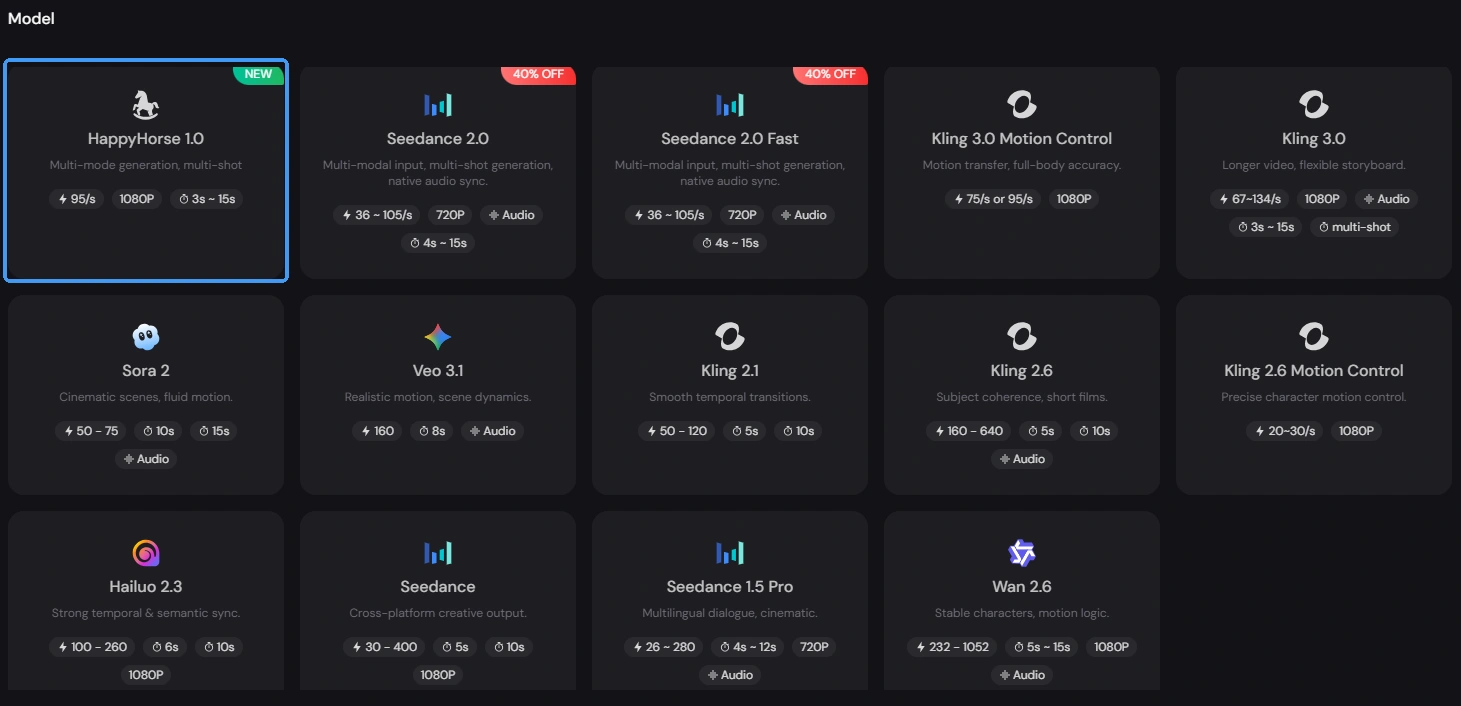
Step 1: Choose HappyHorse-1.0
Open PicLumen’s AI video task workspace and select the HappyHorse-1.0 model.
Step 2: Add Your Prompt or Image
Enter a text prompt, or upload a reference image if you want more control over the subject.
Step 3: Set Video Details
Choose the video ratio, quality, and duration based on where you plan to use the clip.
Step 4: Generate and Share
Click generate, review the result, then download or share the video when it looks right.
What Worked Best for Me
HappyHorse-1.0 worked better when I kept the scene focused on one clear moment.
For example, instead of asking for a full story, I got better results with simple ideas like a creator looking into the camera, a horse standing under soft lights, or a person walking through a busy street with natural background movement.
The clips felt stronger when I added small real-life details. Things like soft lighting, handheld camera movement, people in the background, natural expressions, or objects around the subject made the video feel less empty.
I would not overcomplicate the prompt. A clear subject, a simple action, and a specific mood were usually enough.
My Prompt Tips After Testing
I do not think HappyHorse-1.0 needs a very long prompt. What helped me most was giving the model a clear scene, a camera feeling, and one simple action.
For example, this kind of prompt worked better for me:
Prompt 1:
Close-up shot of crispy fried chicken being cut open, golden texture, warm kitchen light, slow macro camera movement, crunchy sound, soft background ambience, appetizing and realistic mood.
Prompt 2:
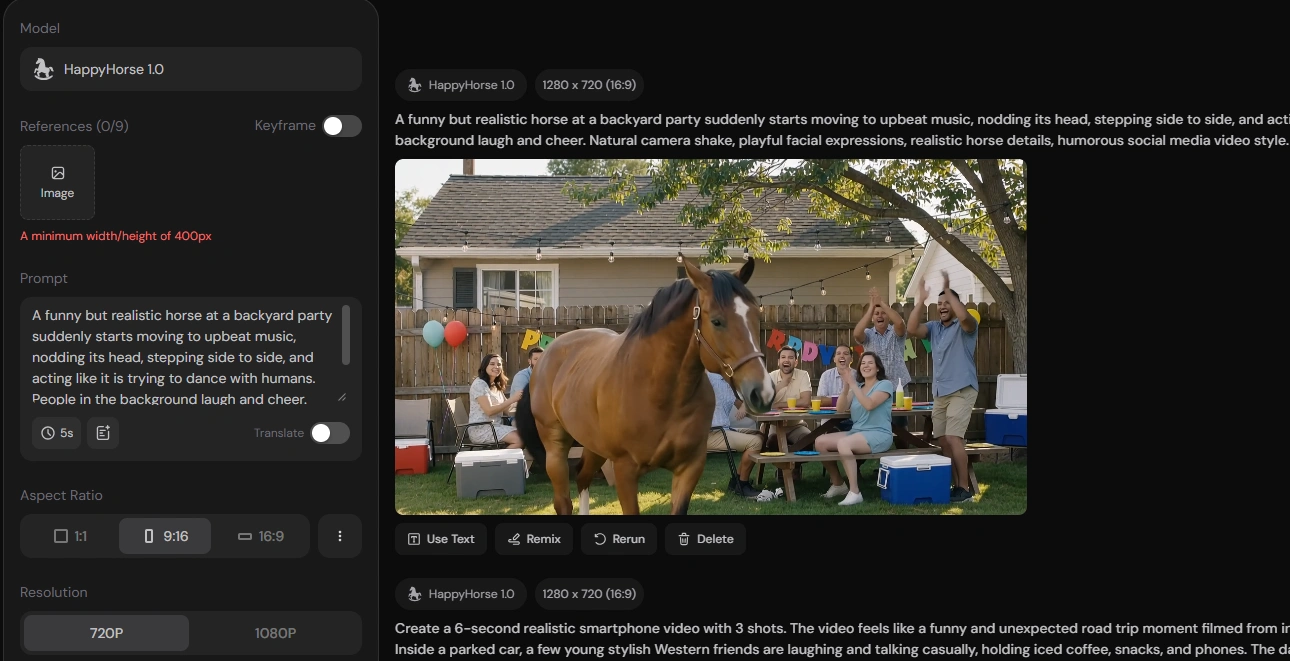
A funny but realistic horse at a backyard party suddenly starts moving to upbeat music, nodding its head, stepping side to side, and acting like it is trying to dance with humans. People in the background laugh and cheer. Natural camera shake, playful facial expressions, realistic horse details, humorous social media video style.
The main thing I learned is to avoid stacking too many actions into one short clip. HappyHorse-1.0 feels stronger when the video focuses on one moment, such as a glance, a smile, a small movement, or a simple reaction. That makes the final clip feel more natural and easier to use.
Text to Video vs. Image to Video
I tested both on PicLumen, and I would use them for different reasons.
Text to video is better when I want to test a quick idea. It is useful for brainstorming, trying different moods, or seeing whether a scene has potential.
Image to video is better when I already care about the subject’s look. If I have a specific character, animal, product, or portrait, uploading a reference image gives the result more direction.
For my own workflow, I would probably start with text to video, then move to image to video once I know the style I want.
Where HappyHorse-1.0 Feels Strong
Based on my test, HappyHorse-1.0 feels strongest for short social-style videos.
It works well for creator clips, realistic character moments, animal scenes, lifestyle videos, and simple visual hooks. The model seems to do better when the focus is on mood, motion, and expression rather than a complicated storyline.
I especially liked it for scenes that looked like casual phone recordings. The results felt more believable when I added words like natural light, handheld camera, soft expression, and background movement.
Why I Would Keep Using It on PicLumen
The biggest reason is convenience.
PicLumen lets me test the model, adjust the idea, use text-to-video or image-to-video, and download the result in one place. It also gives me room to explore other AI video models if one result does not match what I want.
I also like that PicLumen has a creator community. Sometimes browsing other people’s works helps me find better visual directions before I write my own prompt. For AI video creation, that kind of inspiration is actually useful.
For me, PicLumen makes HappyHorse-1.0 feel easier to test and more practical to use.
Final Thoughts
My first test with HappyHorse-1.0 was better than I expected. It is not a model I would use for every video idea, but it works well for short, realistic, expressive clips.
The best results came from simple scenes, natural movement, clear camera direction, and small background details. I would use it most for TikTok-style videos, creator clips, animal videos, realistic character scenes, and quick visual hooks.
Testing HappyHorse-1.0 on PicLumen made the process much easier. I could try ideas quickly, adjust the settings, compare results, and download the clips without leaving the platform.
If you want to make short AI videos that feel more natural and less stiff, HappyHorse-1.0 is worth trying on PicLumen.