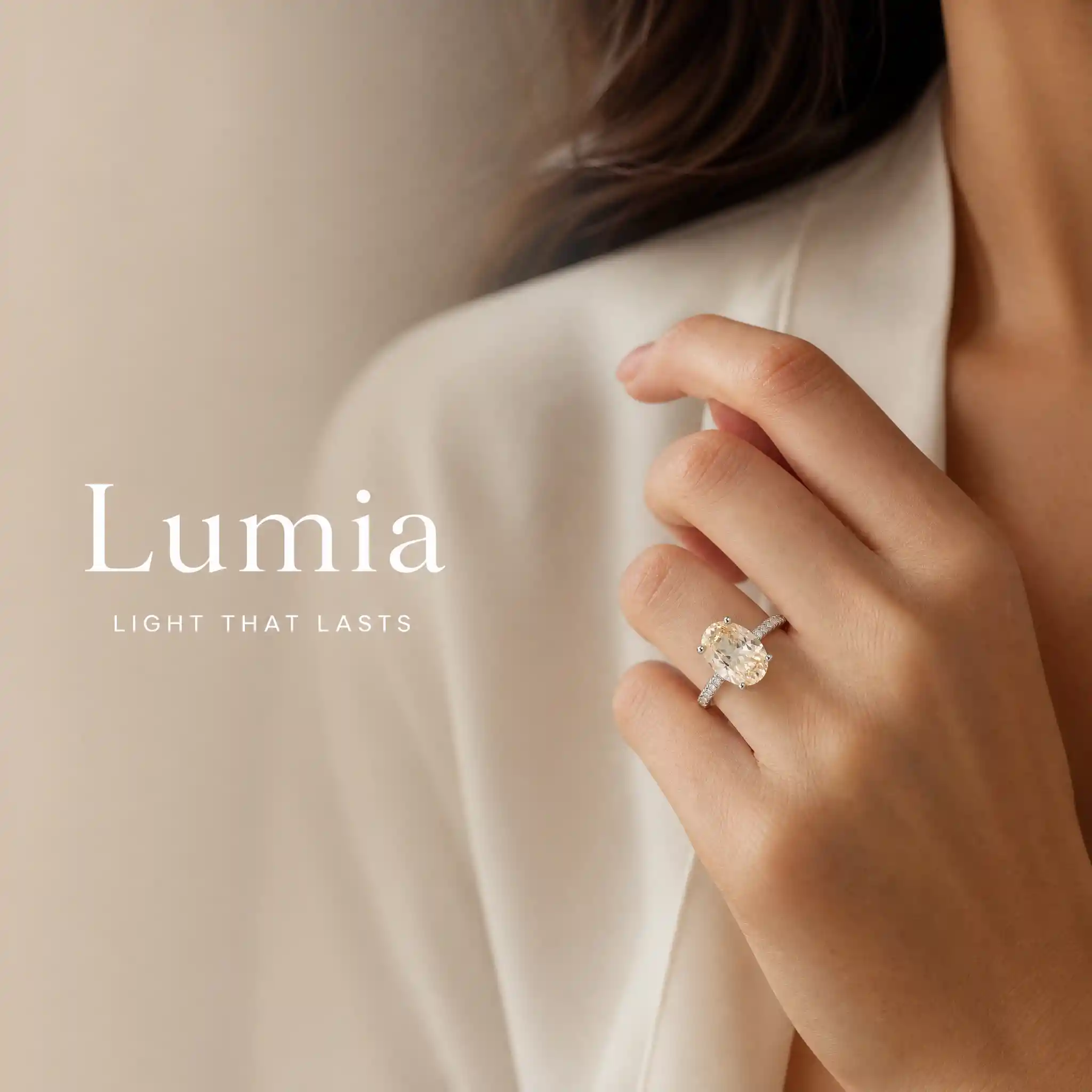
럭셔리 액세서리 라이프스타일 사진
로딩 중...
xyqc

Luxury Accessory Lifestyle Photo

프롬프트
Create one premium Brand & Lifestyle Image using the exact locked jewelry or watch product. OUTPUT ONLY ONE FINISHED LUXURY COMMERCIAL IMAGE. MANDATORY TEXT SOURCE: Read the connected Product Information node. Extract the exact value after “Brand Name:” and stop at the next field label. Extract the exact value after “Brand Slogan (Optional):” and stop at the next field label. Use these two extracted values as the only visible text. Any non-empty extracted value is valid user-entered content. Copy both values character for character. Do not translate, rewrite, shorten, expand, correct or replace them. MANDATORY COMPOSITION: Create one continuous full-canvas model-wearing photograph. Do not use separate images, panels, split screens or collage. Place a Western commercial model wearing the exact locked product mainly on the right two-thirds of the canvas. Reserve the left one-third as a text-safe area within the same photograph. LEFT TEXT-SAFE AREA: Continue the exact same model scene and background across the left side. Do not create or insert a separate background image, fabric image, stone texture, product image or decorative panel behind the text. Apply only a natural soft blur and a smooth transparent gradient over the original scene on the left. Reduce background detail and contrast gradually toward the left edge while preserving the same lighting and color palette. The transition between the blurred left area and sharp right area must be seamless and invisible. Do not create a hard vertical boundary. Display the exact user-entered Brand Name on the left as the largest text. Display the exact user-entered Brand Slogan directly below it in smaller text. Use refined luxury editorial typography, elegant scale contrast, restrained letter spacing and generous negative space. Never invent additional text, a logo, emblem, monogram, tagline or promotional phrase. RIGHT MODEL AREA: Show a premium close-up of the model naturally wearing the exact locked product. Automatically select the correct wearing composition: Ring: hand and finger close-up. Necklace: neck, collarbone and upper-chest close-up. Earrings: ear, jawline and partial side-profile close-up. Bracelet: wrist and hand close-up. Brooch: lapel, scarf or garment detail close-up. Watch: wrist and hand close-up. Do not show a complete identifiable face. Keep the product sh Product Name: Product Category: Brand Name: Brand Slogan (Optional): Material: Color: Finish or Plating: Gemstone Information (Optio
Model
GPT-Image-2
Date created
09/17/26 at 3:50 PM
Resolution
2048 x 2048

이 럭셔리 액세서리 사진 소개

이 이미지의 피사체, 스타일, 디테일을 자세히 살펴보세요.

이 콘셉트는 주얼리나 시계를 착용한 서양인 광고 모델을 연속된 라이프스타일 사진으로 담아냅니다. 모델은 오른쪽에 배치되고, 같은 장면이 왼쪽의 부드러운 영역으로 이어져 브랜드명과 슬로건을 넣을 공간을 마련합니다.

제품에 시선을 집중시키고 에디토리얼 타이포그래피를 더한 고급 상업용 비주얼입니다. 주얼리나 시계 제품 페이지는 물론, 카피를 넣을 공간이 필요한 브랜드 캠페인 레이아웃에도 적합합니다.

크리에이티브 스타일 & 디테일

이 작품의 분위기를 만드는 디테일입니다.

피사체

서양인 광고 모델이 주요 주얼리나 시계를 착용하며, 제품이 이미지의 중심이 됩니다.

비주얼 스타일

상업 브랜드와 라이프스타일을 표현하기 위해 럭셔리 에디토리얼 스타일을 적용했습니다.

구도

모델과 제품은 오른쪽 3분의 2를 차지하고, 왼쪽 3분의 1은 같은 장면의 일부로 이어지며 텍스트를 배치하기 좋은 공간을 제공합니다.

타이포그래피 및 텍스트

왼쪽에는 브랜드명을 가장 큰 글자로 배치하고, 바로 아래에는 더 작은 럭셔리 에디토리얼 서체로 슬로건을 넣을 수 있도록 구성했습니다.

나만의 럭셔리 액세서리 사진 만들기

이 작품의 시각적 아이디어를 출발점으로, 장면에 나만의 방향을 더해 보세요.

나만의 버전을 위한 아이디어

이 작품을 바탕으로 한 AI 제안입니다.

오른쪽의 제품 강조와 텍스트를 배치하기 좋은 부드러운 여백은 유지하면서, 액세서리나 장면의 색상을 바꿔 나만의 이미지로 완성해 보세요.

Related images
코바늘 커버업을 입은 비치 패션 포트레이트
체커보드 드레스를 입은 1960년대 모드 패션 초상화
두 인물이 등장하는 SF 일러스트
호텔 복도 거울 앞에서 셀카를 찍는 한국 여성
금발 아프로 헤어 여성의 애니메이션 초상화
럭셔리 요트 위 금발 여성 패션 포트레이트
레오파드 프린트 수영복을 입은 풀사이드 인물 사진
금빛 윤곽선으로 둘러싸인 꽃 정원의 바로크풍 여인
갈색 말과 함께한 카우걸 초상화
도시 카페에서 패턴 바지를 입은 여성
두 모델의 패션 뷰티 포트레이트
레드 립스틱을 바른 80년대풍 패션 인물 사진
올리브 톤의 럭셔리 패션 에디토리얼 인물 사진
무지개 레이스 바디수트를 입은 타투 여성
교실 속 여성 패션 인물 사진
럭셔리 수영장 옆의 빨간 머리 패션 인물 사진
미래적인 옥상에서 펼쳐지는 프라이드 패션 에디토리얼
은하계 3D 장면 속 미래적인 패션 모델
영화 같은 로스앤젤레스 스트리트 패션 인물 사진