Have you seen those Korean Baseball Trend AI videos on TikTok, Reddit, or X recently? The clip usually looks like a live baseball broadcast: someone is sitting in the crowd, casually watching the game, and the camera suddenly catches them for a few seconds.
The best part is how unplanned it feels. The lighting is not perfect, the background is full of fans, drinks, handheld fans, and stadium seats, and the person looks like they had no idea they were being filmed.
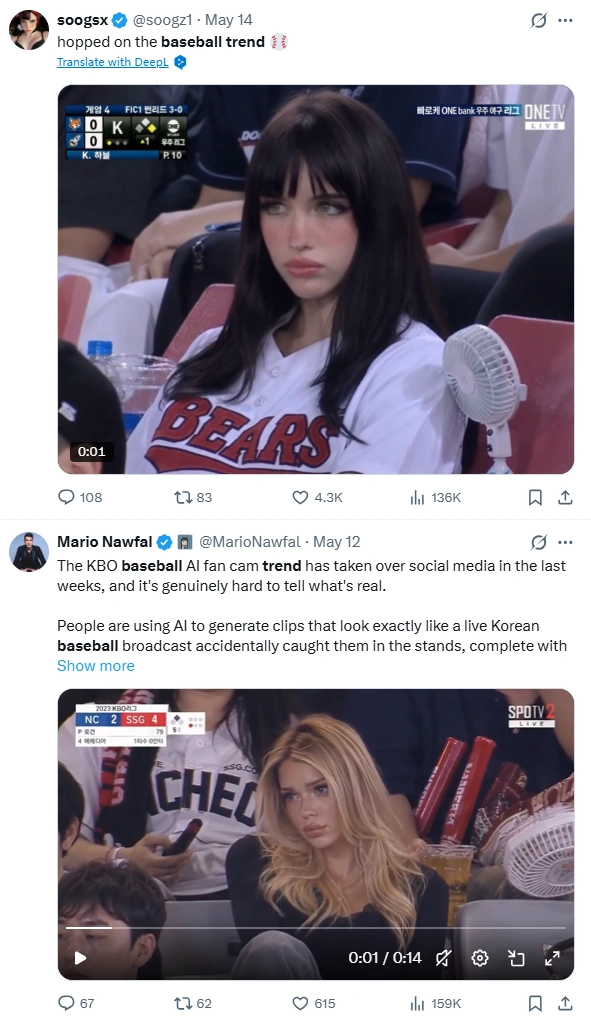
I wanted to make a similar video for social media, but I didn’t want it to look like a glossy AI model clip. I wanted something closer to a realistic KBO-style crowd cam moment. So I tried making it with PicLumen, using Image to Image first and then Image to Video. Here’s my process.
Why This Trend Works So Well with AI
I think one reason this trend keeps growing is that AI image and video quality has become much more believable than before. A while ago, it was still easy to spot something that looked obviously AI-made. Now, with better facial detail, more natural motion, and stronger scene consistency, it’s much easier to create clips that feel close to real broadcast footage.
That shift also makes people more curious. When an AI video looks realistic enough to make someone pause for a second, it naturally gets more attention on social media. And the Korean Baseball Trend is a perfect example of that — it combines a familiar live-broadcast moment with the kind of realism that makes people want to watch, react, and share.
The Workflow I Used in PicLumen
My process had two parts.
First, I used Image to Image with GPT Image 2 to create a realistic KBO-style baseball crowd image.
Then I used Image to Video with Kling 3.0 to turn that image into a short broadcast-style video.
I liked this workflow because the image step helped me lock in the character, outfit, crowd setting, and live-broadcast mood before moving into video.
👉Part 1: Creating the KBO Broadcast Image with Image to Image
For the image, I didn’t want anything too clean. A perfect portrait would ruin the feeling. The whole point of the Korean Baseball Trend is that the shot should look like it came from a real stadium broadcast.
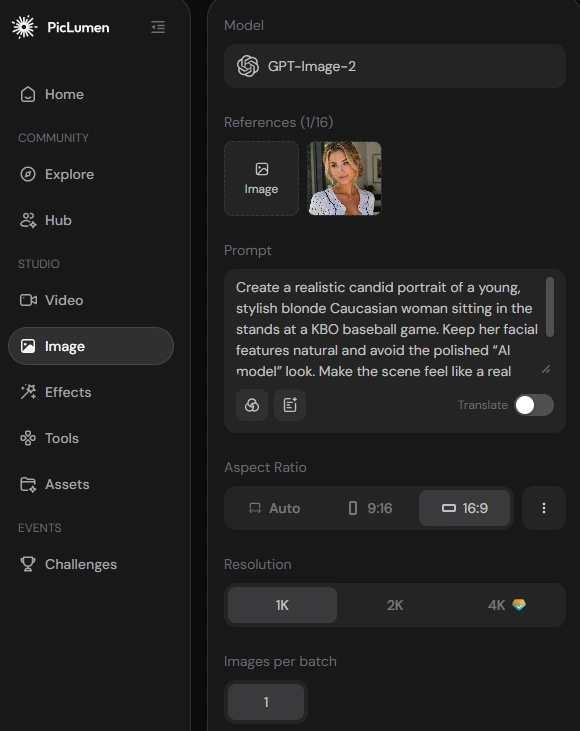
Step 1: Choose GPT Image 2
I opened Image to Image in PicLumen and chose GPT Image 2.0.
GPT Image 2 performs especially well in realistic facial details and complex scene understanding. For this baseball trend, that mattered a lot because the image needed to keep the person natural while also showing the stadium seats, nearby fans, drinks, handheld fans, cheering props, and the slightly compressed look of a live sports broadcast.
Step 2: Upload the Image and Enter the Prompt
Then I uploaded my reference image and added the prompt.
I was careful not to ask for a “perfect beautiful woman at a baseball game,” because that usually makes the result look too polished. For this trend, I wanted the person to look attractive but still real — like someone actually sitting in the crowd.
Here’s the prompt I used:
Create a realistic candid portrait of a young, stylish blonde Caucasian woman sitting in the stands at a KBO baseball game. Keep her facial features natural and avoid the polished “AI model” look. Make the scene feel like a real SPOTV/KBO live broadcast screenshot, with surrounding fans, drinks, cheering props, handheld fans, and natural stadium seating.
Add subtle broadcast blur, compression noise, slight motion blur, imperfect stadium lighting, realistic skin texture, flyaway hairs, and a light sweat sheen. She should look relaxed and focused on the game, not posing for the camera.
Do not slim the face, enlarge the eyes, reshape the jawline, or create overly smooth glass-like skin. The final image should feel like an ordinary spectator accidentally caught on a live broadcast and later going viral online.
The restriction part helped a lot. If the face is too smooth or the pose looks too intentional, the image immediately loses that real crowd-cam feeling.
Step 3: Choose Image Ratio and Resolution
I chose a 16:9 ratio because it feels closer to a real sports broadcast frame. It also gives enough space for the surrounding crowd, seats, drinks, and small background details.
For resolution, I picked a higher setting so the face and stadium details would still look clear after downloading.
Step 4: Generate, Download, and Share
After that, I clicked Generate.
The first good result already had the feeling I wanted: a KBO-style crowd shot with a female spectator in the stands, surrounded by other fans. I made a few light edits afterward, mostly to the hairstyle, skin tone, and makeup, but I tried not to overdo it.
Once I had the image I liked, I downloaded it and used it as the base for the video.
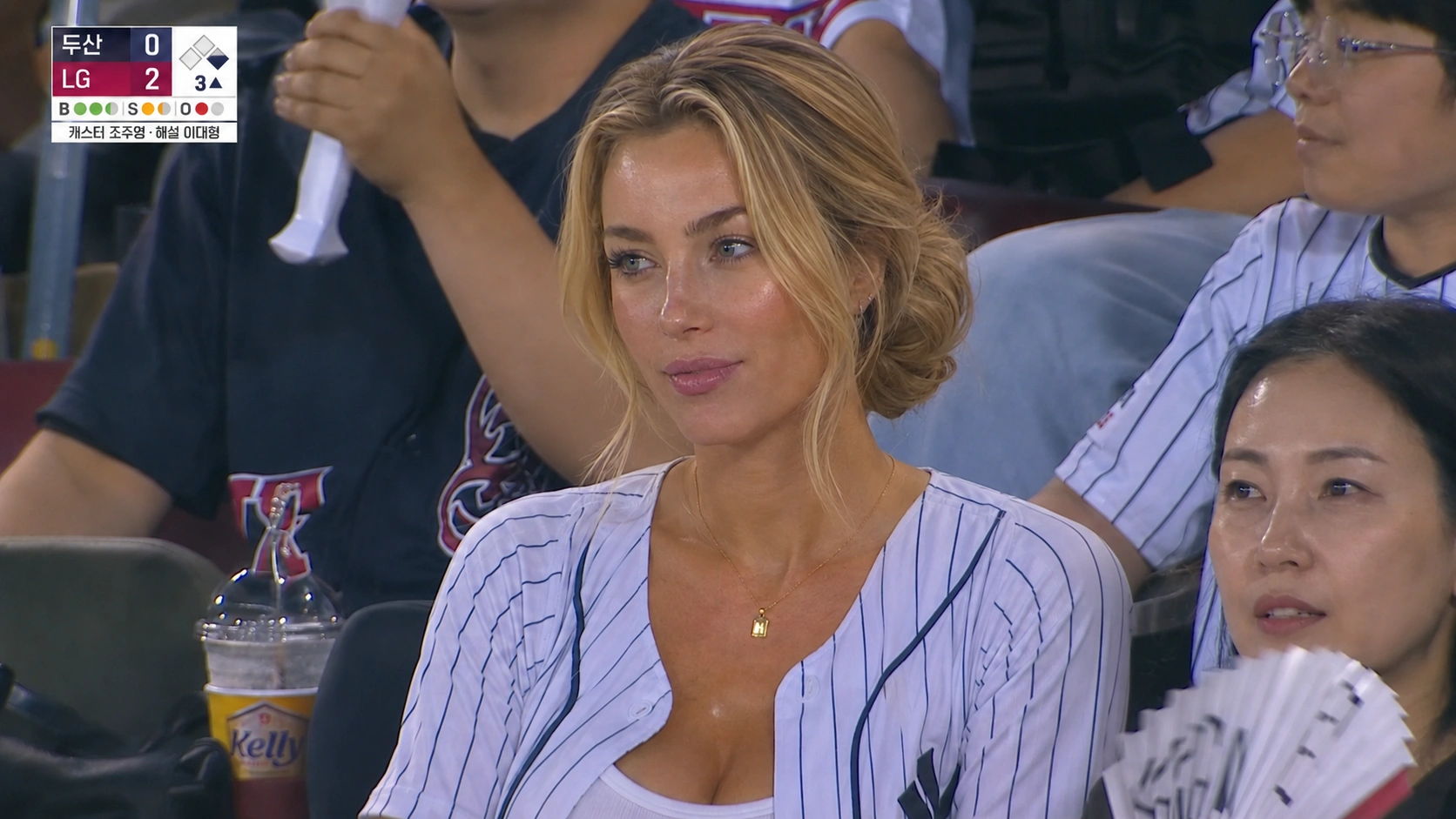
👉Part 2: Turning the Image into a Video with Image to Video
After the image was ready, I moved to Image to Video.
This part was all about keeping the motion subtle. I didn’t want the clip to feel like a music video or a beauty ad. It needed to feel like a short live broadcast moment.
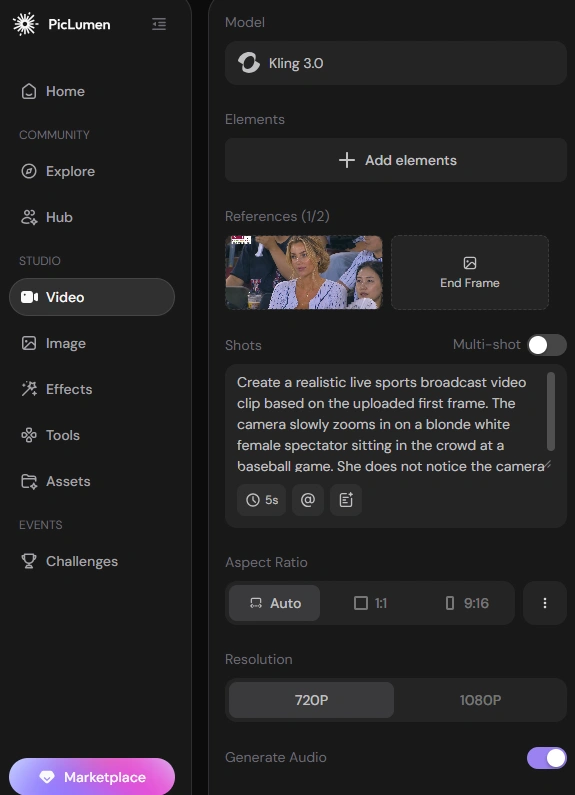
Step 1: Choose Kling 3.0
I opened Image to Video in PicLumen and chose Kling 3.0.
Kling 3.0 performs well in smooth, natural motion, especially when the scene only needs subtle movement. For the Korean Baseball Trend, that works better than dramatic action because the clip should feel like a real broadcast camera slowly catching someone in the crowd.
Step 2: Upload the Image and Enter the Prompt
Then I uploaded the generated image as the first frame.
This helped keep the same person, outfit, stadium background, crowd details, and broadcast-style composition.
Here’s the video prompt I used:
Create a realistic live sports broadcast video clip based on the uploaded first frame. The camera slowly zooms in on a blonde white female spectator sitting in the crowd at a baseball game. She does not notice the camera and remains focused on the match.
Her movements should feel natural and spontaneous: she may lightly adjust her hair, glance toward the field, react subtly to the game, or take a small sip of her drink. Keep the scene candid, slightly imperfect, and broadcast-like, with natural stadium lighting, subtle compression, mild motion blur, and realistic crowd atmosphere. Avoid posed, influencer-style, or cinematic glamour movements.
I kept the action simple because that is what makes it believable. A slight glance, a small reaction, or a natural hair adjustment is enough.
Step 3: Choose Video Ratio, Resolution, and Duration
I kept the video in a wide ratio to match the original image.
For the duration, I chose a short clip. This kind of trend works better when it feels like a quick broadcast cutaway, not a long edited scene.
I also chose a higher resolution so the final video would be clean enough to post on Reddit, TikTok, or X.
Step 4: Generate, Download, and Share
Then I clicked generate.
The best result had very little movement: a slow camera push-in, a natural expression, and some subtle crowd motion in the background. It felt much closer to a real baseball cam clip than a staged AI video.
Quick Settings I Recommend
Setting | What I Used | Why |
Image model | GPT Image 2 | Good for realistic faces and stadium details |
Video model | Kling 3.0 | Creates smooth but subtle movement |
Image ratio | 16:9 | Feels like a real broadcast frame |
Video duration | Short clip | Matches the quick crowd-cam style |
Visual style | Candid broadcast | Keeps the result from looking staged |
What Made the Result Feel More Real
The biggest thing I learned is that the Korean Baseball Trend depends on small imperfections.
I avoided the perfect AI model look. No over-smoothed skin, no oversized eyes, no reshaped jawline, and no glossy studio lighting.
I also kept the live-broadcast flaws. A little blur, compression noise, uneven stadium lighting, random fans in the background, drinks, hand fans, and messy seats all made the result feel more believable.
For the video, the same rule applied. Small movement looked better than big movement. The more natural the subject stayed, the more convincing the final clip became.
Final Thoughts
This was a fun AI video test because the goal was not to make something perfect. It was to make something that felt accidental.
PicLumen made the workflow pretty easy. I used Image to Image with GPT Image 2 to create the KBO-style crowd shot, then used Image to Video with Kling 3.0 to turn it into a short baseball cam clip.
For anyone trying the Korean Baseball Trend, my main advice is simple: don’t over-polish it. Keep the crowd details, keep the broadcast imperfections, and let the person look like they are actually watching the game.
Ready to try it yourself? Open PicLumen, start with Image to Image, then turn your favorite result into a short baseball cam video with Image to Video.