If you’re looking for an AI tool that blends creativity with commercial safety, Adobe Firefly is probably already on your radar. More importantly, it’s built as part of the Adobe ecosystem. That means seamless integration with tools like Photoshop and Illustrator, it helps you move from idea to final output without breaking your workflow.
But does it actually deliver in real-world use? And how does it compare to other popular tools? Let’s break it down.
What Is Adobe Firefly?
Adobe Firefly is Adobe’s generative AI platform designed to help users create and edit images, videos, audio, and design assets. What’s more, Firefly is built with a strong emphasis on commercial usability and seamless integration with Adobe’s ecosystem, including Photoshop and Illustrator.
In simple terms, Firefly is made for designers, marketers, and businesses who want AI-generated content that’s both visually polished and safe to use in real projects.
Core Features of Adobe Firefly
Adobe Firefly goes far beyond basic image generation. It supports not only visual creation, but also video and audio production and editing. This integrated approach makes it especially useful for designers, marketers, and content creators who want efficiency without sacrificing quality. Below are the key features that define what Firefly can do.
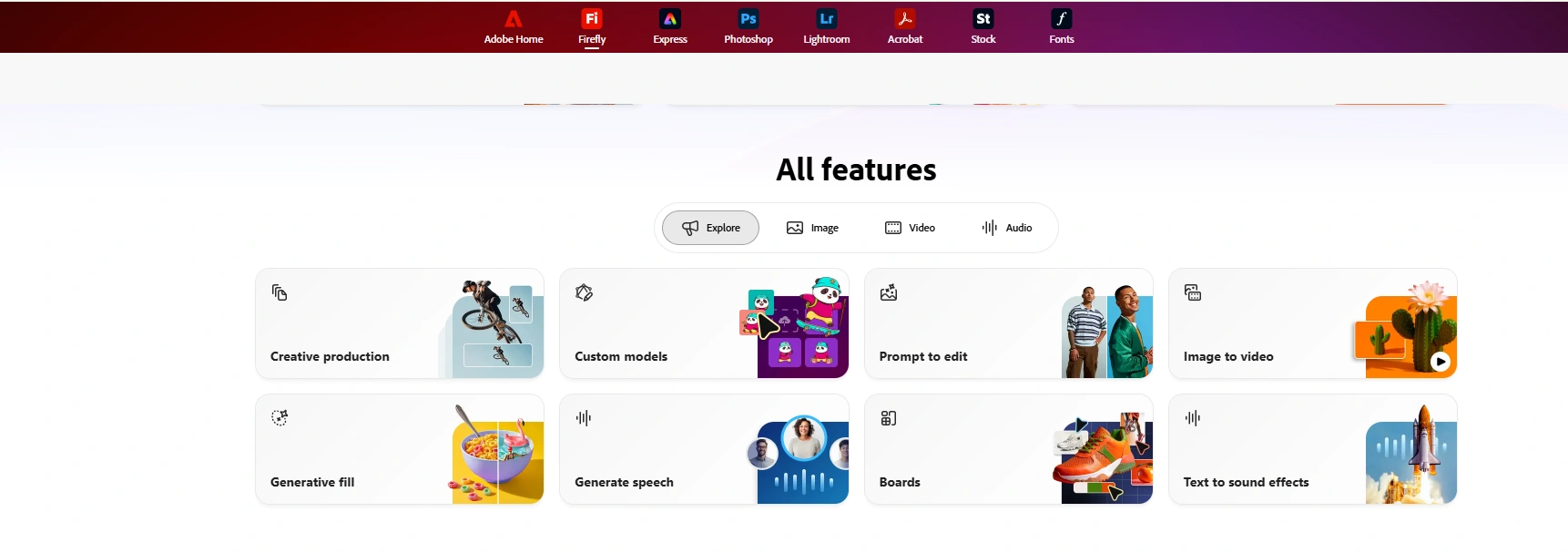
Image to video
Text to sound effects
Generate speech
Custom models
Generative fill
Text to vector
Text to avatar
Enhance speech
Generate soundtrack
Translate audio
Generate speech
Pricing Plans of Adobe Firefly
Adobe Firefly uses a credit-based system, but its pricing is not just about how many credits you get each month. Different plans also come with limitations on model access, feature availability, and how deeply you can integrate with the Adobe ecosystem.
Here’s a quick breakdown of the current plans:
Standard – $9.99/month: 2,000 credits
Pro – $19.99/month: 4,000 credits
Pro Plus – $24.99/month: 10,000 credits
Premium – $99.86/month: 50,000 credits
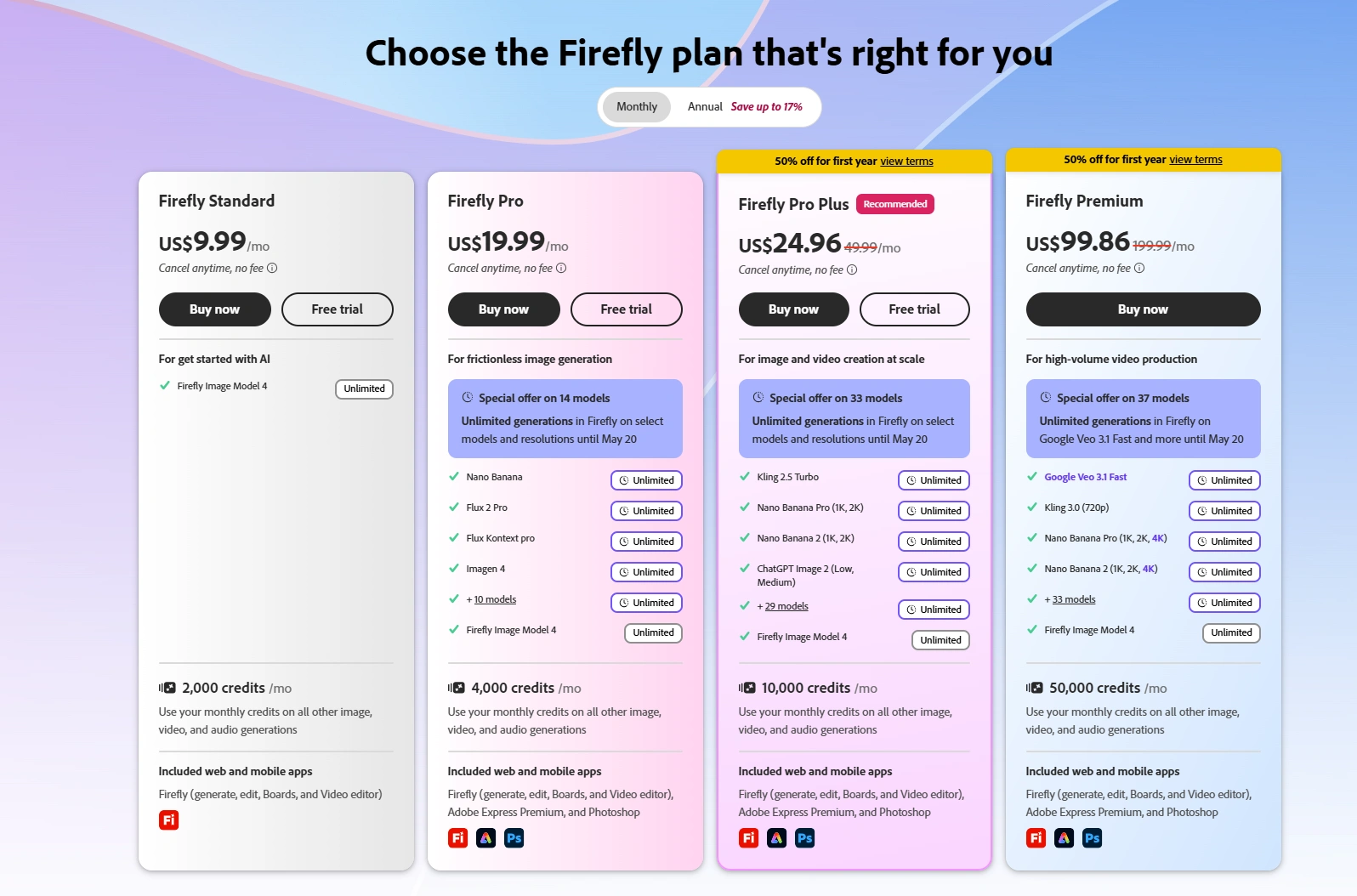
While this may look straightforward, the actual usage is more restricted than it seems. Access to models is limited by plan. For example, the Standard plan only allows unlimited use of Firefly Image Model 4.
In addition, access to the Adobe ecosystem is also tier-dependent. You’ll need a Pro plan or higher to fully integrate with tools like Photoshop and Illustrator.
Pros and Cons of Adobe Firefly
Before deciding whether Adobe Firefly fits your workflow, it’s important to look beyond its feature set. Like most AI tools, it balances strengths and limitations. On one hand, it delivers reliable, design-focused results and integrates well with Adobe’s ecosystem. On the other, it trades some creative flexibility for control and comes with usage constraints tied to credits and plans.
Pros
1️⃣ High-quality output (design-focused)
Firefly consistently produces clean, polished visuals that align with commercial design standards. It’s less about experimental art and more about usable, production-ready content.
2️⃣ Commercially safer AI
Adobe trains Firefly on licensed and public-domain data. This makes it a more reliable option for businesses concerned about copyright and usage rights.
3️⃣ Seamless Adobe ecosystem integration
For users already working in Photoshop or Illustrator, Firefly fits naturally into existing workflows—especially on Pro plans and above—helping streamline the entire creation process.
Cons
1️⃣ Limited creative freedom
Compared to more experimental tools like Midjourney, Firefly can feel more controlled and less flexible in artistic exploration.
2️⃣ Learning curve for beginners
While more accessible than traditional design software, Firefly still requires some familiarity with Adobe-style tools and workflows.
Adobe Firefly vs Other AI Generators
When comparing Adobe Firefly with other AI generators, the key difference is not only in output quality, but also in workflow integration, media coverage, and commercial usability. Firefly is positioned as a structured, brand-safe creative tool, while many competitors focus more on open-ended image generation and artistic exploration.
Adobe Firefly vs PicLumen
When comparing these two tools, the difference goes beyond image generation. Adobe Firefly focuses on a more complete creative ecosystem, while PicLumen prioritizes affordability and flexibility. Your choice depends on whether you value integrated workflows or cost-efficient, high-volume creation.
🗒️ Adobe Firefly
Audio + visual all-in-one capabilities | Firefly supports not only image and video generation, but also audio creation and editing. Features like speech generation, audio enhancement, and soundtrack creation make it a more comprehensive tool—something PicLumen currently doesn’t offer. |
|---|---|
Strong Adobe ecosystem integration | With seamless connections to Photoshop and Illustrator (available on Pro plans and above), Firefly enables a smooth transition from generation to editing and final production. |
Better suited for professional workflows | Its structured outputs and licensing advantages make it a strong choice for brands, agencies, and teams that need consistency and commercial safety. |
🗒️PicLumen
More affordable pricing | PicLumen offers a very low entry point, with a Mini plan starting at just $3/month, making it accessible for individual creators. |
|---|---|
Flexible model usage | Unlike Firefly’s restrictions, most popular models on PicLumen can be used freely as long as you spend credits. This allows for more experimentation without strict limitations. |
Custom plans for businesses | For enterprise users, PicLumen provides customizable solutions, making it easier to scale based on usage needs. |
In Short:
Choose Firefly if you need audio + visual creation and a strong design ecosystem
Choose PicLumen if you prioritize affordability, flexibility, and broader model access
Adobe Firefly vs Midjourney
When comparing these two tools, the key difference comes down to control vs creativity. Adobe Firefly is built for structured, brand-safe content within a professional workflow, while Midjourney is known for its highly artistic and expressive outputs. Choosing between them depends on whether you prioritize commercial usability or creative freedom.
🗒️ Adobe Firefly
Design-focused and commercially safe | Firefly produces clean, consistent visuals that align with real-world design needs. Its training data (licensed and public-domain) makes it more reliable for business and branding use. |
|---|---|
Multi-format capabilities (image, video, audio) | Unlike Midjourney, Firefly goes beyond images. It also supports video and audio generation and editing, making it a more complete creative solution. |
Adobe ecosystem integration | With seamless access to tools like Photoshop and Illustrator (on Pro plans and above), Firefly fits naturally into professional design workflows. |
🗒️ Midjourney
Stronger artistic style | Midjourney is widely known for its visually striking, highly stylized images. It excels at creating unique, imaginative artwork that feels less constrained. |
|---|---|
Greater creative freedom | Compared to Firefly, Midjourney allows more experimentation with styles, compositions, and abstract concepts. |
Image-focused experience | While powerful for visuals, Midjourney is primarily focused on image generation and does not offer built-in video or audio creation features. |
In Short:
Choose Firefly if you need structured content with multi-format capabilities
Choose Midjourney if you want maximum creativity and artistic expression
Wrapping Up
Adobe Firefly is not trying to be the most creative AI tool. It’s built for reliability, consistency, and commercial use, making it a solid choice for designers, marketers, and businesses already working within the Adobe ecosystem.
However, if you’re looking for maximum creative freedom or more cost-efficient generation at scale, alternatives like PicLumen or Midjourney may be a better fit.