Luxury Accessory Lifestyle Photo
Loading...
xyqc

Luxury Accessory Lifestyle Photo

Prompt
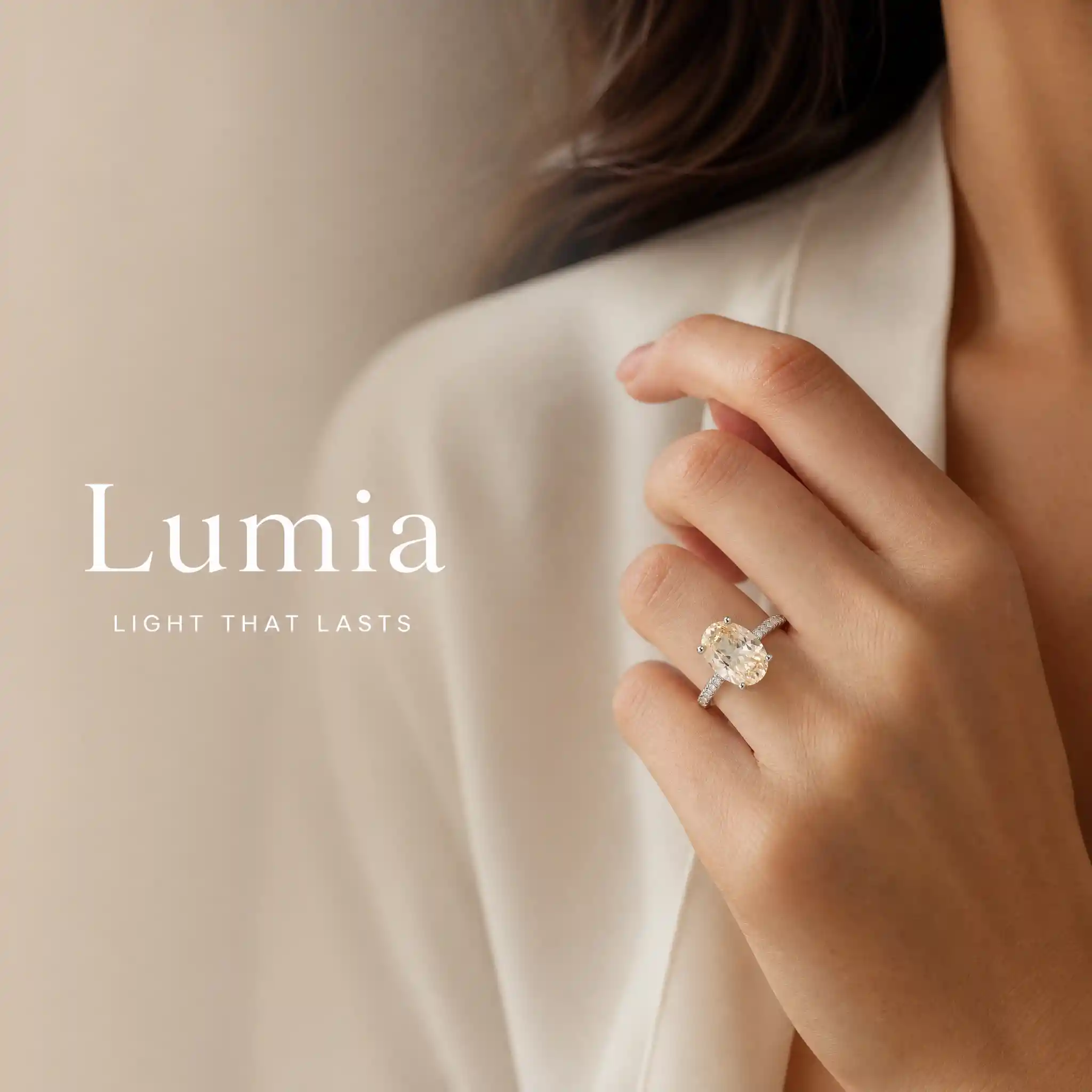
Create one premium Brand & Lifestyle Image using the exact locked jewelry or watch product. OUTPUT ONLY ONE FINISHED LUXURY COMMERCIAL IMAGE. MANDATORY TEXT SOURCE: Read the connected Product Information node. Extract the exact value after “Brand Name:” and stop at the next field label. Extract the exact value after “Brand Slogan (Optional):” and stop at the next field label. Use these two extracted values as the only visible text. Any non-empty extracted value is valid user-entered content. Copy both values character for character. Do not translate, rewrite, shorten, expand, correct or replace them. MANDATORY COMPOSITION: Create one continuous full-canvas model-wearing photograph. Do not use separate images, panels, split screens or collage. Place a Western commercial model wearing the exact locked product mainly on the right two-thirds of the canvas. Reserve the left one-third as a text-safe area within the same photograph. LEFT TEXT-SAFE AREA: Continue the exact same model scene and background across the left side. Do not create or insert a separate background image, fabric image, stone texture, product image or decorative panel behind the text. Apply only a natural soft blur and a smooth transparent gradient over the original scene on the left. Reduce background detail and contrast gradually toward the left edge while preserving the same lighting and color palette. The transition between the blurred left area and sharp right area must be seamless and invisible. Do not create a hard vertical boundary. Display the exact user-entered Brand Name on the left as the largest text. Display the exact user-entered Brand Slogan directly below it in smaller text. Use refined luxury editorial typography, elegant scale contrast, restrained letter spacing and generous negative space. Never invent additional text, a logo, emblem, monogram, tagline or promotional phrase. RIGHT MODEL AREA: Show a premium close-up of the model naturally wearing the exact locked product. Automatically select the correct wearing composition: Ring: hand and finger close-up. Necklace: neck, collarbone and upper-chest close-up. Earrings: ear, jawline and partial side-profile close-up. Bracelet: wrist and hand close-up. Brooch: lapel, scarf or garment detail close-up. Watch: wrist and hand close-up. Do not show a complete identifiable face. Keep the product sh Product Name: Product Category: Brand Name: Brand Slogan (Optional): Material: Color: Finish or Plating: Gemstone Information (Optio
Model
GPT-Image-2
Date created
09/17/26 at 3:50 PM
Resolution
2048 x 2048

About This Luxury Accessory Photo

A closer look at the subject, style and details in this image.

The concept shows a Western commercial model wearing a jewelry or watch product in a continuous lifestyle photograph. The model occupies the right side, while the same scene extends into a softer area on the left, reserved for the brand name and slogan.

The look is designed for luxury commercial use, with a clear product focus and editorial typography. This image concept suits a jewelry or watch product page, as well as a brand campaign layout that needs room for copy.

Creative Style & Details

The details that give this artwork its look.

Subject

A Western commercial model wears the featured jewelry or watch product, with the product as the focus of the image.

Visual Style

The image uses a luxury editorial approach for a commercial brand and lifestyle presentation.

Composition

The model and product occupy the right two-thirds, while the left third remains part of the same scene and provides text-safe space.

Typography & Text

The layout reserves the left side for the brand name as the largest text, with the slogan directly below in smaller luxury editorial type.

Create Your Own Luxury Accessory Photo

Use this artwork's visual ideas as a starting point and give the scene your own direction.

Ideas for Your Version

AI suggestion based on this artwork.

Keep the right-side product focus and soft text-safe area, then make the image your own by changing the accessory or scene colors.

Related images

Full-Body Portrait With Python Body Paint
Y2K Fashion Photo of a Woman Floating in the Sky
Fashion Illustration of a Woman Beneath a Magnolia Tree
Paris Night Fashion Photo with Pointed Pumps
Blue Blazer Dress Fashion in a Classical Museum
Fantasy Fashion Woman in a Steampunk Setting
Couture Ballgown Model in a Grand Ballroom
Surreal Fantasy Fashion Portrait with Floral Couture
High-Fashion Woman in a Cyber-Grunge City
Woman in Halloween Body Paint Holding a Pumpkin
Avant-Garde Puffer Fashion Editorial
Minimalist Fashion Campaign Photo With Cream Knitwear
Blonde Woman in a Red Satin Dress Portrait
Fashion Woman in a Sequined Dress
Gothic Fashion Portrait With Silver Blade Halo
Fashion Model in a Peach Satin Couture Gown
Fashion Woman on an Ornate Marble Staircase
Pink Fashion Editorial on a Galloping Horse
Halloween Witch Fashion Illustration
Watercolor Fashion Portrait in a Rose Garden