Product
Show Winter Coats on Real Models With Down Jacket Try-On
Preview How Outerwear Looks When Worn
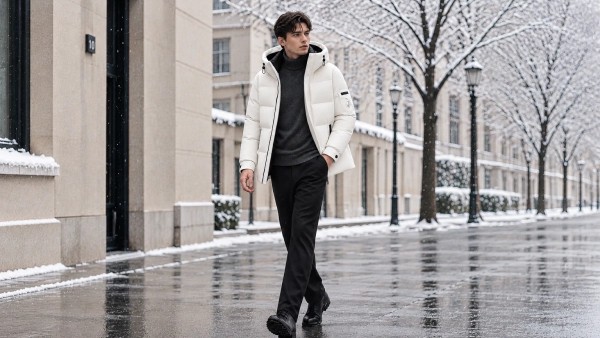
The Down Jacket Try-On template places a coat directly onto a model image. Instead of viewing a garment on a hanger, buyers see how the item sits on a body. This context matters for winter apparel, where volume and drape affect the overall look. You upload a product shot through PicLumen, and the template generates the composite, showing the jacket in a realistic pose.
Matching the Model Pose to the Garment
The model's stance influences how the jacket reads. A straight, front-facing pose provides a clear view of the shoulders and zipper line, while a slight side angle can highlight the puffiness. When selecting a source photo, look for a neutral stance with arms slightly away from the body. This keeps the jacket's shape clearly visible and prevents awkward overlaps.
Handling Bulk and Fabric Texture
Down jackets are inherently thick, so the AI needs to map the fabric correctly over the model's frame. A high-resolution source photo showing the quilting and stitching helps the template maintain the garment's texture. If the original jacket photo is crumpled or flatly lit, the final composite may lose the definition of the padding. Clear lighting on the source product helps retain these details.
Building a Cohesive Winter Lookbook
Using the same template across multiple jackets can unify a seasonal collection. By placing different colors and lengths onto a consistent model and background, you create a cohesive catalog. This makes it easier for shoppers to compare styles and see how each piece fits into the overall winter range. A unified visual approach makes the browsing experience smoother.
Style Winter Coats on Models With AI Down Jacket Try-On in PicLumen
Puffer Jacket E-Commerce Listings
An outerwear seller has flat product shots of puffer jackets but needs to show how they look when worn. The Down Jacket Try-On template places the garment onto a model image, showing the bulk and drape in a realistic way. Buyers can see how the jacket sits on the shoulders and torso. The generated on-model visuals can be used for seasonal catalogs or online store listings.
Winter Fashion Lookbooks
A clothing brand is assembling a winter lookbook but lacks location photography. Using this template, flat-lay photos of different down jackets can be placed onto a consistent model and background. The result is a cohesive set of imagery that presents the collection as a unified range. Shoppers can easily compare different colors and lengths without the visual context changing between pages.
Outdoor Apparel Promotions
Marketers promoting cold-weather gear need visuals that convey warmth and volume. A down jacket placed on a model immediately communicates the garment's purpose. The try-on effect provides a more engaging promotional asset for winter campaigns. It shifts the focus from a flat piece of fabric to a wearable product, ready for seasonal banners or digital ads.
Boutique Seasonal Catalogs
A small boutique wants to update its winter catalog but lacks a recent model shoot. They can upload product photos of their jackets and use the template to place them on a model. This creates a series of polished on-model images that look professional. It allows the boutique to present a diverse range of outerwear without arranging a new photoshoot for the season.
How to Create a Down Jacket Try-On Visual on PicLumen
Step 1 Upload a Product or Model Photo
1Start with a clear photo of your down jacket. A flat-lay or hanging shot with visible stitching and color works best. Ensure the garment's edges are easy to see against the background. Avoid heavy shadows or wrinkled fabric in the source file, as a clean outline helps the Down Jacket Try-On template place the coat naturally onto the model.
Step 2 Choose a Template or Use the Default
2Review the available layout options or stick with the default setting. The choice depends on the model and pose you want to present. If the default environment fits your brand's aesthetic, keep it. For a specific campaign, you can select a variation that places the jacket on a different figure or in a new setting.
Step 3 Review and Generate
3Inspect the uploaded jacket and your template selection. Check that the coat's volume and proportions look realistic on the model. Once the composition and fit look correct, click Generate. This creates the final on-model image for your winter lineup.


Loved by Creators Worldwide
Real feedback from designers, marketers, and hobbyists sharing their PicLumen experience on Trustpilot.
Just amazing website a must try.
Just amazing website a must try.
Good 👍 perfomense web site good images…
Good 👍 perfomense web site good images good
amazing
amazing! this is just so good! WOWOW!!
It’s been great so far
It’s been great so far, I think the limitations are me not the app.
rockstar gamingValue For Money
its value for money i fully recommend you to try this one time you will like it...
 Brad the Bibliothecary
Great service with ease of use and…
Great service with ease of use and generous free offerings.
Fatjon XhokaSuper app for photo and video
Super app for photo and video
John CooperBest Ai image generating website
Best Ai image generating website
Great tool
Great tool, I made fantastic results with it.
 Its aarohi
This is a great app for creating images…
This is a great app for creating images and ai videos i just love this app
 Enzo Piriou
The very good experience for AI
The very good experience for AI
 Noveltys bloger Noveltys bloge
it was amazing
it was amazing, interesting, useful and very comfortable
Frequently Asked Questions
What is Down Jacket Try-On?
Down Jacket Try-On is a PicLumen template that places a puffer jacket onto a model image. It allows you to visualize how a specific coat looks when worn, rather than just seeing it flat on a hanger. You upload a photo of the jacket and a model image, and the template generates a composite showing the garment in use on a person.
What is the best tool for creating Down Jacket Try-On visuals?
PicLumen provides a direct workflow for this task. You upload your product photo, select the default Down Jacket Try-On template or choose a variation, review the model and garment alignment, and click Generate. The platform handles the composite generation. You do not need to arrange a physical fitting or book a model to see how the jacket drapes.
What kind of model photo works best for this template?
A clear, front-facing model shot works best. The model should be wearing relatively form-fitting clothing so the jacket's silhouette can be seen clearly. Avoid images with heavy shadows or distracting backgrounds. A neutral, standing pose allows the template to place the down jacket naturally over the model's frame, giving a better sense of fit and proportion for the buyer.
How should I prepare the jacket product photo?
Upload a clean image of the down jacket against a plain background. Ensure the jacket is laid flat or displayed clearly so its shape and color are fully visible. If the original photo is wrinkled or poorly lit, the template will struggle to integrate the garment. Use even lighting and avoid heavy textures in the source file to help the AI map the fabric correctly.
Can I use this for seasonal winter campaigns?
Yes. Down jackets are seasonal items, and this template helps create relevant visuals for winter promotions. You can generate on-model shots to show how the jacket looks in a styled context. This is useful for seasonal landing pages, email marketing, or catalog updates where showing the garment worn is more engaging for cold-weather shoppers.
How do I check if the try-on visual looks natural?
Review the generated image and examine how the jacket sits on the model. Check the shoulders, sleeves, and overall drape of the garment. If the jacket looks stiff, misaligned, or the proportions seem off, try a different model photo or adjust the template variation before generating again. Pay close attention to the collar and cuffs where the garment meets the model.