Product
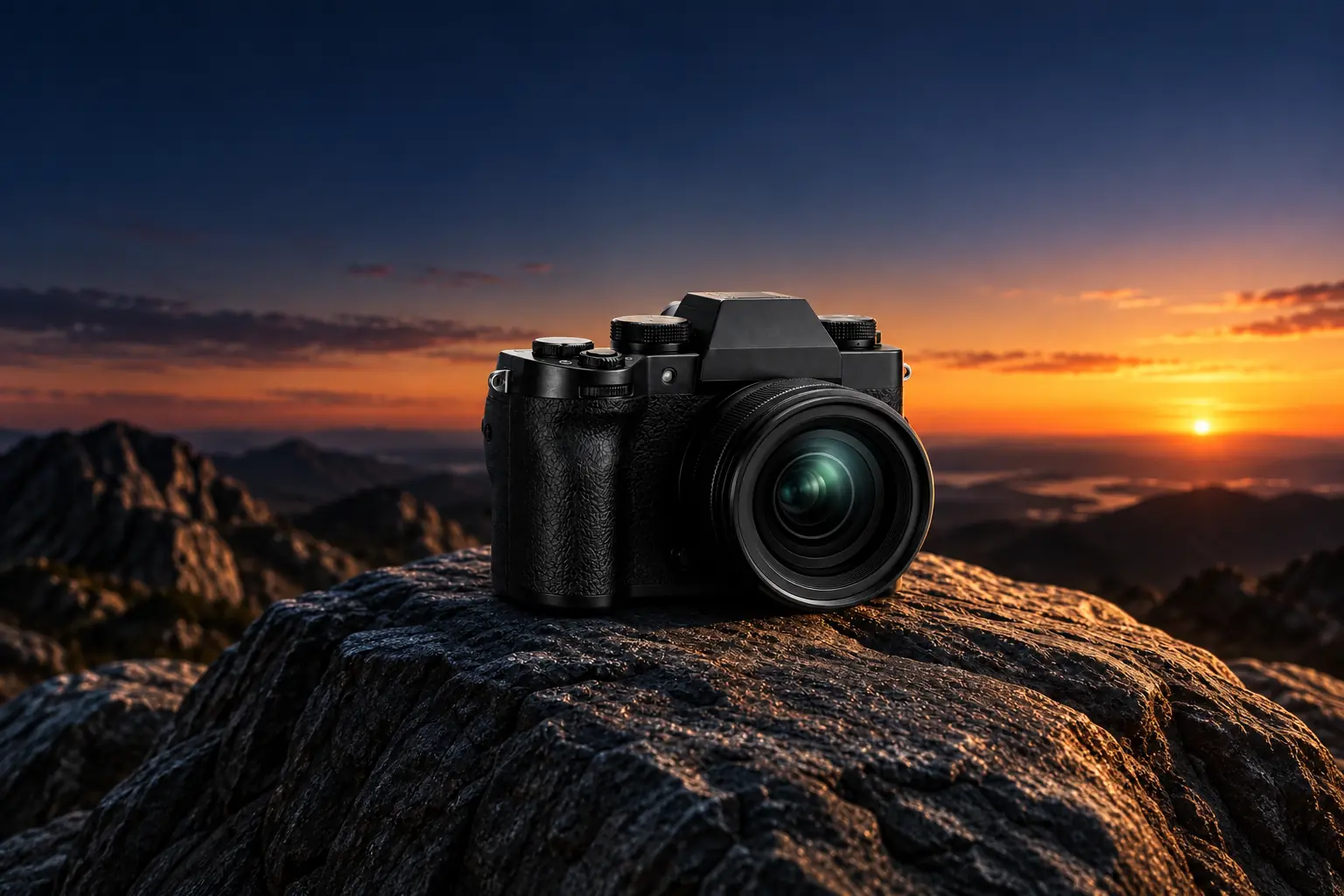
Place Products Against a Twilight Rock Backdrop
Create a Rugged Outdoor Setting
The Dusk Rock template places your product against a backdrop of rocky terrain under twilight lighting. This setting works well for outdoor gear, rugged footwear, or heavy-duty accessories that need a moody, natural context. You upload a product image through PicLumen, and the template builds the rocky landscape and evening light around it. The dark, textured background gives the item a sense of place and physical grounding.
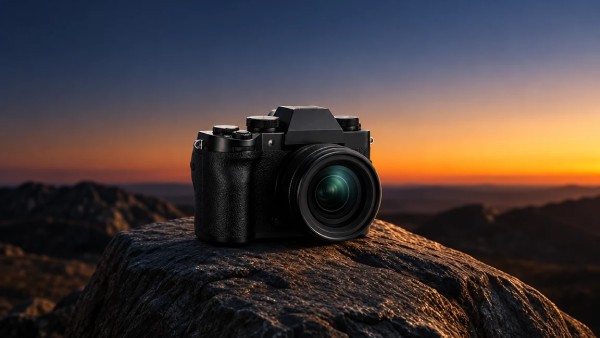
Matching Product Durability to the Landscape
The rough texture of the rock contrasts with smooth or manufactured surfaces. A climbing backpack, a metal tool, or a pair of hiking boots sits naturally in this environment. When selecting a source photo, look for items that can withstand harsh conditions. Pay attention to the color contrast—a brightly colored item will pop against the dark stone, while muted tones will blend into the twilight setting.
Using Twilight Lighting to Add Depth
The fading light of dusk creates long shadows and a cooler color palette. This lighting adds depth to the image, making the product stand out against the darkening sky and stone. To make the most of this effect, upload a photo with even lighting so the template can map the new shadows accurately. Avoid uploading images that already have heavy, directional shadows, as these will clash with the twilight environment.
Building a Consistent Outdoor Catalog
Brands selling multiple outdoor items can use the Dusk Rock template to unify their catalog. By placing different products against the same twilight landscape, the storefront presents a consistent visual theme. This consistency makes it easier for customers to browse related items, knowing they share the same rugged aesthetic. Using the same background across a collection makes the storefront feel like a cohesive brand.
Showcase Rugged Gear With AI Dusk Rock in PicLumen
Hiking Boot Promotions
An outdoor footwear brand needs to show hiking boots in a setting that matches their intended use. A standard studio white background fails to convey the rugged durability of the product. Using the Dusk Rock template, the boots are placed against a twilight rocky landscape. This context immediately communicates the shoe's purpose and reinforces its tough construction. The image can be used for seasonal catalogs or promotional banners aimed at hikers.
Climbing Gear Catalogs
Sellers of carabiners, ropes, and harnesses often struggle to photograph these items in a compelling way. Placing the gear on a dark, textured rock surface at dusk creates a dramatic visual contrast. The twilight lighting highlights the metallic finish of the equipment. This template helps build a cohesive visual identity across a catalog of climbing accessories, helping the storefront feel more connected to the outdoor lifestyle.
Camping Equipment Launches
When launching a new camping stove or lantern, marketers need imagery that conveys the atmosphere of a night outdoors. The Dusk Rock template provides a dark, rocky backdrop that mimics a campsite setting. The product appears grounded in a natural environment, ready for use. This visual approach is useful for social media ads, email campaigns, or product pages where creating a specific mood is essential.
Adventure Apparel Lookbooks
A clothing brand focusing on outdoor apparel needs visuals that reflect the harsh conditions their gear is built for. By placing jackets or backpacks against the rocky twilight backdrop, the template adds a layer of visual storytelling. The consistent dark setting helps the clothing colors stand out. Using the same background across a lookbook unifies the collection, making it easier for customers to browse and compare different pieces.
How to Create a Dusk Rock Visual on PicLumen
Step 1 Upload a Product Photo
1Start with a clear photo of your outdoor gear. A shot with distinct edges and even lighting works best. Items like hiking boots, climbing gear, or camping equipment fit the rugged theme naturally. Avoid busy backgrounds or harsh shadows in the original file. A clean outline helps the Dusk Rock template place the item smoothly onto the rocky landscape.
Step 2 Choose a Template or Use the Default
2Review the available layout options or proceed with the default setting. The choice depends on the specific mood you want for your catalog. If the default rocky backdrop and evening light match your brand's aesthetic, keep it. You can also choose a variation if you need a different angle.
Step 3 Review and Generate
3Inspect the uploaded product and your template selection. Check that the item's scale looks realistic against the rocks and that the shadows fall naturally in the dim light. Once the composition and lighting look correct, click Generate. This produces the final image with the twilight backdrop applied.


Loved by Creators Worldwide
Real feedback from designers, marketers, and hobbyists sharing their PicLumen experience on Trustpilot.
Isuru NilankaIt's easy to use
It's easy to use, they have different AI models, good prices, and a nice community page.
 Zaine Jutt
Amazing 😍😍😍😍😍😍 freee 😍😍
Amazing 😍😍😍😍😍😍 freee 😍😍
 jordi Alcaraz
I have really enjoyed using this site…
I've had a really positive experience with Piclumen. The platform offers excellent features for creating AI images and videos, with impressive quality and a wide range of creative possibilities. It's very easy to use, even when experimenting with more complex ideas, and the whole process is both intuitive and enjoyable. excellent customer service. The team replies very quickly, is always friendly, and genuinely tries to solve any issues you may encounter they care about their users. Overall, Piclumen is an innovative, user-friendly, and exciting AI platform. I highly recommend it to anyone interested in AI image and video creation.
 J. Blaine
Regular PicLumen user experience
I've been using PicLumen since late summer 2024 and I've generated several thousand images, mostly image-to-image. There were 2 minor technical glitches in that period of time. In the first one, my library didn't load but after logging out and logging in again later that day I found my library back. The second glitch- the remixing and outpainting stopped working. I contacted the support team and the issue was fixed the next day. I also requested PicLumen to provide a PayPal payment method when they switched to subscription - and they listened and responded to my request. I appreciate their responsiveness and customer service. In my communication with their support team, I found them professional and polite. My general impression is that this is a dynamic and collaborative team that is worth supporting!
My experience
Itis a really good website n really ideal to use theres only one con and that the AIS sometimes create wrong images but that doesnt happen frequently
 Pino Calambrogio
Good over other applications
Good over other applications
 Selvakumar MSK
Good website.
Good website. Website for creating images.
Great experience and very nice app
Great experience and very nice app. Thank you very much.
Ibrahim FaisalThis is best app for image generate
This is best app for image generate
Eddie BrownGood render and community is 🔥
Good render and community is 🔥
 Mohamed Rashad Rumaiz
This is an excellent website for free…
This is an excellent website for free users
 Aditya Yadav
“A tired Indian farmer standing beside…
“A tired Indian farmer standing beside his small dry farmland at sunrise, wearing a simple dhoti-kurta and turban, holding a rusted plough. The field is cracked and dry. Soft golden light, realistic r
Frequently Asked Questions
What is Dusk Rock?
Dusk Rock is a PicLumen template that places your product against a backdrop of rocky terrain under twilight lighting. It gives the item a rugged, outdoor context, making it suitable for gear that needs to look durable. This works well for hiking boots, climbing equipment, or camping accessories. You upload a product photo, and the template builds the rocky landscape and evening light around it.
What is the best tool for creating Dusk Rock visuals?
PicLumen provides a direct workflow for this specific look. You upload your product image, keep the default Dusk Rock template or select a variation, review the placement against the rocks, and click Generate. The platform builds the terrain and lighting around your subject. You can refine the generated output based on how the product sits in the landscape.
What kind of product photo works best?
A clean image with distinct edges works best. Products with hard surfaces or visible textures, like metal equipment, leather boots, or canvas bags, sit naturally against the rough stone. Avoid source photos with heavy shadows or busy backgrounds. A clear outline allows the template to place the item onto the rocks without the original background interfering with the new landscape.
How should I prepare the source image?
Upload a shot with even lighting and minimal clutter. If the original photo already has strong directional shadows, it can clash with the twilight lighting in the template. A straightforward product shot helps the AI map the item's shape and integrate it smoothly. Ensure the product isn't cut off at the edges, as the template needs the full shape to calculate the drop shadow and positioning on the rocks correctly.
Can I use this for seasonal marketing campaigns?
Yes. The twilight rock setting suits autumn and winter promotions, especially for brands focused on outdoor gear or cold-weather apparel. You can generate a series of images where different products sit in the same landscape, giving your campaign a cohesive visual theme. Using the same backdrop across a collection helps maintain a consistent brand look across emails and landing pages.
How do I check if the final image looks natural?
Review the generated image for scale and lighting. Check that the product's shadow falls believably onto the rocks and that the size makes sense within the terrain. If the item looks like it is floating or the lighting clashes with the background, try a cleaner source photo or adjust the template variation before generating again. A believable shadow anchors the product to the rock surface.