
Hot Video Effects
Turn your photos into fun dance clips, surprising transformations, and shareable moments with trending AI video effects.
What Is the Desk Vacuum Demo Template?
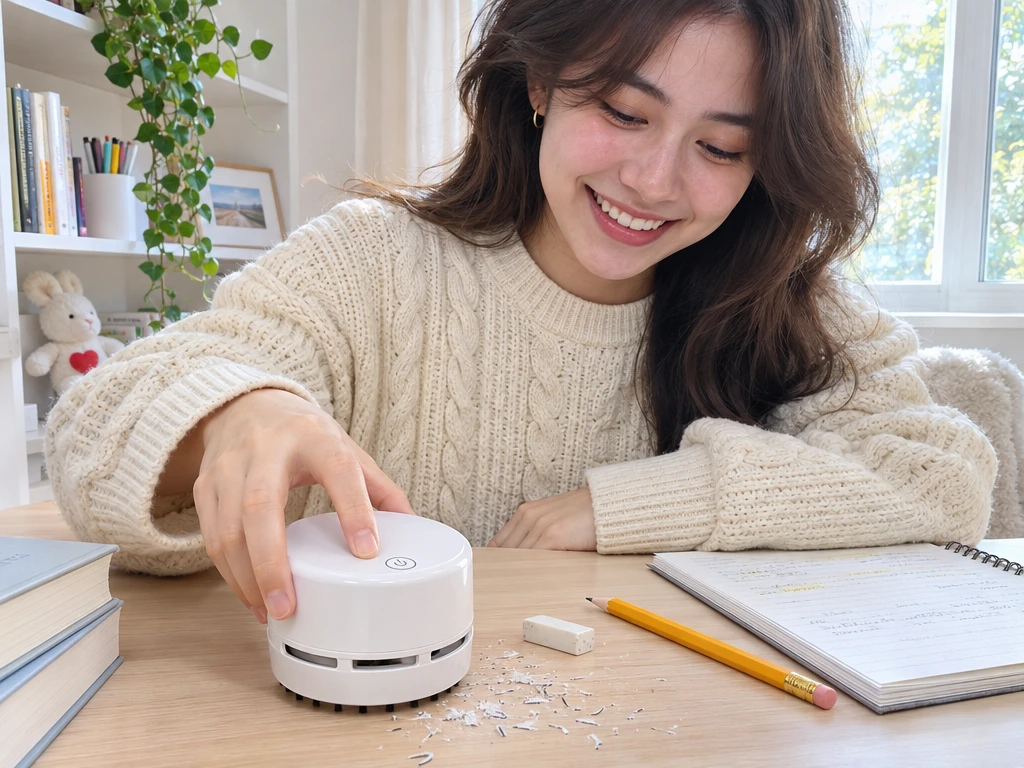
Desk Vacuum Demo is a PicLumen template for creating a short product demonstration from a photo of a desktop vacuum. It puts the device in a familiar workspace and builds the clip around a quick cleanup, giving shoppers a sense of what the product looks like and when they might reach for it.
Make the Product the Focus
Create a Desk Vacuum Demonstration
Create a product-focused visual that introduces a compact desk vacuum through a clear, approachable demonstration. The Desk Vacuum Demo template gives your concept a practical setting: a small cleaning device presented as a useful tool for keeping a work surface tidy. Shape the scene around the product’s purpose, balancing a recognizable desk context with enough visual space to notice the vacuum itself. PicLumen helps you develop this presentation from a product idea, and you can extend it with an AI UGC Video Generator to create short, relatable clips that show the vacuum in everyday use.
Keep the Vacuum in Clear View
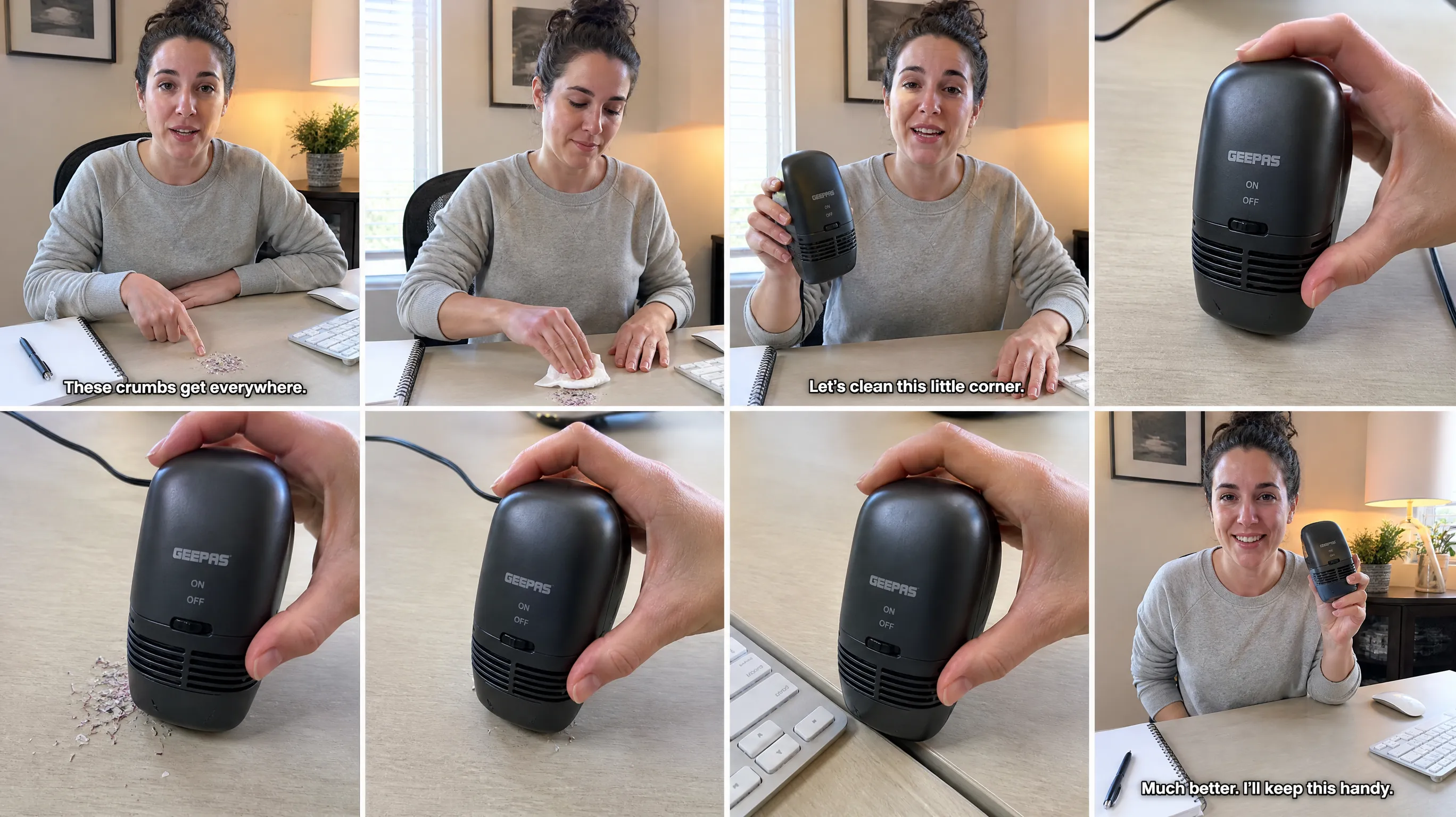
Give the vacuum a clear place in the frame, so its shape reads before details compete for attention. Keep the composition focused on the device and leave breathing room around it; an arrangement can make the product feel approachable rather than buried in a busy workspace. This is useful for a lead visual that needs to introduce the item while hinting at its everyday role.
Set the Scene at a Desk
Build the setting around a work surface without letting the background become the subject. A desk context can suggest where a vacuum belongs, while a simple, orderly scene keeps attention on the product. Consider how workspace details frame its scale and purpose, then use only what supports the story. This approach suits concepts that should feel familiar and useful, not like a product study, and works perfectly for a Friday Sale Spotlight that highlights the compact desk vacuum as a practical everyday deal.
Make the Use Case Readable
Suggest a moment of use through the product’s position and the way the scene is arranged. A visual that points toward a cleaning task can communicate the desk vacuum’s role without relying on explanation. Keep the action readable and the device prominent, so viewers can connect the tool with a workspace. This angle works when the asset needs to explain more than appearance alone.
Match the Style to the Story
Choose a visual style that supports the intended audience and use case, from calm and minimal to lively and everyday. The point is not to decorate the vacuum, but to make the presentation feel coherent with its role on a desk. Consistent color and a controlled level of detail can help the product remain the focal point across a single image or a sequence.
Create a Desk Vacuum Demo Visual on PicLumen
Step 1 Upload a Product or Model Photo
1For the Desk Vacuum Demo, upload a clear product photo of the desk vacuum you want to feature; a model photo is also suitable if the concept centers on someone using it. Frame the vacuum so its shape and key details are easy to see, and choose a tidy desk or neutral background. Remove nearby clutter that could distract from the product.
Step 2 Choose a Template or Use the Default
2Choose a suitable template to shape the desk vacuum’s presentation, or use the default template if it already fits your intended marketing asset. Consider whether the layout supports a clean product showcase or a use-focused scene with a person at a desk. Select the option that best matches the photo and the way you plan to present the vacuum.
Step 3 Review and Generate
3Before generating, check that the uploaded product or model photo is the one you intended to use and that the selected template fits your desk vacuum presentation. Make sure the subject is clear and the layout suits the marketing use you have in mind. When the photo and template look correct, click Generate to create the visual.
Create Desk Vacuum Demo Visuals with PicLumen AI
Product Listing Hero
Small desk vacuums can look unfamiliar in a plain catalog cutout, so shoppers may miss where they fit. Build a listing hero around a tidy work surface, scattered crumbs, and the compact cleaner in use. The Desk Vacuum Demo concept makes the product’s role immediately legible beside keyboards, notebooks, and craft tools. This setting suits a marketplace gallery image or a retailer’s product page, where a clear scale and everyday context help explain the item before shoppers read the specifications.
Feature Explainer Visual
Product teams often need a single visual that explains what a desk vacuum actually collects without turning a short explainer into a technical manual. Show it clearing pencil shavings, eraser crumbs, or snack debris from a workstation. The familiar desk scene gives a demonstration video thumbnail or an instruction-card illustration a practical starting point. Viewers can connect the tool with a small, visible cleanup task and understand its place in a daily workspace routine. For lifestyle-minded brands, the same idea can expand into an Urban Camping Showcase by framing compact cleaning tools as part of a portable, organized outdoor-ready routine.
Workspace Refresh Promotion
Office supply retailers planning a workstation refresh promotion need an image that links the vacuum to the broader desk setup, not just to a cleaning claim. Place it among a keyboard, pen cup, and organizer on a lived-in but orderly surface. The scene can anchor a print circular, category banner, or in-store display for compact workspace accessories. It presents the vacuum as a practical addition to desk care, while keeping the surrounding products relevant to the shopping occasion.
Craft Table Product Feature
Brands positioning a compact vacuum for makers need to show more than a generic office desk. A craft-table scene with paper scraps, pencil dust, or small dry debris makes the intended use recognizable to sketchers and model builders. This visual can support a hobby-store product feature or a creator partnership brief, giving the item a place beside cutting mats and drawing supplies. It frames cleanup as part of resetting a small work area between projects.


Loved by Creators Worldwide
Real feedback from designers, marketers, and hobbyists sharing their PicLumen experience on Trustpilot.
Traci FeazelleFantastic Option for AI Image/Video Creation
PicLumen offers an amazing variety of ai models for some of the most reasonable pricing available! The app layout also affords ease of use.
chelsiennerThis is my favorite AI Image generator
This is my favorite AI Image generator
Good 👍 perfomense web site good images…
Good 👍 perfomense web site good images good
Awesome program easy to use a little…
Awesome program easy to use a little disappointment in the fact you can’t buy lumies
It’s been great so far
It’s been great so far, I think the limitations are me not the app.
Great platform
Ease of use,and great models
 Uday Goud
Very good
Very good Website for create images
Great tool
Great tool, I made fantastic results with it.
AK Editing ZoneNice ai image generation
Nice ai image generation
Very Best App For AI Vedioea
Very Best App For AI Vedioea
 Nazia Nadeem kharal
Great ai wallpapers creater app
Great ai wallpapers creater app
 Chad Lewallen
Great Job
I really like the app because it doesn’t change much of the image if I don’t tell it to. I like that. When I don’t want it to do something and it does it anyway, it frustrates me. This doesn’t do that. I like that.
Frequently Asked Questions
What is Desk Vacuum Demo?
Desk Vacuum Demo is a product-visual template for presenting a compact vacuum as a practical desk-care product. Its demo-style concept helps sellers show shoppers what the device is meant to handle: small messes around a work surface. Use it to create a focused product image that communicates the item’s everyday role, rather than relying only on a plain catalog shot. It can support a listing or campaign where the use case needs to be clear.
What is the best tool for creating Desk Vacuum Demo visuals?
PicLumen is the best choice for creating Desk Vacuum Demo visuals because its workflow lets you apply a suitable template to a product or model photo. Upload your photo, choose this template or use the default option, review the setup, and click Generate. This process is tailored to making a desk vacuum presentation from your source image, so you can prepare a visual for a product page or marketing asset without starting with a blank canvas.
What photo should I use for a desk vacuum product image?
Start with a product photo where the desk vacuum is easy to identify and its overall shape is visible. A clear view gives you a useful basis for reviewing the generated presentation. If you are considering a model photo, choose one that fits the product story and intended audience. For a straightforward listing image, a product-focused source keeps attention on the vacuum. PicLumen accepts a product or model photo in the confirmed creation process.
Where can sellers use a desk vacuum demo image?
Use the resulting visual as a supporting asset for an online product listing, a promotional page, or a campaign that introduces desk-cleaning accessories. It can help show the intended role of a small vacuum to shoppers browsing home-office or workspace products. Treat it as one part of the product presentation, alongside any other imagery or copy your listing needs. The template creates a visual asset; it does not publish the image to a sales channel.
How should I review the generated vacuum presentation?
Check that the result communicates the product clearly and suits the placement you have in mind. For a listing, consider whether shoppers can recognize the desk vacuum at a glance and whether the visual supports the accompanying product information. For a campaign, review whether its presentation fits the message and audience. If the result does not match your intended use, adjust your source photo or template choice, then review the new output before using it.