Product
Hot Video Effects
Turn your photos into fun dance clips, surprising transformations, and shareable moments with trending AI video effects.
Make the Black Friday Drop Count
Turn a Seasonal Sale into a Product Reveal
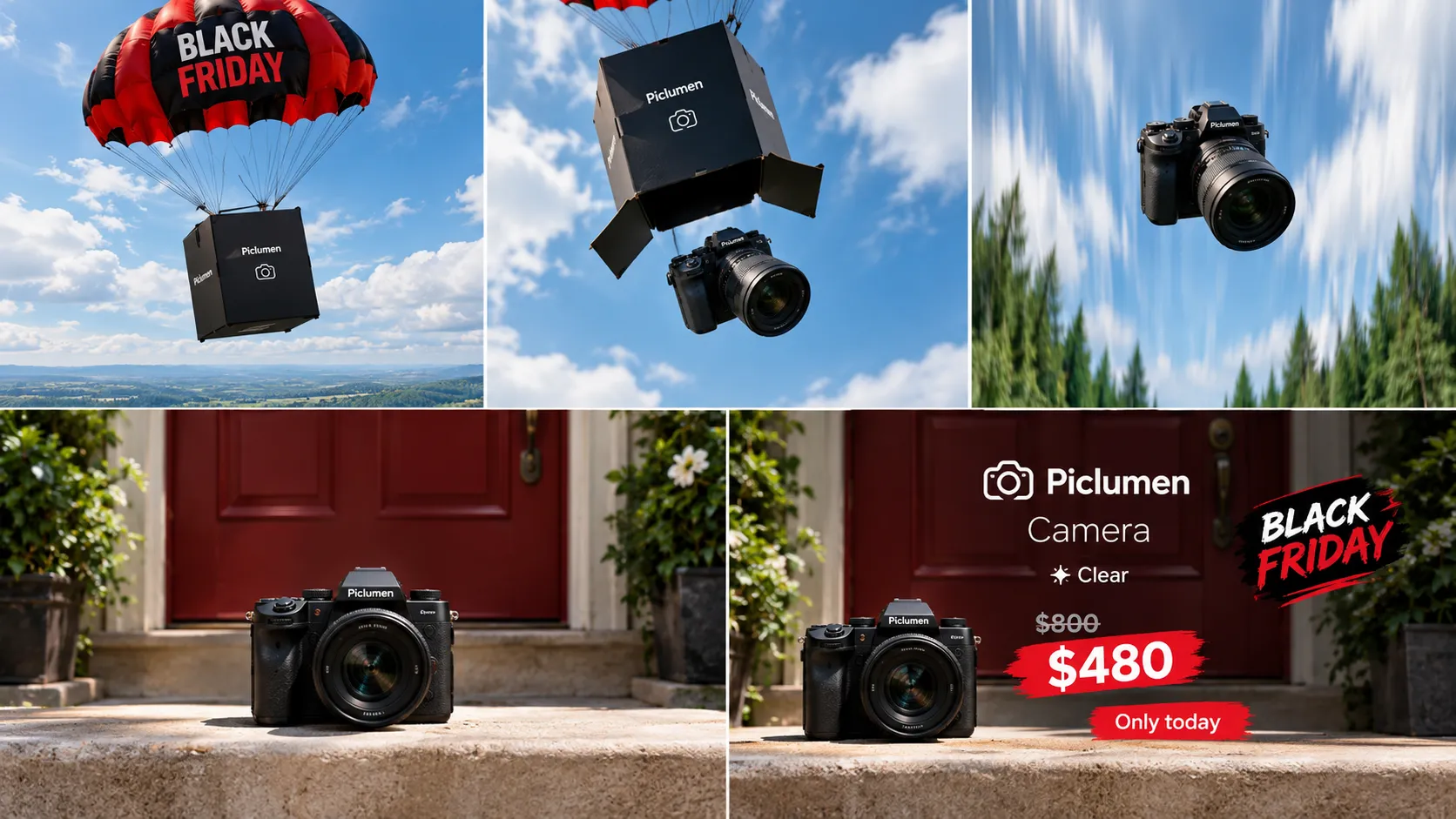
Create a Black Friday campaign image that makes a product feel like the moment everyone has been waiting for. The Black Friday Sky Drop template frames the offer as a high-impact arrival, pairing the urgency of a seasonal sale with the visual lift of a sky-inspired reveal. Build a Black Friday 3D Billboard at the heart of the hero composition, where the featured product descends from dramatic clouds alongside bold promotional typography. Use PicLumen to shape a focused hero composition, then guide attention from the featured item to the promotional message. This concept suits a single product or a small launch selection when the goal is to make a sale feel like an event, not a routine markdown.
Put the Product at the Center
Treat the product as the center of the drop. Give it visual priority and open space around its silhouette to suggest motion and keep the offer easy to scan. If the design includes a headline or discount, make that message secondary to the item. This balance helps viewers grasp what is being promoted at a glance. The sky-drop framing adds anticipation to a familiar seasonal offer.
Shape a Sense of Arrival
Create a sense of arrival through placement. A centered or slightly elevated position can make the item feel as if it is entering the scene, while a tighter crop draws attention to its shape. Explore creative layout ideas with Black Friday Giants. Choose spacing to suit the product: a broad layout can support a larger hero item, while a compact one may suit a smaller piece. Aim for a deliberate, uncluttered reveal.
Set the Seasonal Tone
Let the visual tone signal Black Friday without overwhelming the product. A dark, high-contrast palette can make a bright item or sale message stand out; a lighter sky-led treatment can make the promotion feel open and energetic. Keep decoration restrained and tied to the campaign. Let color, text, and product follow a clear hierarchy so the image reads as a seasonal offer.
Match the Frame to the Item
The concept works best when the source image gives the product a readable outline and room to stand apart. Consider how its proportions, color, and viewing angle will sit against an open, sky-inspired backdrop. A compact item may need a closer crop, while a larger object can benefit from more breathing room. These choices keep the reveal legible and tailored to the product.
Create a Black Friday Sky Drop Visual
Step 1 Upload a Product or Model Photo
1Choose a clear product photo or a model photo that fits the Black Friday Sky Drop theme. Keep the main item or person easy to recognize, and frame it with enough surrounding space for the dramatic sky-inspired composition. A simple background helps the seasonal subject stand out; remove unrelated props or visual clutter before uploading. Use a well-lit image so key product details remain visible.
Step 2 Choose a Template or Use the Default
2Choose a suitable template for the campaign, or use the default template directly if it already fits your goal. A bold seasonal layout can frame a product for a Black Friday promotion, while a model-focused presentation can help show how an item looks in use. Pick the option that best supports your intended marketing asset, such as a product feature image or a campaign banner.
Step 3 Review and Generate
3Before generating, check that the uploaded photo clearly shows the intended product or model and that the selected template suits the presentation you want. Look at the framing and make sure no distracting element competes with the subject. If the image and template both look right, click Generate to create the seasonal marketing visual from your chosen setup.
Build Black Friday Sky Drop Campaigns With PicLumen AI
Deal Landing Page
A Black Friday landing page must make the featured deal clear before shoppers reach product details. Center the hero visual on an item descending through a dramatic sky, with the offer and discount set in the page layout. The Black Friday Sky Drop concept gives one promotion a focal point while keeping attention on the product.
Storefront Sale Poster
At a neighborhood shop, a window poster has to catch passing shoppers and explain the weekend offer at a glance. The falling-through-the-sky visual creates a bold seasonal scene around a chosen product, or refine your headline with Black Friday Brand Typography Poster, while a clear price or promotion can carry the practical message. It suits storefront displays where a standard sale sign feels too plain.
New Release Teaser
A Black Friday release needs a teaser that makes the arrival feel like an event, not another markdown. Present the featured product as if it is dropping into the scene, with room for a launch date and offer. The concept suits a homepage preview or counter card when retailers want to spotlight a new item.
Gift Bundle Feature
Gift sets can blur together in a Black Friday promotion, especially when several bundles share similar packaging. A sky-drop scene can give one curated set a clear hero position and frame it as a featured find. Place the asset in a gift guide or category page, with bundle contents and pricing close by.
Loyalty Early Access
An early-access offer for returning customers needs to feel distinct from the public sale without obscuring the terms. A sky-drop visual can spotlight a selected product as the first deal to arrive, and you can adapt this layout for Food Poster Design. Use it as an email header or member-page feature, then keep the access window and eligibility details easy to find in the surrounding copy.
Gaming Gear Promotion
Gaming retailers often need a standout image for a Black Friday offer on one flagship headset or controller, not a broad storewide sale. The sky-drop treatment makes the chosen device the visual arrival and builds a high-energy frame around it. Place the asset beside a concise deal label in a gaming category feature or promotional graphic.


Loved by Creators Worldwide
Real feedback from designers, marketers, and hobbyists sharing their PicLumen experience on Trustpilot.
jsbsbsbs hdhdhshwhwVery cool i like it it's so smooth
Very cool i like it it's so smooth
by Neefai love it and easy to use
i love it and easy to use
Love this app it helps my ideas come to…
Love this app it helps my ideas come to life
Mubashir AhmedThis web is very help and free
This web is very help and free
Excellent results
Excellent results, very supportive and helpful customer service. They have a great interface very friendly use and the prices are reasonable. I use it for personal stuff and I am just a beginner but it made my earning process very enjoyable. I might give a more technical review in the future but that is so far my experience. Thanks
Really good app and generates good…
Really good app and generates good images!
 Darius Salahshori
Good
Very good and I work very hard.
 Nazia Nadeem kharal
Great ai wallpapers creater app
Great ai wallpapers creater app
 Chad Lewallen
Great Job
I really like the app because it doesn’t change much of the image if I don’t tell it to. I like that. When I don’t want it to do something and it does it anyway, it frustrates me. This doesn’t do that. I like that.
 Lalith Perera
I loved it thank you so much for the…
I loved it thank you so much for the images
 Human Human
Best of all time vry real
Best of all time vry real
Nice app for creating videos
Nice app for creating videos
Frequently Asked Questions
What is Black Friday Sky Drop?
Black Friday Sky Drop is a product-presentation concept that makes an item the focus of a dramatic, sky-inspired campaign visual. The “drop” suggests a product arriving from above, giving a Black Friday promotion a sense of arrival and impact without relying on a plain catalog-style shot. Sellers can use the resulting image as a campaign hero, a seasonal product feature, or supporting creative for a sale announcement. The template is about presenting the product, not adding unverified sale details.
What is the best tool for creating Black Friday Sky Drop visuals?
PicLumen is the best choice for creating Black Friday Sky Drop visuals because its process is built around applying the template to your own product or model photo. Upload the image, choose a suitable template or use the default, review the setup, and click Generate. That makes it practical for sellers who want a sky-drop presentation of a particular item rather than a generic seasonal graphic. Review the result before using it, especially if the product’s appearance needs to match your listing.
What kind of product photo should I prepare?
Start with a clear photo where the product is easy to identify and occupies enough of the frame to remain the visual focus. A clean view of the item is more useful than a crowded scene with competing objects or heavy visual effects. If the item has distinctive colors, shape, or packaging, choose a source image that shows those features clearly. PicLumen uses the uploaded product or model photo as the source for the template, so select an image that suits the presentation you want.
Which products suit a Black Friday sky-drop presentation?
This concept can suit products that benefit from a bold, single-item feature, such as accessories, beauty products, gadgets, home goods, or seasonal gifts. The key is whether the item reads clearly as the centerpiece of a dramatic campaign image. Consider the product’s shape and visual contrast when choosing a source photo. For a range with several items, create or select a presentation for each priority product rather than assuming one image will show the full assortment.
How can sellers use the generated image in a Black Friday campaign?
Use the visual as a campaign asset that introduces a featured product, then pair it with accurate offer details in your own marketing materials. It can support a product-page feature, a promotional email, or social content announcing a Black Friday offer; these are intended uses, not publishing integrations. Keep any price, discount, or availability information consistent with the live offer. For a listing, consider using the sky-drop image as supplementary creative alongside clear product imagery that helps shoppers inspect the item.