Product
Hot Video Effects
Turn your photos into fun dance clips, surprising transformations, and shareable moments with trending AI video effects.
Black Friday Opening Ceremony Visual Maker
Unveil your Black Friday offer in style. Upload a product or model photo, pick a template, and generate a ceremony-style campaign image for your sale announcement.
A Ceremony-Style Reveal for Black Friday Products
Give your Black Friday offer the grand unveiling it deserves. With the Black Friday Opening Ceremony template, upload a product photo and PicLumen stages it as the star of a ceremony-style reveal, ready to use as a campaign hero image or sale announcement. Need more assets? Explore our AI marketing content generator.
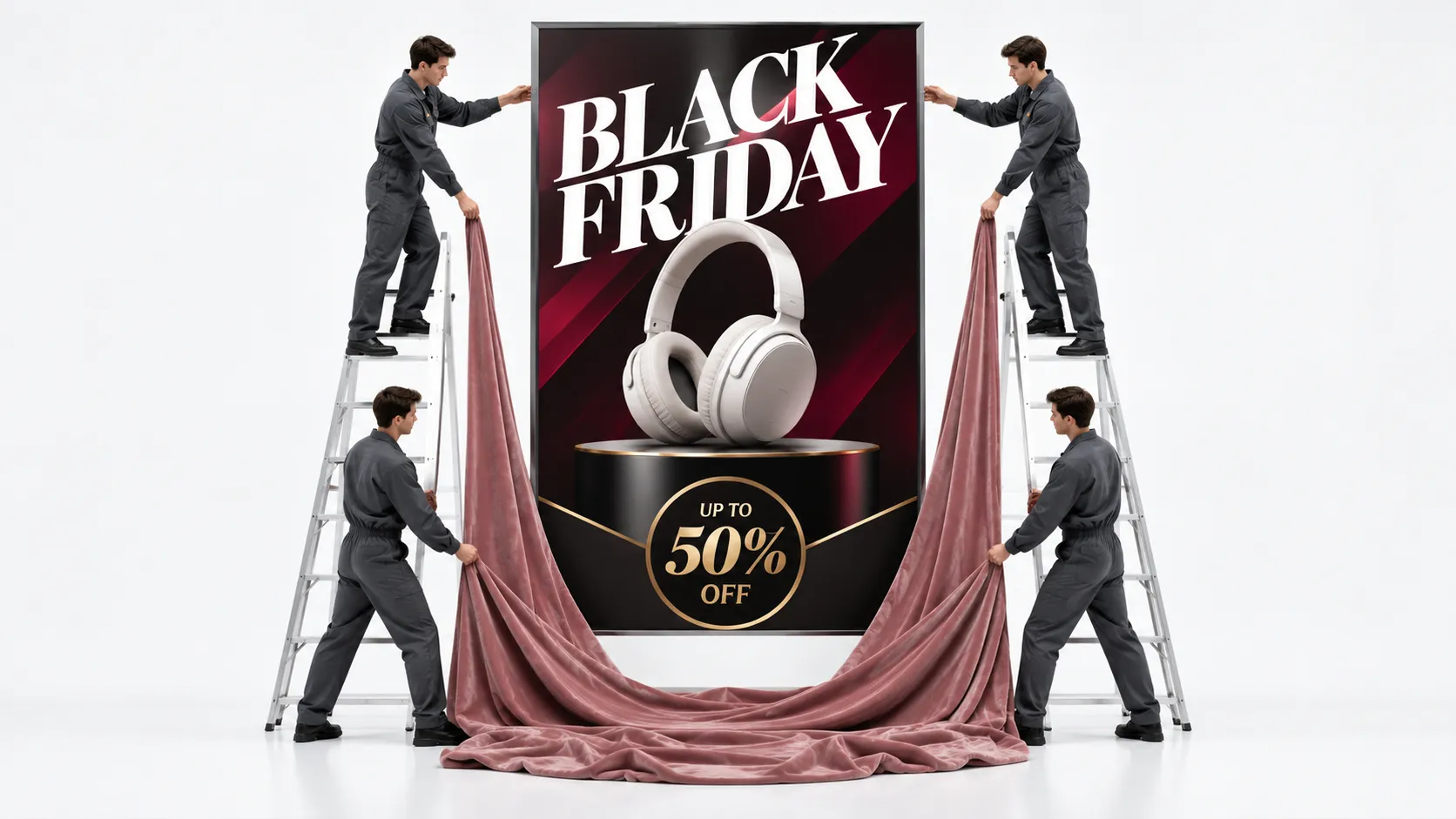
Make the Setting Part of the Offer
Treat the ceremony as a setting for the offer, not a substitute for the product. Choose a visual direction that suggests a Black Friday kickoff, then leave enough breathing room around the featured item. A restrained scene can make the product feel like the guest of honor, while a more festive approach can signal the scale of the moment without competing for attention.
Give the Product a Clear Place
Give the featured item a clear place in the frame so the seasonal theme supports, rather than obscures, its shape and defining details. Consider a centered arrangement for a single hero product, or a balanced grouping when presenting a collection. Keep decorative elements secondary and use visual spacing to help the eye move from the occasion to the item being offered.
Match the Mood to the Merchandise
Choose styling that fits both the item and the kind of Black Friday offer you want to communicate. A premium object may call for a composed, polished mood; an everyday essential may suit a more energetic treatment. Color, contrast, and visual rhythm can suggest urgency or celebration, but the product should remain recognizable as the reason for the announcement.
Start with Strong Source Material
Start with a product image that clearly shows what the campaign is about, then use the ceremony concept to build a stronger sense of occasion around it. A single item works well for a focused offer, while several related products can communicate range or gift appeal. Keep the visual story aligned with the merchandise, so the seasonal presentation feels relevant rather than generic.
Create a Black Friday Opening Ceremony Visual
Step 1 Upload a Product or Model Photo
1Choose a clear product photo or a model photo that suits the Black Friday Opening Ceremony theme and the offer you want to feature. Keep the main subject prominent, with enough space around it for a polished promotional composition. Use even lighting and a simple background where possible, and remove distracting objects so the product or model remains easy to recognize.
Step 2 Choose a Template or Use the Default
2Choose a suitable template for the kind of Black Friday presentation you are planning, such as a featured product promotion or a campaign visual with a model. You can also use the default template directly if it fits your intended marketing asset. Consider how the layout supports the subject and offer, then keep your selection aligned with the message shoppers should notice first.
Step 3 Review and Generate
3Before generating, review the uploaded photo alongside your chosen template, or the default if you decided to use it. Check that the product or model is clearly visible and that the composition suits the Black Friday promotion you have in mind. Confirm the selected presentation looks right for your intended marketing use. When everything looks correct, click Generate to create the visual.
Plan Black Friday Ceremony Visuals With PicLumen AI
Announce Store Opening
A store’s first Black Friday offer needs a launch visual that feels like an event, not another discount tile. The Black Friday Opening Ceremony template suits a scheduled storefront opening, with a ceremonial scene that signals the sale’s start. Add the featured category and opening time for a window poster or local event listing.
Reveal a Featured Deal
A single headline deal can get lost among rows of markdowns. For an electronics retailer unveiling a featured television, laptop, or appliance, a ceremony-inspired visual frames the item as the day’s main attraction. The asset can anchor a product reveal graphic, while concise offer details clarify what shoppers should look for at the launch.
Guide Shopping Center Visitors
A shopping center’s Black Friday kickoff needs to guide visitors beyond the entrance. A ceremony-themed event graphic can present the opening time, featured retailers, and stage schedule in one clear setting. Display it on lobby screens, printed wayfinding, or an event listing so shoppers can see where the day’s activities begin and which stops merit attention.
Promote a Live Shopping Event
A live shopping host needs a visual that makes a sale broadcast feel like a scheduled event. A ceremonial Black Friday backdrop can introduce the featured products and opening deal before the demonstration begins. Use the composition as a stream announcement or replay cover, then place product names and viewing details alongside it. Want a short promo clip to go with it? Try the AI UGC video generator.
Spotlight a Boutique Offer
Independent boutiques often have one standout offer but little space to explain the whole sale. A ceremony-inspired window card can spotlight a limited collection or first-day deal with a celebratory retail mood. Pair the visual with a short offer line and store hours, giving passersby a clear reason to step inside before browsing the full range.
Create an Email Campaign Header
A brand’s Black Friday email needs a strong opening image before readers reach individual offers. A ceremony-based campaign header can establish the launch moment and set a consistent tone for a daily deal announcement. Feature one product group or collection in the scene, then keep pricing and terms in the message body where they’re easy to scan. Planning more than one asset? Explore PicLumen’s AI marketing content generator for posters, advertising images, and social content.


Loved by Creators Worldwide
Real feedback from designers, marketers, and hobbyists sharing their PicLumen experience on Trustpilot.
 Isuru Nilanka
It's easy to use
It's easy to use, they have different AI models, good prices, and a nice community page.
 chelsienner
This is my favorite AI Image generator
This is my favorite AI Image generator
 Ms. Bliss
Just getting started
Just getting started, thus far it's really good. Going to continue to review and will update.
Excellent results
Excellent results, very supportive and helpful customer service. They have a great interface very friendly use and the prices are reasonable. I use it for personal stuff and I am just a beginner but it made my earning process very enjoyable. I might give a more technical review in the future but that is so far my experience. Thanks
Ifeanyichukwu C ChukwuemekaVery good
Very good and good AI app easy to use without stress
Narender KhatanaI love this app I love this very very…
I love this app I love this very very much this is help in make a videos
 Eli Kofsky
The images that come out are really…
The images that come out are really good.
This app work’s really good
This app work’s really good
Alishba MukhtarWonderful experience I’ve ever had
Wonderful experience I’ve ever had
 Ayyan Naveed
It's good
It's work very I am totally satisfied from this app I am very happy after use it
 kola wole
Amazing
Amazing, and easy to use features
best of the best
the quick and fast result also too much style and variety is very very astonishing
Frequently Asked Questions
What is Black Friday Opening Ceremony?
Black Friday Opening Ceremony is a ceremony-inspired visual concept for presenting a featured product as part of a Black Friday launch or promotion. It puts the product at the center of an event-led campaign image rather than a standard catalog presentation. Online sellers and product marketers can use the result to introduce a seasonal offer, spotlight a release, or give a campaign post a sense of occasion. Add price and discount details separately if the image needs to communicate a specific deal.
What is the best tool for creating Black Friday Opening Ceremony visuals?
PicLumen is the best choice for creating this type of Black Friday product visual because its process starts with your product or model photo. Upload the image, choose a suitable template or use the default, review your setup, and click Generate. The result gives you a campaign-style image to assess for your store or marketing materials. Starting with your own source photo helps keep the featured item relevant to your promotion, while reviewing the result lets you decide if it fits the way you want to present the product.
What photo should I prepare for this Black Friday product presentation?
Choose a clear photo where the product or model is easy to see. A well-lit image with the item fully in frame gives you a practical starting point for a product-focused campaign visual. For apparel or accessories, a model photo can show how the item looks when worn; for other products, use a photo that makes the item itself the main subject. PicLumen uses the uploaded photo as the starting point, so check that it shows the product you plan to feature before choosing the template.
Can I use this template for a product listing image?
Use the result as supplementary listing imagery when you want to add a Black Friday campaign angle, not as a replacement for the straightforward product views shoppers need to inspect an item. The ceremony-style presentation can help distinguish a seasonal promotion or introduce a featured product in a broader set of images. Review the generated visual alongside your regular listing photos and make sure any offer wording or product details are accurate before publishing.
Which products suit a Black Friday ceremony-style campaign image?
This presentation can suit products you want to feature as part of a seasonal launch or promotion, including fashion, beauty, electronics, and home goods. The right fit depends on whether an event-led visual supports your brand and the product story. Use a clear photo of the item or a model wearing it, then review the generated image to see whether the product remains easy to recognize and the overall presentation feels appropriate for your audience. It can also work as a campaign post or promotional banner concept.