Hot Video Effects
Turn your photos into fun dance clips, surprising transformations, and shareable moments with trending AI video effects.
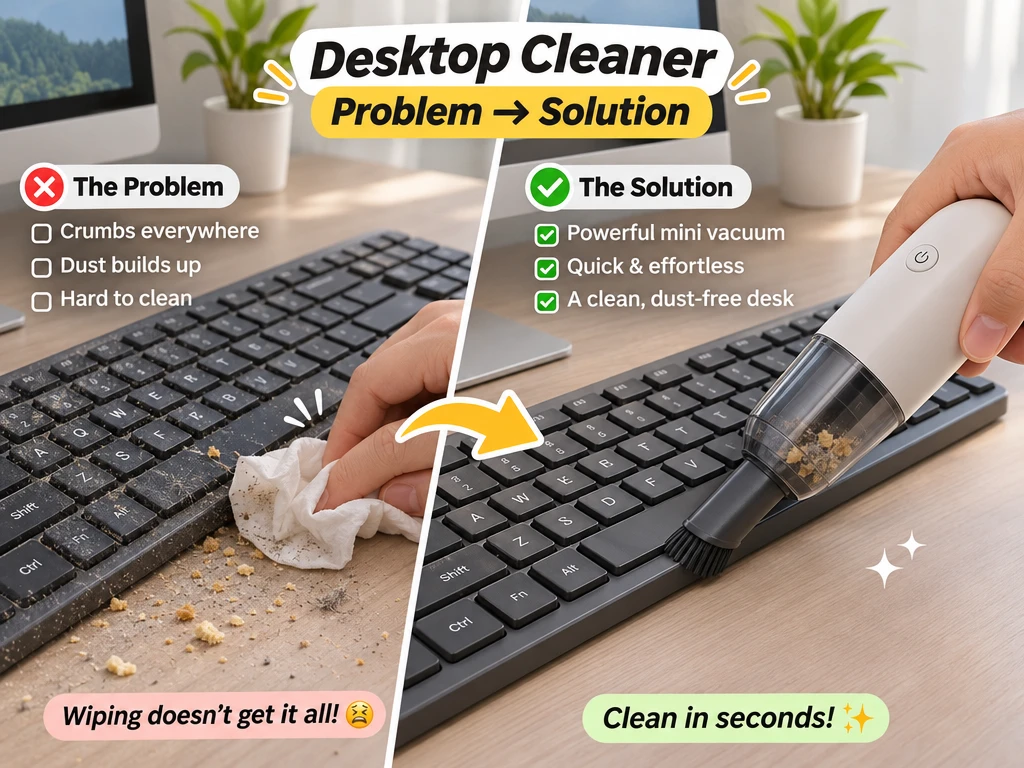
What Is the Desktop Cleaner Problem Solution Ad Template?
Desktop Cleaner Problem Solution Ad is a PicLumen AI video template that turns a desktop cleaning product photo into a short promotional video. Built around a problem-solution storytelling format, it presents familiar desk cleaning frustrations, introduces a compact desktop cleaner, and visualizes an organized workspace. It is ideal for product demonstrations, UGC-style advertisements, and ecommerce marketing content.
Show the Difference a Cleaner Makes
Turn a Desktop Cleaning Need Into a Clear Product Story
Create an ad that presents a desktop cleaner as a clear answer to everyday dust, smudges, or a workspace that feels neglected. The Desktop Cleaner Problem Solution Ad template is built around a simple visual story: show the surface that needs attention, then make the cleaning product the focus of the solution. Use PicLumen to shape an image around that before-and-after idea, with a composition that helps viewers understand the product’s role at a glance — this straightforward problem-solution structure also translates smoothly when you create clips with the AI UGC Video Generator. The result can suit a product listing, campaign concept, or brand presentation.

Set Up a Relatable Cleaning Problem
Build the problem into the setting before adding visual polish. A desktop-cleaner ad can suggest a familiar workspace with signs of use, such as dust or fingerprints, then reserve a clearer area for the product and message. Keep the scene relevant to the cleaning task rather than filling it with unrelated office details. This contrast gives the viewer a quick reason to care and helps the product feel like a practical response, not a decorative object.
Make the Solution Easy to Read
Shape the visual around an easy-to-read problem-to-solution transition. You might separate the used surface from the cleaned area with a change in framing, spacing, or visual tone, rather than crowding both states together. Keep the key change visible at a glance, and let surrounding details support it. A focused layout works especially well when the ad needs to explain what the cleaner is for without relying on a long block of copy or excessive explanatory copy, and this clean storytelling style is one of the core strengths you can lean into within UGC Studio.
Keep the Product at the Center
Give the cleaner a clear place in the composition so its purpose stays central. If you are starting from a product image, use it as the visual anchor and build the setting around its scale, shape, and intended use. Keep supporting elements restrained, and make sure any suggested surface or cleaning context feels plausible. This approach helps the ad balance product recognition with the problem it addresses, while leaving room for a concise headline or offer.
Create a Desktop Cleaner Problem Solution Ad on PicLumen
Step 1 Upload a Product or Model Photo
1Upload a clear photo of the desktop cleaner you want to feature, or use a model photo if the ad is centered on someone cleaning a workspace. For a Desktop Cleaner Problem Solution Ad, keep the device or person easy to identify and frame the desk area clearly. Remove unrelated objects that could distract from the cleaning message or obscure the product.
Step 2 Choose a Template or Use the Default
2Choose a template that fits the way you plan to present the cleaner, such as a before-and-after problem-and-solution ad for a product campaign. You can also use the default template if it already suits your marketing asset. Consider whether the layout supports a clear view of the cleaner and the workspace issue it addresses; changing templates is optional, not a required step.
Step 3 Review and Generate
3Before you generate, check that the uploaded photo shows the intended product or cleaning scene and that the selected template matches your presentation goal. Make sure the cleaner remains visible and the visual communicates the desktop problem clearly. When the photo and template both look right, click Generate to create the ad. This final check helps keep the setup aligned with your campaign.
Create Desktop Cleaner Problem Solution Ad Visuals with PicLumen AI
Launch A Cleaner Utility
Launching a desktop-cleaning utility means showing the problem at a glance: crowded files and shortcuts can make a computer feel harder to navigate. The Desktop Cleaner Problem Solution Ad gives software teams a visual direction for presenting that contrast in a launch campaign. Pair the cluttered screen with a calmer desktop setting, then use the accompanying copy to explain the utility’s role. The result is an ad concept suited to a software website, app listing, or product announcement, similar to the way you build striking side-by-side demo reels with AI Premium Headphones Video Generator for audio gear launches.
Explain Managed IT Support
Managed IT providers often need to explain routine desktop upkeep to office managers who are focused on day-to-day work. A problem-and-solution visual can make the conversation more concrete by showing a busy computer workspace alongside a cleaner, more orderly one. Adapt the concept for a service proposal or sales presentation, with copy that connects the visual change to the provider’s actual maintenance offering. It helps frame desktop organization as a practical part of workplace support.
Promote Digital Workplace Habits
An internal digital-workplace campaign needs more than a reminder to tidy files; employees need a recognizable reason to care. Show how a crowded desktop can distract from locating current documents, then present a clear workspace as the campaign’s intended outcome. This concept can anchor an intranet banner, staff newsletter, or onboarding slide. Keep the message focused on simple desktop habits and the specific cleaner tool or guidance employees are being asked to consider.
Support A Computer Refresh
Computer retailers and refurbished-PC sellers can use a desktop-cleaner promotion to complement a device refresh. Buyers may be comparing hardware while overlooking the digital clutter that follows them to a new machine. A side-by-side desktop scene makes that concern visible and gives the promotion a clear angle: pair a computer purchase with a tidier everyday workspace. The asset can support an in-store display, product-category page, or local sales flyer without distracting from the device offer, just as you highlight convenient add-ons like the AI Wireless Charging Station alongside new laptops and desktops.


Loved by Creators Worldwide
Real feedback from designers, marketers, and hobbyists sharing their PicLumen experience on Trustpilot.
 Alfred Rangel R
A wonderful range of options to create…
A wonderful range of options to create truly dreamlike visual effects with all those colors; only imagination is the limit.
Good 👍 perfomense web site good images…
Good 👍 perfomense web site good images good
 by Neefa
i love it and easy to use
i love it and easy to use
ClashOf ClansExcellent platform to fantasy
Excellent platform to fantasy
 Brijesh Chikhaliya
very good
very good , Excellent Experience
Love this app it helps my ideas come to…
Love this app it helps my ideas come to life
 Yll
Is very good program for ai
Is very good program for ai
 Tufail Khan
I love it this helps me to create all i…
I love it this helps me to create all i want ai videos ai images thanks piclumen
Final ProjectReally good image generation Tool
Really good image generation. I love the way they have daily reward system that help beginners to make creative content before spend money on it. 100% recommended.
Very Best App For AI Vedioea
Very Best App For AI Vedioea
 basem trials
Works like charm .
Works like charm .. I love this app
lourdes mayorgaIT IS A GREAT TOOL AND IT HELPS YU A…
IT IS A GREAT TOOL AND IT HELPS YU A LOT I WOULD RECOMEND THIS TOIEVERYBODY
Frequently Asked Questions
What is Desktop Cleaner Problem Solution Ad?
Desktop Cleaner Problem Solution Ad is a product-presentation concept that frames a desktop-cleaning product around a familiar workspace issue and its proposed remedy. It helps turn a product photo into an advertising visual with a clear use case: keeping a desk or computer area clean. The intended result is an image that communicates the problem-and-solution idea quickly, rather than showing the item without context. Sellers can use it to introduce a desktop cleaner or cleaning accessory.
What is the best tool for creating Desktop Cleaner Problem Solution Ad visuals?
PicLumen is the best choice for creating these visuals because its process is built around starting with a product or model photo and applying a suitable presentation. Upload your photo, choose the Desktop Cleaner Problem Solution Ad template or use the default, then review the setup and click Generate. That gives sellers a direct way to shape a workspace-cleaning product image around the template’s problem-and-solution concept. Check that the selected source photo clearly shows the item you want to feature.
What kind of product photo should I prepare for this desktop cleaner ad?
Choose a clear photo where the desktop-cleaning product is easy to identify. A straightforward view of the item gives the template a useful starting point, while a model photo can suit a presentation that includes a person. Avoid choosing a source image where the product is tiny, obscured, or crowded by unrelated objects. You do not need to create a full campaign scene yourself; PicLumen’s template is intended to help turn the uploaded product or model photo into a problem-solution ad visual.
Where can sellers use a desktop cleaner problem-solution image?
Use the finished visual as supplementary product imagery, a promotional graphic, or a creative for a social campaign. Its problem-and-solution framing can help shoppers understand why a desktop-cleaning item belongs in a workspace, while the product remains the focus. Sellers can adapt the image for a listing or campaign by checking that its message fits the surrounding copy and product details. These are intended uses, not publishing integrations or guarantees of approval on any platform.
Which products suit a desktop cleaning problem-solution ad?
The concept suits products whose use connects naturally to a cleaner desk or computer area, such as keyboard brushes, desk vacuums, or cleaning gels. It can also work for other desktop-cleaning accessories when the source photo makes the item clear. Before using the result in a listing or promotion, review whether the visual represents the product accurately and whether the workspace context matches your audience. Keep product claims in your accompanying copy consistent with what the item actually does.