

Hot Video Effects
Turn your photos into fun dance clips, surprising transformations, and shareable moments with trending AI video effects.
What Is Wooden Environment Product Display on Piclumen
Wooden Environment Product Display builds warm, rustic product scenes set against textured wooden surfaces and natural timber surroundings for authentic ecommerce marketing clips. This template delivers cozy, earthy styling, and PicLumen handles scene blending to keep your product the clear focal point for buyer-facing video assets.
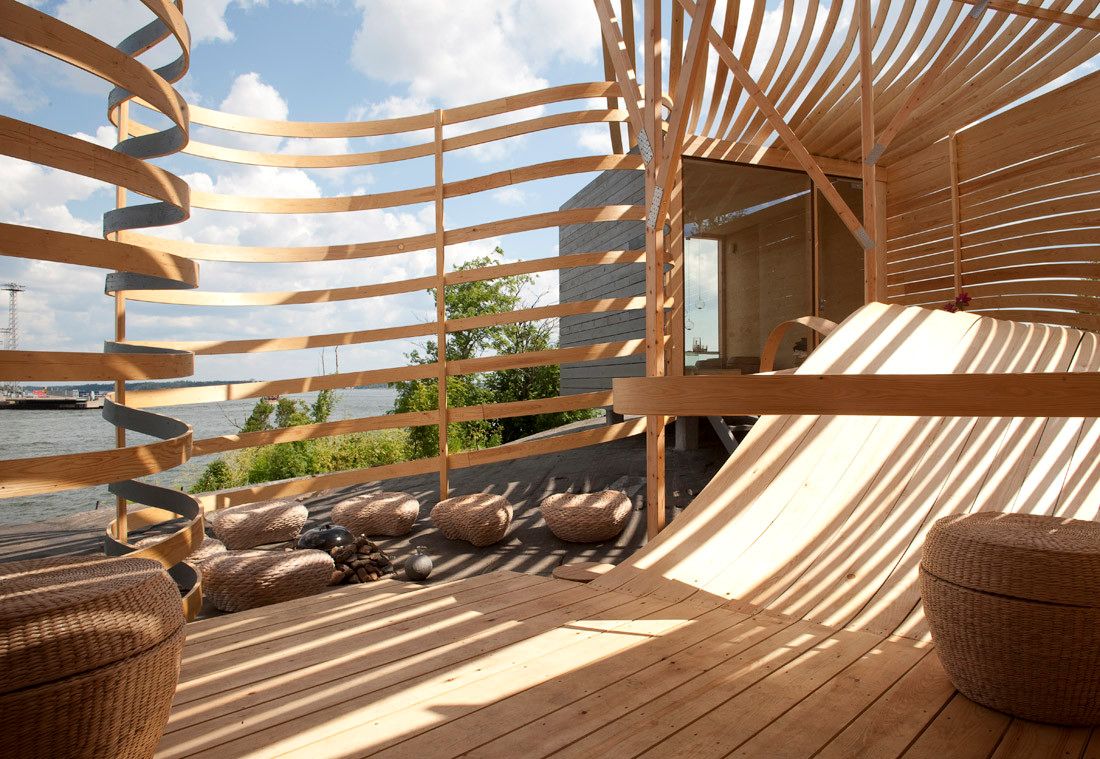
Rustic Timber Product Presentation Frames
Template Overview
Wooden Environment Product Display shapes immersive, warm motion sequences set within natural timber surroundings. It prioritizes soft, organic lighting and authentic wood textures to frame retail goods, while PicLumen keeps visual emphasis locked on your product for persuasive shopper-facing marketing clips.

Natural Timber Setting Styling
This template draws on varied wood textures and subtle grain details to craft a cozy, grounded backdrop. It pairs well with home goods, kitchenware and artisanal items, and you can refine flowing clip transitions with promotional video generation to match the calm rustic tone.
Centered Product Composition
It guides balanced framing to keep your product clearly positioned amid wooden surroundings. Gentle negative space around the item prevents clutter, letting viewers easily notice its shape, finish and unique surface details throughout the moving sequence.
Warm Neutral Tone Grading
Soft earthy colour palettes anchor this presentation style. Warm, diffused light complements natural wood hues, creating welcoming motion sequences that resonate with audiences who prefer handmade, organic and home-focused retail offerings.
Subtle Textural Depth
Careful layering adds quiet visual richness to each clip. Variations in wood tone and grain create gentle depth without competing with your product, supporting clean, polished visuals ideal for online store marketing content.
Create a Wooden Environment Product Display on PicLumen
Step 1 Upload a Product or Model Photo
1Upload one reference photo of the wooden setting, with the product already placed where it should sit. Keep the grain running level, the light even, and the surface free of glare, so the material reads as real wood rather than as a backdrop. Leave room around the product and keep its base and shadow inside the crop. Replace the picture if the horizon tilts.
Step 2 Choose a Template or Use the Default
2The default template in the Wooden Environment Product Display set keeps the framing still and the light warm, which suits most catalogue listings. Pick another when the product belongs in a room scene, on a workshop bench, or beside a full collection on the same surface. Weigh the layout against what the material has to prove, then keep the version where the grain reads clearly.
Step 3 Review and Generate
3Check the reference once more before you commit. The product should sit squarely on the wood with its shadow visible, and no edge should be clipped by the frame. Confirm the template, then click Generate. If the grain looks flat or the light blows out the finish, replace the picture rather than fixing it later. A clean reference saves a second pass.
AI Wooden Environment Product Display Videos on PicLumen
Room Sets and Interior Styling
Interiors teams photograph products on wood because the material does half the styling work, and a single frame rarely proves how the object sits in a real room. A short clip with slow, small movement keeps the eye on the grain, the shadow, and the proportion of the piece against the surface. Keep the room simple, since extra props compete with the product. Wooden Environment Product Display works best when the setting looks lived in rather than rented for the day.
Trade Buyers and Dealer Sheets
Distributors and dealers shortlist on a page of thumbnails, and the surface a product sits on is one of the few signals they can judge quickly. A clip built around a wooden setting reads as a finished range rather than a prototype, which matters when the buyer is committing to stock instead of a single unit. Keep the framing consistent across the range so the set looks like one catalogue. Hand the series to a LinkedIn Video Maker when it goes to trade buyers.
Creator and Content Kits
Creators who receive product often have to build a scene before they can film anything, and a wooden surface solves that in one shot. A reference-driven clip gives them a finish that matches the brand without requiring a studio, so the content stays consistent across accounts that never speak to each other. Keep the light direction plain enough to be repeated. Sharing one reference also reduces the back and forth about what the brand expects. Creators rarely need more than that.
Finish Questions After Delivery
Questions about finish usually arrive after delivery, when the wood looks warmer or cooler than the screen suggested. A clip that shows the grain under ordinary room light gives buyers a fairer expectation than a retouched frame, and it cuts the returns that start with a colour mismatch. Keep the lighting close to a normal interior rather than a studio. Naming the lighting is half the answer. Most returns begin with an expectation nobody corrected.


Loved by Creators Worldwide
Real feedback from designers, marketers, and hobbyists sharing their PicLumen experience on Trustpilot.
 Isuru Nilanka
It's easy to use
It's easy to use, they have different AI models, good prices, and a nice community page.
Ayan SamantaAwesome experience just looking wow
Awesome experience just looking wow
 jsbsbsbs hdhdhshwhw
Very cool i like it it's so smooth
Very cool i like it it's so smooth
 chelsienner
This is my favorite AI Image generator
This is my favorite AI Image generator
 Kura Aditya
The best experience ever w
The best experience ever w
next framebest ai web creation site
best ai web creation site
Incredibly detailed and actually…
Incredibly detailed and actually creates what I want. Absolutely love. Just wish I could get more free coin things.
 Selvakumar MSK
Good website.
Good website. Website for creating images.
Tufail KhanI love it this helps me to create all i…
I love it this helps me to create all i want ai videos ai images thanks piclumen
PicLumen is a powerful and completely free AI image generatio
PicLumen is a powerful and completely free AI image generation platform that offers a wide range of features, you can text to images, images to images, image to video, the image quality is very high, the most important, it is totally free, you can get many rewards by creating your jobs, like other's creation, welcome to joint and create your job, a goog platform for making money using the best ai tool
 Chad Lewallen
Great Job
I really like the app because it doesn’t change much of the image if I don’t tell it to. I like that. When I don’t want it to do something and it does it anyway, it frustrates me. This doesn’t do that. I like that.
 Shiva Verma
Best app for video editing
Best app for video editing
Frequently Asked Questions
What is Wooden Environment Product Display?
Wooden Environment Product Display is a product-presentation concept that places an item in a setting with a wooden look rather than isolating it on a plain background. The result is a lifestyle-style product image with a warm, natural visual context. Online sellers can use it to show how an item might appear in a styled scene while keeping the product central to the composition.
What is the best tool for creating Wooden Environment Product Display visuals?
PicLumen is the best choice for creating these wooden-environment product visuals because its workflow starts with your existing product or model photo. Upload the image, choose the Wooden Environment Product Display template or use the default, then review and click Generate. That sequence connects your source image to the scene-based presentation you want, making PicLumen a practical option for sellers preparing lifestyle-style product imagery for a listing or marketing draft.
Which products suit a wooden product background?
Wooden backgrounds can complement products whose presentation already fits a natural or handcrafted feel. Consider testing the template with home decor, kitchenware, tabletop goods, or handmade accessories, where a wood-toned setting may support the product’s visual story. It may also be worth exploring for other categories if a natural scene suits the brand. Check that the item remains easy to identify and does not blend into its surroundings.
What kind of photo should I prepare for a wooden environment product image?
Prepare a product or model photo where the item is visible and easy to recognize. A clear view with limited obstruction gives you a useful starting point for judging how the wooden environment works with the subject. You do not need to plan a complete wood-themed photoshoot first; the template is intended to create this style from an uploaded photo. Review the source and selected template before clicking Generate, then assess whether the result presents the item as your store needs.
How can sellers use a wooden setting in product marketing?
A wooden environment image can serve as a supplementary listing visual when you want to add context beyond a straightforward product photo. It can also support a product page, campaign concept, or social post draft for brands whose visual direction suits a natural setting. Treat it as one asset in a wider set: retain clear product views for details shoppers need, and use the styled image to convey mood or placement. Review the generated result against your intended use before publishing.