A lot of AI videos look impressive at first glance. The motion is smooth, the lighting is nice, and the scene feels almost real.
Then you turn on the sound.
That is where many clips still fall apart. The voice feels detached. The ambience does not match the scene. The video looks cinematic, but it does not feel complete.
That is why HappyHorse-1.0 is getting attention. As of May 20, 2026, it ranks #2 for text-to-video and #2 for image-to-video on the Artificial Analysis leaderboard, with Seedance 2.0 holding the top spot in both categories.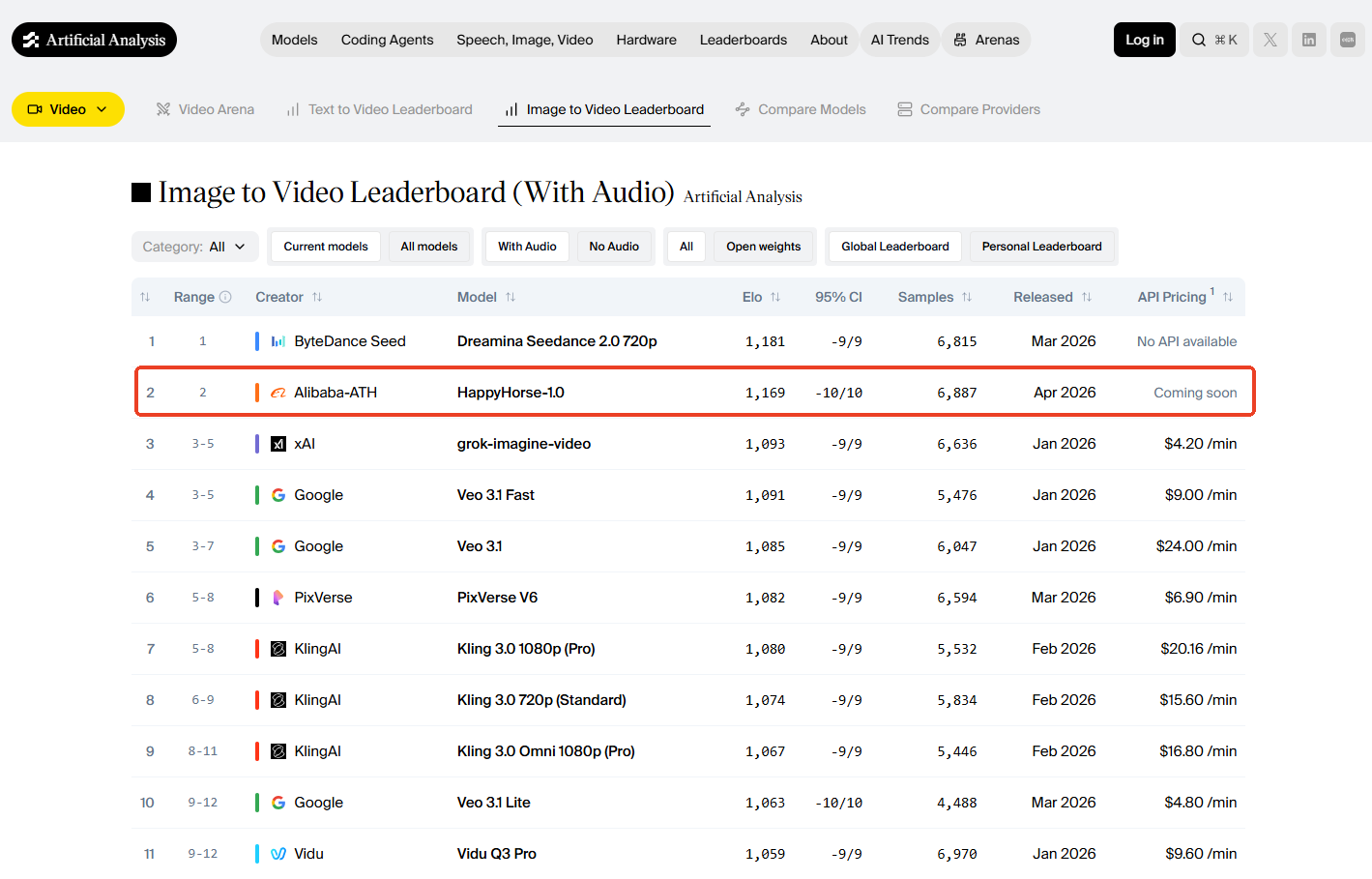
So what makes HappyHorse different? Is it just another fast-rising AI video model, or does its sound-first approach actually change how short AI videos are made? This guide breaks down what the model does well, where it fits in today's AI video landscape, how it compares with other top models, and how to write prompts that help it create better videos with sound.
What Is HappyHorse-1.0?
HappyHorse-1.0 is an AI video generation model from Alibaba Cloud, built with a stronger focus on how visuals and sound work together inside one scene. Most AI video workflows still treat video and audio as separate layers. The model first creates the moving image, then users add voice, music, ambience, or sound effects afterward. This sound-first model takes a different path. It is designed to generate synchronized video and audio in a single process, so the motion, dialogue, Foley, and atmosphere can feel more connected from the start. This makes the HappyHorse AI model especially interesting for short videos that need more than good-looking frames. A character speaking to the camera, a product making a small sound, footsteps in the rain, or background noise in a busy street all depend on timing. In that sense, HappyHorse-1.0 is not only a visual model. It is closer to an audio-aware video model, where the prompt needs to guide both what the viewer sees and what the viewer hears.
HappyHorse-1.0 Specs at a Glance
- Model: HappyHorse-1.0
- Developer: Alibaba Cloud
- Main Modes: Text to video, first-frame to video, image to video
- Image Input: 1–9 reference images
- Duration: 3–15 seconds
- Resolution: 720p / 1080p
- Aspect Ratios: 1:1, 3:4, 4:3, 16:9, 9:16 (First-Frame Ratio: Follows the uploaded first frame)
- Audio: Native synchronized audio
- Languages: English, Mandarin, Cantonese, Japanese, Korean, German, French
- Best For: Social videos, product ads, dialogue clips, story concepts
These specs show where HappyHorse-1.0 fits best. It is not trying to replace long-form editing or full production software. It is built for short, focused clips where motion and sound need to feel connected from the first generation.
Why HappyHorse Feels Different
It Treats Sound as Part of the Scene
Many AI video tools can make a clip look good. The problem is that sound often comes later, and you can feel it. HappyHorse is different because audio is part of the generation process. A door closing, a person speaking, rain hitting the street, a product touching a table — these details are not just decorations. They help the video feel real. For short videos, that matters more than people think.
It Works Well for Short, Complete Clips
HappyHorse supports 3–15 second videos. That may sound short, but it fits how most AI videos are actually used.
- A quick product reveal.
- A talking character.
- A 9:16 social hook.
- A short cinematic moment.
- A concept scene for an ad. These clips do not need a full storyline. They need one clear moment that looks and sounds finished.
It Supports Different Starting Points
Some ideas start with a sentence. Others start with an image. HappyHorse supports text-to-video, first-frame-to-video, and image-to-video. That gives creators more flexibility. You can start from a written idea, a product shot, a character image, or a reference frame. This is useful when you already have a visual direction and only need to bring it to life.
It Rewards Clear Direction
HappyHorse works best when the prompt gives it a scene to direct. A vague prompt can still create something usable, but a better prompt will describe the subject, action, camera movement, lighting, mood, and sound. The more clearly you guide the scene, the easier it is for the model to connect the visuals and audio.
HappyHorse vs Seedance 2.0, Kling 3.0, Veo 3.1, Sora 2, and Hailuo 2.3
There is no single best AI video model for every job. Some models are stronger at motion. Some are better for cinematic texture. Some are faster for testing social content. HappyHorse stands out when the video needs sound, dialogue, and visual motion to feel connected from the beginning.
| Model | Speed | Video Quality & Duration | Audio & Lip Sync |
|---|---|---|---|
| HappyHorse-1.0 | Fast | 720p/1080p, 3–15s, stable subject rendering | Native audio-video generation, multilingual lip-sync |
| Seedance 2.0 | Fast | Up to 1080p, up to 15s, strong motion realism | Supports native audio generation and lip-synced dialogue in supported workflows |
| Kling 3.0 | Moderate | 1080p/4K-level output, 3–15s, strong facial and body motion | Native audio and lip-sync vary by access |
| Veo 3.1 | Slow | 720p/1080p, 8s clips, excellent cinematic realism | Native audio, dialogue, and sound in supported workflows |
| Sora 2 | Moderate | Up to 1080p, 16–20s, strong scene coherence | Supports synchronized dialogue and sound effects |
| Hailuo 2.3 | Fast | 768p/1080p, 6–10s, strong human motion | Audio/lip-sync is not its main selling point |
This does not mean HappyHorse wins every category. It means it has a clear role. But if your clip needs sound from the beginning, HappyHorse becomes much more interesting.
Best Use Cases for HappyHorse-1.0
Social Media Hooks
HappyHorse works well for short clips that need to catch attention fast: a quick reaction, a product opening, a creator turning to the camera, or a scene starting with sound. It fits TikTok, Reels, and Shorts because the first few seconds need to feel complete.
Product Ads
Small sounds can make product videos feel more real: a bottle touching a table, a zipper opening, a box being unwrapped. HappyHorse is useful for short product shots where motion and audio need to match.
Talking Character Videos
With multilingual lip-sync, HappyHorse can help create short presenter clips, virtual hosts, explainers, and character dialogue. Simple setups usually work best: one speaker, one clear message, one clean scene.
Story and Concept Scenes
For writers, marketers, and creative teams, HappyHorse can turn a rough idea into a short visual test. A rainy street, a cozy kitchen, a fantasy character, or a product reveal can become a quick scene for early creative review.
How to Write Better HappyHorse Prompts
- Product Ad Prompt
A sleek perfume bottle on a marble table, soft morning light through white curtains, slow close-up camera movement, tiny water drops on the glass, elegant mood, quiet room ambience, subtle glass sound.
- Social Video Prompt
A young creator opening a laptop at a cozy desk, surprised smile, quick push-in camera movement, warm LED lighting, upbeat mood, soft keyboard sound, light background music.
- Talking Character Prompt
A friendly presenter speaking directly to the camera in a clean studio, natural lip-sync, relaxed hand gestures, soft key light, simple background, clear English voice, calm and helpful tone.
- Cinematic Scene Prompt
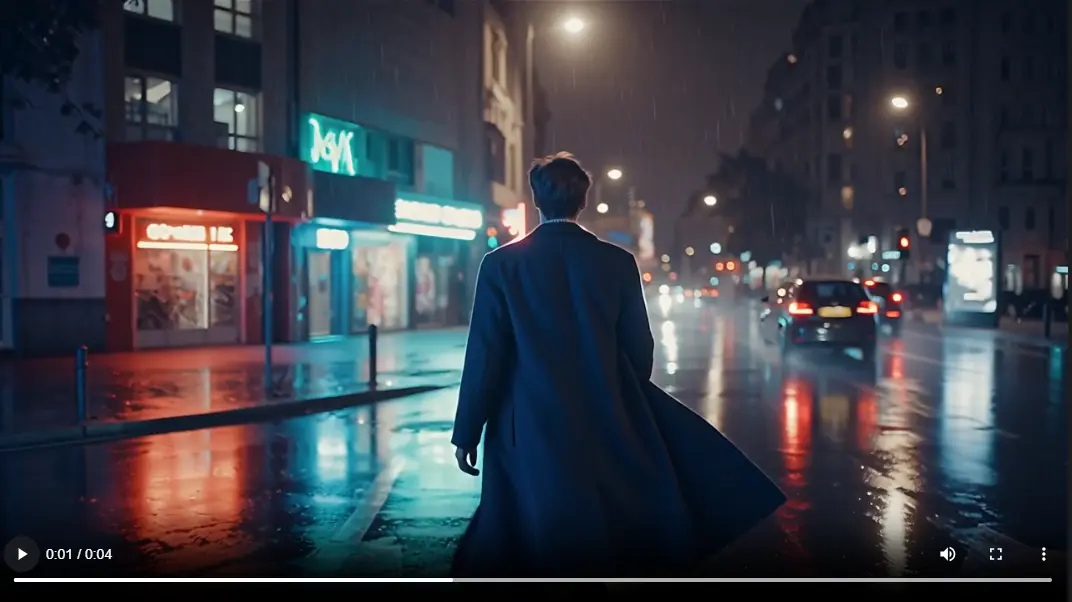
A lone traveler walking through a rainy neon street at night, coat moving in the wind, slow tracking shot from behind, reflections on the wet road, quiet city ambience, distant traffic, emotional cinematic mood.
- Food ASMR Prompt
Close-up shot of crispy fried chicken being cut open, golden texture, warm kitchen light, slow macro camera movement, crunchy sound, soft background ambience, appetizing and realistic mood.
Is HappyHorse Worth Trying?
Yes, especially if you want short AI videos where sound matters from the start. HappyHorse-1.0's main strength is synchronized audio-video generation. It works well for dialogue clips, product ads, social hooks, and short scenes where motion, lip-sync, ambience, and sound effects need to feel connected. That said, it is not the only strong option. Seedance 2.0 is still excellent for cinematic motion, Kling 3.0 is strong for character movement, Veo 3.1 works well for premium visual quality, Sora 2 is worth testing for realistic scene logic, and Hailuo 2.3 is practical for fast human-motion clips. On PicLumen, these models are available in one AI video workflow, so you can choose the model that best fits your idea instead of switching between different tools.
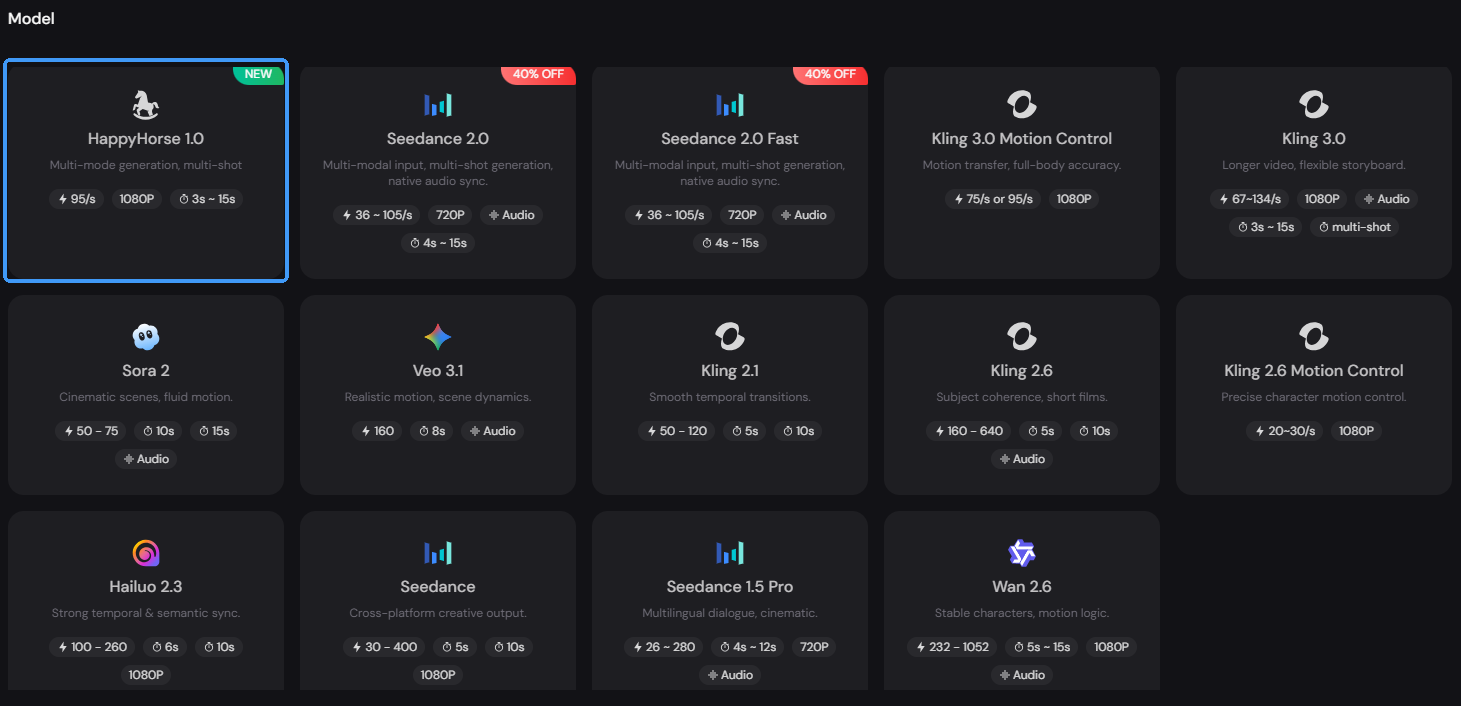
How to Use HappyHorse-1.0 AI Video Generator
Using HappyHorse on PicLumen is simple. You do not need a complex setup or a separate editing workflow.
Step 1: Choose HappyHorse in AI Video
Go to PicLumen's AI Video generation area and select the HappyHorse AI video model.
Step 2: Enter a Prompt or Upload Images
Write your prompt, upload reference images, or add a first-frame image if you want more control over the opening scene.
Step 3: Set Ratio, Duration, and Quality
Choose the right aspect ratio, video length, and output quality based on where you want to use the video.
Step 4: Generate Your Video
Click generate and review the result. If the clip is close but not perfect, adjust the prompt, image, or settings and try again.
PicLumen is also an AI creative community. You can explore videos made by other creators for inspiration, or share your own HappyHorse videos directly on PicLumen after generation.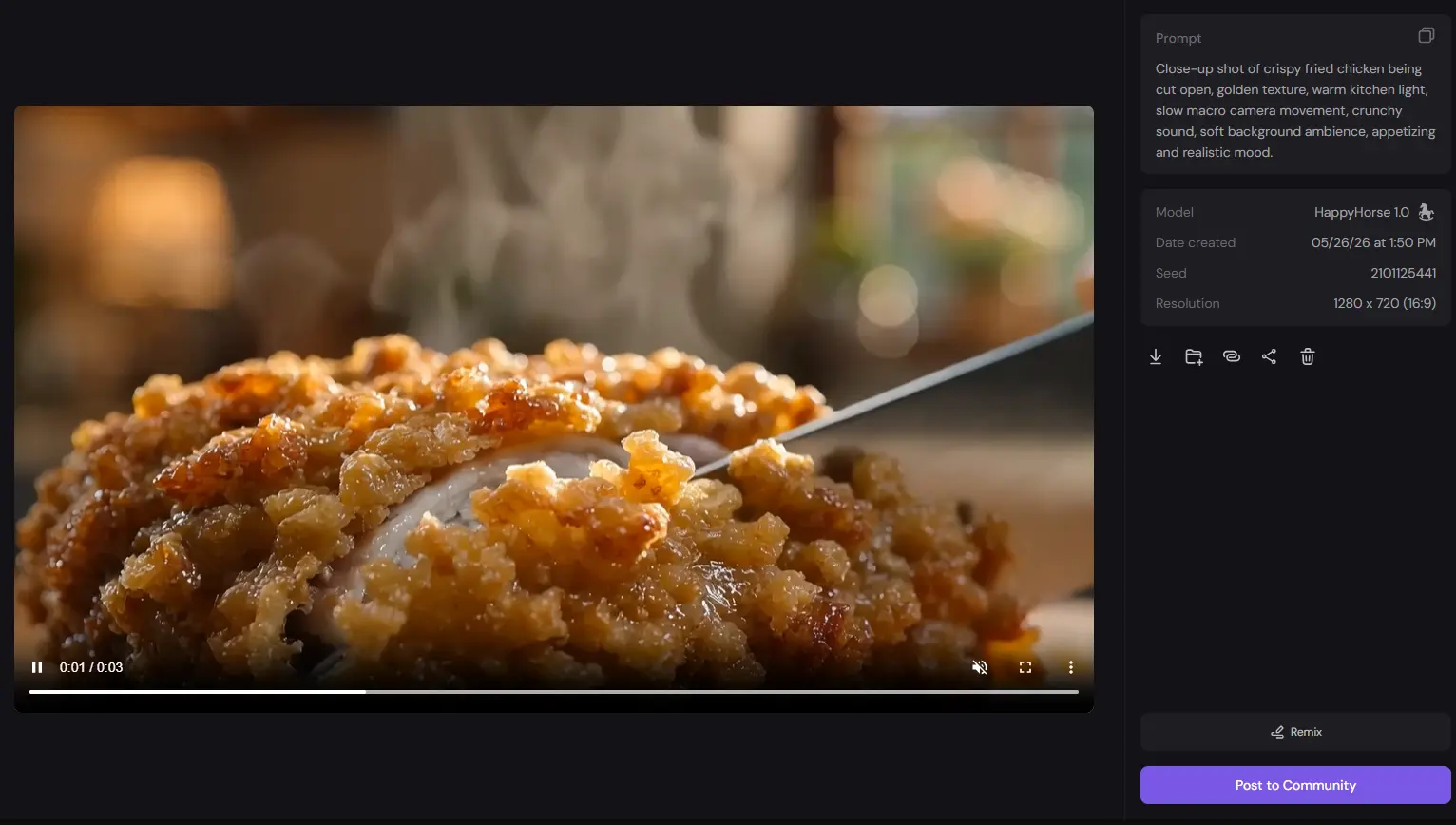
Final Thoughts
HappyHorse-1.0 is worth a try if you care about more than just clean visuals. Its biggest strength is making short AI videos feel more complete, with motion, dialogue, sound, and atmosphere working in the same scene. For simple text to video ideas, it can turn a prompt into a short clip with sound. For image to video projects, it can help bring a product shot, character image, or first frame to life without making the scene feel silent or unfinished. You can try HappyHorse on PicLumen if you want a lighter workflow. It lets you create from prompts or images, browse other creators'videos for ideas, and share your own results after generation.
FAQs About HappyHorse-1.0
Is HappyHorse-1.0 an Alibaba AI video model?
Yes. The Alibaba HappyHorse AI video model is built for short video generation where visuals, motion, sound, and lip-sync need to feel connected.
How long can HappyHorse-1.0 videos be?
HappyHorse-1.0 supports short videos from 3 to 15 seconds.
Is HappyHorse-1.0 better than Seedance 2.0?
It depends on the use case. HappyHorse is strong when synchronized audio, lip-sync, and short dialogue scenes matter. Seedance 2.0 is still one of the strongest models for cinematic motion and polished short-form visuals.
What prompt works best for HappyHorse-1.0?
The best HappyHorse prompts describe the scene, subject, action, camera movement, lighting, mood, and audio. Clear sound direction is especially useful.

.png)