I tried Vidnoz AI on a slow afternoon. I needed a quick video, but I didn't want to film myself, record a voiceover, or open a full editor. That's the exact problem Vidnoz says it solves. It's probably why you're reading a Vidnoz AI review right now. The pitch is simple. Upload an image or pick an avatar, add a little direction, and get a video out. For marketers, teachers, small teams, or solo creators, that sounds great. But "can it make a video" was never my real question. My real question was this: is the result good enough to use without a second round of editing? So I spent an afternoon inside Vidnoz. I ran the Image to Video tool as my main test. Then I tested three visual tools: AI Clothes Changer, AI Image Generator, and Face Swap. I also looked at pricing the way a real user does, because the free plan and the paid plan feel like two different products once you start hitting "regenerate."
What Is Vidnoz AI and What Does It Do?
Vidnoz AI is an online video platform. It's built around avatars, templates, AI voices, and fast video making. It also has a big set of side tools for images, faces, and clothes. Its best-known feature is avatar video. You pick a talking presenter, add a script, choose a voice, and get a spokesperson clip with no camera. I only lightly poked at that feature this time. My focus was the image-based tools, because those are closer to the work most creators and marketers do every day. Everything below is from that hands-on session.
Vidnoz Image to Video Review: Is the Motion Any Good?
I spent the most time on Image to Video. Turning a still photo into motion is the most useful case here. Product shots, portraits, and campaign visuals all run through it.
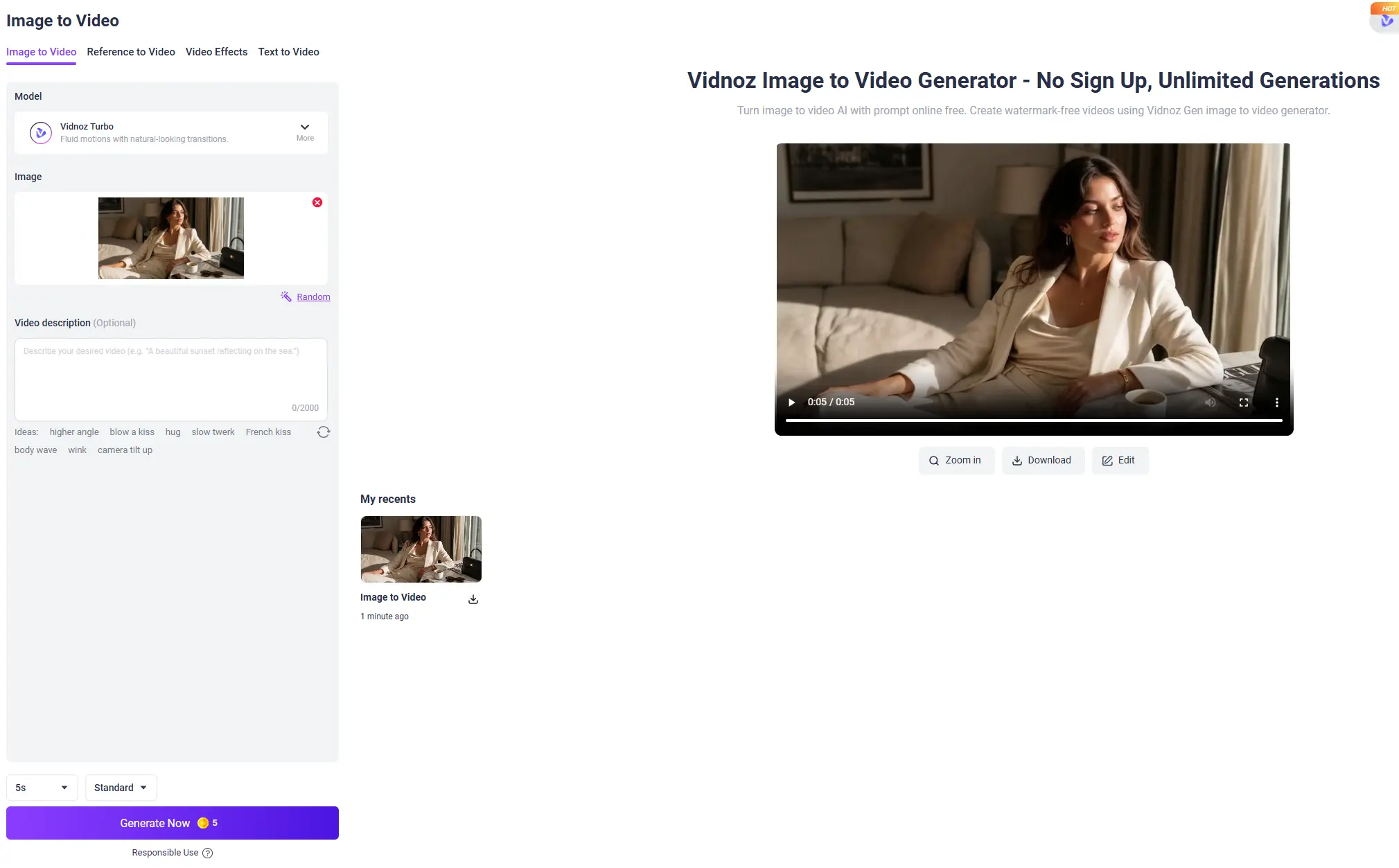
How I tested it
I uploaded one business-portrait photo. I left the model on Vidnoz Turbo (the default, sold as "fluid motion with natural transitions"), set the length to 5 seconds / Standard, and hit generate. One thing to flag first. The preset motion "Ideas" Vidnoz suggests feel a bit clickbait: blow a kiss, French kiss, slow twerk, wink. You can ignore them, but they tell you who a lot of this traffic is.
What I got back
The clip took about three minutes to make. That's slower than the "instant" feel the landing page gives you. But the result held up better than I expected. The woman's small movements stayed locked to the original frame. The warm window light from my source photo carried through clean. The transition didn't tear or warp. Short clips like this hide their weak spots, though. Five seconds isn't long enough to expose the hand glitches and weird micro-expressions that longer AI motion usually shows. So I'd still scrub every clip frame by frame before I post it.
What it costs
Here's the part that matters. That one 5-second clip costs 5 credits, and Standard caps you at 5 seconds. So the honest read is simple. Vidnoz Image to Video works well for a short, motion-led social shot when your source image is already strong. But at 5 credits for 5 seconds, it's a tool for small accents, not for building anything long.
Vidnoz AI Clothes Changer Review: Does It Look Real?
Let me correct one thing first, because it changes how you use this tool. Clothes Changer is not a text-prompt tool. You don't type "put her in a beige blazer."
How it actually works
You upload a photo with a clear body. You pick Feminine or Masculine. You choose a category (HOT, Party, Daily, or Costume). Then you pick from a fixed set of outfit thumbnails, like Strapless, Gold Midi, Straight-Leg Jeans, or Flowy Block Dress. You can also upload your own garment. That preset setup is faster for beginners, but it locks you into whatever styles Vidnoz already stocked.
The result
I took a photo of a woman in a white tank and jeans and swapped her into the Strapless black top. It came back cleaner than I expected. The skin transition across her shoulders, collarbone, and arms looked natural. There was no pasted-on seam, and that's usually where these tools fall apart. The top edge of the strapless piece sat flat against her body instead of floating. Her hair layered over the black fabric the right way, instead of smearing into it. But here's what this test didn't prove. The original jeans got cropped out of the result, so the tool never had to solve a top-and-bottom seam. And a plain solid strapless top is about the easiest thing you can give it. Try something with sleeves, a real collar, or a busy pattern, and the edge work gets much harder.
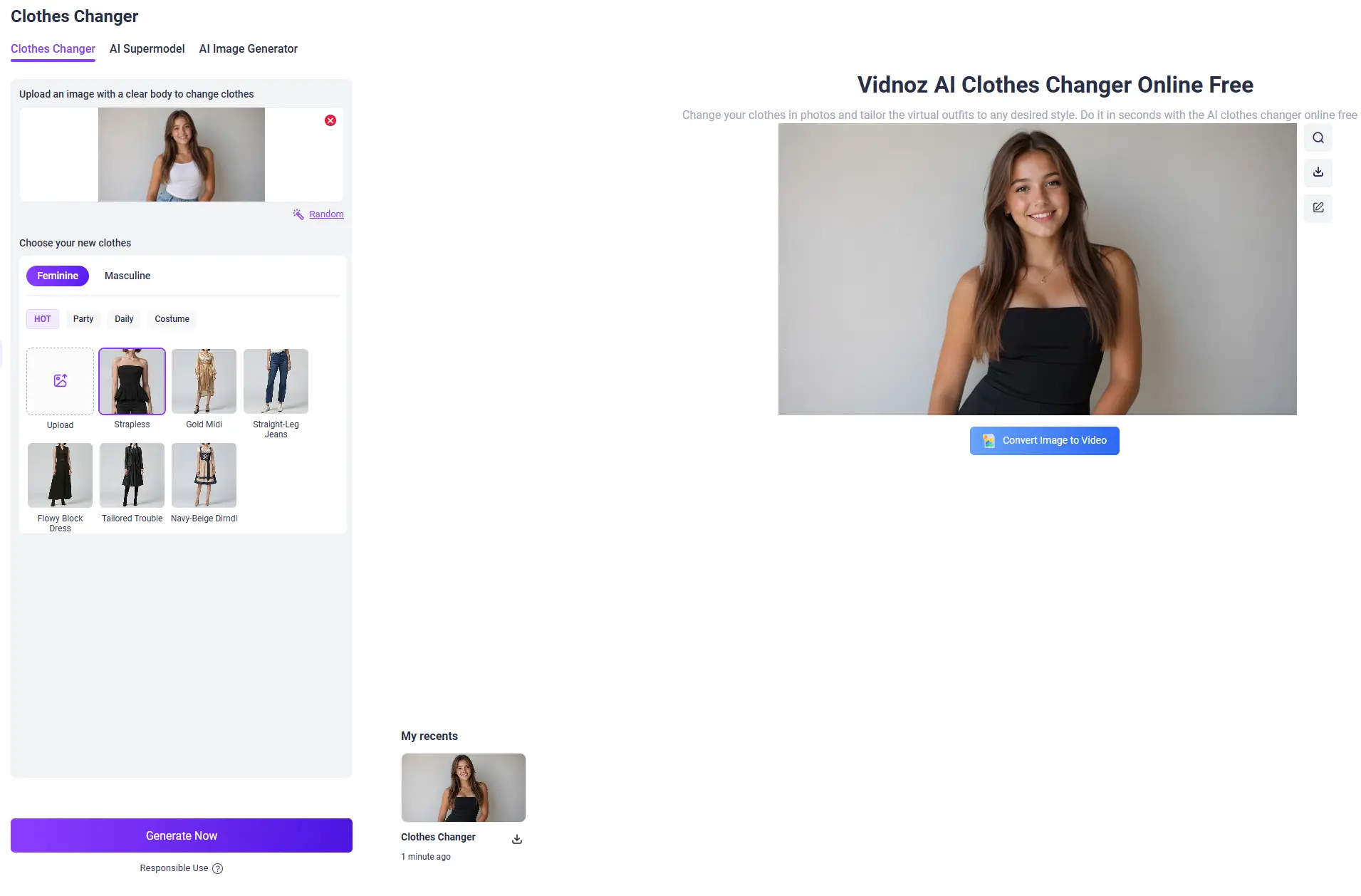
For a quick, simple swap, it looks convincingly clean. But the preset-only setup limits control, and one easy outfit isn't proof it handles hard ones. I'd test it again with a sleeved, structured piece before I trusted it for a store.
Vidnoz AI Image Generator Review: Can It Make Product Photos?
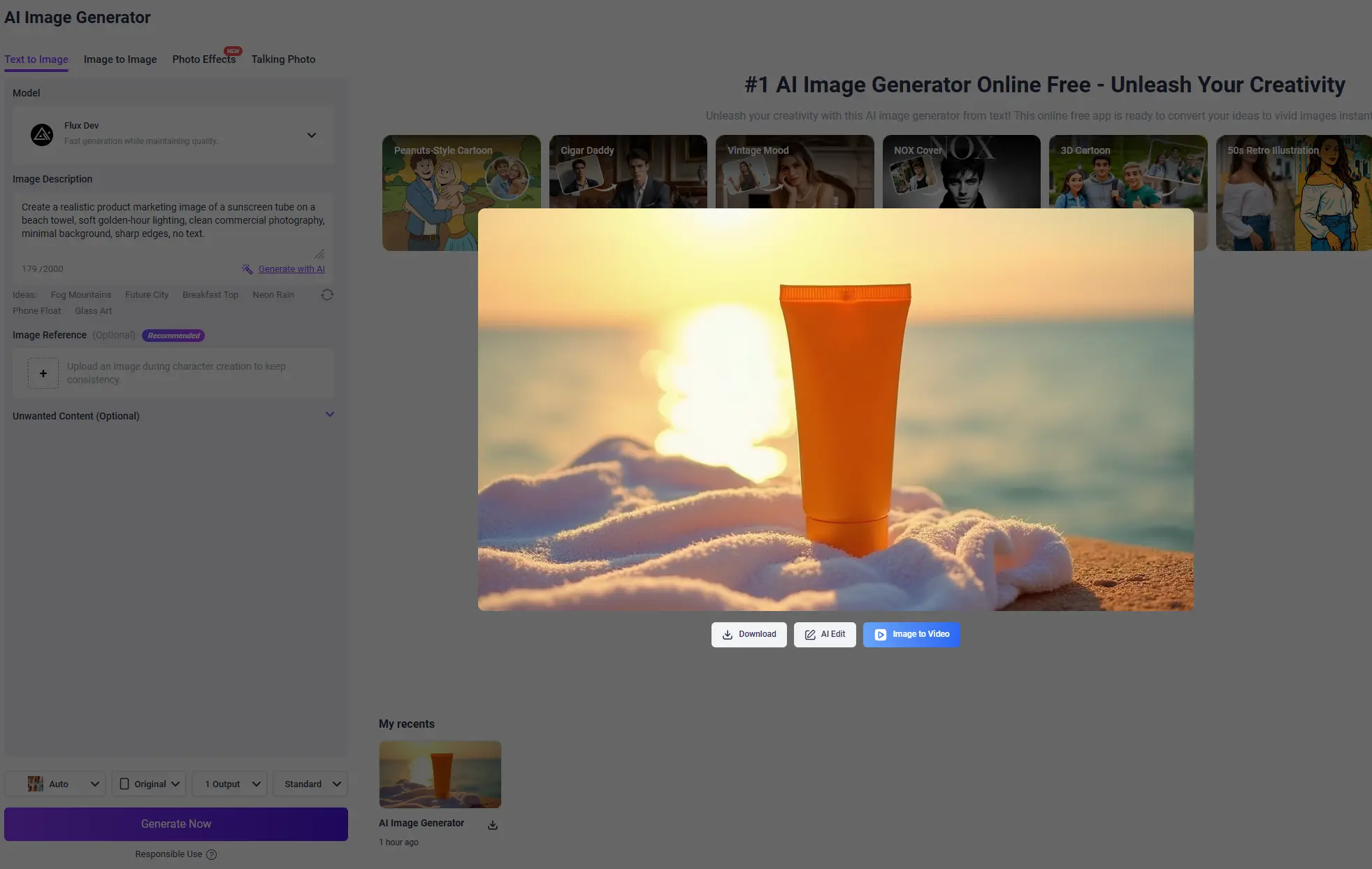
I ran the AI Image Generator with a product-photo prompt: "Create a realistic product marketing image of a sunscreen tube on a beach towel, soft golden-hour lighting, clean commercial photography, minimal background, sharp edges, no text."
What it got right
Two things, credit where it's due. It followed "no text." The tube came back clean and unlabeled, with no fake SPF numbers and no garbled fake branding. A lot of image tools can't do that. And the golden-hour light was the best part: warm backlight, a real rim-light down the left edge of the tube, exactly the soft commercial glow I asked for. The subject was sharp against a blurred background too, so "sharp edges" landed.
Where it broke
Look at the bottom of the tube. A real squeeze tube seals at the base with a flat crimped seam. Vidnoz drew a rounded, cap-like closure instead, a bottom that doesn't exist on any real sunscreen. Zoom in, and that's the first thing that gives it away. The sun behind the tube is also a soft, smeared blob instead of a clean light source, which looks a little off on a second glance.
From across the room, it's a usable concept shot, and the light is honestly nice. But the second you zoom to the base, that impossible rounded seal ruins it. Good enough for a mood board or a rough idea. Not good enough for a real campaign without a reshoot.
Vidnoz AI Face Swap Review: Realistic or Fake?
Face Swap is the toughest of the four, because people spot a bad face right away.
How I tested it
The steps are easy. Upload a clear front-facing source face, upload a target image, and hit Swap Face Now. I used a curly-haired portrait as the source and a full-body shot with similar lighting as the target.
The result
All the features were there: eyes, nose, mouth, jaw. But the face never stopped looking stuck on instead of blended in. The head-to-neck area had a faint seam, where the source face's skin tone and light didn't fully match the body below. The hairline was the worst part. With curly hair, the wispy edges around the forehead blurred into the background instead of reading as real strands. The expression also felt a little empty. The smile was there, but the eyes had no focus, and that's the exact "something's off" tell that face tools live or die by. The skin tone in the middle of the face actually matched fine. The problem was at the edges, not the center.
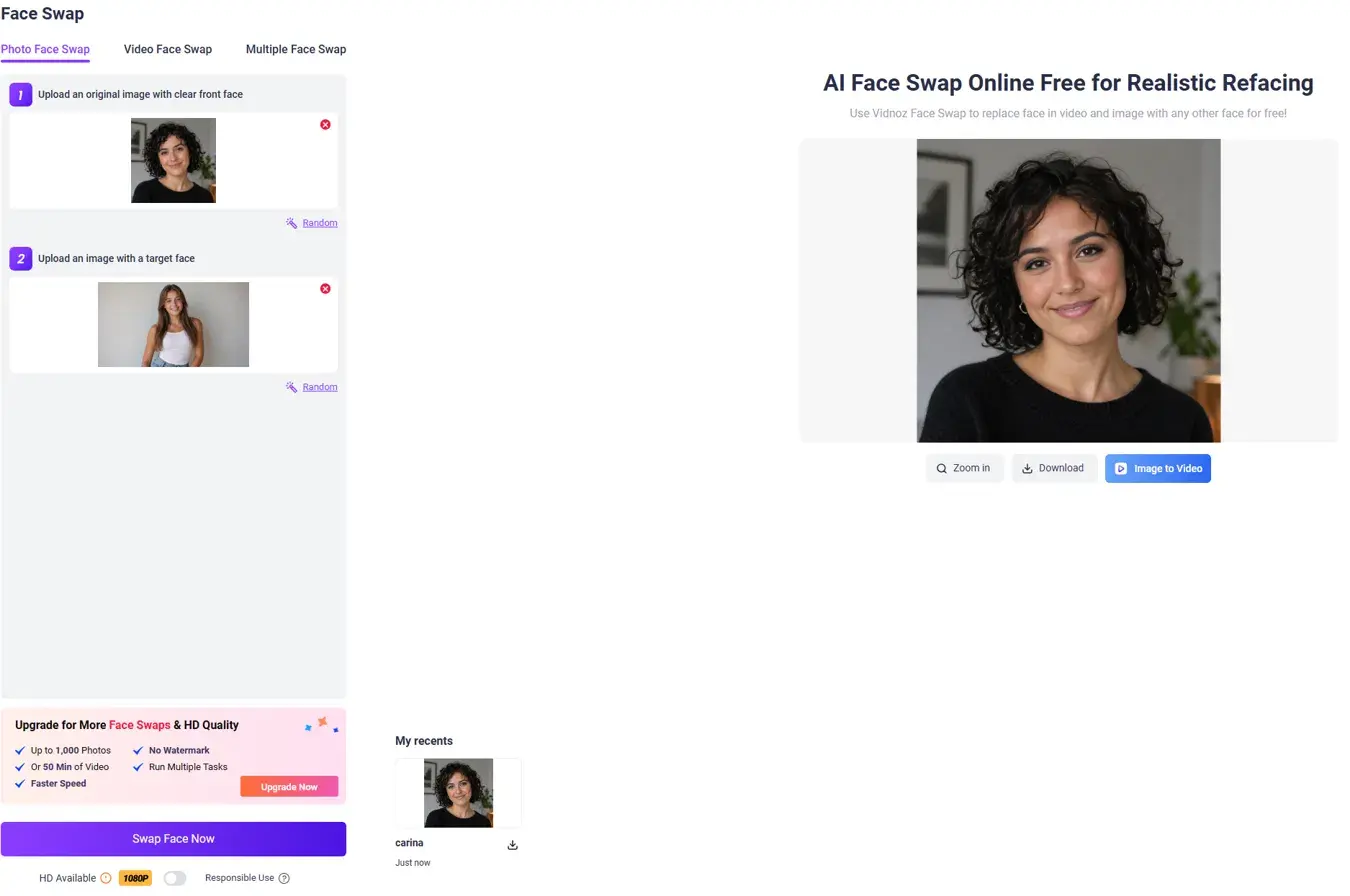
Two more things I noticed in the interface, and they matter more than the swap itself. The 1080P HD toggle is locked behind an upgrade. And removing the watermark also needs the paid plan. So a free Face Swap comes out watermarked and below HD. The swap didn't fall apart. But "the face is stuck on" is impossible to miss: fuzzy hairline, a seam at the neck, empty eyes. It's fine for memes, avatars, or a fun social test. It's risky for anything brand-facing, and the free version is watermarked.
Vidnoz AI Pricing: Is Vidnoz Free and Worth It?
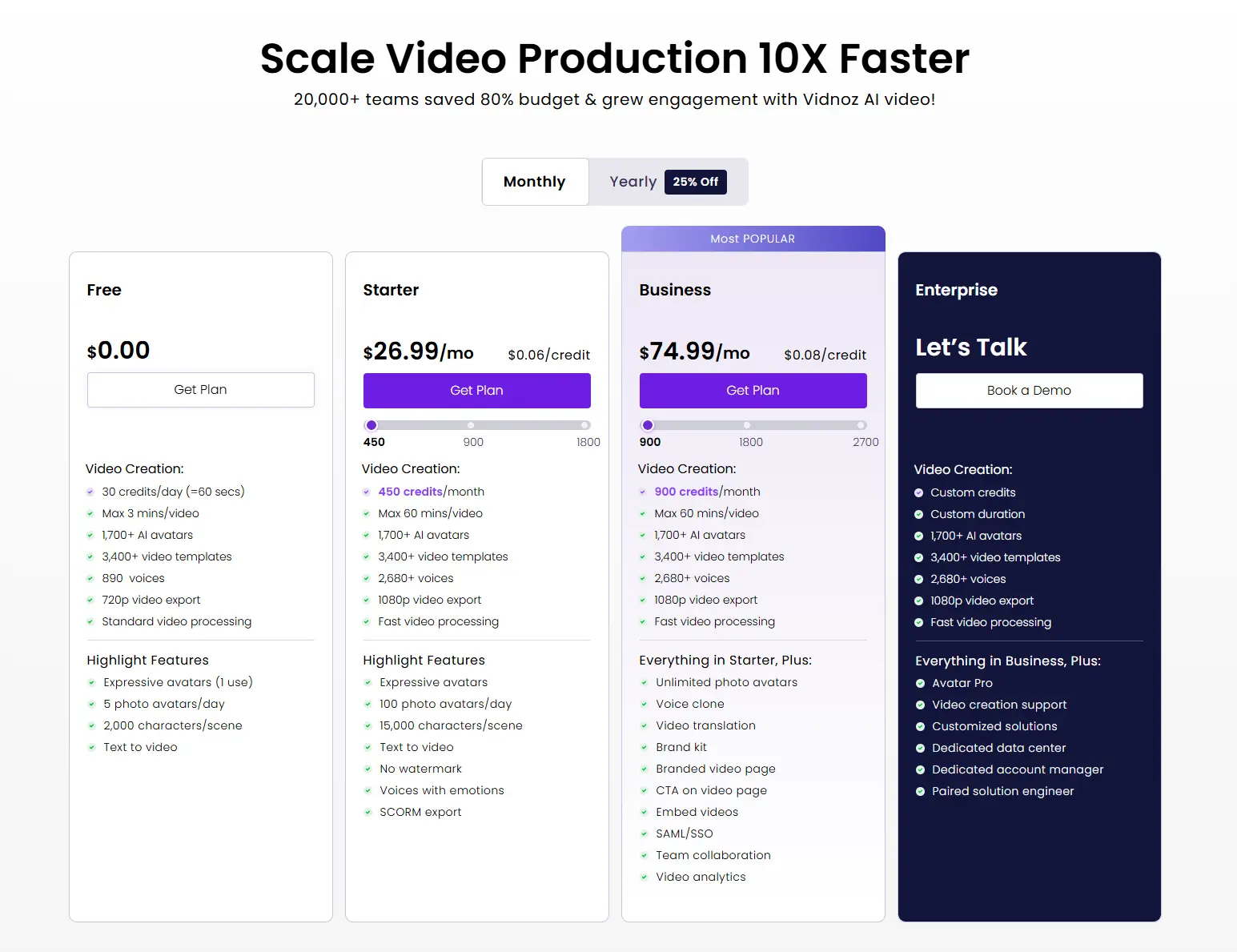
Vidnoz has a free plan, and I'd really start there. But go in knowing what "free" costs you in practice, because it's more specific than the pricing page says. Two limits kept showing up in my tests. Free Face Swap output comes watermarked and below HD, since 1080P is locked behind the upgrade. And Image to Video runs on credits: one 5-second clip is 5 credits. So whatever your free credit balance is, you can do the math on how many short clips that really buys before you pay. (Image to Video is sold as watermark-free even on free, which is nicer than Face Swap, so the tools don't all share one rule.) That's the number that decides value. Not the price on the table, but this: how many usable outputs does your plan make, once you count regenerations, credits per clip, and the watermark and HD gate? Test one avatar video, one image, one swap, and one image-to-video clip on the free tier first. You'll learn more from watching your credits drain than from any pricing grid. Credit costs and plan limits change, so check the official Vidnoz pricing page before you subscribe.
Vidnoz AI Pros and Cons
Pros | Cons |
|---|---|
Image to Video keeps the source photo's lighting and framing, with clean transitions | A 5-second clip costs 5 credits and caps at 5s, so long videos get pricey fast |
Preset outfit and avatar libraries let beginners skip the blank-timeline problem | Clothes Changer is preset-only, with no text control |
Clothes Changer handles simple, solid outfits with a clean skin transition | One easy garment doesn't prove it can handle sleeves or patterns |
The image generator nails warm golden-hour light and respects "no text" | The image generator breaks on structure: the tube's base was an impossible rounded seal |
Fast, guided workflow across every tool, with a very low skill floor | Face Swap looks stuck on (fuzzy hairline, neck seam, empty eyes), and free output is watermarked and sub-HD |
Are Vidnoz AI Videos Actually Good?
Yes, for the right, narrow job. If you have a strong source image and want five seconds of clean motion, or a script and want a talking avatar, Vidnoz gets you a usable draft fast, with no camera. The Image to Video output kept the lighting and framing honest, and that's the tool I'd come back to. But it's not a do-everything platform, and the seams show under pressure. The image generator breaks on product structure. Face Swap looks stuck on and watermarks the free version. Clothes Changer only proved itself on the easiest outfit. Test one clip, one image, and one edit on the free tier. Watch your credits. Zoom in on the results. You'll know within an afternoon if Vidnoz fits your workflow.
Vidnoz AI vs PicLumen: The Best Vidnoz Alternative
If you want one clear alternative to compare Vidnoz against, it's PicLumen. The two tools start from opposite ends of a project. Vidnoz is best when your project starts with an asset you already have and a clear plan. A portrait to animate. A script for an avatar to read. A photo to restyle. It gives you structure and speed for spokesperson clips, quick restyles, and short motion accents. PicLumen is the better fit when your project starts with an idea, not an asset. It's built around AI image and AI video generation. So it's the natural home for campaign visuals, product images, image-to-video sequences, and wider creative work, where you make the look itself instead of just animating or editing something that already exists.
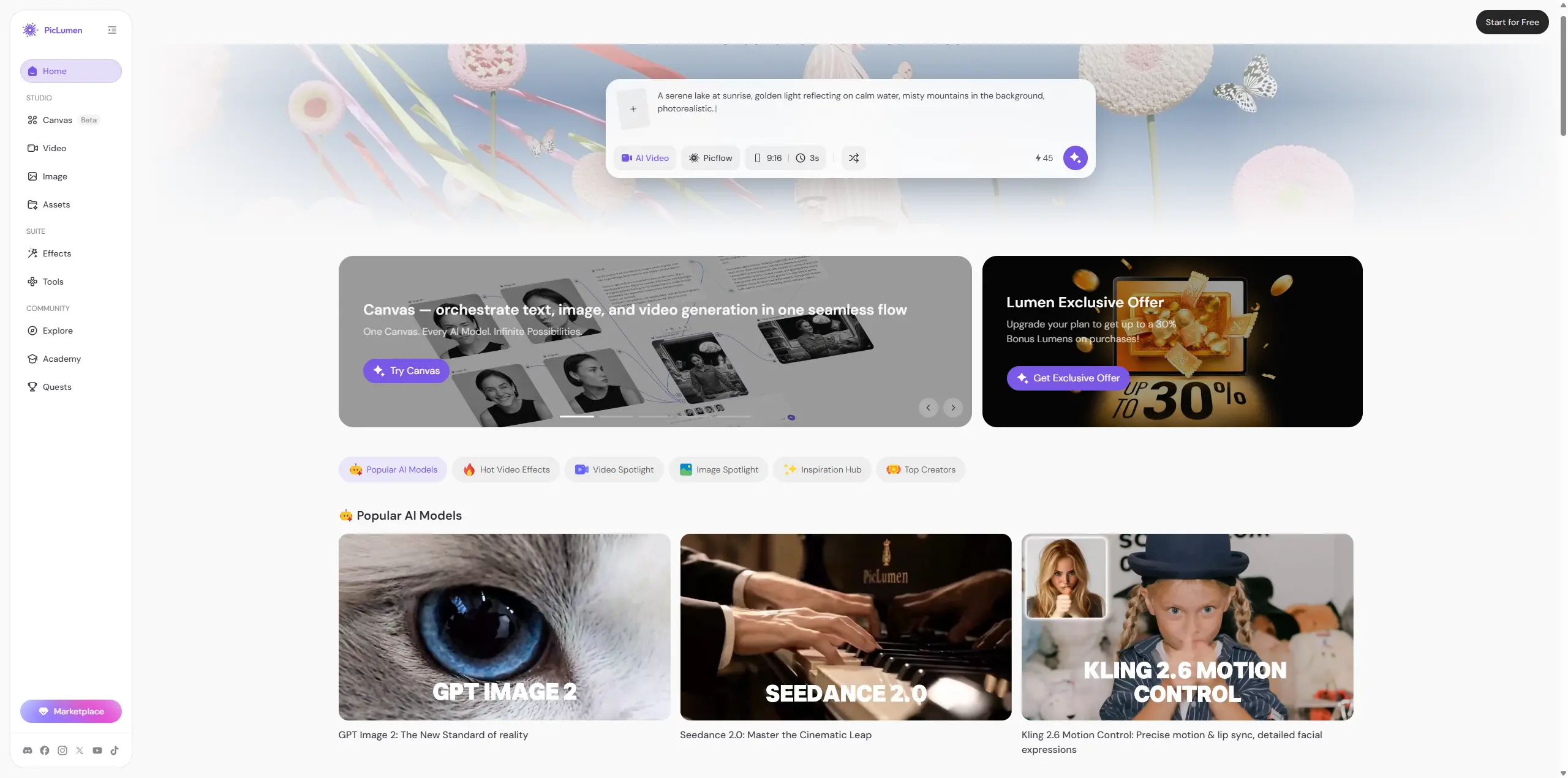
Here's the simple version with that sunscreen brief. Vidnoz's path is "upload a product shot, animate it for five seconds, or have an avatar talk about it." PicLumen's path is "generate the campaign visual first, then turn it into video." If you already have the asset and want it moving fast, Vidnoz is handy. If you need to create the visual first, that's PicLumen's lane, and it's the alternative worth comparing head to head.
How to Choose the Right Tool for You
Pick Vidnoz if you already have an image or a script and want a fast result: an avatar clip, a short image-to-video shot, or a quick outfit or face edit. Pick PicLumen if you're starting from scratch and need to generate the visual yourself: original campaign images, longer or more controllable image-to-video, or a full image-and-video workflow with real art direction instead of presets.
FAQ about Vidnoz AI
Is Vidnoz AI worth it?
It's worth a free try if you need fast avatar videos or short image-to-video clips from images you already have. It's less exciting if you need to generate original visuals or want tight control, since a lot of it runs on presets.
Does Vidnoz AI put a watermark on free videos?
It depends on the tool. Free Face Swap output is watermarked and capped below HD, since 1080P needs the upgrade. Image to Video is sold as watermark-free even on the free tier. The rules aren't the same across tools, so check each feature.
What is the best Vidnoz AI alternative?
It depends on where your project starts. For avatar explainers, Vidnoz works. For making original AI images and video from scratch, like campaign visuals, product images, and image-to-video, PicLumen is the best alternative to compare, especially for creators and marketers who need more visual freedom than a preset workflow gives.





