Looking for the best AI clothes changer? Changing clothes with AI tools may look simple, but getting the ideal result is not always easy. Some tools can create an outfit in a similar style, but fail to accurately generate the clothes you want.
The goal is not just to change an outfit, but to create a result that looks natural and realistic.
To see how different AI tools perform, I tested five popular AI clothes changers using the same person image, focusing on both the generated results and the overall user experience.
Quick Answer
After testing five AI clothes changers, PicLumen delivered the best overall result in my test, with strong outfit accuracy, natural details, and consistent facial and body features. Fotor came close in image quality, while ClothMotion stood out for its realistic results and fast generation.
The five tools I tested were PicLumen, Fotor, ClothMotion, Magic Hour, and OutfitGen.
What Is an AI Clothes Changer?
An AI clothes changer lets you replace the outfit in an existing photo without taking a new picture. Depending on the tool, you can usually upload a clothing reference, describe the outfit with a prompt, or use both.
For this comparison, I focused on how accurately each tool could reproduce the same target outfit while keeping the original person recognizable.
How We Tested the Best AI Clothes Changers
Testing Method
Testing period: September 2026
Pricing and free-access information checked: September 14, 2026
I used the same person image and target outfit across the five tools. For tools that supported clothing reference images, I used the same reference image; otherwise, I followed each tool's native workflow.
Each tool made at least one main generation, with additional tests only when needed to investigate a specific issue or provide a useful comparison. I evaluated the actual generated results rather than selecting only the best-looking output.
This comparison focuses on image-based clothes changing rather than video generation.
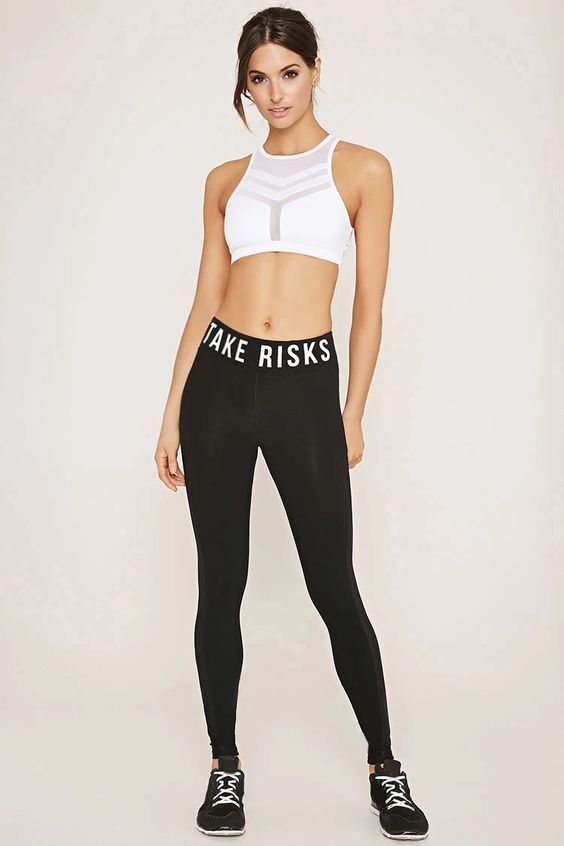
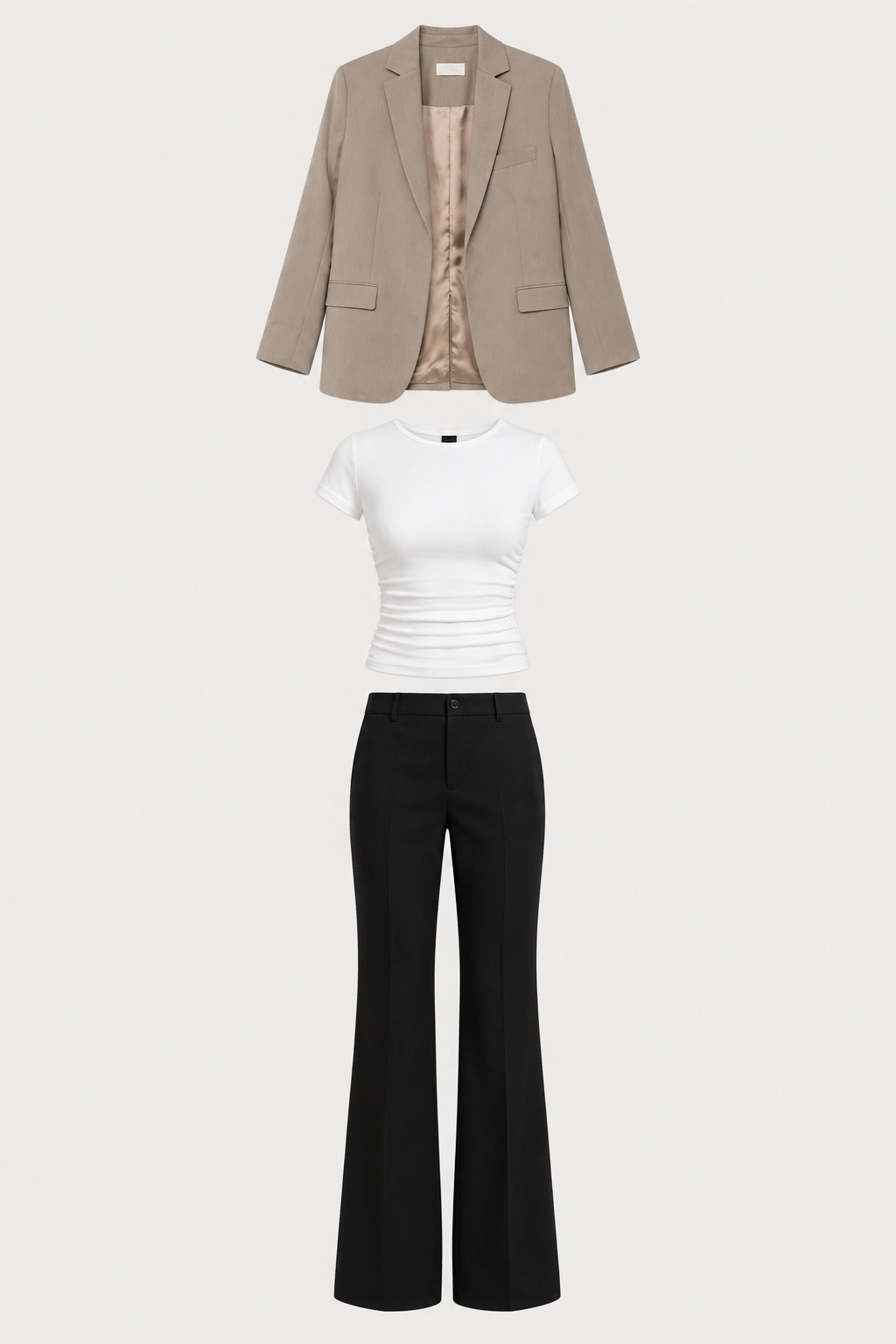
The same person image and outfit reference used for the AI clothes changer tests
Evaluation Criteria
I focused on the aspects that matter most when changing clothes in an existing photo.
Criteria | What I Checked |
|---|---|
Clothing Accuracy | Whether the new outfit matched the target clothing |
Face & Identity Consistency | Whether the face and hairstyle stayed consistent |
Body & Pose Consistency | Whether the body shape and pose were preserved |
Garment Details | Edges, sleeves, trouser shape, folds, and fit |
Overall Realism | Whether the outfit looked natural on the person |
Ease of Use | How simple and efficient the workflow was |
I also recorded free access, pricing, watermarks, and other noticeable workflow differences for each tool.
5 Best AI Clothes Changers Tested
PicLumen
Best for: Overall performance
How I Tested It
PicLumen's AI Clothes Changer required two image inputs in my test: the person image and the clothing image. It did not provide a prompt field in the workflow I tested, so I used the same person image and the same clothing reference as the other reference-based tests.
After uploading both images, I clicked Generate. The result took about one minute and required no additional settings.
Test Results
PicLumen produced the most complete and consistent result in my comparison.
The colors and overall silhouettes were close to the clothing reference. The face, hairstyle, and body shape remained consistent, and the overall pose was preserved.
The clothing itself also looked convincing. The edges, sleeves, trouser hems, folds, and overall fit were natural, with barely any obvious AI artifacting.
The only noticeable change was the woman's left hand: part of it was hidden behind her thigh in the original image, but it was repositioned in front of the thigh in the generated result. The new position still looked natural rather than distorted.
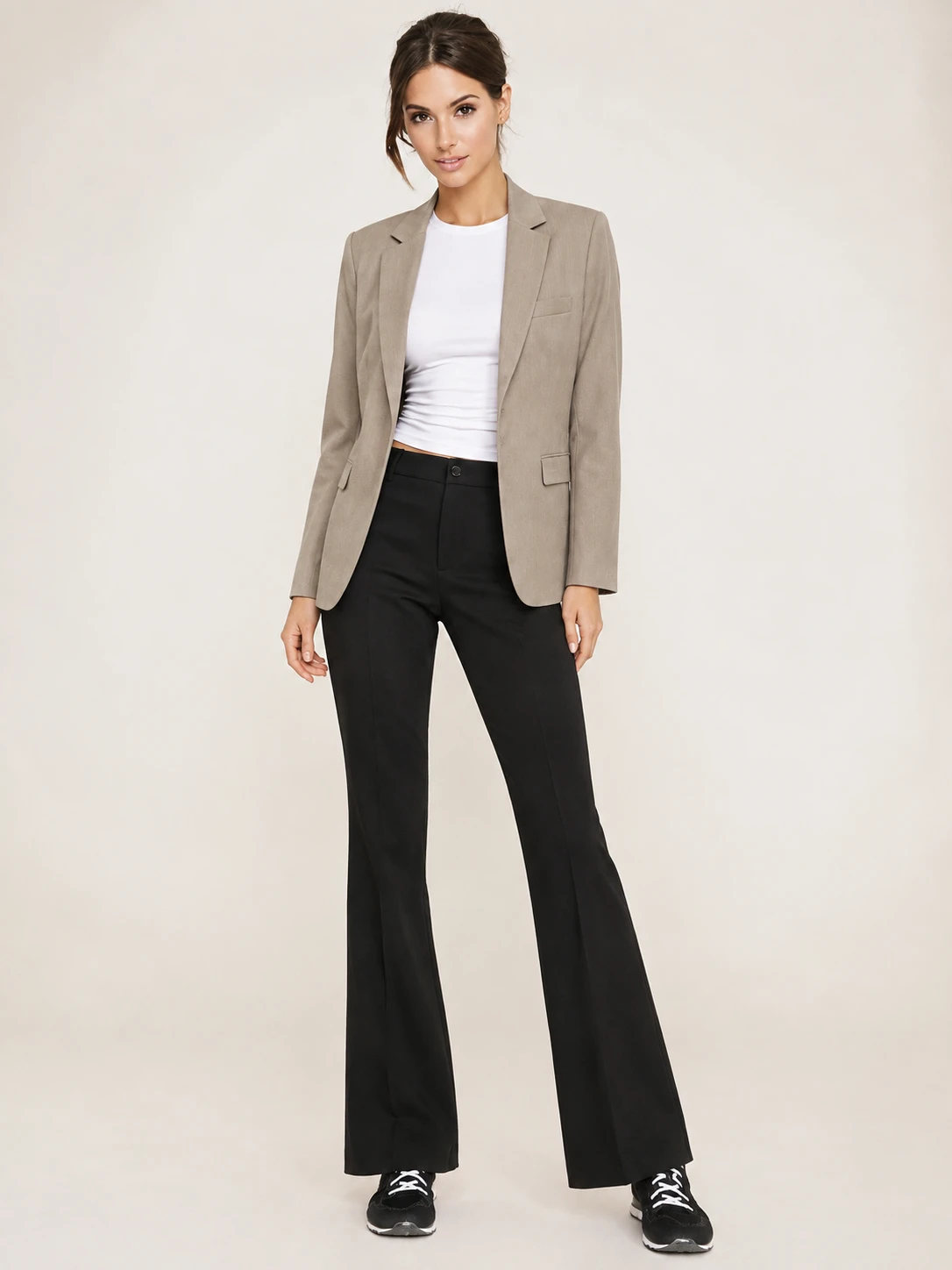
PicLumen successfully applied the target outfit while keeping the person and background largely consistent
Pros
Fast generation with a simple one-click workflow
High outfit accuracy and natural clothing details
Strong consistency in the face, hairstyle, body, and overall image
Cons
The tested workflow required a clothing reference image
No prompt-based outfit customization was available in my test
Free Access & Pricing
PicLumen required registration to generate an image. The AI Clothes Changer cost 12 Lumens per generation, and the interface displayed a 20-Lumen daily offer for new users. The generated image had no watermark and no visible resolution restriction in my test.
For paid plans, PicLumen's pricing page showed the Lite plan at $6.09/month when billed yearly, with higher-tier Standard, Pro, and Elite plans also available.
Verdict
PicLumen delivered the most balanced result in my test. It was not only accurate with the target outfit, but also preserved the person naturally and kept the overall image clean. For users who mainly want a fast and realistic outfit swap, it was the strongest option I tested.
👉🏻Try AI Clothes Changer on PicLumen
Fotor
Best for: AI clothes changing with built-in editing tools
How I Tested It
I uploaded the same person image and clothing reference image and generated the outfit change. Fotor also allowed additional prompt input.
The generation took about two minutes. The process was straightforward, although the AI Clothes Changer required an extra step before I reached the editing interface.
Test Results
Fotor came surprisingly close to PicLumen in image quality.
The taupe blazer, white top, and black trousers were all generated successfully, with colors and overall silhouettes close to the reference. The face, hairstyle, body shape, and pose were also largely preserved.
The generated clothing looked natural, including the sleeves, edges, folds, and fit. The right hand moved slightly forward, similar to the PicLumen result, but the change did not look visibly distorted.
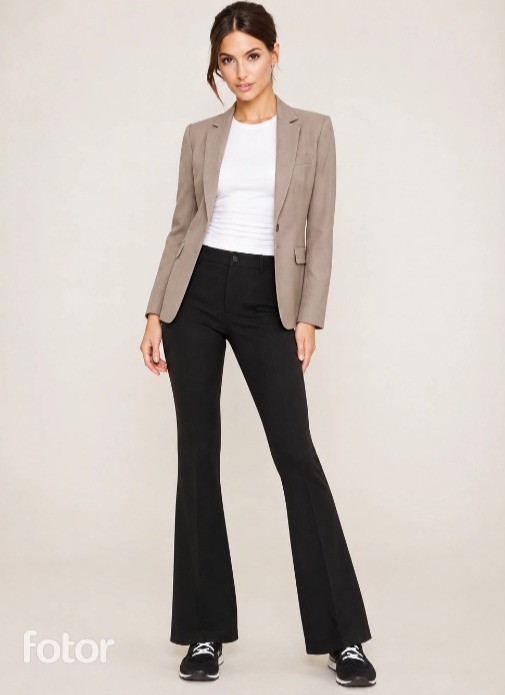
Fotor produced a realistic outfit change, but the preview included a watermark
Pros
Realistic and natural-looking outfit results
Good character consistency in my test
Offers many built-in editing and adjustment tools after generation
Cons
Requires registration before generation
Free access requires earning credits through tasks
Free preview includes a watermark
Free Access & Pricing
Fotor required registration before generation, and one clothes-changing generation used 4 credits in my test. I earned 7 additional credits by completing a community task that required posting a Fotor-generated work.
After generation, I could only preview the result with a watermark. I could not download the original image without the watermark unless I upgraded to Pro. At the time of testing, the pricing page showed Pro at $3.99/month when billed annually, with a 7-day free trial.
ClothMotion
Best for: Fast, realistic outfit generation
How I Tested It
ClothMotion allowed me to upload the same person image and clothing reference image and also add a text prompt.
My first test used the image inputs without an additional prompt. I then performed a second generation using a prompt to see whether more explicit instructions would improve consistency.
The first generation took about 15 seconds.
For the second test, I used a prompt to preserve the original appearance and pose while keeping the clothing realistic.
Prompt used for the second test:
Match the outfit in the reference image more closely. Preserve the woman's original appearance and pose, and keep the clothing natural and realistic.
Test Results
ClothMotion was the fastest tool I tested, and its first result was also one of the most convincing visually.
In the first generation, the blazer, white top, and black trousers were recreated with good shape and detail. The overall image looked natural, and the output was also sharpened compared with the source.
However, the generated image changed the woman's hand position on its own by placing one hand into a pocket. The change was not explicitly requested, but it still looked natural.
In the second generation, the original shoes were restored more clearly, although the sole became slightly thicker. The hand position changed again despite the prompt specifically asking the model to preserve the original pose.
The result looked very good, but the model still did not fully follow the pose instruction.
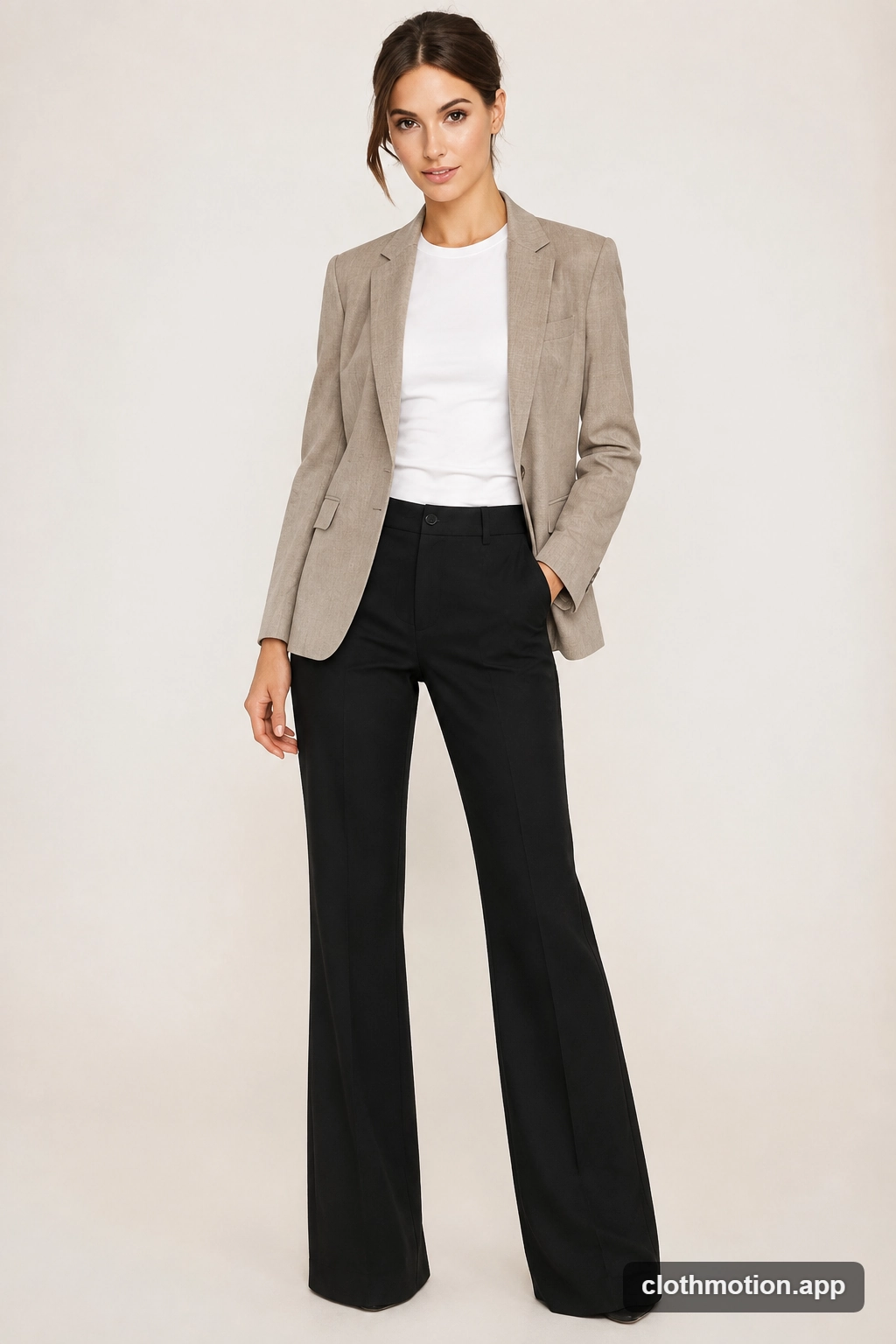
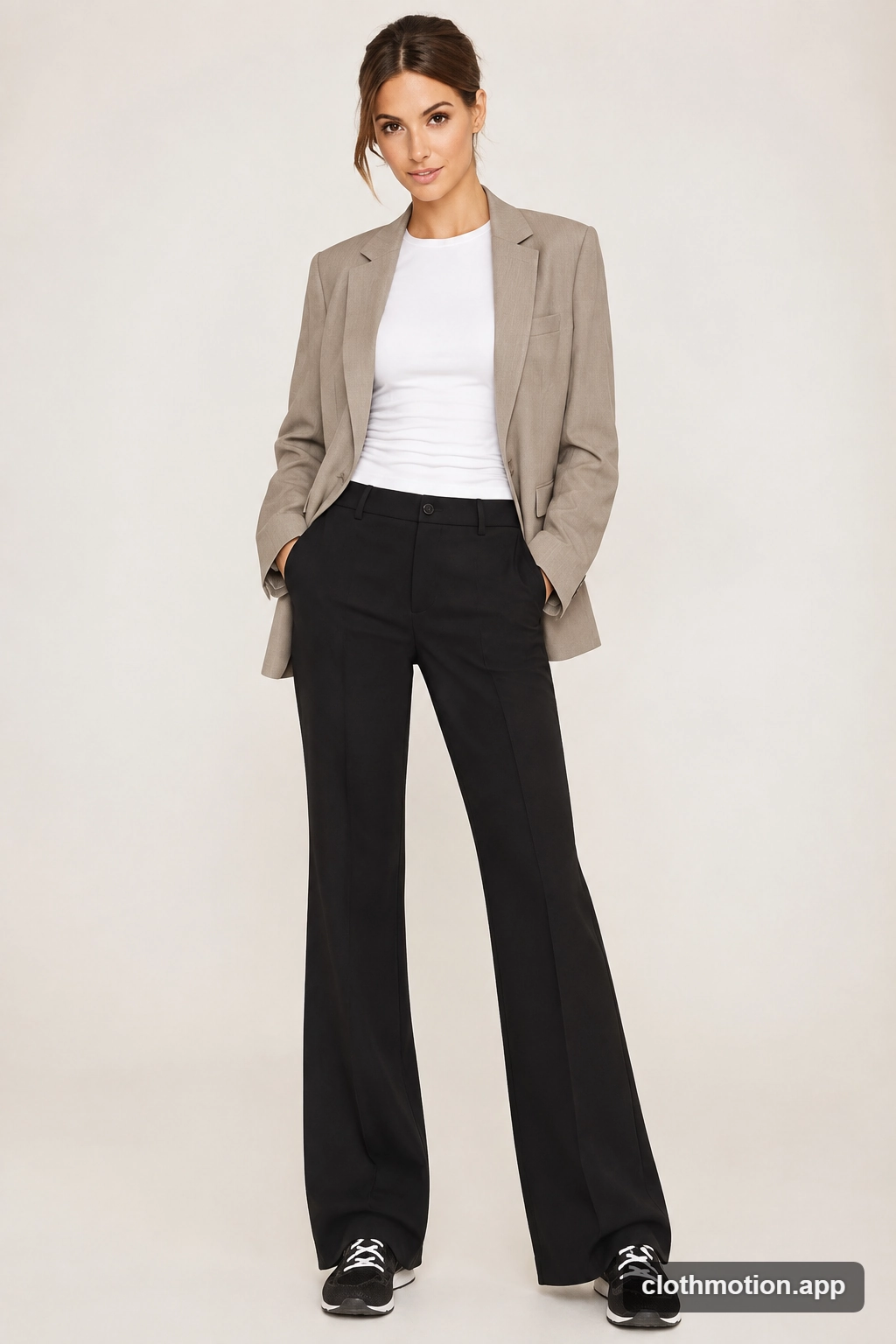
ClothMotion test results: reference image only vs. reference image plus prompt
Pros
Very fast generation
Strong clothing details and realistic results
Supports both clothing references and prompt-based instructions
Cons
The hand position changed despite a prompt asking to preserve the original pose
Free output includes a watermark
Watermark-free downloads require an upgrade
Free Access & Pricing
ClothMotion required registration and provided 10 credits. One AI clothes-changing generation used 3 credits per image, giving me enough credits for several test generations.
The free output included a watermark, while an upgrade to Pro was required for watermark-free downloads. The pricing page showed the Pro plan at $7.90/month when billed yearly.
Verdict
ClothMotion delivered one of the most realistic outputs in my tests and generated results very quickly. Its main limitation was instruction adherence: even when I explicitly asked it to preserve the original pose, it still changed the hand position.
Magic Hour
Best for: Simple reference-based outfit changes
How I Tested It
I uploaded the same person image and clothing reference image. Magic Hour did not provide a prompt field in the workflow I tested, so the result relied on the image references.
Each generation took less than one minute.
Test Results
Magic Hour gave me a reasonable first result, but the later generations became less reliable. The face looked softer than the original, with some distortion around the eyes and facial features. One output retained lettering from the original pants, while another lost the blazer sleeves and failed to replace the trousers.
The person's hand positions also changed across generations, and the eye distortion became more noticeable.
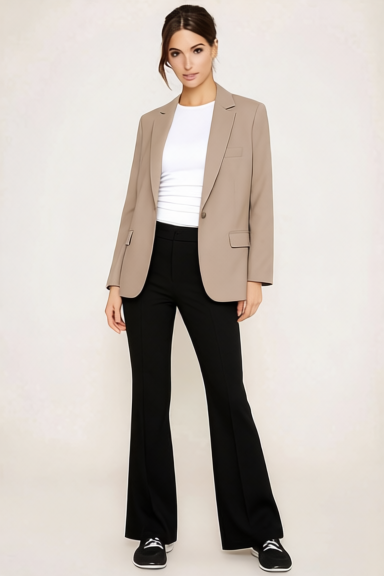
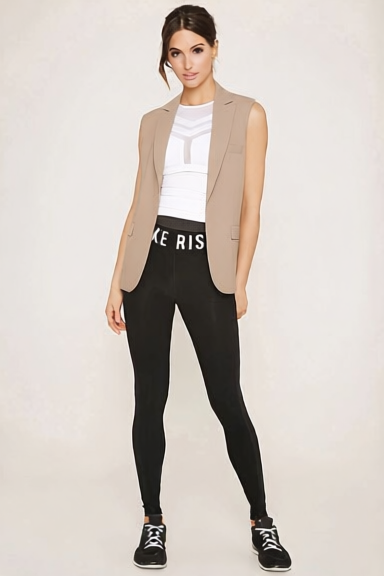
Magic Hour produced a reasonable first result, but later generations showed more noticeable problems with facial consistency and outfit replacement.
Pros
Simple reference-based workflow
Fast generation
Generous initial credits for testing
Cons
Facial details became less consistent in later generations
Some clothing elements were not fully replaced
Image quality decreased in some results
Free Access & Pricing
Magic Hour required registration and gave me 400 credits after signing up. Each AI clothes-changing generation used 25 credits, so the initial credit balance allowed for multiple test generations. A daily check-in also provided an additional 100 credits.
The pricing page showed paid plans starting at $12/month for Creator when billed yearly, followed by Pro and Business plans.
Verdict
Magic Hour offered a relatively easy testing experience and generous initial credits, but the visual quality was less consistent than the tools above it. The biggest issue in my test was the combination of facial distortion and reduced image quality.
OutfitGen
Best for: Quick and convenient outfit experiments
How I Tested It
I tested OutfitGen three times because the tool supported both clothing-reference and prompt-based workflows.
The first two tests used the same person image and clothing reference image. For the third test, I switched to a text prompt describing the target outfit.
Each generation took less than 15 seconds.
Test Results
OutfitGen was easy to use and very fast, but the same target outfit proved difficult to reproduce accurately across three attempts.
In the first test, the blazer was relatively close in color, but the overall jacket shape was different and the trousers were not changed as expected.
The second generation changed the trousers, but the top became more like a collared shirt and the overall outfit still did not closely match the reference.
For the third test, I used a text prompt instead of a clothing reference. This produced a more coherent business-style outfit, but the white top became cropped and the black trousers still did not match the intended style.
The person's face and hairstyle remained relatively stable across all three generations. However, some clothing and hand details were less convincing. In one result, the hand appeared to be inserted into the trousers, which looked anatomically and functionally unusual.
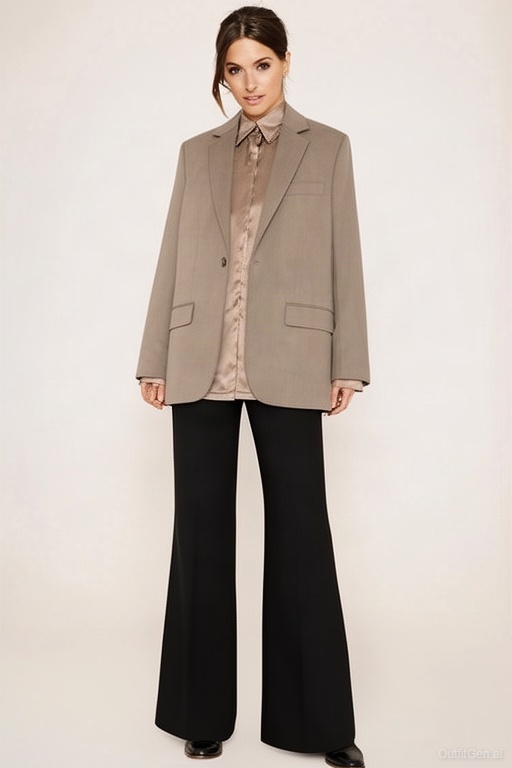
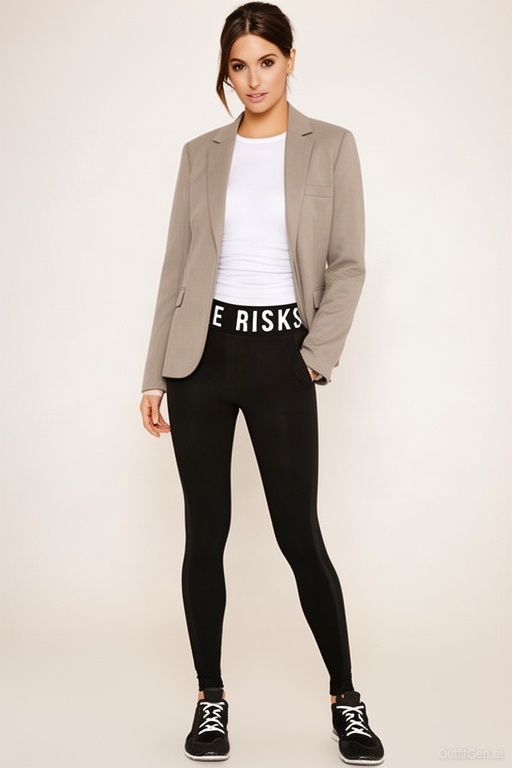
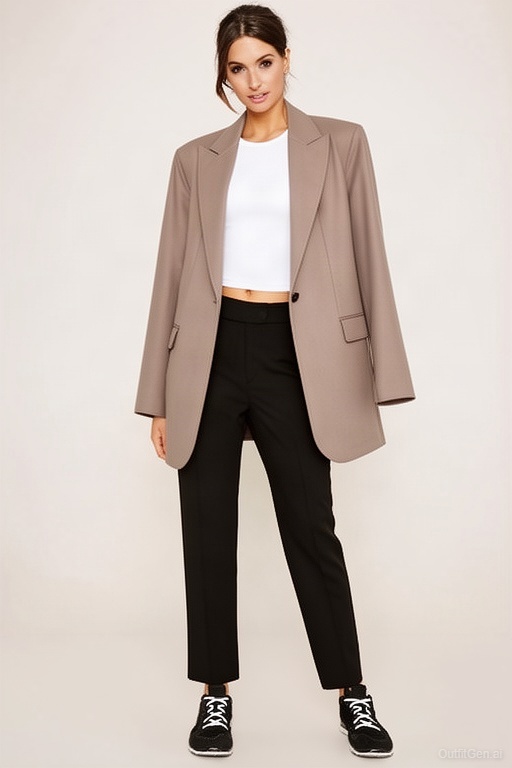
OutfitGen produced different outfit variations across three tests, but none fully matched the target clothing.
Pros
Very fast generation
Simple workflow
Supports both clothing references and text prompts
Cons
The target outfit was not accurately reproduced in my tests
Noticeable differences remained across both reference-based and prompt-based generations
Some garment and hand details looked unnatural
Free Access & Pricing
OutfitGen offered three free generations without requiring registration. I used all three generations during testing: two with a clothing reference image and one with a text prompt.
The pricing page also showed paid plans, including Plus at 1,200 credits per year, Pro at 6,000 credits per year, and Studio at $49/month. The free plan provided three initial generations.
Verdict
OutfitGen was the fastest and simplest tool to test, but it was the least accurate at reproducing my target outfit in this comparison. In all three tests, it created a plausible new outfit but failed to accurately reproduce the specific target clothing.
AI Clothes Changer Comparison
After testing all five tools, the differences became clearer.
PicLumen and Fotor delivered the strongest combination of clothing accuracy and consistency, while ClothMotion stood out for realistic results and speed. Magic Hour and OutfitGen had useful workflows, but their generated results were less reliable in my tests.
The table below summarizes my hands-on test results rather than the tools' advertised capabilities.
Tool | Outfit Match | Face & Identity | Pose | Prompt | Free Experience |
|---|---|---|---|---|---|
PicLumen | Close match | Preserved | Minor hand change | No | No watermark |
Fotor | Close match | Preserved | Minor hand change | Yes | Watermarked |
ClothMotion | Close match | Preserved | Hand changed | Yes | Watermarked |
Magic Hour | Partial | Face changed | Changed | No | No watermark |
OutfitGen | Partial | Mostly preserved | Some changes | Yes | Watermarked |
Conclusion
AI clothes changers can produce very different results even when they are given a similar task. My tests showed that outfit accuracy is only part of the picture; preserving the person's appearance, handling clothing details, and providing a practical workflow also matter a lot.
Among the five tools I tested, PicLumen offered the most balanced experience. The best choice finally depends on whether you care most about overall accuracy, editing flexibility, or generation speed.
FAQ
Can AI change clothes in a photo?
Yes. AI clothes changers can replace an existing outfit with a new one using a clothing reference image or a text prompt, which depends on the tool. The results can vary in outfit accuracy, character consistency, and realism.
How do you change clothes in a photo using AI?
Start with a clear photo of the person, then provide the new outfit through a clothing reference image, a text prompt, or both. Generate the result and check whether the clothing matches your target while the person's appearance remains consistent.
Does an AI clothes changer work better with a reference image or a text prompt?
It depends on the tool and the type of change you want to make. A reference image can help when you want to transform a specific outfit, while a text prompt can be useful when you want to describe a new outfit and refine a result.
What is the best AI app for changing clothes?
Based on my hands-on testing, PicLumen delivered the best overall result among the five tools I compared. It offered the strongest combination of outfit accuracy, natural-looking details, character consistency, and ease of use in my test.