Finding the right AI music video maker can be a bit tricky since each tool has its own way of doing things. I looked at four AI music video makers to compare their music input options, creative controls, and workflows.
In this review, I'll walk you through how each one operates and share what I found in my tests.
How AI Music Video Makers Work
An AI music video maker turns a song or audio track into visuals based on a prompt, a preset style, or other creative settings. The general process looks like this:
Music or Audio → Visual Direction → AI Video Generation → Final Music Video
The main difference between tools is how much work they do for you. Some let you upload a song and choose a style, while others offer more detailed controls for characters, visual references, and storyboards. Some also let you create music before moving on to video generation.
I generated videos with PicLumen and reviewed the workflows, controls, and access limits of Freebeat, Solmi, and Neural Frames. The following sections show what I found in each tool.
4 AI Music Video Makers Reviewed
1. PicLumen: An All-in-One AI Music Video Workflow
PicLumen lets you upload an existing song to AI Video or create a track with AI Audio first. I tried both workflows.
Workflow 1: Existing Music → AI Video
I started with a royalty-free music track from Pixabay. It had vocals, a clear beat, and noticeable changes in mood, making it a useful source for testing how well the generated video followed a song.
In PicLumen's AI Video interface, I could upload audio as a reference, enter a prompt, and adjust settings such as aspect ratio, video duration, and output quality. The interface also showed the estimated credit cost before generation. A Prompt Enhancer was available to help refine an existing prompt.
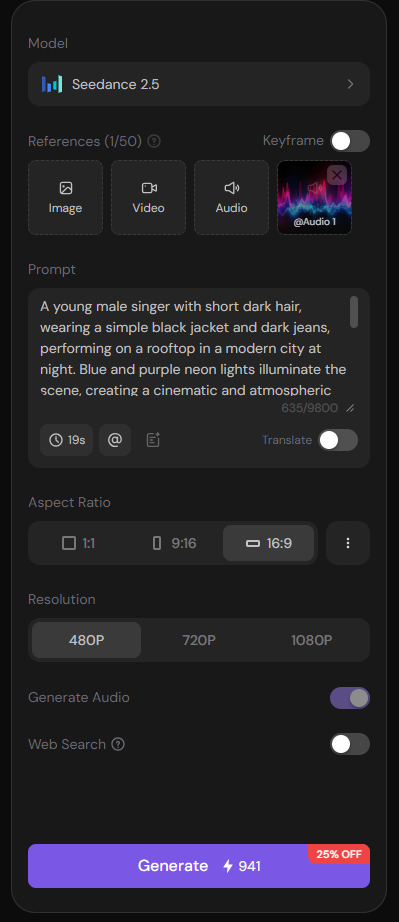
PicLumen's AI Video interface with audio reference and generation settings
First generation
For the first attempt, I used a short visual prompt:
An energetic nighttime journey through a lively modern city, with a young man moving through busy streets and glowing city lights. Dynamic movement, youthful atmosphere, cinematic music video style.
PicLumen's first music video generation using an existing song
The man moved naturally, and the clip had a clear sense of progression. The overall mood also fit the song.
But it barely showed any singing, and PicLumen changed the uploaded track to an instrumental version. Vocals appeared only in the final few seconds, and the clip ended abruptly.
Second generation
After seeing the first result, I kept the same audio and other settings but changed the visual direction. This time, I wanted a young man on a road trip, singing along to the song.
The revised prompt made the performance requirements more explicit:
A young man driving on an open highway during a road trip, singing naturally along to the uploaded song. Realistic lip movements clearly synchronized with the vocals, with natural facial expressions and subtle head movements. Cinematic but realistic road-trip music video, natural daylight, smooth camera movement.
PicLumen's second attempt with more explicit singing and lip-sync instructions
I also added instructions asking the model to use the uploaded audio as the only soundtrack and keep the man singing throughout the video.
The man now appeared to sing with more expression, and his mouth movements were more convincing. The highway scenery also looked natural. However, the car was visibly distorted, and the lyrics still differed from the original track.
Workflow 2: AI text - AI audio - AI video
PicLumen also lets users start without an existing soundtrack.
On the AI Audio page, I described the kind of music I wanted and adjusted the available settings. Using the Suno option, I generated two original tracks for a total of 40 credits. I chose Neon Afterglow and then uploaded it to AI Video to create a music video.
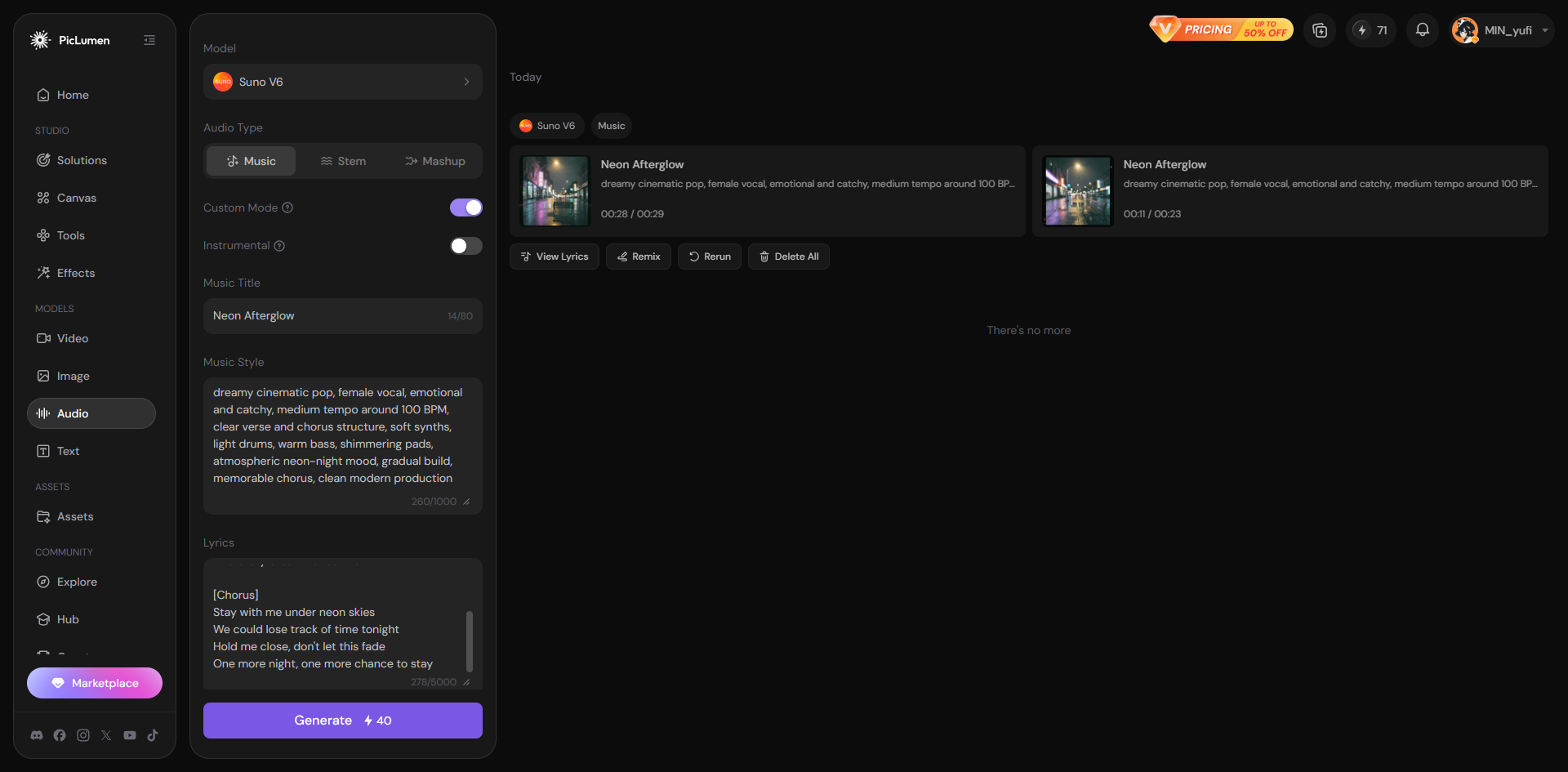
Generating original music with PicLumen AI Audio before moving to AI Video
If you don't have a song ready, you can use the Suno option in PicLumen's AI Audio tool to create an original track, then upload it to AI Video to generate your music video.
Tip: Need help developing your music idea first? Use PicLumen AI Text to explore a music style and write lyrics, then follow the workflow: AI Text → AI Audio → AI Video.
Controls, credits, and limitations
Before generating, PicLumen displays the estimated cost for the selected model. Both of my 19-second Seedance 2.5 videos cost 941 Lumens each, while generating two music tracks in AI Audio cost 40 credits in total.
Getting the prompt right took some trial and error. A short prompt did not clearly establish the singing behavior I wanted, while a more detailed one still could not prevent visual distortions or audio changes.
My conclusion: PicLumen's clearest strength in this test was its flexible workflow, especially the ability to move from AI-generated music to video within the same platform. The generated videos also showed that visual quality and soundtrack adherence need to be checked separately. Better prompts helped, but they did not eliminate every problem.
Try PicLumen's AI Video Generator
2. Freebeat: A Straightforward Music-to-Video Setup
Workflow: Upload Music → Choose Style → Generate Video
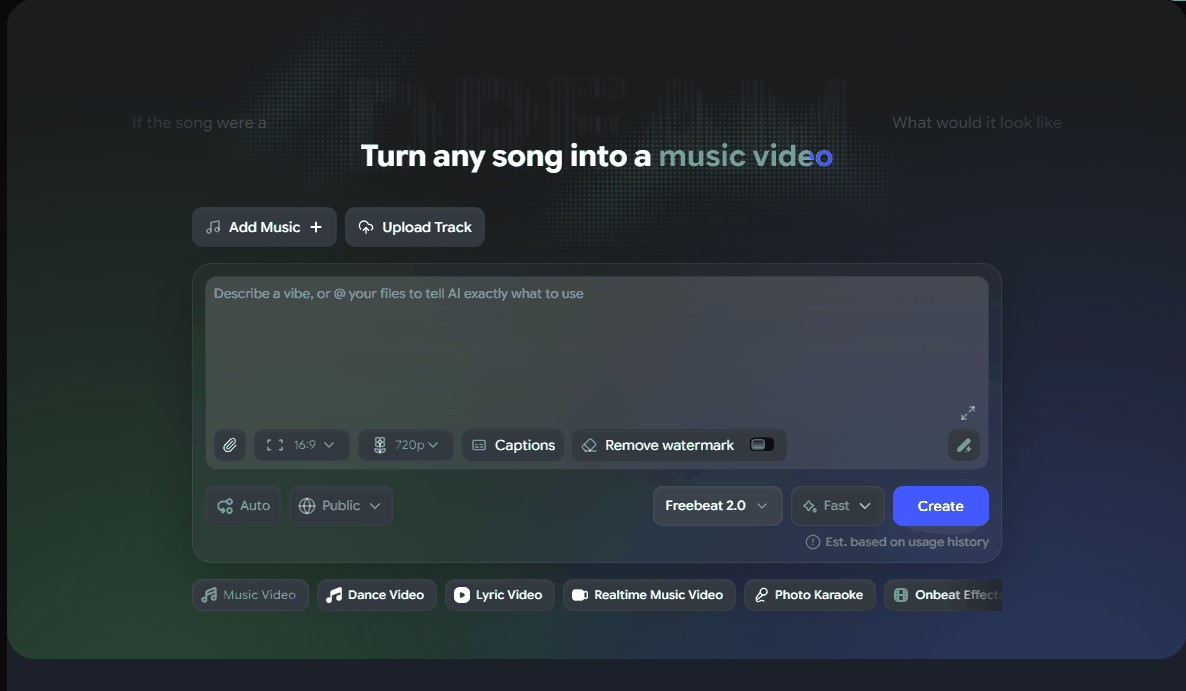
Freebeat's music video setup interface with music input and generation options
Freebeat has a relatively clean setup interface. Users can choose from popular music, upload their own song or audio track, or provide a URL. The generation screen also offers settings for aspect ratio and quality, along with video-style and privacy options.
One limitation I noticed was model choice: the interface I reviewed used Freebeat's own model rather than offering a selection of different video models. The style presets make it easier to give the video a general direction without relying entirely on a written prompt.
The free account also came with a practical restriction. In the interface I checked, video generation was limited to clips of 10 seconds or less before upgrading to Pro. The registration allowance provided enough credits for one generation, although I did not render a video to evaluate its final quality.
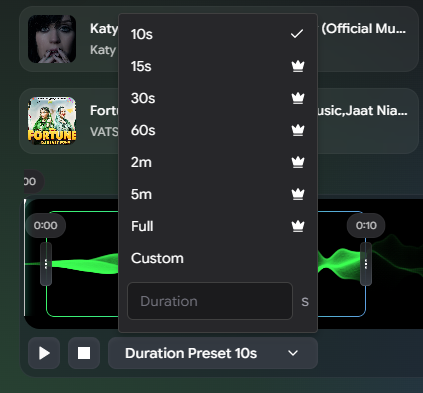
The duration options available before upgrading Freebeat
My conclusion: Freebeat is easy to set up, but the 10-second free-tier limit and single-model option leave less room for experimentation.
3. Solmi: Character Choices and a Wide Range of Styles
Workflow: Choose or Upload a Singer → Select Music → Choose Visual Style → Generate
Solmi takes a more character- and style-oriented approach. Its setup interface lets users select a singing character or upload their own, choose a song or upload music, and select from 24 video styles.
The number of presets gives users several visual directions to explore without having to describe every detail in a prompt. The basic options were easy to understand during my review.
However, parts of the interface loaded in a confusing order, which made the experience less smooth than the straightforward setup initially suggested. A newly registered account showed 100 credits, but I did not use those credits to generate a finished video.
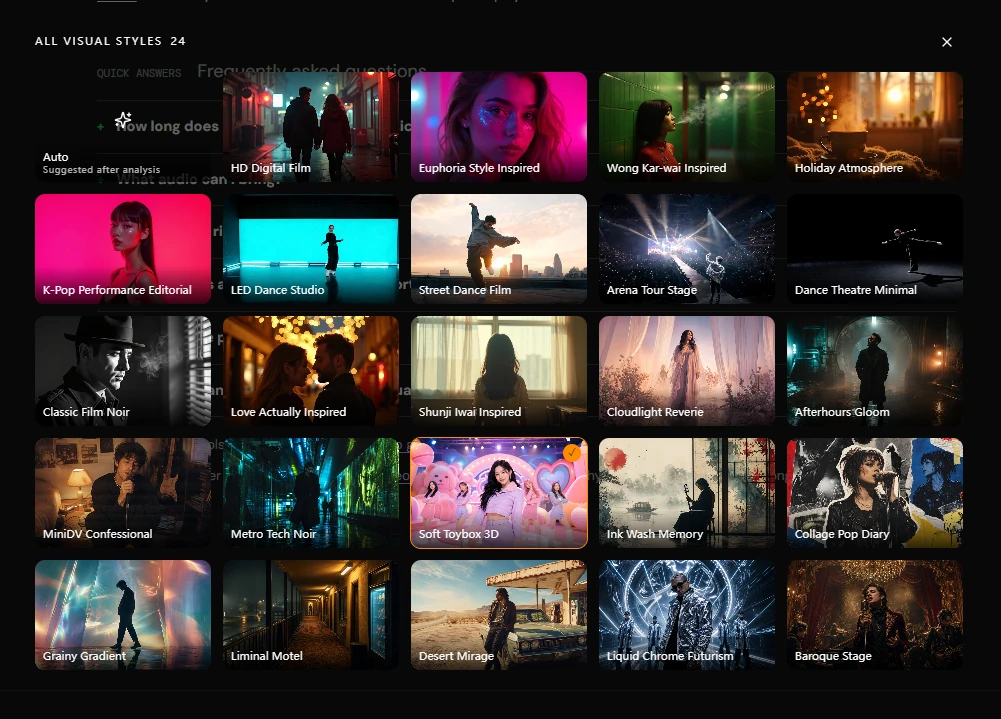
Solmi's visual-style browser with 24 preset styles
My conclusion: Solmi offers plenty of visual styles and lets users choose a singer. During my review, though, parts of the interface loaded in a confusing order.
4. Neural Frames: A More Detailed, Step-by-Step Workflow
Workflow: Upload Music → Set Visual Direction → Configure Storyboard → Generate Visuals
Neural Frames approaches music video creation differently from tools that present most settings on a single screen. Its interface guides users through the process step by step, with options for prompts, visual styles, models, props, custom reference material, audio, and storyboard adjustments.
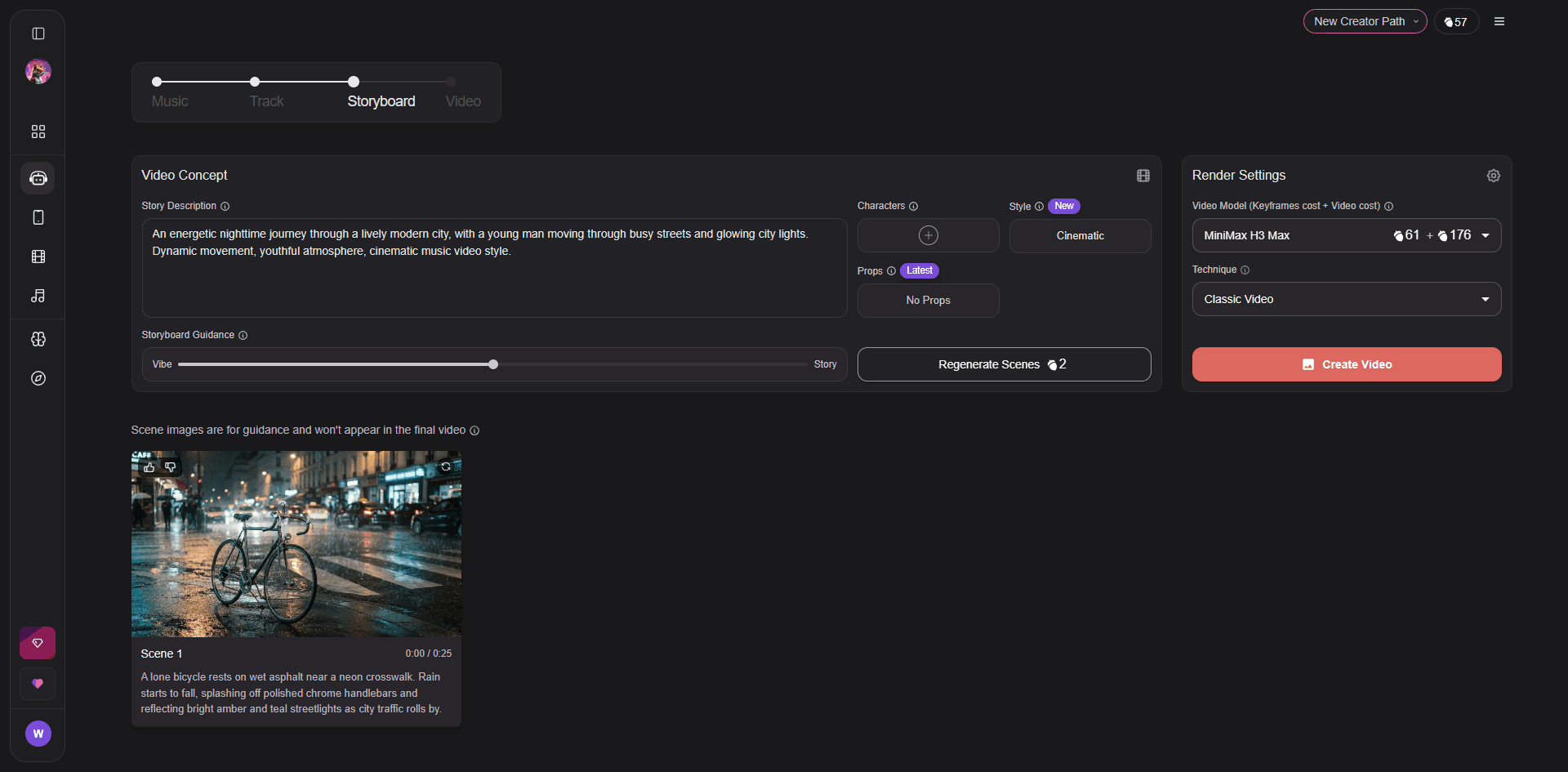
Neural Frames' storyboard stage, where users can review scene guidance and adjust render settings
This setup offers a lot of creative control. Users can build a more specific visual direction and review the storyboard before moving forward. The interface also presents options for longer videos.
The trade-off is complexity. There are many controls to work through, so the process may feel less direct to someone who simply wants to upload a song and quickly create a video.
Access was another important limitation in my review. Although registered users could earn credits gradually through tasks, the interface required a paid upgrade before video generation. I therefore did not generate a finished video or assess the output quality.
My conclusion: Neural Frames gives users more ways to adjust their visuals, but the step-by-step workflow takes more work to get through. In my review, I also found that video generation required a paid upgrade.
Which AI Music Video Maker Fits Your Workflow?
If you want to create a music video from scratch, PicLumen is the one I'd recommend starting with. You can upload an existing song or generate original music with AI Audio, then turn it into a video without switching platforms. In my tests, the workflow was easy to use, although audio changes and visual distortions still occurred.
The other tools serve more specific needs:
Freebeat: A simple upload-and-style workflow, but the free tier I reviewed limited videos to 10 seconds.
Solmi: A wide range of preset styles and singer options, though I experienced some interface loading issues.
Neural Frames: More detailed visual controls, but a more complex workflow and a paid upgrade required before generation.
FAQ
How can I make a music video with AI?
Upload an existing song or create one with an AI music tool. Then choose a visual style, generate the video, and check the final result.
Can AI make a music video from a song?
Yes. AI music video makers can turn an uploaded song into visuals, but the generated video may not preserve the original audio or lyrics exactly.
What is an AI music video maker?
An AI music video maker uses artificial intelligence to create visuals from a song, audio track, or text prompt, depending on the tool.
What is the best AI music video maker?
The best tool depends on your needs. PicLumen stands out for combining AI music creation and video generation in one platform, though I only generated videos with PicLumen firsthand.





