How I Get Extra Lumens on PicLumen Without Paying for More
If you use PicLumen regularly, you've probably run into the same problem I have: running low on Lumens right when you're in the middle of creating something.
A few days ago, I was testing different image styles for a project and burned through my daily Lumens much faster than expected. That's when I discovered PicLumen's Referral Program.
The idea is simple. You share your referral link with someone who hasn't used PicLumen before. If they join through your link, both of you receive bonus Lumens.
It's not a magic way to generate unlimited credits, but it's one of the easiest ways to get additional Lumens without purchasing a top-up.
In this guide, I'll walk through exactly how the PicLumen Referral Program works, who can use it, where to find your invite link, and a few practical ways I've seen creators successfully earn referral rewards.
What Is the PicLumen Referral Program?
Think of the Referral Program as a reward system for existing users.
Instead of spending money on advertising alone, PicLumen encourages current users to introduce the platform to friends, creators, and AI art enthusiasts.
When someone creates an account through your referral link or QR code, the system records that signup as your referral. Depending on the program rules at the time, both parties may receive bonus Lumens.
For users who create images regularly, referral rewards can be a useful way to extend their available credits throughout the month.
Why Many Users Search for Ways to Get More Lumens?
Lumens are the currency that powers image and video generation on PicLumen.
Depending on how often you generate images, experiment with prompts, or upscale results, your available Lumens can disappear surprisingly quickly.
Common situations include:
✅Testing multiple prompt variations
✅Generating character concepts
✅Creating batches of social media content
✅Exploring different art styles
✅Producing higher-resolution images
For many users, referral rewards become a practical supplement between monthly renewals or daily resets.
Where to Find Your Referral Link and QR Code?
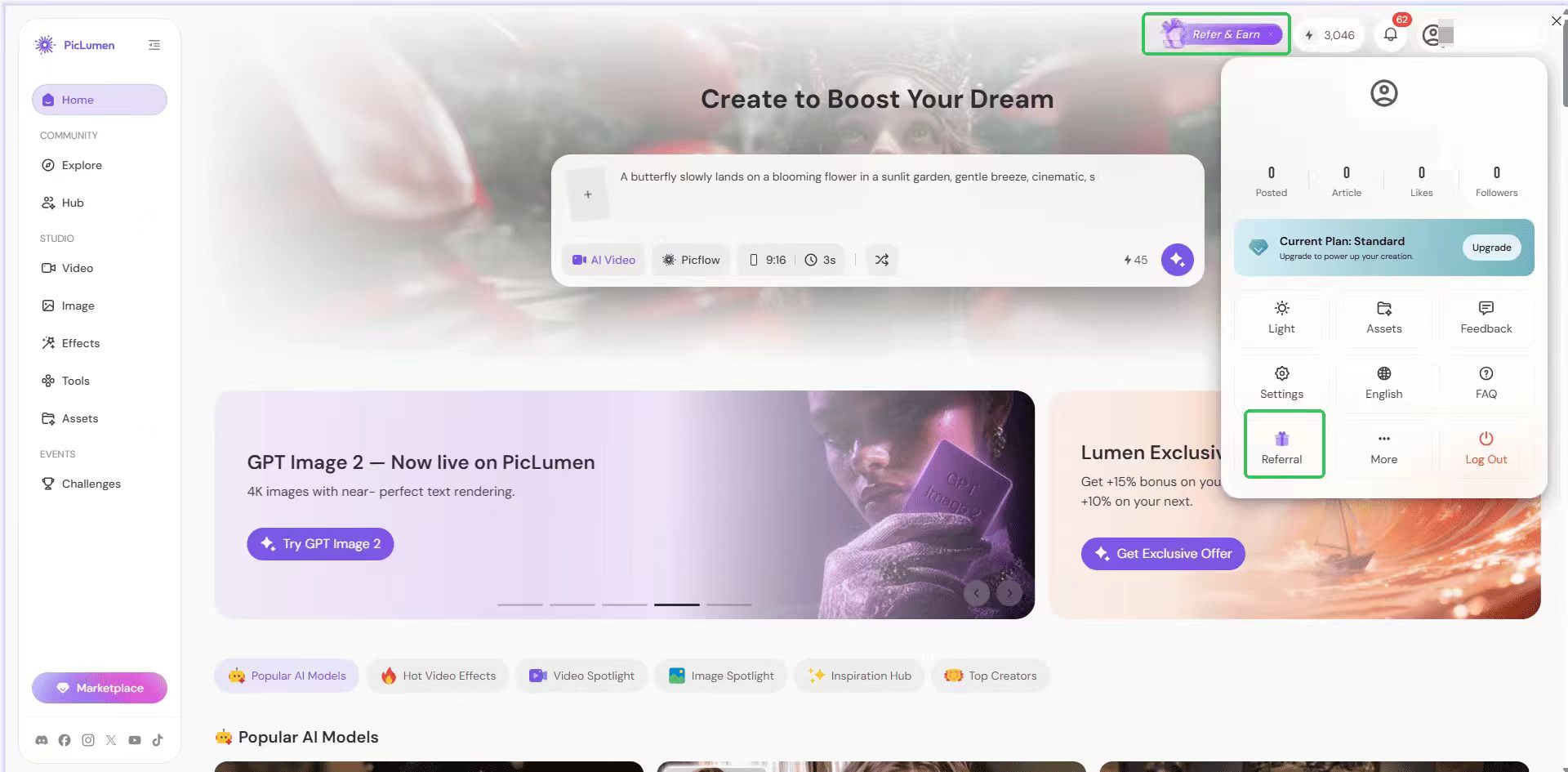
There are two places you can access the referral feature: ▶️Top navigation bar: Look for the referral icon to the left of your Lumen balance. Or if you haven't interacted with it yet, you'll see a small "Refer & Earn" tooltip. Click it to go to the referral page. If you dismiss the tooltip, it won't reappear for 24 hours. ▶️Your profile dropdown: Click your avatar in the top-right corner. The "Referral" option is listed in the dropdown menu.
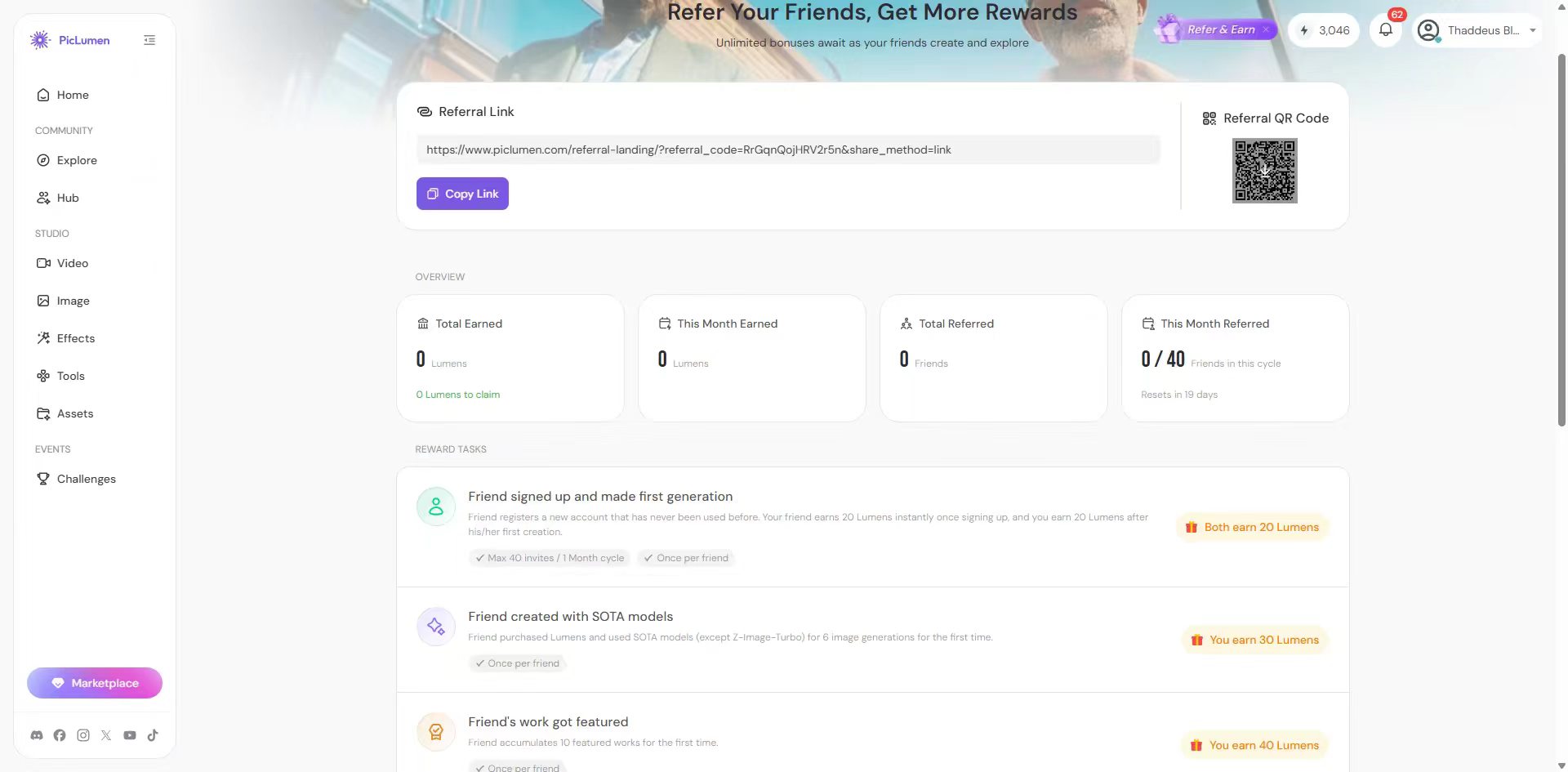
From the page "Referral", you'll find both your shareable invite link and your personal QR code. The link and QR code are permanent and will remain active as long as your account is active. Hover over it and a download button appears so you can save it and share it anywhere.
Who Can Use the Referral Program?
Not every account has referral access right away, which is by design. Here's how it breaks down:
Free / Non-Subscriber Accounts
✅New accounts (under 30 days): No referral access yet. The feature isn't visible until your account is at least a month old. ✅30+ days, never purchased: You can invite up to 10 people per calendar month. ✅30+ days, with at least one Lumen purchase or past subscription: Limit increases to 20 invites per month.
Subscriber Accounts
✅Mini plan: 30 referrals per month ✅Standard plan: 40 referrals per month ✅Pro plan: 50 referrals per month ✅Elite plan: 70 referrals per month
The monthly count resets at the start of each calendar month. If you upgrade mid-month, your new limit applies immediately.
How to Share Your Referral Link
There are a few approaches that tend to work better than others: 🔅Social media: If you post your AI-generated work on Reddit, Twitter/X, Instagram, or Bluesky, drop your referral link in the caption or bio. People who like what they see are already halfway interested in trying the tool. 🔅Discord communities: AI art servers and creative communities are full of people actively looking for image generation tools. Share your work in the showcase channels along with your referral link. 🔅QR code for in-person or visual sharing: The QR code works well in YouTube videos, TikToks, or any visual content where you're already showing off PicLumen outputs. Download it from the referral page and drop it into your content. 🔅Direct message: Sometimes the most effective referrals come from just texting a friend who you know would enjoy the tool. Personal recommendations convert better than broadcast posts.
A Practical Example: Running Out of Lumens
Here's a scenario that comes up more often than you'd think: it's mid-month, your Lumens are almost gone, and you're in the middle of a project. Instead of buying a top-up or waiting for the monthly reset, open the referral page from your profile menu and send your QR code or link to a friend who's been curious about AI image tools. If they sign up, you earn Lumens.
Start Earning Extra Lumens for free on PicLumen
If you're already sharing your AI artwork online, the PicLumen referral program is worth setting up.
The process takes less than a minute, your referral link stays active, and it can help you collect additional Lumens over time without purchasing extra credits.
While referral rewards probably won't replace a subscription for heavy users, they can be a useful way to extend your available Lumens and keep creating between billing cycles.
If you're eligible, open the Referral section in your PicLumen account, copy your invite link, and start sharing it wherever you already showcase your work.
Frequently Asked Questions
How do I get free Lumens on PicLumen?
One of the easiest methods is through the PicLumen referral program. Eligible users can invite new members using a referral link or QR code and receive bonus Lumens when referral requirements are met.
Why can't I see the referral option?
Accounts that are less than 30 days old do not currently have access to the referral feature.
Does my referral link expire?
No. The referral link and QR code remain active as long as your account remains active.
Can I invite more people after reaching my monthly limit?
Your referral quota resets at the beginning of each calendar month. Upgrading to a higher subscription tier may also increase your monthly referral allowance.




.png)