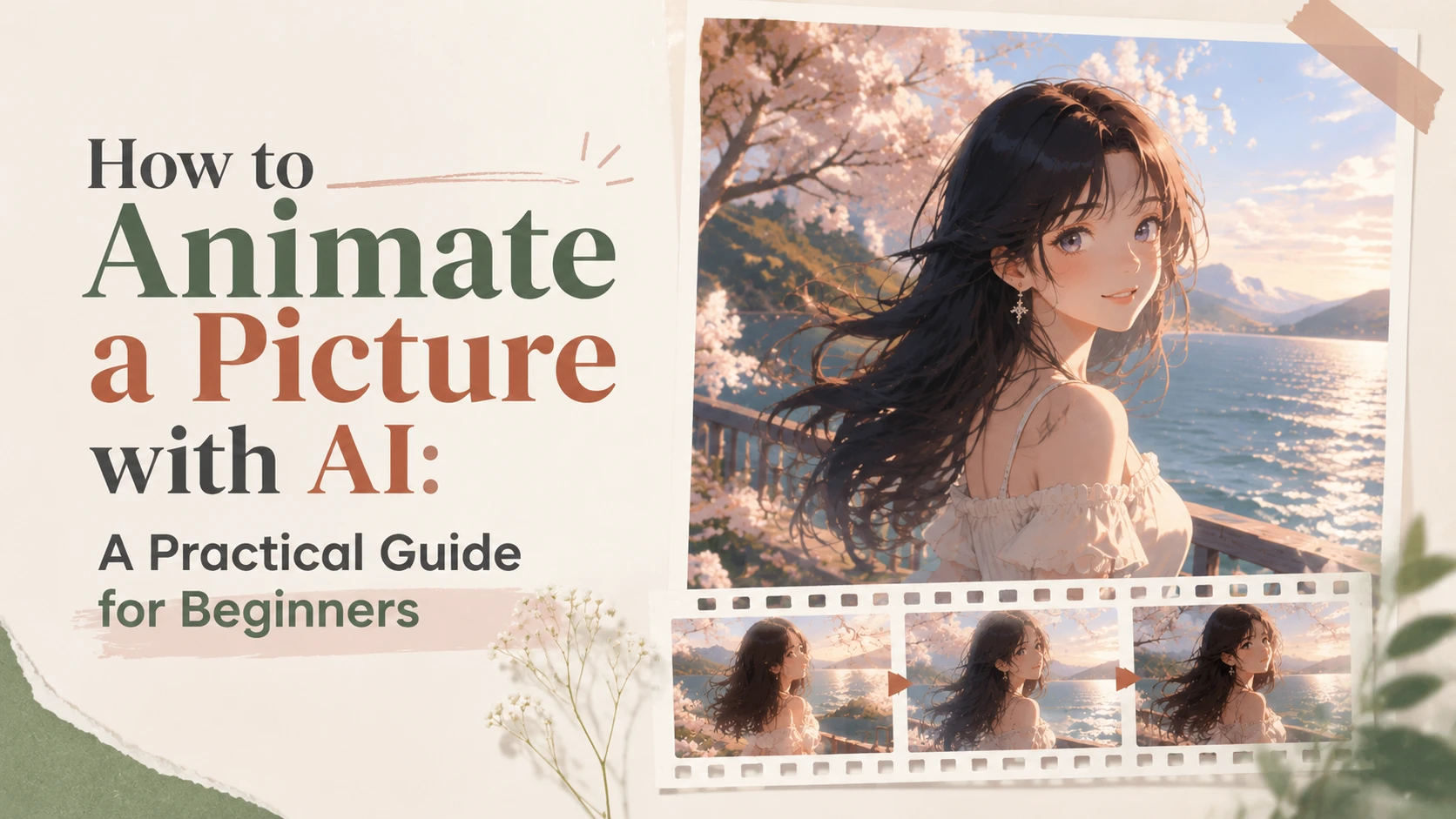
To animate a picture with AI, you only need three simple steps: upload your image to an AI image animator, write a prompt describing the movement you want, and click Generate to create an animated video. With an all-in-one AI animation tool, you can easily turn photos, artwork, and characters into dynamic videos.
A photo can capture a special moment, but over time, those memories can slowly fade. Now, AI can help bring those moments back to life. In this guide, you'll learn how to animate a picture. We'll also show you how to write better AI animation prompts, so you can create more satisfying videos with ease.
What Is AI Photo Animation?
AI photo animation turns a still image into a short video by adding motion. You don't need to create animations frame by frame anymore, because AI can analyze everything such as image structure, depth, and scene details to generate movement that matches the original picture. Moreover, it is also different from video editing, because it does not require existing footage.
With an AI image animator, you only need three things: one image, one animation prompt, and one click. This is why, for creators, marketers, and beginners, an AI image animator online is a perfect tool.
What Can You Create With AI Image Animation?
AI photo animation can be used for different types of content creation. Here are some popular ways to bring static images to life:
Use Case | What You Can Create | Best For |
Animate Old Photos | You can turn family photos and historical pictures into short videos with subtle facial movements and natural expressions. | People who want to make memories alive or restore old photos |
Bring Artwork to Life | You can add motion to paintings or your AI-generated works | Artists, designers, and AI creators |
You can animate your favorite movie characters, game characters, or digital avatars. | Character creators and content creators | |
Create Social Media Videos | You can transform photos into short-form videos to attract more followers on social media. | Social media creators and marketers |
Make Product Videos | Turn product images into engaging videos with camera movements and cinematic effects. | Brands, e-commerce sellers, and advertisers |
How to Animate a Picture With AI Online
Step 1: Jump into PicLumen's Video Tool
Open PicLumen's main sidebar. Tap the Video tab
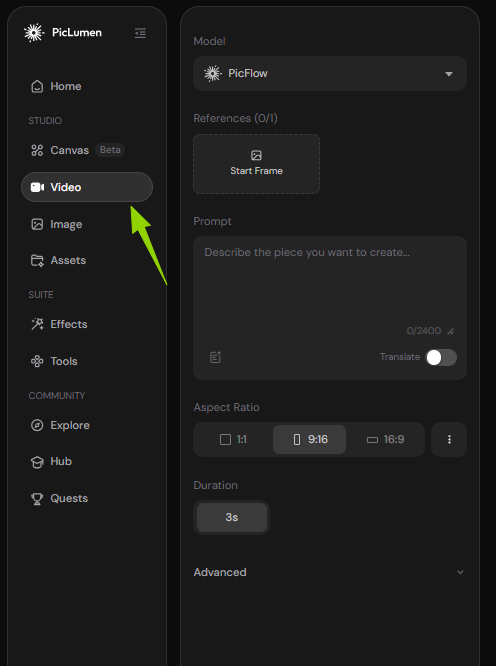
At the top of the Video panel, you can see the Model dropdown, and it shows PicFlow by default.
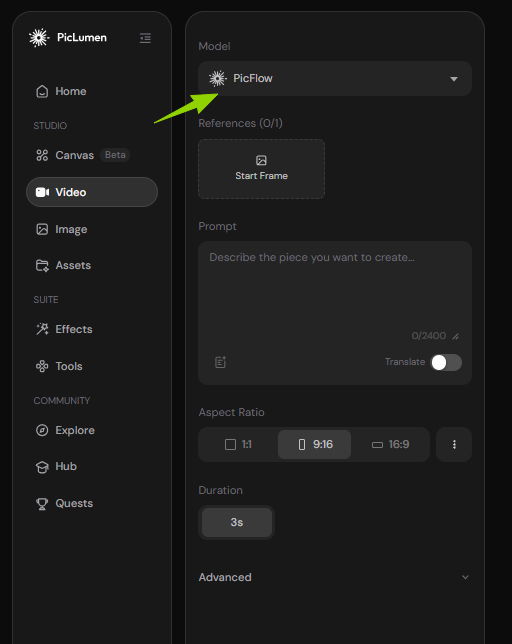
Click it, and you can open the full model library. PicLumen offers many different AI video models, which are all famous and powerful.
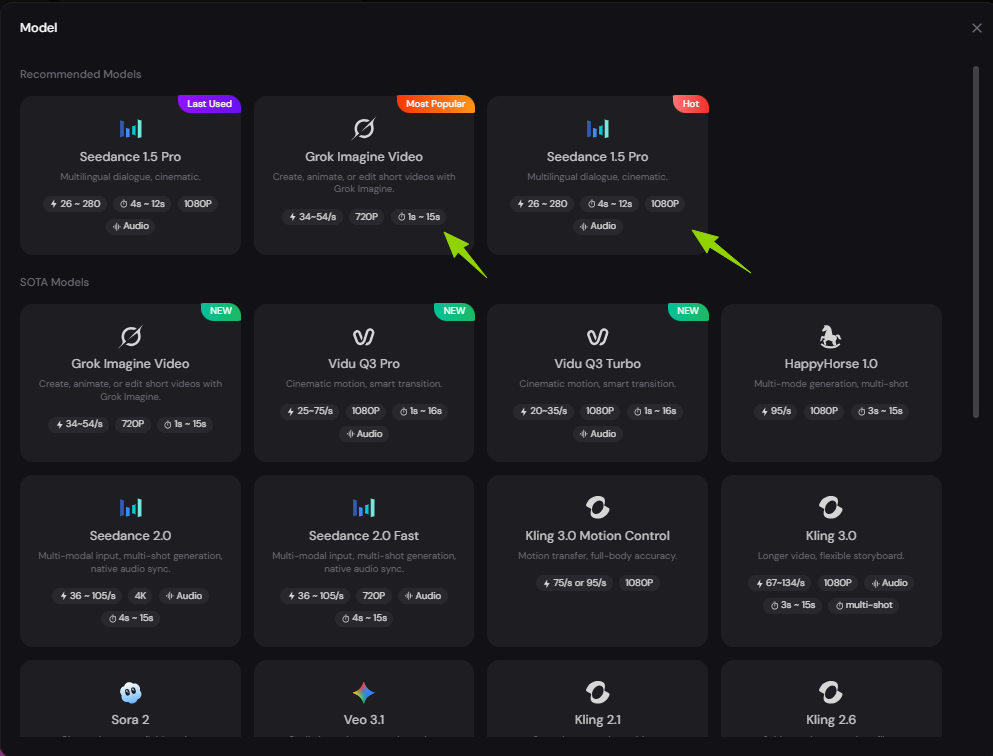
Quick Tip for New Users
If you don't know the difference between these models, you can choose the Recommended Models first, like Seedance or Grok. When you are familiar with image animation, you can try other models to meet your specific needs.
Step 2: Upload Your Photo & Customize Animation Settings
Upload your static picture: you can find the Start Frame box under the Model menu. Click it to upload the image you want to animate. This photo will be the base frame of your video.
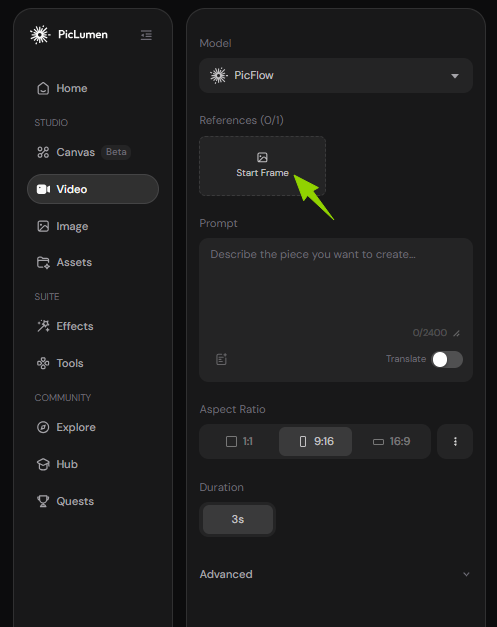
Then, you need to write your animation prompt, in which you can describe how you want your image to move.
Prompt example:
A gentle anime movie scene coming to life. Preserve the same girl from the original image. Her long black hair softly dances in the wind, cherry blossom petals slowly drift through the air, sunlight sparkles on the lake, and her eyes gently blink as she breathes naturally. The scene feels peaceful and emotional. Keep all character details unchanged.
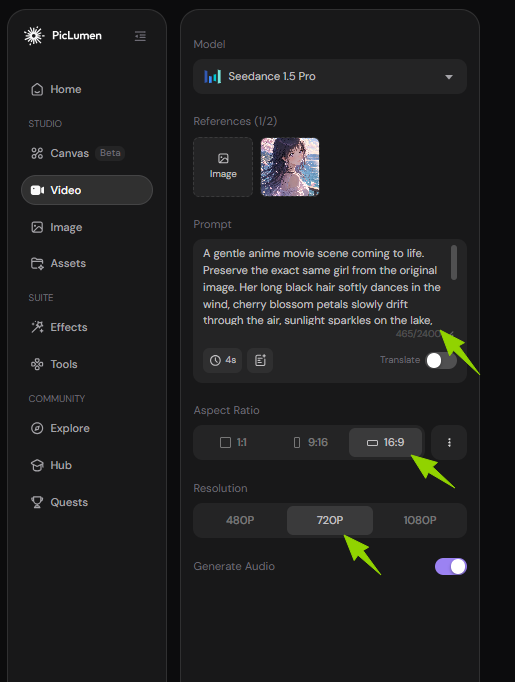
After finishing your prompt, you need to adjust the video settings based on your needs:
Video Duration: If you expect complex movements, you'd better choose a longer duration.
Aspect Ratio: It's up to on which platform you want to share your video:
9:16 for TikTok, Reels, and Shorts
16:9 for YouTube videos
1:1 for social media posts
Resolution: If you pursue high-quality video, choose a higher resolution.
You can even enable AI to add sound effects or background music, so that your animation will become more engaging.
Step 3: Generate and Share Your Animation
Next, click Generate to create your AI video. In just a few seconds, your animated image will be ready.
You can then preview the video and make sure the motion is what you want.
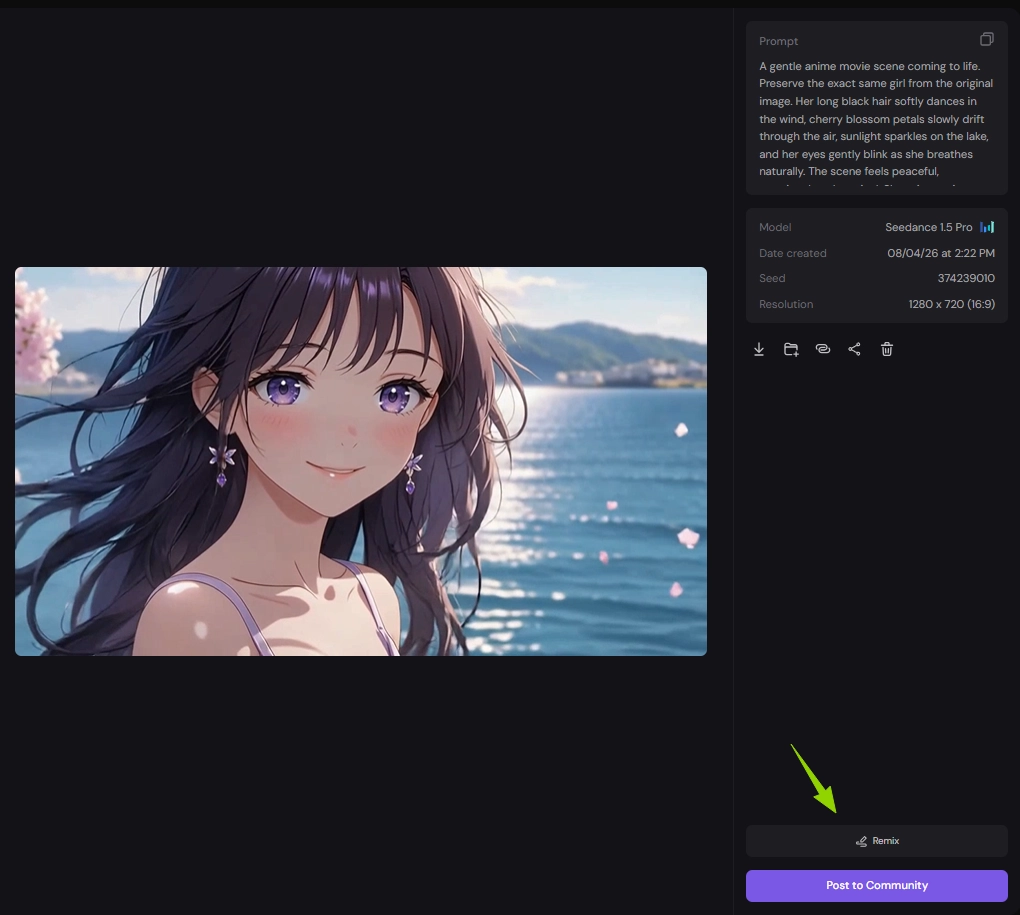
Not satisfied? Click Remix to update your prompt and try again.
Love the result? Download your video or directly share it on social media and the PicLumen community.
Three steps are all it takes to animate a picture. Pretty simple, right?
How to Write Better AI Image Animation Prompts?
But here's the tricky part: getting a good animation is not only about clicking “Generate”. The magic happens in your prompt. To make AI better understand what you want, your animation prompt needs to include five parts:
Prompt Element | What to Describe | Example |
Subject Movement | Describe what the main subject should do. | The girl gently smiles, blinks, and moves her hair in the wind. |
Environment Movement | Add movement to the background or small details. | Cherry blossom petals fall, clouds move slowly, and water ripples softly. |
Camera Movement | Tell AI how the camera should move. | Slow zoom in, smooth camera pan, cinematic camera movement. |
The Speed of motion | Control how fast the movement is. | Slow and gentle, smooth and natural, fast and dynamic. |
Style | Describe the general style and feeling. | Such as dreamy anime style, realistic cinematic look, warm and moody. |
Example: Bring Old Photos to Life
Before
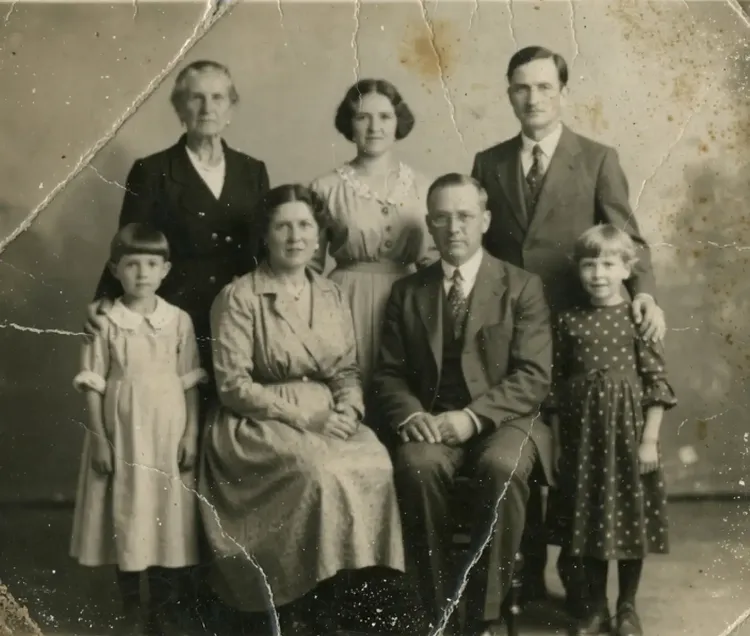
Prompt Used:
Animate this old family portrait with [gentle smiles, natural blinking, and small movements from the family members]. Add [subtle motion to the scene to make the memory feel alive]. Use [a slow and gentle camera movement] with [a warm and realistic feeling]. Keep the original faces, photo style, and composition unchanged.
After
Frequently Asked Questions
What is an AI image animator?
An AI image animator is a tool that turns images into short videos. It uses AI to add realistic movements, such as facial expressions, camera motion, or moving backgrounds.
How can I make photo animation online?
You can animate a photo online in a few simple steps:
Upload your image to an AI image animator.
Add a prompt to describe the movement you want.
Adjust video settings like duration, aspect ratio, and resolution.
Then you can click Generate, and if you're satisfied with the animation, you can download or share the result.
How to get AI to animate a photo for free?
You can try AI photo animation for free by using tools that offer free credits or trial plans. With PicLumen, you can test the image-to-video feature with available free usage. If you need more advanced features, you can upgrade to a paid plan.
What is the best free AI image animator?
If you search for a simple way to turn images into videos, PicLumen’s image-to-video feature is a great choice. On PicLumen, you can create smooth AI videos with just a few clicks. It works well for animating portraits, artwork, and characters.
.png)
 (1)_compressed.jpg)