
Free AI Hair Color Changer Online
Transform your look instantly with PicLumen's AI hair color changer. Upload any photo and switch to a new hair color in seconds. Try natural shades or bold colors, experiment with your style, and see the results before you commit.
Why Choose PicLumen’s Hair Color Changer?
Thinking about switching your hair color but unsure how it will actually look on you? Whether you're planning a subtle refresh or a bold transformation, guessing can lead to disappointing results. PicLumen’s hair color changer helps you visualize different shades instantly, so you can experiment with confidence before making any real commitment.
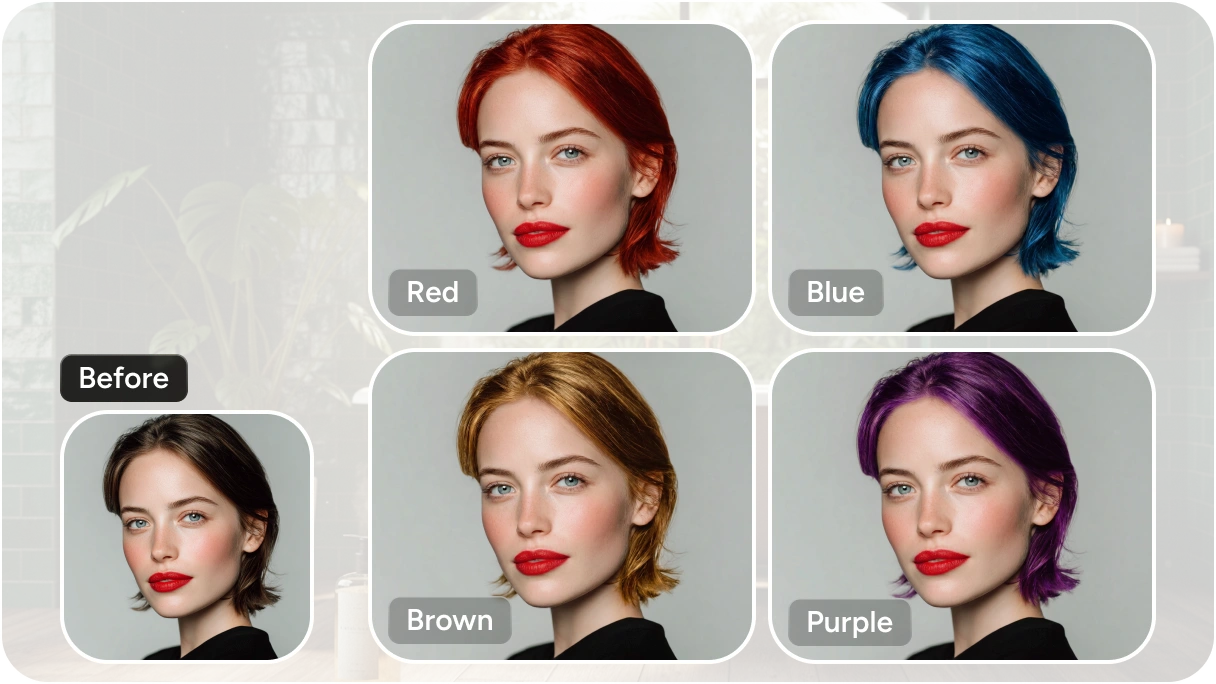
Instant Hair Color Changes Online
Just upload your photo and see the results in seconds. PicLumen lets you instantly apply different hair colors with realistic blending, saving you time compared to traditional editing apps. It’s perfect for quick previews, whether you’re deciding on your next salon visit or just exploring new looks for fun.
Explore Natural & Bold Hair Colors
From classic brunettes and soft blondes to vibrant reds, pastels, and even fantasy shades, you can try a wide spectrum of color options online. This flexibility allows you to test both everyday styles and more creative looks in one place. You can easily compare different tones to find the shade that best complements your skin tone and personal style.
Works for All Hair Types & Lengths
Curly, straight, wavy, short, or long, PicLumen’s hair color changer adapts to different hair textures and styles with impressive accuracy. It detects hair regions intelligently, ensuring even complex hairstyles are colored smoothly and naturally.
Use Cases for Hair Color Changer

Personal Style Exploration
Experimenting with your look has never been easier. PicLumen’s hair color changer lets you try different shades, from subtle highlights to bold transformations. Whether you're refreshing your everyday style or exploring something completely new, you can quickly compare options and find what truly suits your personality, skin tone, and overall aesthetic.

Salon & Stylist Consultations
Make your next salon visit more efficient and stress-free. Instead of relying on vague descriptions, you can show your stylist realistic previews of your desired hair color. This helps avoid miscommunication and ensures you and your stylist are aligned. It’s a practical way to visualize results in advance and feel more confident about your final decision.

E-Commerce Product Retouching
For beauty brands and online stores, showcasing different hair color effects is essential. PicLumen helps create clean, consistent visuals by easily adjusting hair colors in model images. This allows you to present multiple product variations without additional photoshoots, saving both time and cost.

Social Media Content Creation
Stand out on platforms like Instagram, TikTok, or Pinterest with eye-catching visuals. Use the hair color changer to create engaging before-and-after posts, trend-based transformations, or creative edits. It’s a simple way to produce fresh, scroll-stopping content that attracts attention and keeps your audience interested.
How to Change Your Hair Color on PicLumen
1 Upload Your Photo
1Start by uploading a clear photo where your hair is visible. For best results, use an image with good lighting and minimal background distractions. This helps the tool accurately detect your hair and apply color more naturally.
2 Describe Your Desired Hair Color
2Enter a prompt describing the hair color you want, such as “ash blonde,” “chocolate brown,” or “pastel pink.” You can also upload a reference image to match a specific shade or style more precisely. This step gives you more control over the final look.
3 Generate Your New Look
3Click “Generate” and let PicLumen do the rest. Within seconds, you’ll see your hair transformed with realistic color blending. You can try multiple variations to compare and find the perfect shade before downloading or sharing your result.


Loved by Creators Worldwide
Real feedback from designers, marketers, and hobbyists sharing their PicLumen experience on Trustpilot.
 jordi Alcaraz
I have really enjoyed using this site…
I've had a really positive experience with Piclumen. The platform offers excellent features for creating AI images and videos, with impressive quality and a wide range of creative possibilities. It's very easy to use, even when experimenting with more complex ideas, and the whole process is both intuitive and enjoyable. excellent customer service. The team replies very quickly, is always friendly, and genuinely tries to solve any issues you may encounter they care about their users. Overall, Piclumen is an innovative, user-friendly, and exciting AI platform. I highly recommend it to anyone interested in AI image and video creation.
 J. Blaine
Regular PicLumen user experience
I've been using PicLumen since late summer 2024 and I've generated several thousand images, mostly image-to-image. There were 2 minor technical glitches in that period of time. In the first one, my library didn't load but after logging out and logging in again later that day I found my library back. The second glitch- the remixing and outpainting stopped working. I contacted the support team and the issue was fixed the next day. I also requested PicLumen to provide a PayPal payment method when they switched to subscription - and they listened and responded to my request. I appreciate their responsiveness and customer service. In my communication with their support team, I found them professional and polite. My general impression is that this is a dynamic and collaborative team that is worth supporting!
Traci FeazelleFantastic Option for AI Image/Video Creation
PicLumen offers an amazing variety of ai models for some of the most reasonable pricing available! The app layout also affords ease of use.
A New TV Episodes Of Ninja Sweetie On…
A New TV Episodes Of Ninja Sweetie On Paramount+
Love this app it helps my ideas come to…
Love this app it helps my ideas come to life
It’s way easier to use then these other…
It’s way easier to use then these other apps
 Jonathan Kauan da Silva
good i like create images
good i like create images
It’s easier to use on a computer instead of a phone
Being able to generate my own art
 sakura cherry
Very good Free ai photo
Very good Free ai photo, thanks, i wish consistency ,
 Alishba Mukhtar
Wonderful experience I’ve ever had
Wonderful experience I’ve ever had
Ayyan NaveedIt's good
It's work very I am totally satisfied from this app I am very happy after use it
Sheikhvery user friendly
very user friendly, easy to use.
Frequently Asked Questions
Do I need a high-quality or studio photo to get good results?
Not at all. A regular selfie works perfectly as long as your hair is clearly visible and the lighting is decent. Natural light and a simple background usually help the AI deliver more accurate and realistic color results.
How close is the AI preview to real-life hair dye results?
The preview is designed to be realistic, but it’s still a simulation. Your final salon outcome may differ based on your original hair color, texture, and whether processes like bleaching are required.
Is it helpful to bring the generated image to my hairstylist?
Definitely. Saving and sharing your AI-generated result can make it much easier to communicate your expectations. It gives your stylist a clear visual reference to work from.
Will my natural hair color impact the final result?
Yes, it does. While the AI can instantly show lighter shades on darker hair, achieving those results in real life may require additional steps like bleaching. Your starting hair color plays a big role in how the final dyed result will look.
Is NSFW or explicit content allowed on PicLumen?
No, PicLumen does not support generating NSFW or explicit content. The platform is designed for safe, creative, and professional use cases such as personal styling, e-commerce visuals, and social media content.