I've tried quite a few AI image generators over the past year. Some of them are amazing but complicated, some are easy to use but the results are hit or miss.
That's exactly what made DeeVid AI interesting to me. When I came across its Trustpilot page, I was surprised to see a rating of only 1.5 out of 5 stars. The score was based on 196 reviews, with 79% of users leaving 1-star ratings and only 12% giving it 5 stars. And 193 were posted within the past 12 months, which means the low score mainly reflected recent user experiences.
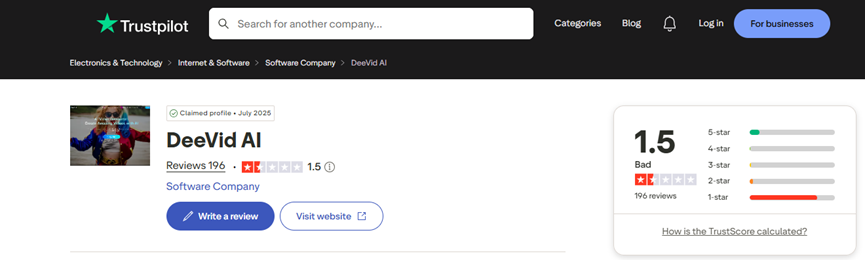
Looking through the reviews, the main complaints were surprisingly consistent. Many users felt the generated videos were lower quality than expected, with issues like visual errors and unnatural movement. Many others complained about how fast it is to consume the credits.
Seeing reviews like those immediately made me curious.Was DeeVid AI really as disappointing as some users claimed, or was there more to the story?
Instead of making a judgment based only on online reviews, I decided to try it myself and test its main features, including AI image generation, face swap, photo-to-anime transformation, and image-to-video creation.
Here's what I found.
What Is DeeVid AI?
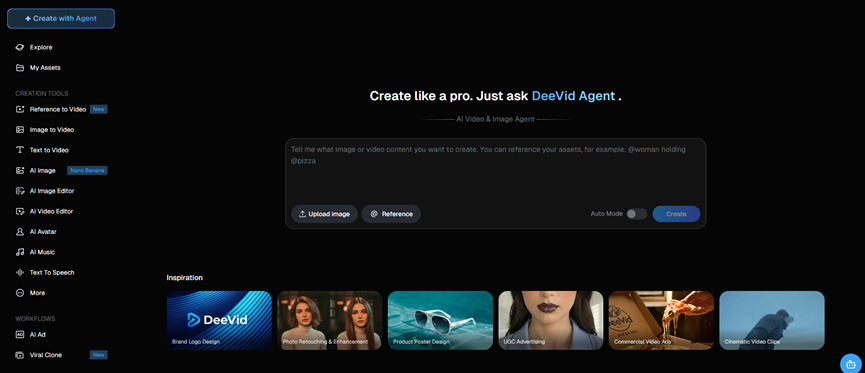
DeeVid AI is an AI-powered creative platform that combines AI image generation, AI editing, face swap, and image to video AI tools in one place. It is designed for users who want to create and transform visual content without switching between multiple AI tools.
It is convenient for quick creative projects, although users looking for advanced control may still prefer more specialized tools.
How I Tested DeeVid AI
I didn't want to just click through the features, generate a few random images, and call it a review. That's usually how you end up saying every AI tool is "pretty impressive" without really testing much. So I decided to use DeeVid AI the way I would normally use a creative tool, which is by actually trying to make things with it.
I tested different types of content, including realistic portraits, product-style images, anime transformations, face swaps, and image-to-video animations. Basically, I threw a bit of everything in it and waited to see what would happen.
While testing, I paid attention to a few things: how well DeeVid understood my prompts, whether the results looked natural, how well it kept details consistent, and most importantly, whether I could actually use these results for real content creation.
Turning Images into Motion: DeeVid AI Video Capabilities
I started with DeeVid AI's image-to-video feature. To see how well it could handle complex movement, I used a reference image of an ancient Chinese warrior.
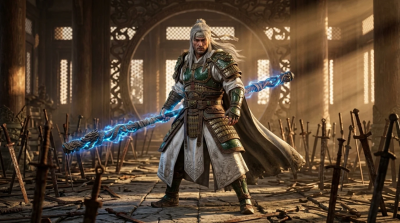
And I gave it a more action-heavy prompt:
The man grips the staff with both hands, slowly winding up from left to right, veins bulging on his arms. Then, with a sudden burst of power, the staff traces a full moon arc, spins at high speed in midair, and plummets downward. The instant the heavy staff strikes the ground, the earth cracks open, a ring of air blast erupts outward, and dust and smoke surge skyward.
The result was actually quite impressive at first glance. The overall atmosphere, dramatic movement, and cinematic effects were all there. The dust, impact effects, and action style gave the video an epic feeling.
However, when I watched it more carefully, some of the movement logic started to fall apart. The biggest issue was consistency. During the action sequence, the warrior suddenly appeared in a different position, making the movement feel like the AI was jumping between different frames.
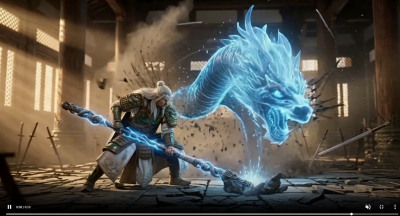
This is a common challenge for current AI video tools. They can create visually impressive moments, but maintaining accurate body movement and spatial relationships is still difficult.
So my impression of DeeVid AI's video generation is a bit mixed. For creating short cinematic clips or adding motion to static images, it can produce some genuinely cool results. But if you expect precise action choreography with perfect character consistency, there is still a noticeable gap.
DeeVid AI Image Generation: Testing Core Image Tools
Text to Image Generation
DeeVid AI's text-to-image feature was a really interesting part of the test. For the first try, I used a product photography prompt:
A luxury skincare product bottle placed on a marble table, surrounded by white flowers and water droplets, premium beauty advertisement photography, soft studio lighting, minimalist background, high-end cosmetic brand style, ultra realistic.
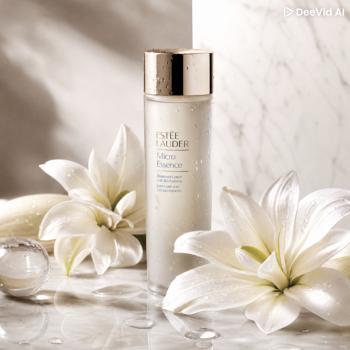
The result was actually pretty solid. DeeVid AI did a good job capturing the overall mood of the prompt. The clean beauty aesthetic, soft lighting, and premium product photography style were all there. The image looked polished enough to work as a social media visual or a simple marketing pic.
That said, it's not dramatically different from what you would expect from many current AI image generators. The strength here is more about convenience: you can get a usable visual in seconds without spending too much time refining prompts.
AI Face Swap Test: How Realistic Are the Results?
Next up was DeeVid AI's face swap feature. This was actually the one I was most curious about, because face swap tools can be either surprisingly good or painfully bad. There's usually not much middle ground. I uploaded two images and asked DeeVid to replace the face while keeping the original identity and making everything look natural.

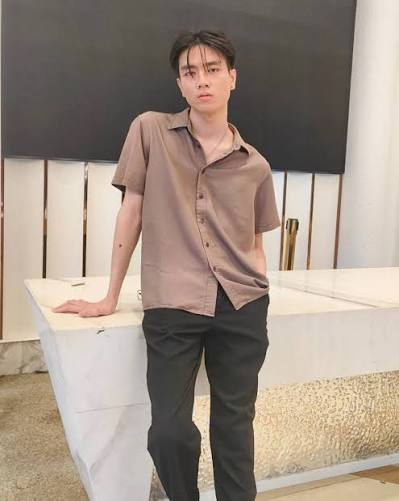
For the prompt, I used:
Seamlessly swap the face while preserving the person's identity, natural facial features, skin texture, and realistic expression. Ensure perfect blending with the target image, matching the lighting, skin tone, angle, and shadows. Keep the result photorealistic and high quality.
Unfortunately, this test didn't go as smoothly as I hoped.
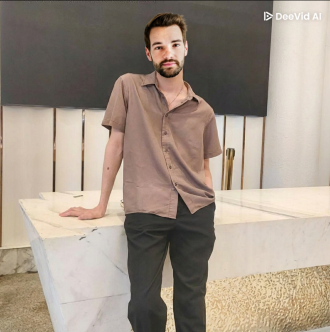
The generated image technically completed the face swap, but the final output didn't feel very natural. Instead of looking like a realistic AI-generated transformation, the face appeared somewhat pasted onto the target image, with noticeable differences in blending, and lighting.
It felt closer to a basic manual Photoshop edit than a seamless AI face replacement. This is the kind of result where you immediately notice something is "off" when looking at the image.
Of course, face swap results depend a lot on the input images. A better angle, similar lighting, and higher-quality photos would probably improve the output. But even with a suitable setup and a detailed prompt, DeeVid AI still struggled to make the result look truly natural in this test.
For a fun experiment or casual edit, it works. But if you're looking for a realistic face swap that could fool someone for more than two seconds, this feature still has some catching up to do.
Photo to Anime Transformation
After the face swap test, I moved on to something a bit more fun, which is DeeVid AI's photo-to-anime feature. For this test, I used the following prompt:
Convert this photo into a Japanese anime movie style, with detailed hand-drawn animation aesthetics, soft lighting, expressive eyes, natural facial features, beautiful background details, and a warm cinematic atmosphere. Preserve the person's identity and original pose.
The result was actually pretty good. DeeVid AI managed to capture the overall anime-inspired look without completely changing the person into a random anime character. The facial features, hairstyle, and original pose were still recognizable, which is usually the tricky part with this type of transformation.
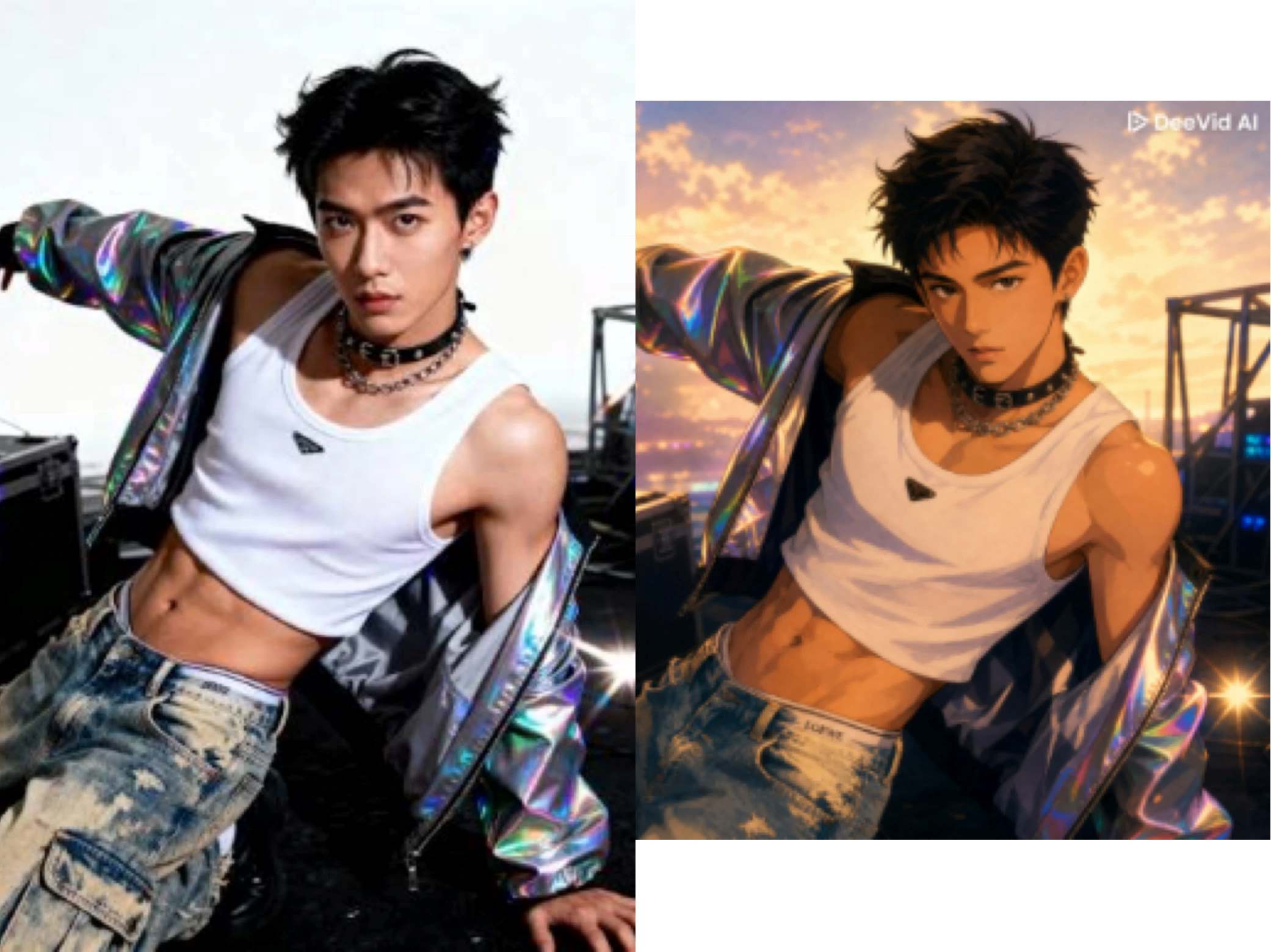
I also liked how it handled the atmosphere. The softer lighting and illustrated details gave the image a more cinematic anime feel instead of just adding a simple anime filter on top.
Of course, it's not going to replace a professional anime artist or give you unlimited control over the exact art style. But for creating a fun profile picture, or just seeing yourself in an anime world for a few seconds, it does a pretty solid job.
DeeVid AI Pricing: Is It Worth It?
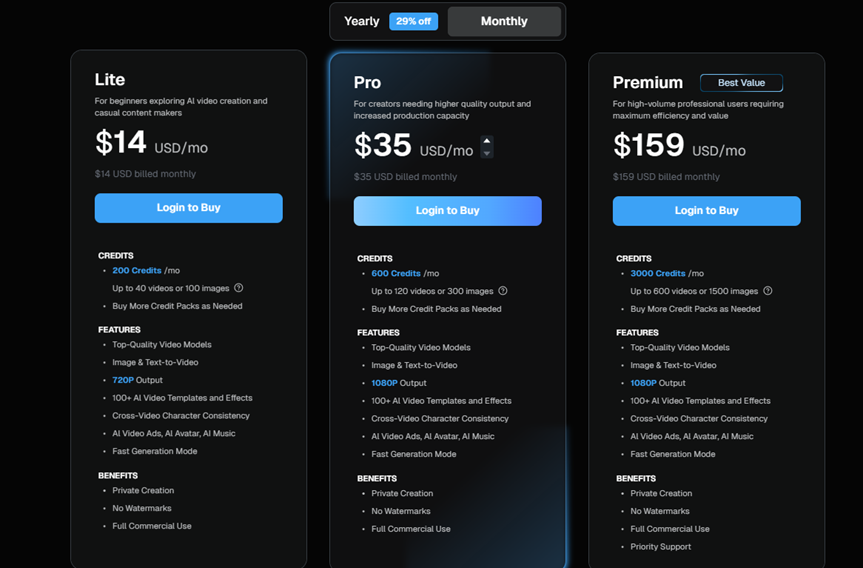
Let's break down the DeeVid AI pricing. Like most AI tools these days, it uses a credit-based system with three main plans: Lite ($14/month or $10/month billed yearly), Pro ($35/month or $25/month billed yearly), and Premium ($159/month or $119/month billed yearly). The plans include 200, 600, and 3,000 credits per month respectively, with higher tiers offering 1080p output. The pricing itself is not too absurd, but the real catch is whether those credits are actually enough for your workflow.
In my testing? Not really.
One thing I noticed while testing DeeVid AI was that the actual number of generations depends a lot on how you use the platform. DeeVid estimates that the Lite plan's 200 credits can generate around 40 videos or 100 images, but this is based on certain usage conditions. If you choose more advanced AI models, which naturally require more credits per generation, the number of outputs will decrease accordingly. In my case, after testing different models and creating multiple versions to improve the results, my credits were used up much faster than the estimate suggested. This is not necessarily a flaw unique to DeeVid AI — it is a common trade-off with AI tools — but it is something to keep in mind if you plan to experiment frequently rather than generate only a few final results.
If you're a content creator, designer, or marketer producing assets daily, you'll likely burn through your credits before the month is even half over. We all know the AI workflow: you generate, you tweak the prompt, you generate again, and you repeat until it's perfect. Doing that on a limited credit plan gets expensive very quickly.
For me, DeeVid AI shines for a specific crowd. It's a great fit for casual creators who just need occasional AI visuals or beginners who want an "all-in-one" dashboard without the headache of learning five different tools.
Pros and Cons of DeeVid AI
Pros | Cons |
|---|---|
Multiple AI tools in one place, including image generation, video creation, templates, audio generation, and lip syncing | Limited customization and creative control compared with more advanced AI platforms |
Simple and beginner-friendly interface | Limited advanced editing features for users who want to fine-tune their creations |
Supports text, image, and video inputs | Output quality is inconsistent, with occasional distortions, and unnatural movements |
Good for casual AI experiments and quick content creation | Paid plans can feel expensive, especially for frequent users, as credits can run out quickly |
DeeVid AI Alternative You Should Try
If you just want to mess around with AI images, make a quick video, or try out some fun transformations, DeeVid AI is a great starting point. It is perfect for casual, quick experiments. But eventually, most people want to do more than just apply quick effects; they want to actually build a scene from scratch and see where their ideas go.
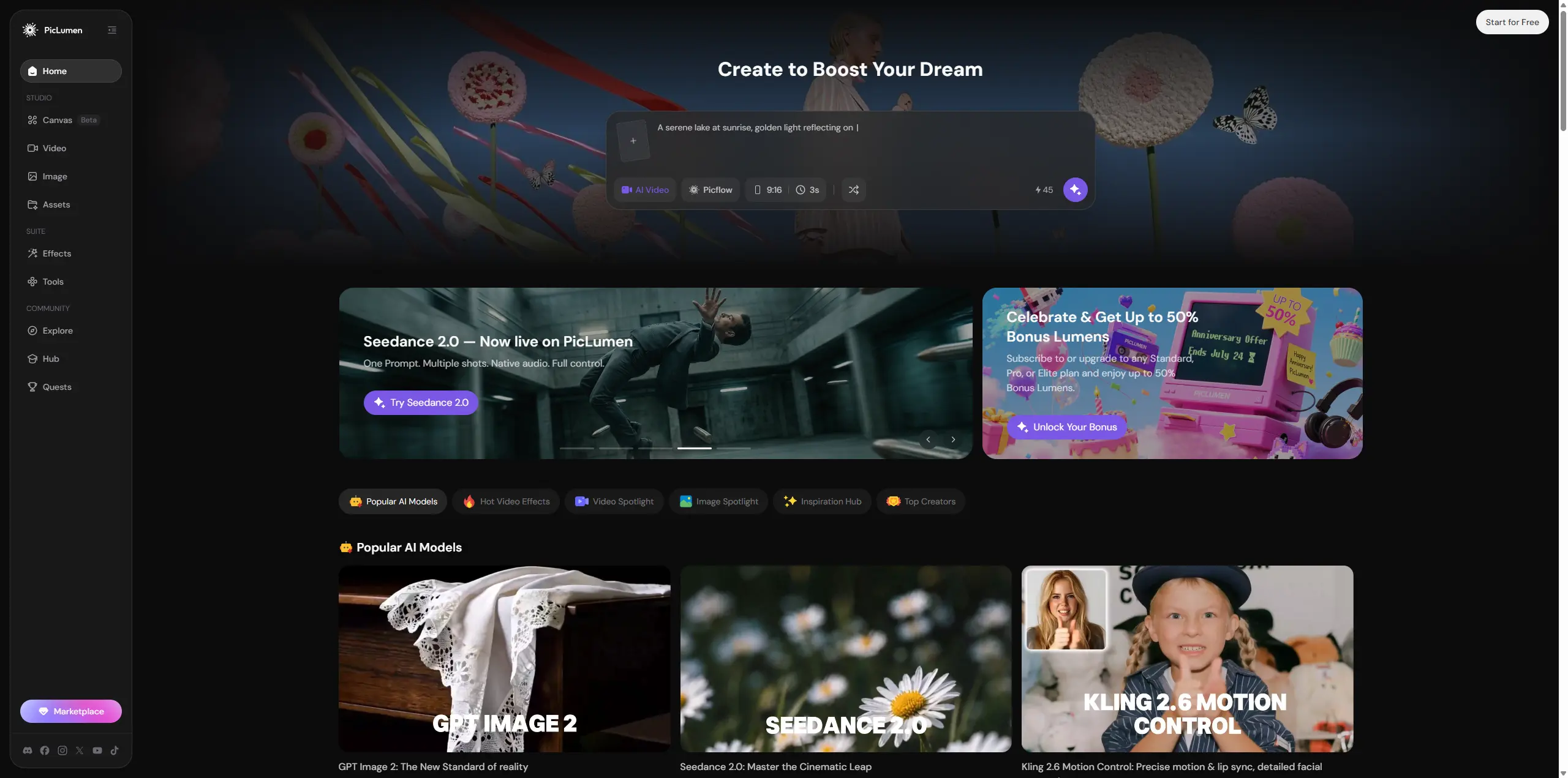
That is where a platform like PicLumen makes a lot of sense. Instead of feeling like a tool for quick edits, it acts more like a creative playground where you can easily swap between different AI models to get the exact look you want. If you ever run out of ideas, you don't have to stare at a blank prompt box, either. You can just scroll through the Explore and Hub feeds to see what prompts other people used and build off of their work.
The best part is that despite having so many features, it isn't intimidating. The interface is simple and clean, which makes it a natural next step for anyone who wants to keep creating without getting bogged down by complicated software.
Final Verdict: Is DeeVid AI Worth It?
I have a mixed opinion on DeeVid AI, to be honest. It's one of those tools where the experience really depends on what you expect from it. Some features worked better than I expected, while others still need more improvement.
On the positive side, DeeVid AI is easy to use and packs multiple AI features into one place. The text-to-image generation was decent, the photo-to-anime transformation performed well, and the image-to-video feature could create some impressive results when everything worked properly.
However, the limitations are hard to ignore. The face swap feature struggled with realistic blending, video generation still had issues with movement consistency, and the credit system can feel restrictive, especially when using higher-quality models.
Overall, I think DeeVid AI works best as a casual creative tool for people who want to experiment with AI images and videos from time to time. But for users looking for a reliable daily AI creation workflow or professional-level control, it may feel a little limited.
Frequently Asked Questions
Is DeeVid AI completely free to use?
No. DeeVid AI offers a free trial, but it comes with limited credits and usage restrictions. For regular image or video generation, you will likely need a paid plan.
Can I use images generated or edited by DeeVid AI for commercial work?
It depends on your plan and the type of content you create. Commercial use is generally available for paid users, while free accounts may have more restrictions.
Is DeeVid AI good for anime photos?
Yes, DeeVid AI’s photo-to-anime feature performs reasonably well. It can create stylized anime images while keeping key facial features recognizable.
What is the cleanest alternative to DeeVid AI for fast image generation?
PicLumen is a strong alternative for users who want fast AI image generation with more creative flexibility. It supports image creation, editing, and AI video workflows.