Removing a background sounds easy, but getting a clean and natural result is not always simple. Many free AI background removers can delete the main background quickly, but they may leave rough edges, remove small details, or make the image look unnatural. For users, a good AI background remover should totally keep hair, product edges, and fine details while making the image ready for social media, e-commerce, or marketing use.
To find the best AI background remover, we compared 5 popular tools with the same images and different use cases. Let's see which tool works best.
Quick Verdict
Among the 5 tested tools, remove.bg delivered the best edge accuracy, especially for portraits with hair details. Adobe Express Background Remover offered the best overall experience with solid results and easy editing features. Photoroom performed well for product images. And Canva achieved quick social media designs. PicLumen stood out for users who want background removal combined with AI editing workflows.
How We Tested the Best AI Background Removers in 2026
To compare these tools, we tested 5 AI background removers with the most common real-world scenarios: portraits.
Test: Portraits & Hair Details
Portrait photos are one of the hardest challenges for AI background removal.
The test images included:
curly hair;
long hair;
flyaway strands;
glasses;
different poses and complex backgrounds.
These details help check whether AI can keep natural edges without removing important parts.
How We Scored These AI Background Removers
Instead of only looking at removal accuracy, we also considered other factors that users cared about. Here are five key areas we mainly focused on.
Evaluation Dimension | Weight | What We Checked |
Edge Accuracy | 30% | Hair, object edges, and fine details |
Background Detection | 25% | Whether AI totally separates the subject from the background |
Output Quality | 20% | Natural edges, image clarity, and transparency quality |
Free Plan Experience | 15% | Watermarks, download limits, and available features |
Workflow & Speed | 10% | Upload process, processing time, and overall convenience |
In the following part, we will show you how the 5 Best Free AI Background Removers worked in test1.
Real Test Example: How the Top 5 AI Background Removers Handle Portraits
1. PicLumen Background Remover Test Result
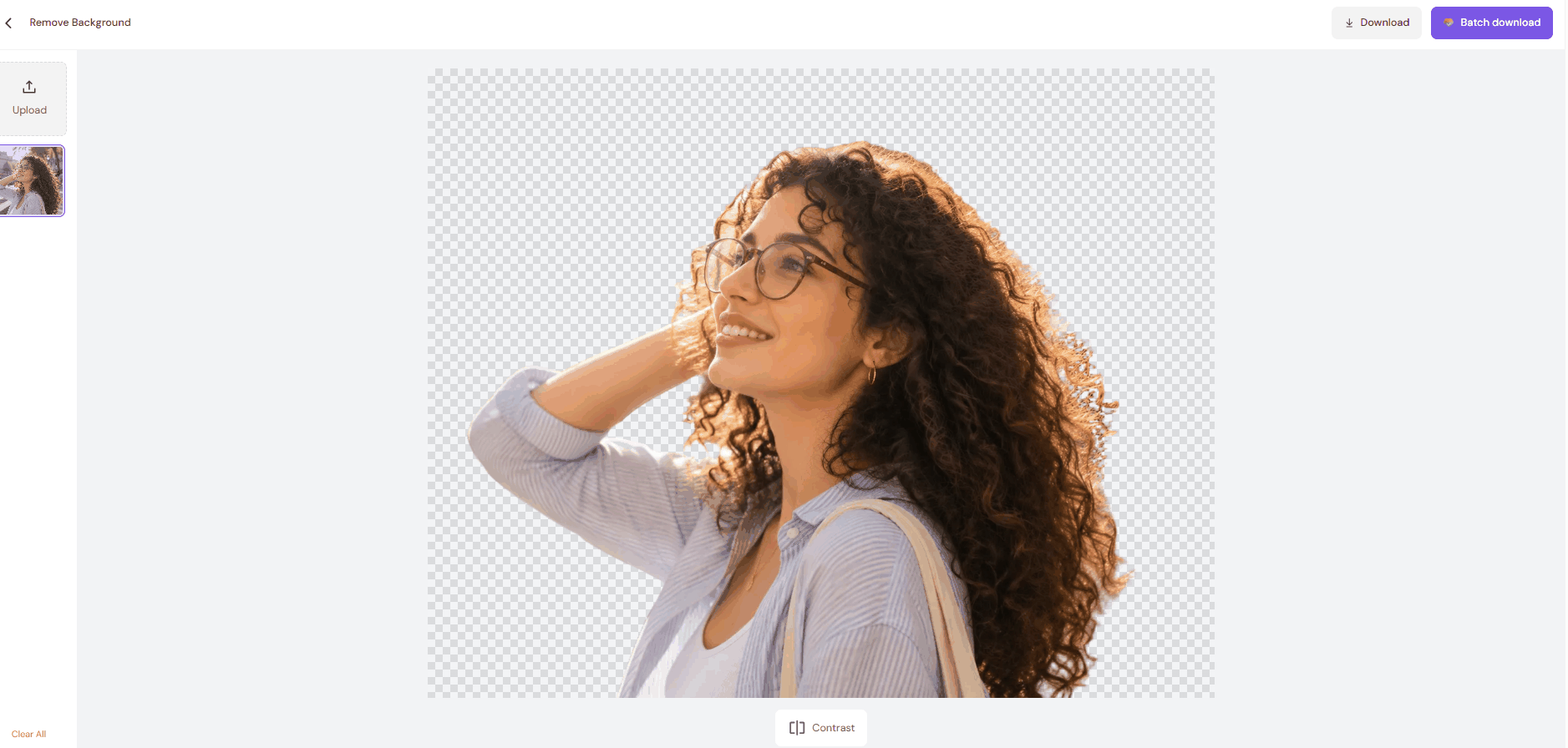

PicLumen is a good choice for creators who want background removal plus AI editing tools in one place. It delivers clean cutouts with good image quality, but it is better for creative workflows than one-click background removal.
PicLumen Performance Breakdown
Evaluation Dimension | Test Result | Our Observation |
Edge Accuracy | ⭐⭐⭐ | The main subject was separated correctly, but some small curly hair strands were merged or removed during background removal |
Background Detection | ⭐⭐⭐⭐ | PicLumen recognized the person well and removed the background without cutting important areas |
Output Quality | ⭐⭐⭐⭐ | The image kept good clarity and natural colors. However, the hair edges looked slightly softer when zoomed in |
Free Plan Experience | ⭐⭐⭐⭐ | PicLumen offers free AI editing features, making it easy for users to test background removal and other creative tools |
Workflow & Speed | ⭐⭐⭐⭐⭐ | The process works well, but it feels more like an AI editor than a one-click background remover. Users may need extra steps to complete the task |

Note: This is only one example from our portrait test. The scores were based on 10 portrait images with different challenging features.
2. Canva Background Remover Test Result


Canva is the easiest AI background remover for beginners and content creators. It delivers clean results for everyday images, but it is not the strongest choice for detailed hair edges or professional cutouts.
Canva Performance Breakdown
Evaluation Dimension | Test Result | Our Observation |
Edge Accuracy | ⭐⭐⭐⭐ | The main outline was clear, but some small hair strands were lost around the edges |
Background Detection | ⭐⭐⭐⭐⭐ | It correctly identified the person and removed the background without cutting important areas |
Output Quality | ⭐⭐⭐⭐ | The final cutout looked natural, but some fine details were slightly simplified |
Free Plan Experience | ⭐⭐⭐ | Easy to try, but some features and downloads require sign-up or even Canva Pro |
Workflow & Speed | ⭐⭐⭐⭐⭐ | Very simple process: upload → remove → edit |
3. Adobe Express Background Remover Test Result
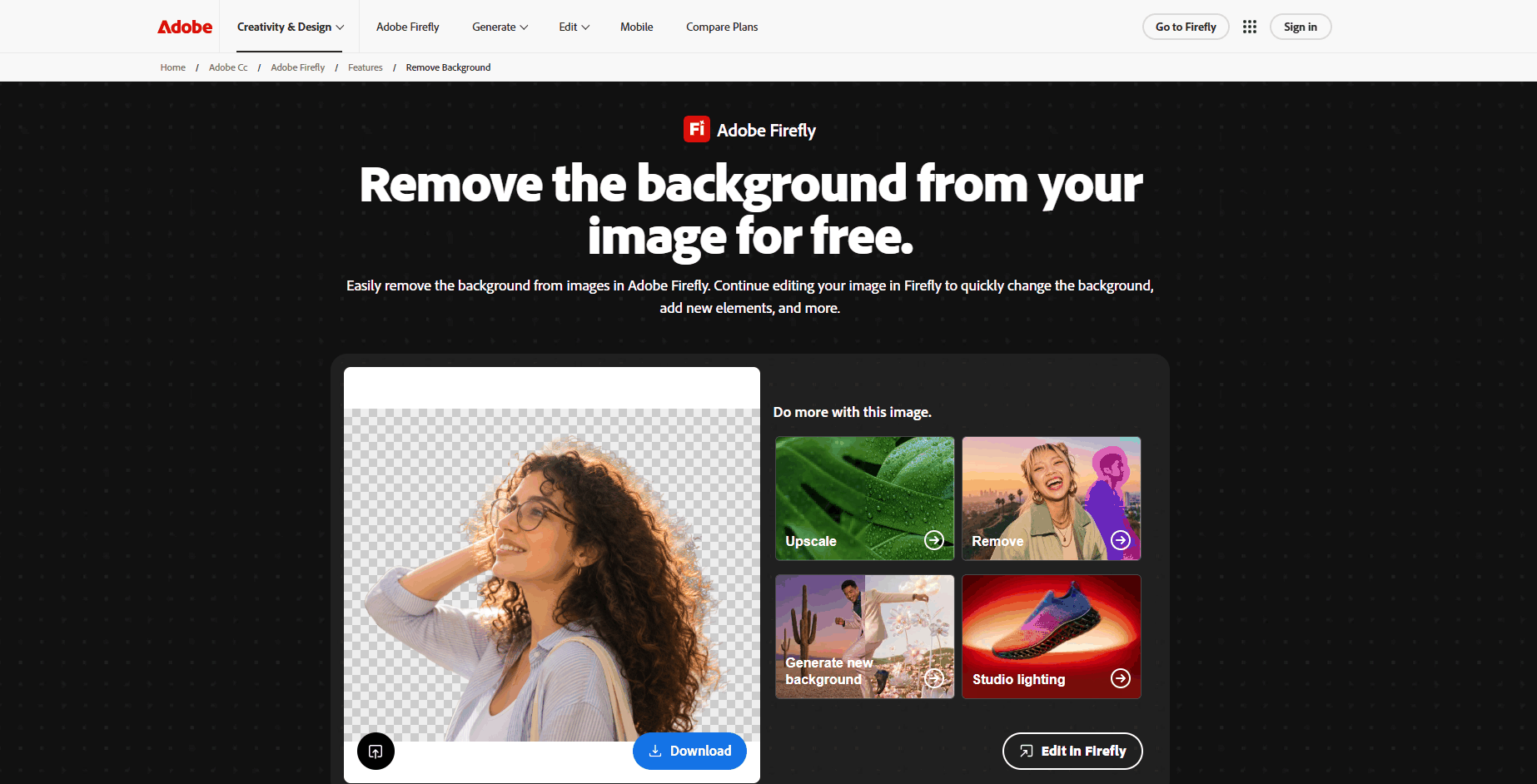

Adobe Express is a solid choice for users who want reliable background removal with Adobe's editing tools. It creates natural-looking cutouts, but details may need extra cleanup.
Adobe Performance Breakdown
Evaluation Dimension | Test Result | Our Observation |
Edge Accuracy | ⭐⭐⭐ | The delicate curly strands along the outer hair perimeter are heavily frayed, and many tiny fine curls are lost or distorted. |
Background Detection | ⭐⭐⭐⭐ | The tool accurately identified the person, including the arm, glasses, and shoulder area |
Output Quality | ⭐⭐⭐ | The cutout looked natural with good image clarity. Ordinary viewing looks fine, yet hair detail collapse is obvious under magnification. |
Free Plan Experience | ⭐⭐⭐ | The tool is easy to try, but some Firefly editing features require an Adobe account or paid plan |
Workflow & Speed | ⭐⭐⭐⭐ | Background removal was fast, and users can continue editing in Firefly without switching tools |
4. Photoroom Background Remover Test Result
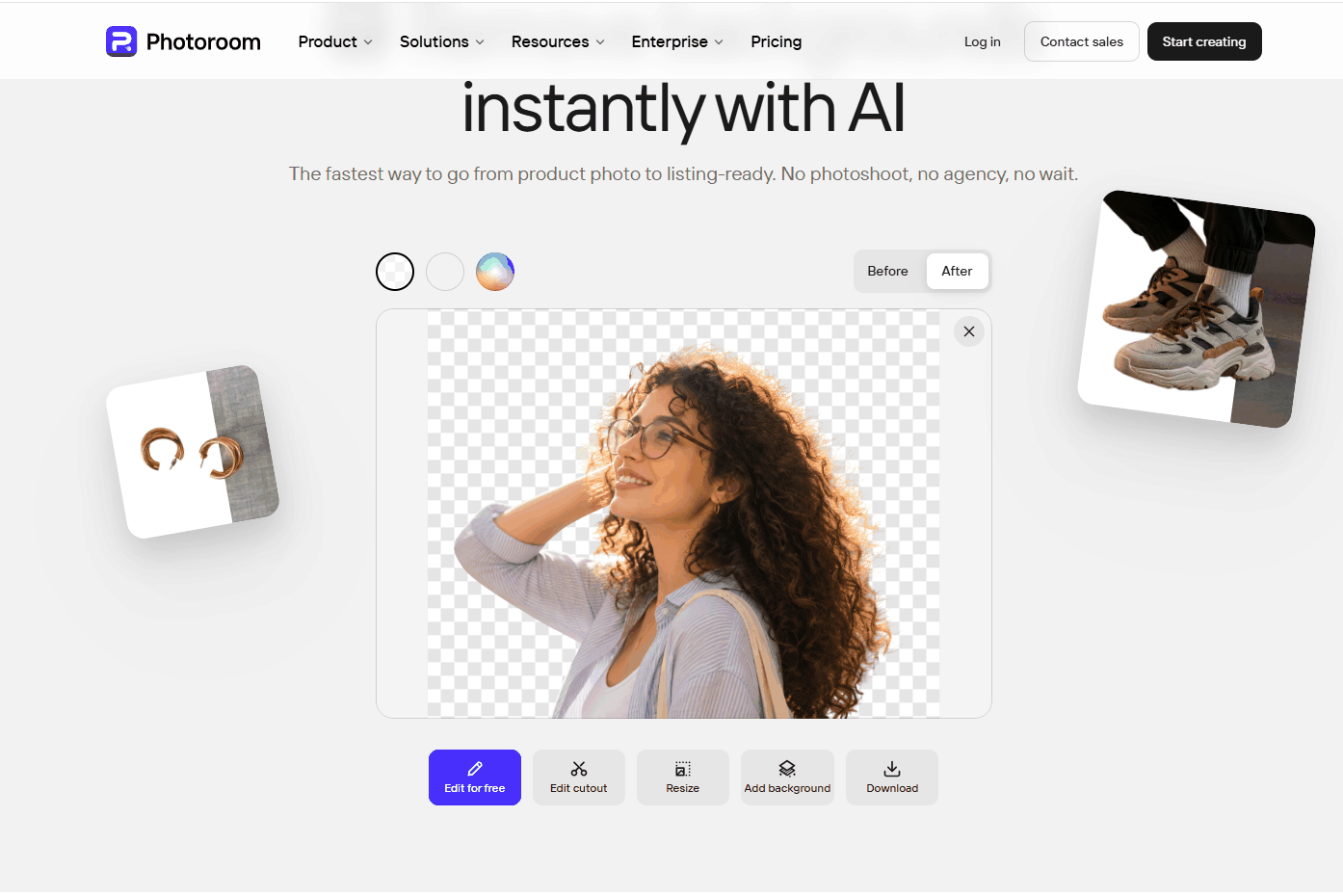

Photoroom is a good choice for online sellers and creators who need fast background removal. It handles subject detection very well and supports efficient editing workflows, but it is less accurate when handling complex details or fine edges.
Photoroom Performance Breakdown
Evaluation Dimension | Test Result | Our Observation |
Edge Accuracy | ⭐⭐⭐⭐ | The main body outline was clean, but some tiny curly hair strands around the edges were simplified |
Background Detection | ⭐⭐⭐⭐⭐ | Photoroom correctly detected the person and removed the outdoor background without affecting the main subject |
Output Quality | ⭐⭐⭐ | The final image looked natural, but some hair details were missed |
Free Plan Experience | ⭐⭐⭐ | It offers a 7-day free trial. Easy to try basic functions. High-quality downloads, batch editing, and AI background tools require Pro payment. |
Workflow & Speed | ⭐⭐⭐⭐⭐ | Supports one-click batch processing for multiple photos. |
5. Remove.bg Background Remover Test Result
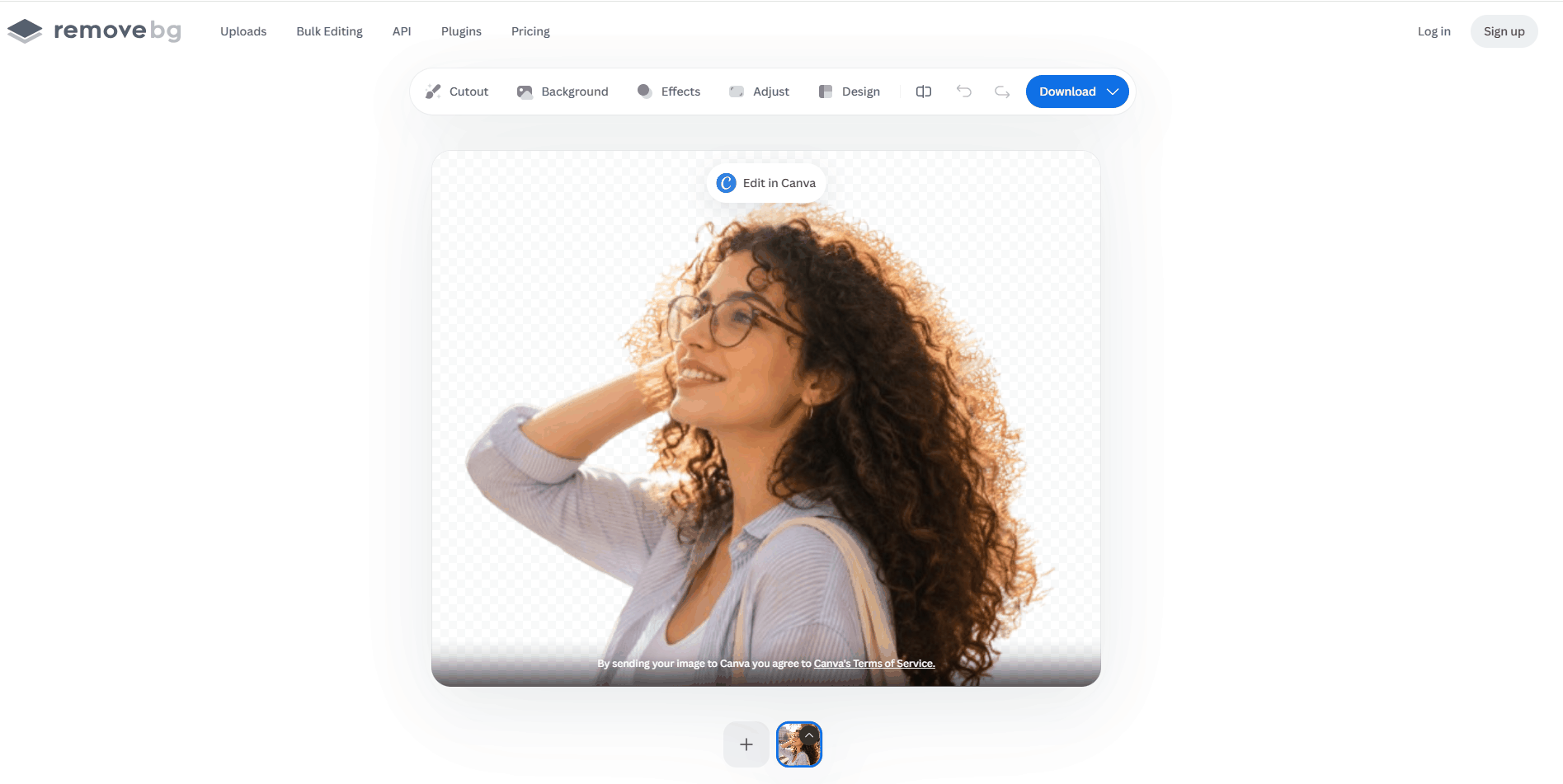

Remove.bg works very well for most images, and it is suitable for users who want fast and accurate background removal for portraits, profile photos, and everyday images.
Remove.bg Performance Breakdown
Evaluation Dimension | Test Result | Our Observation |
Edge Accuracy | ⭐⭐⭐⭐ | It handled the main outline of the person well. The face, glasses, shoulders, and arm edges were clean. For portraits with complex hairstyles, the result is good. |
Background Detection | ⭐⭐⭐⭐⭐ | The tool did not remove important parts of the body or keep unwanted background areas. Even with the bright light around the hair, it separated the foreground clearly. |
Output Quality | ⭐⭐⭐⭐ | The final cutout looks natural for everyday use. The image keeps good sharpness and color. However, the hair edge has a slightly rough feeling. |
Free Plan Experience | ⭐⭐⭐ | remove.bg is simple to test with free credits. The free version is enough for casual users. Downloading high-resolution images usually requires payment. |
Workflow & Speed | ⭐⭐⭐⭐⭐ | The whole process is very simple. The result appears within seconds. |
Which Background Remover Should You Use?
The best tool depends on your editing needs, workflow, and experience level:
Best For | Recommended Tool | Why |
Users who need the most accurate cutouts for portraits, hair, and complex edges | remove.bg | This ai tool is focused on background removal, and it works well. Its AI model delivers cleaner edges on people and detailed objects, so it is a strong choice for professional-looking cutouts. |
Online sellers managing large numbers of product images | Photoroom | Built for e-commerce workflows, it supports batch editing, product templates, and AI-generated backgrounds. So it helps sellers create marketplace-ready images faster. |
Beginners and content creators who design social posts, ads, or presentations | Canva | The background remover is part of a complete design platform. Users can remove backgrounds, add templates, resize images, and publish content without switching tools. |
Adobe users who want professional results without using Photoshop | Adobe Express | Powered by Adobe's AI technology, it offers reliable background removal with no watermark on the free plan. It also connects with Adobe's creative ecosystem for further editing. |
Creators who want background removal plus AI image editing tools | PicLumen | More than a simple remover. It combines background removal with AI image generation and editing features, making it useful for creative projects beyond basic cutouts. |
FAQ
How to remove the white background from a picture?
Upload your image to an AI background remover like remove.bg, PicLumen, or Canva. The tool will automatically detect the subject and remove the white background in seconds. You can then download the transparent PNG or add a new background.
Are there any truly free photo background removers?
Yes. Tools like Adobe Express, Canva, and PicLumen offer free background removal options. Yet, some tools will limit functions such as image quality, downloads, or advanced features. If you want to use these tools, you need to pay for plans.
What is the most accurate background remover?
Based on our tests, remove.bg delivered the most consistent results for portraits and detailed edges. Canva and Photoroom also performed well in subject detection, while PicLumen was more useful for users who wanted to continue editing after background removal.
Which background remover is easiest to use?
remove.bg is the easiest for quick background removal because it only requires uploading an image and downloading the result. For users who want to continue designing after removal, PicLumen offers a smoother all-in-one workflow.