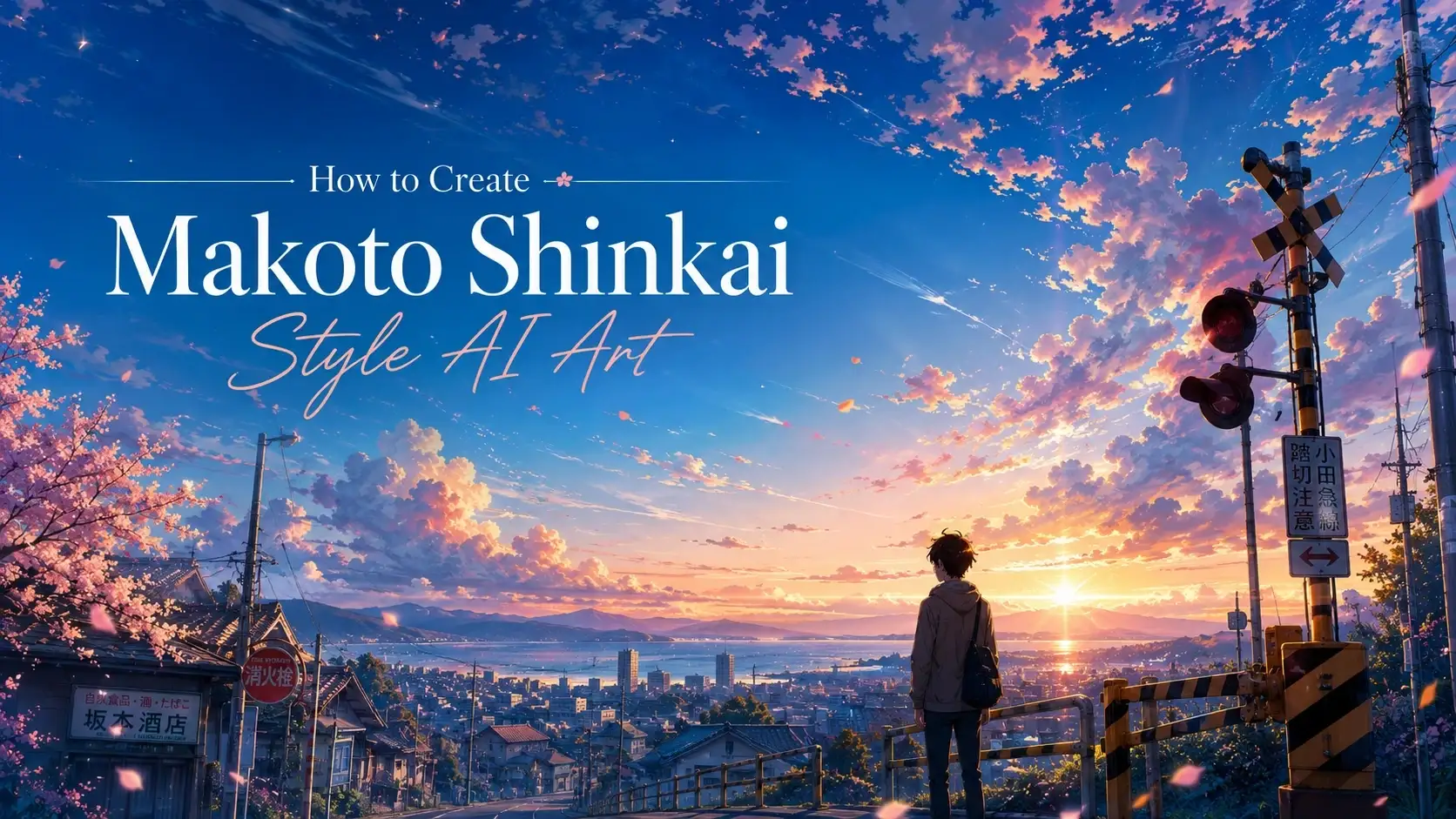
Want to create stunning anime artwork with cinematic landscapes, and breathtaking lighting? PicLumen can help you create Makoto Shinkai-inspired art in just a few steps.
However, getting the right result is not as simple as adding "Makoto Shinkai style" to a prompt. To create images with a similar visual feeling, you need to understand the key elements behind his artwork, and write prompts that describe lighting, atmosphere, composition, and emotions.
In this guide, you'll learn how to create Makoto Shinkai-inspired AI art and explore practical examples for different scenes.
What Is Makoto Shinkai's Art Style?
Before writing your prompt, you need to understand what makes a Shinkai scene instantly recognizable. The dramatic lighting, the fantastical skies, the way wet asphalt reflects streetlights... that's the real sauce you're trying to capture.
When creating AI art inspired by this aesthetic, focus on these key elements:
Visual Element | Signature Characteristics |
Sky | Clouds glowing at sunset, blue-hour twilight, or sprawling starry nights |
Lighting | God rays filtering through tree leaves, soft rim lighting, lens flares, or warm sunlight |
Weather | Rain-soaked pavement, neon lights, lingering mist, or cherry blossom petals caught in the wind |
Colors | Saturated cobalt blues paired with deep oranges, subtle pink gradients, and vibrant foliage greens |
Mood | Nostalgic, peaceful, emotional, dreamlike |
Environment | Railway stations, city streets, schools, countryside, seaside landscapes |
The key is to recreate the feeling of beautiful everyday moments filled with emotion and atmosphere.
How to Create Makoto Shinkai Style AI Art With 5 Steps
Creating cinematic anime artwork with PicLumen only takes a few simple steps. Through the following 5 steps, you can turn your ideas into atmospheric AI-generated anime scenes.
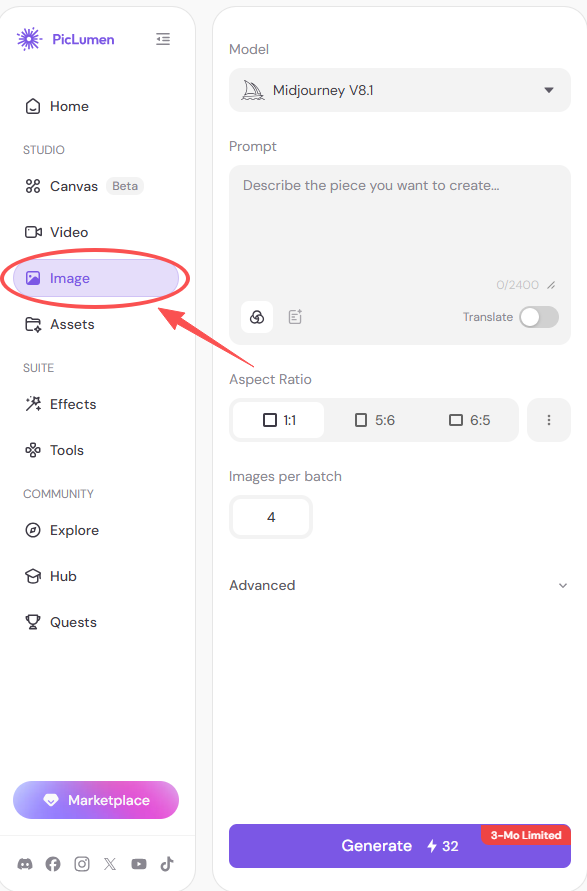
Step 1. Open PicLumen AI Image Generator
Start by opening PicLumen's AI Image Generator and enter the image creation workspace. Here, you can create images from text prompts and explore different AI models based on your creative needs.
Step 2. Select a Model That Suits Your Needs
Choose an AI image generation model that fits your creative purposes. Different models may vary in styles and levels of details.
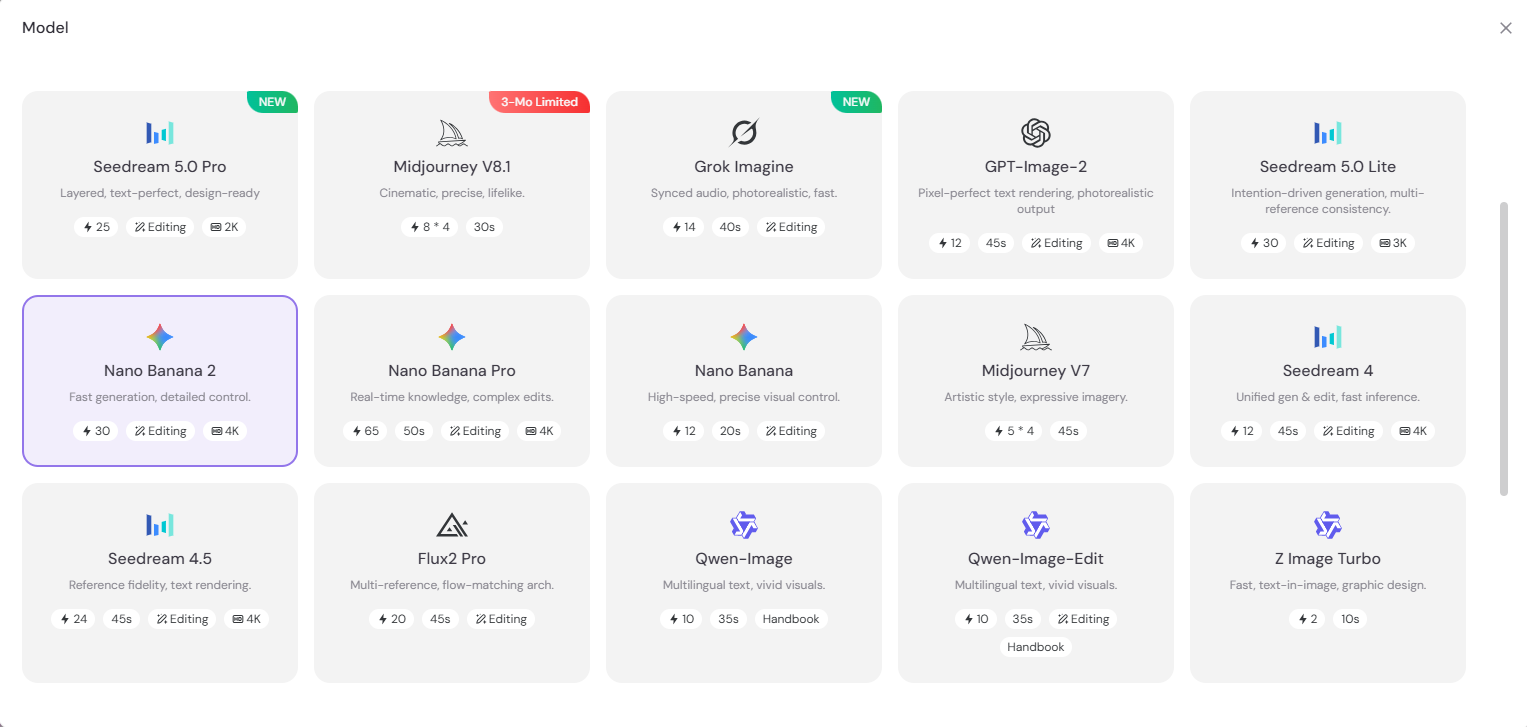
For Makoto Shinkai-inspired artwork, PicLumen has a considerable number of good options available:
Model | Best For |
GPT-Image-2 | Creating detailed scenes from natural language descriptions |
Refining images | |
Producing cinematic anime landscapes | |
Generating highly detailed backgrounds, lighting, and atmospheric scenes |
Step 3. Adjust Your Settings
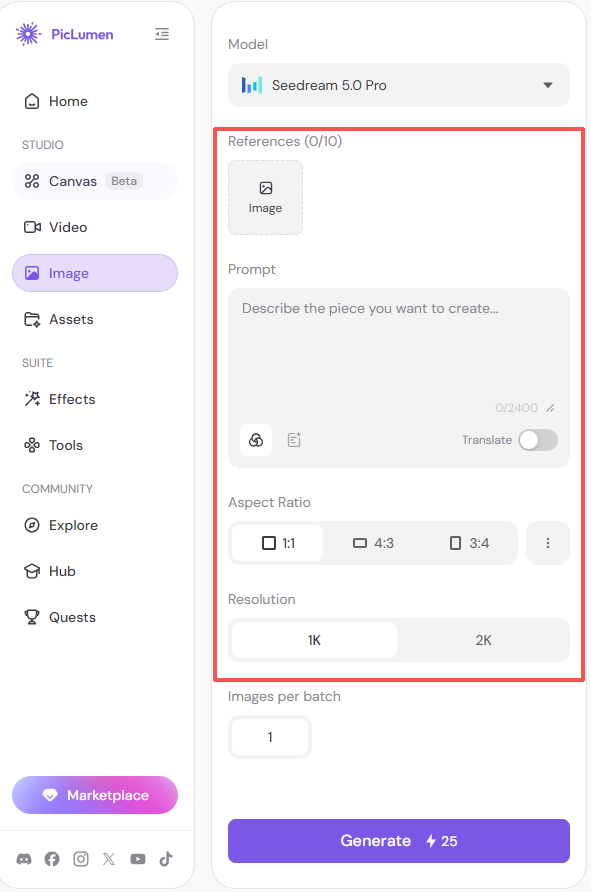
Before generating your image, fine-tune the generation settings for better results.
Consider adjusting:
Aspect Ratio – Choose a wide ratio like 16:9 for cinematic landscapes, or 9:16 for mobile wallpapers and social media.
Resolution – Higher quality settings can produce richer details and cleaner lighting.
Number of Images – Generate multiple versions to explore different moods.
Reference Image (Optional) – Upload a reference image if you want to guide the overall vibe.
Tip: You don't need to get everything perfect on the first try. Start with the default settings, then experiment as you refine your prompt.
Step 4. Write an Effective Prompt
A good prompt describes more than just the subject. It should tell the AI what the scene looks like, feels like, and how it should be composed.
A useful formula is:
Subject + Environment + Lighting + Color + Mood + Composition + Details
For example:
Basic prompt:
A man standing in the street.
This gives the AI very little information and is not vivid enough.
Improved prompt:
Makoto Shinkai anime style, rain-soaked alleyway, glowing lanterns, and emotional farewell. A young man with short dark hair seen from behind, wearing a dark shirt, standing in the foreground looking ahead. In the background, a young girl in a dark skirt holding a black umbrella is walking away down a wet paved street. Over-the-shoulder perspective, reflective wet pavement, hyper-detailed backgrounds. Perfect blend of nostalgic watercolor aesthetics, luminous droplets, and evocative storytelling.
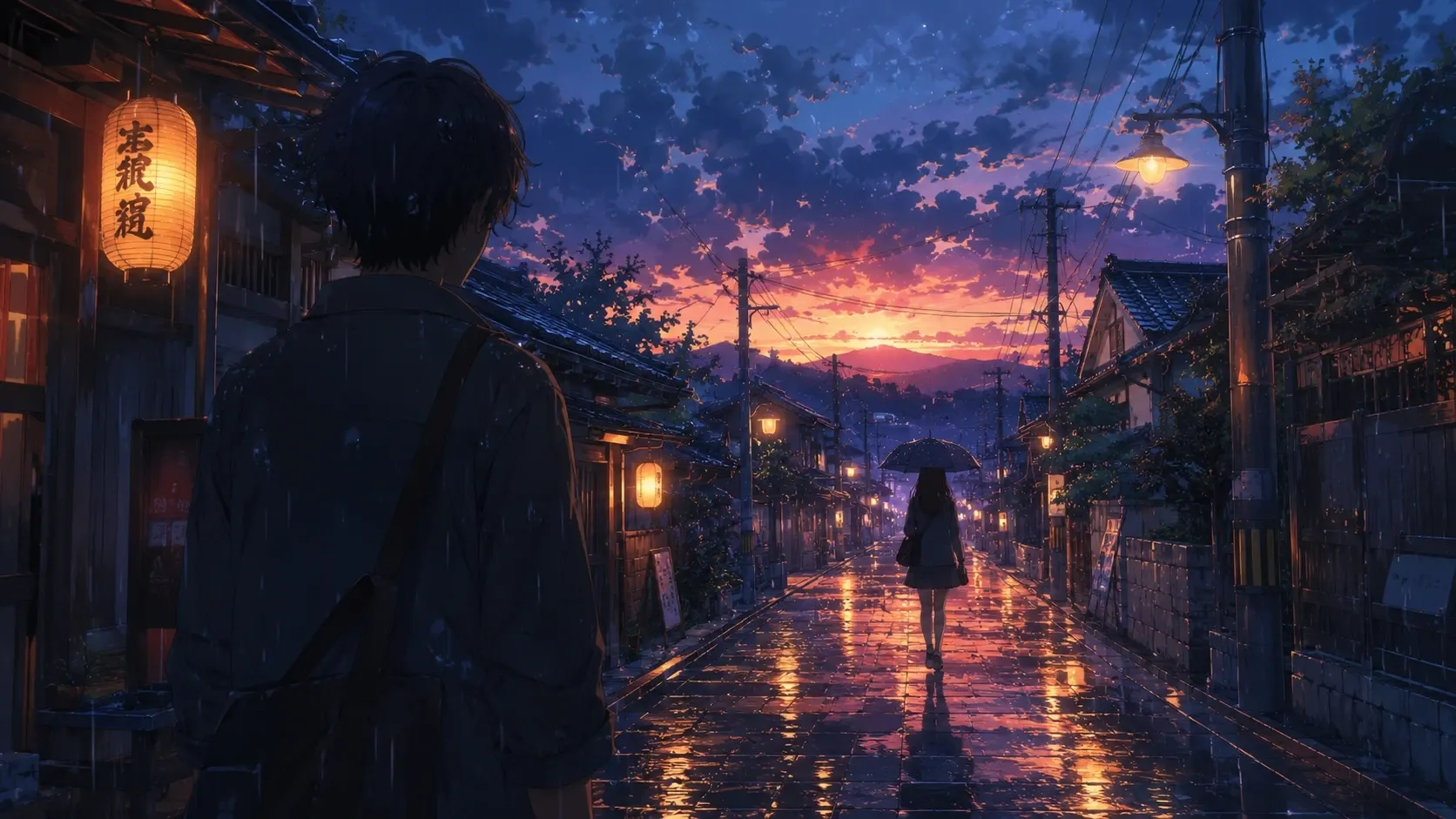
The second prompt works better because it describes:
Where the scene happens
What time of day it is
How the lighting looks
What emotion the image should convey
Step 5. Generate, Refine, and Improve Your Image
The first result may not be perfect. More often than not, you need to generate multiple versions and tweak your prompt for a while before getting the ideal results.
Common adjustments:
Flat lighting: Add cinematic lighting, volumetric sunlight, atmospheric depth
Dull colors: Add vibrant colors, blue-orange contrast, rich gradients
Generic atmosphere: Add nostalgic mood, emotional storytelling, dreamlike atmosphere
Simple backgrounds: Add highly detailed environment, cinematic scenery
A good workflow is: generate → compare → refine → upscale. Small prompt adjustments can make a significant difference in the final results.
Prompt Examples by Scene
The best Makoto Shinkai-inspired AI art is very location-vivid.
Different combinations of environments, lighting, weather, and emotions can create completely different outputs.
Below are several prompt examples that explore different visual themes, which may be inspiring for your own creation.
Rainy Tokyo Street: Urban Nostalgia
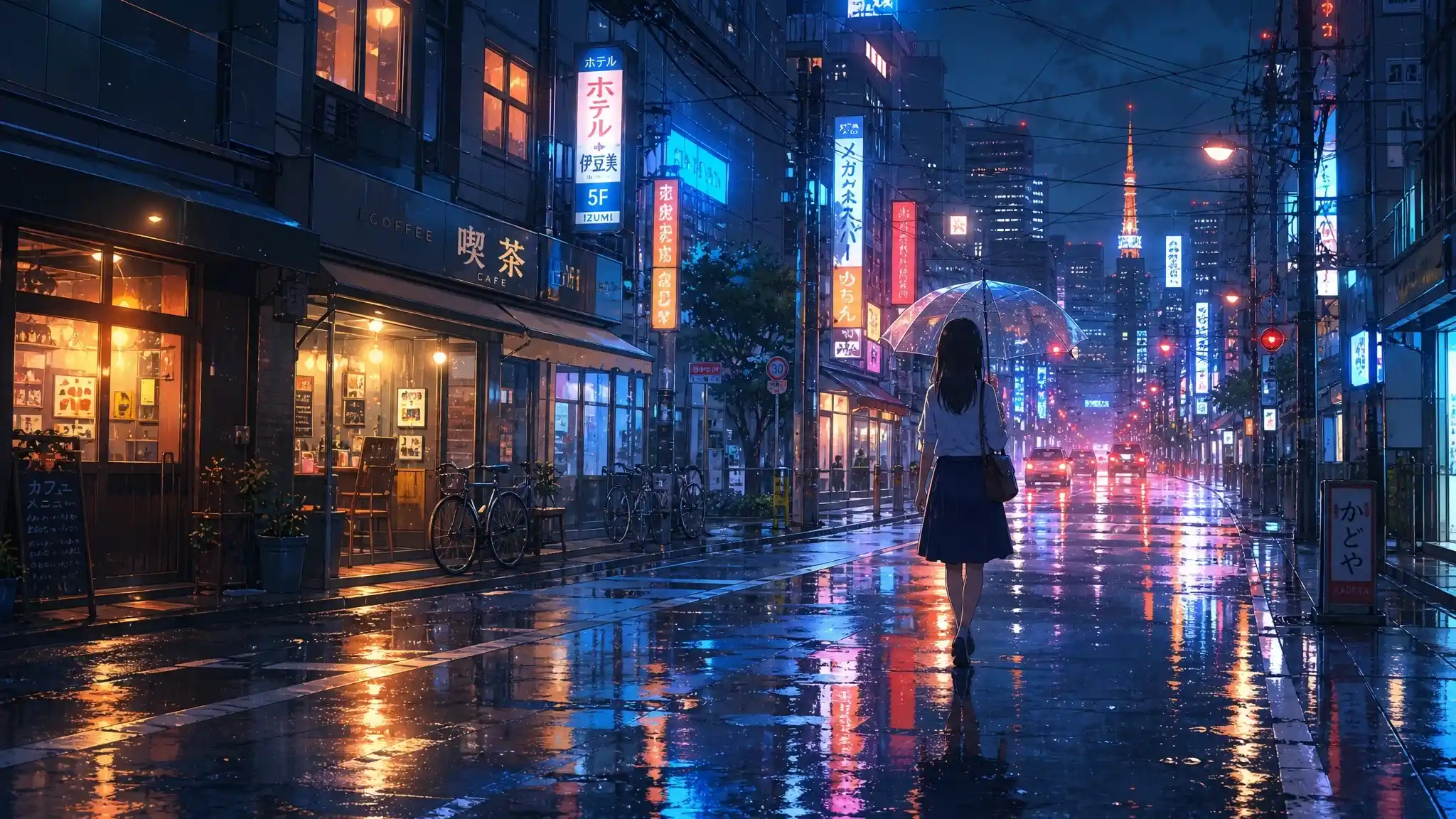
Prompt: A young woman walks alone through a quiet Tokyo street just after a summer rain. She holds a transparent umbrella while tiny raindrops continue to fall. Wet pavement reflects colorful neon signs, warm café lights, and passing traffic. Shimmering pools of blue, orange, and pink on the ground. Gentle mist, while soft evening light blends naturally with the glowing cityscape. Bicycles parked outside shops, overhead power lines, and reflections in puddles. Add realism to the scene. Rich anime-style colors, ultra-detailed urban background, volumetric lighting, subtle lens flare, dreamy atmosphere, inspired by Makoto Shinkai.
Model: GPT-image-2
Rooftop Garden Above Tokyo
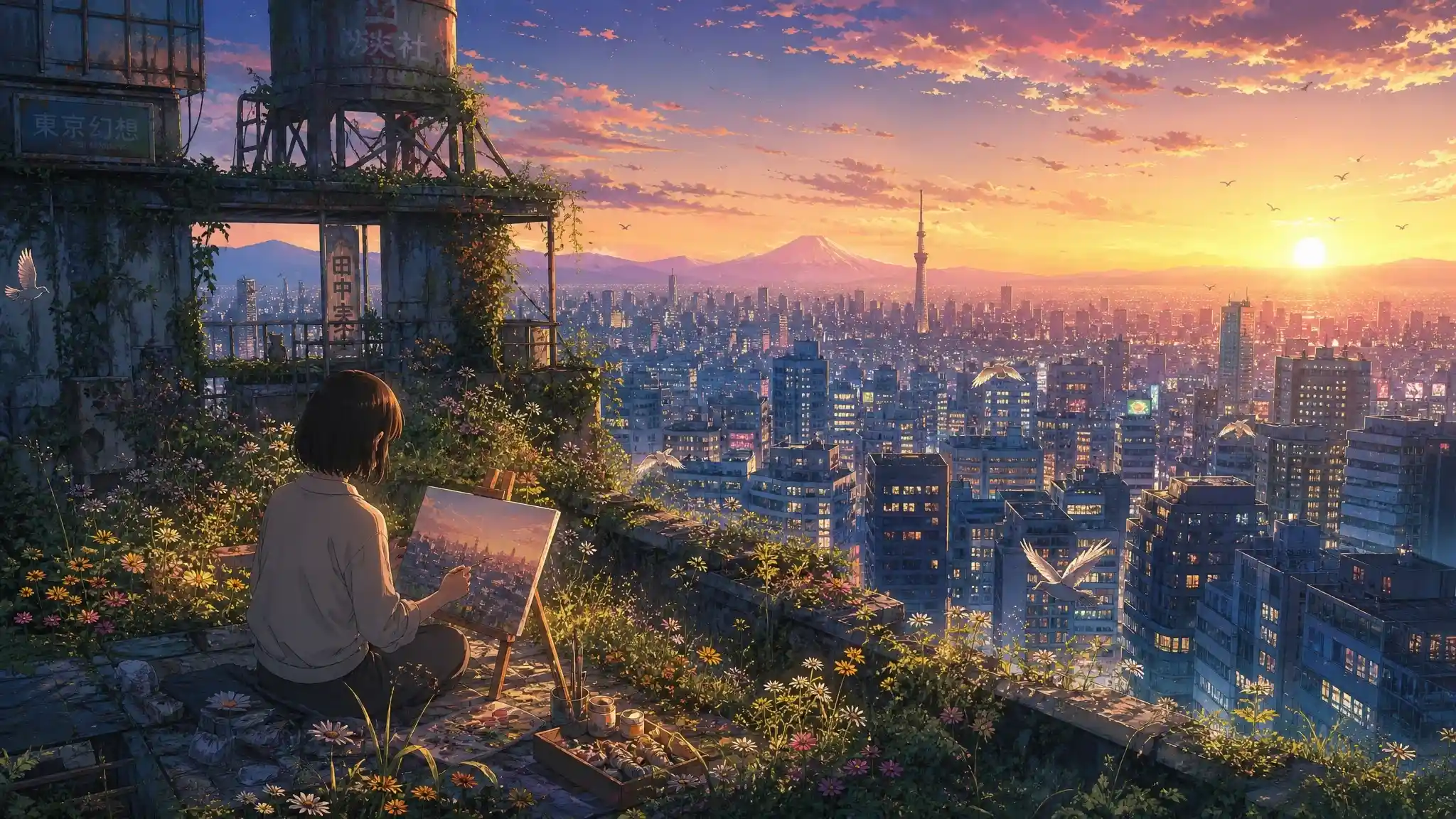
Prompt: Poetic atmosphere, environmental storytelling, warm sunrise lighting, vibrant colors, highly detailed anime scenery, inspired by Makoto Shinkai. A hidden rooftop garden above Tokyo skyscrapers during the first light of dawn. A young artist sits among wildflowers and small trees growing between abandoned buildings. She was painting the city skyline while the morning sun slowly rises behind distant mountains. Below, thousands of apartment windows begin to glow. There is a contrast between the quiet natural garden and the endless urban landscape. Birds fly between buildings, clouds turn pink and gold, and the entire city feels suspended between reality and a dream.
Model: GPT-image-2
Rural Railway Crossing
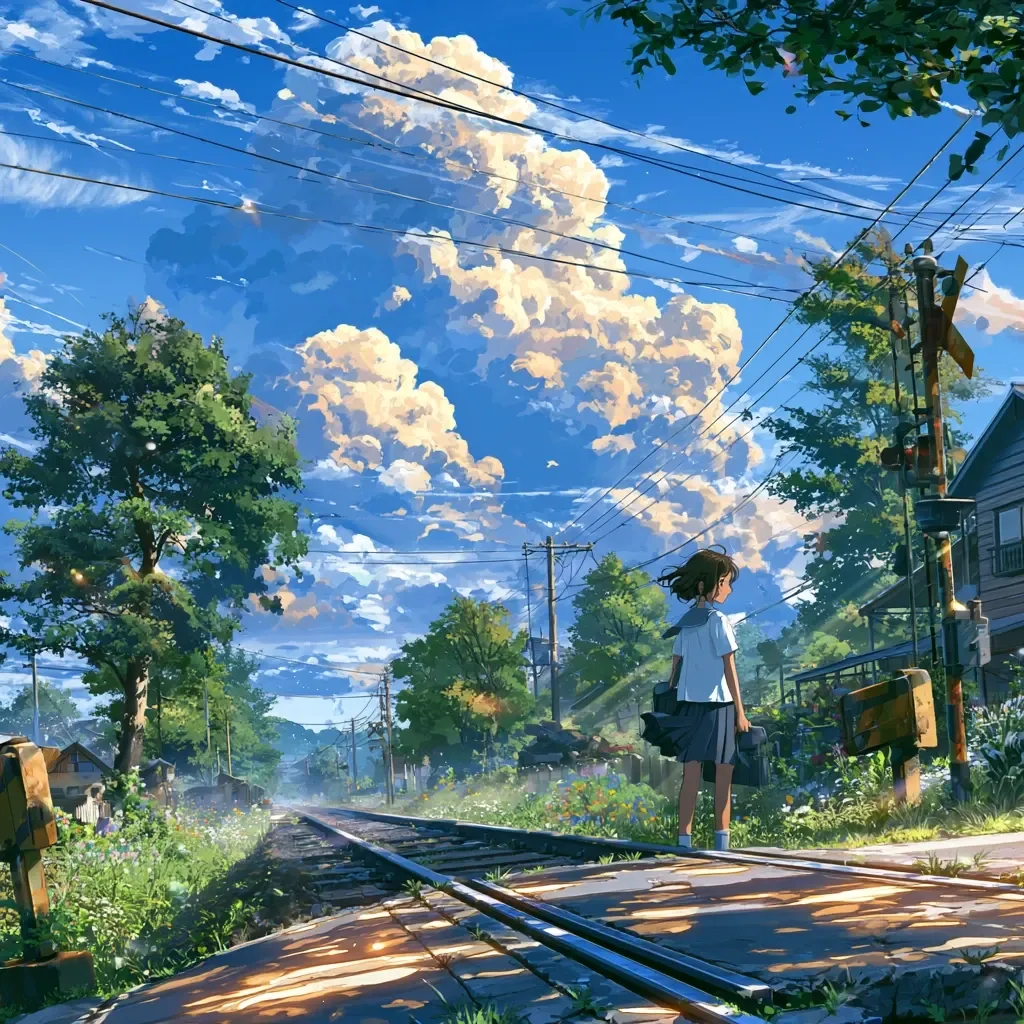
Prompt: A quiet railway crossing in a rural Japanese town during a warm summer afternoon. A teenage girl in a white school uniform stands patiently beside the tracks. She was holding her school bag as a gentle breeze lifts her hair and skirt. Above her, an enormous vivid blue sky, with towering cumulus clouds glowing in the afternoon sunlight. Lush green trees sway softly, wildflowers bloom along the roadside, and sunlight filters through the leaves. The atmosphere feels peaceful, nostalgic, and full of anticipation. Vibrant colors, lighting, subtle lens flare, breathtaking anime scenery, inspired by Makoto Shinkai.
Model: Midjourney V8.1
Mountain Village and Time-Traveling Letter
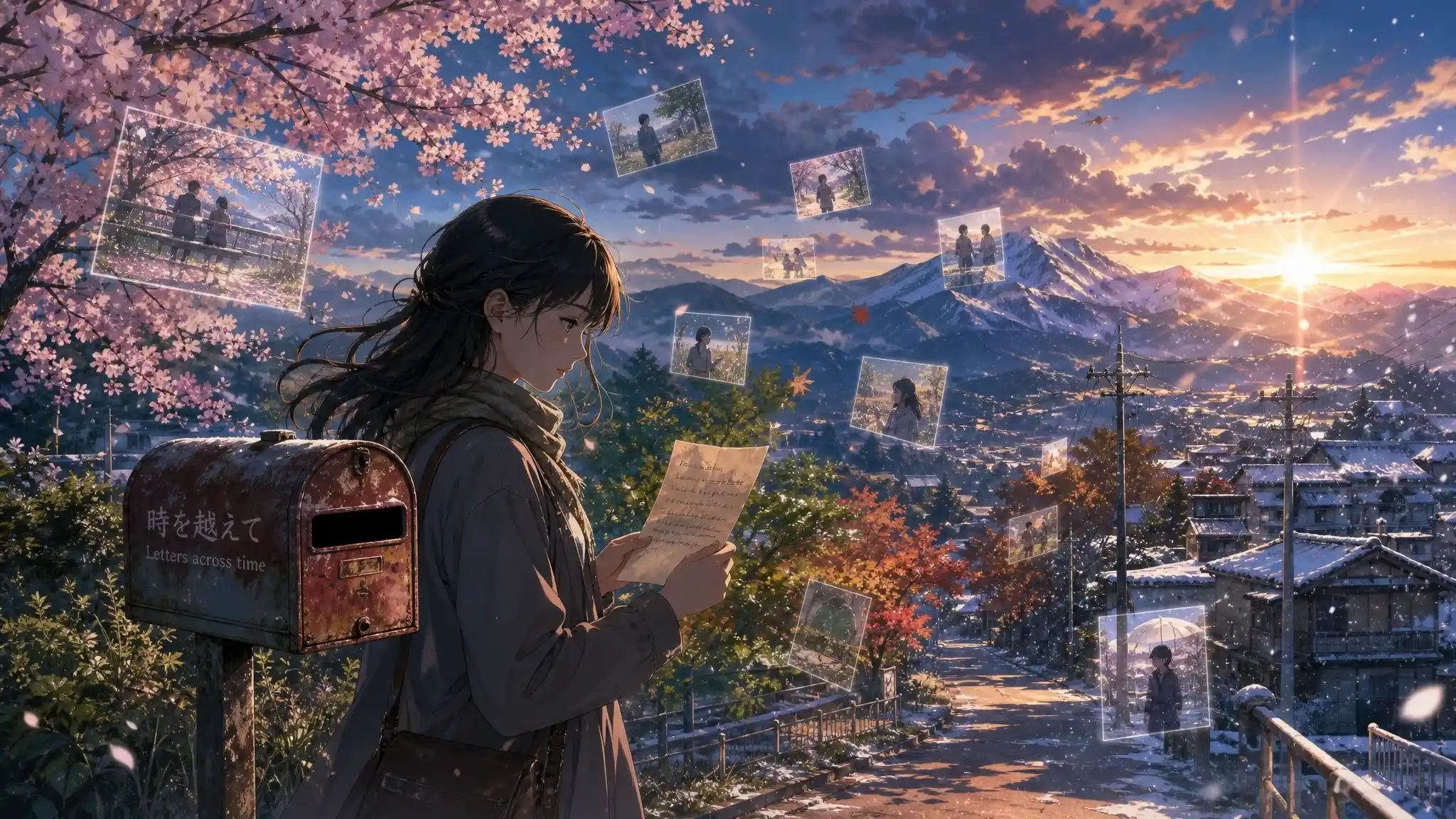
Prompt: A young woman standing beside an old mailbox in a quiet mountain village. She was holding a mysterious handwritten letter that has traveled through time. Around her, glowing fragments of memories float in the air like transparent photographs, showing moments from different seasons and different years. Cherry blossoms, summer sunlight, autumn leaves, and winter snow appear together in the same landscape. Past and present is blending. The village road stretches toward distant mountains under a twilight sky. Cinematic anime film style, surreal yet realistic atmosphere, beautiful lighting, detailed background, inspired by Makoto Shinkai.
Model: Flux 2 Pro
Abandoned Train Station
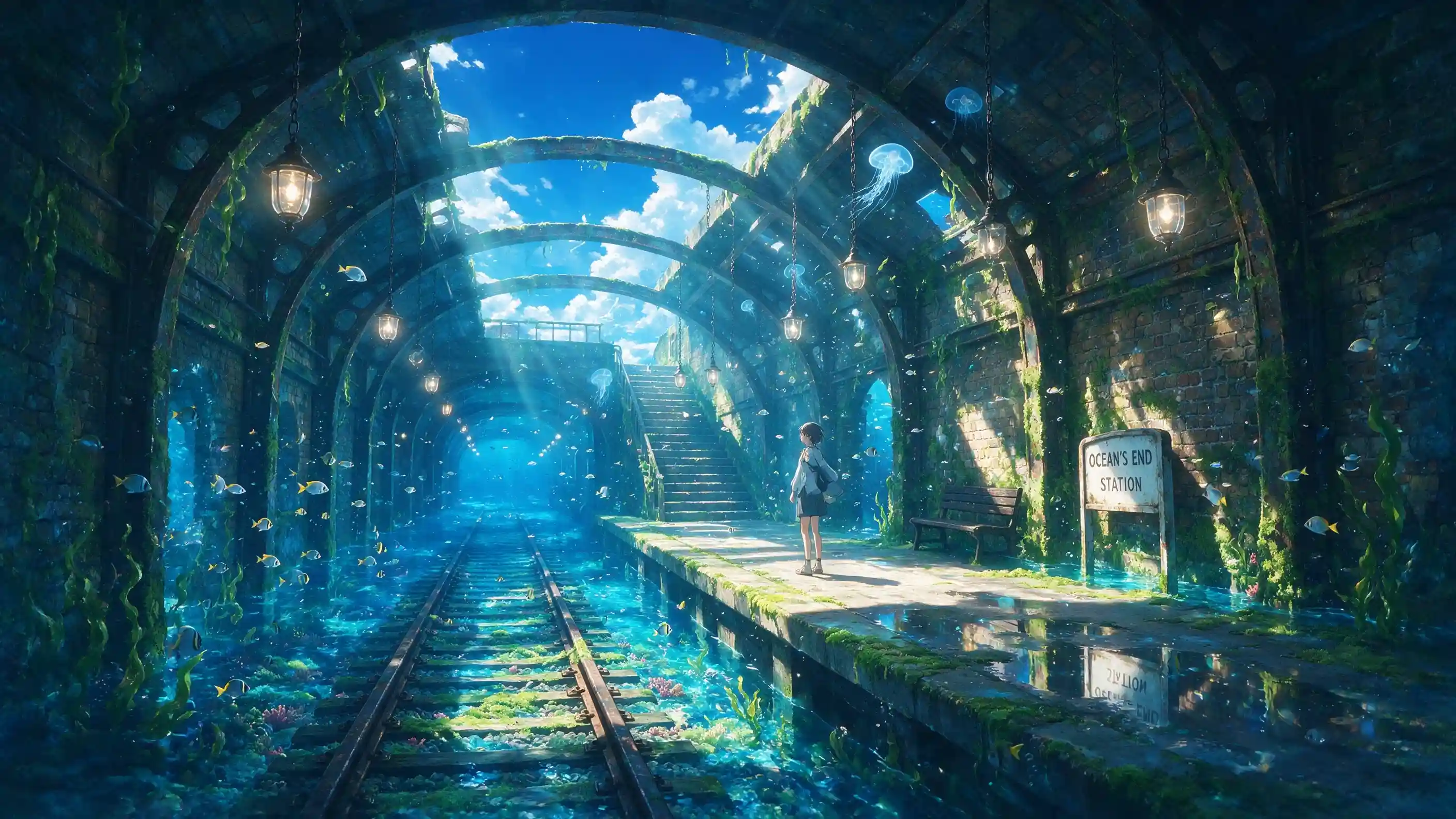
Prompt: Cinematic anime movie scene, surreal realism, atmospheric lighting, stunning reflections, deep blue color palette, inspired by Makoto Shinkai.An abandoned underground train station slowly being reclaimed by the ocean. Crystal-clear seawater flows between the railway tracks, small fish swim beneath glowing station lights. A young traveler stands on a platform surrounded by reflections of the underwater world and the endless blue sky above, sunlight shines through cracks in the ceiling, magical beams of light illuminate the forgotten station. The contrast between ordinary urban infrastructure and a dreamlike ocean, a feeling of nostalgia and discovery.
Model: Seedream 5.0 Pro
Ocean Railway Bridge
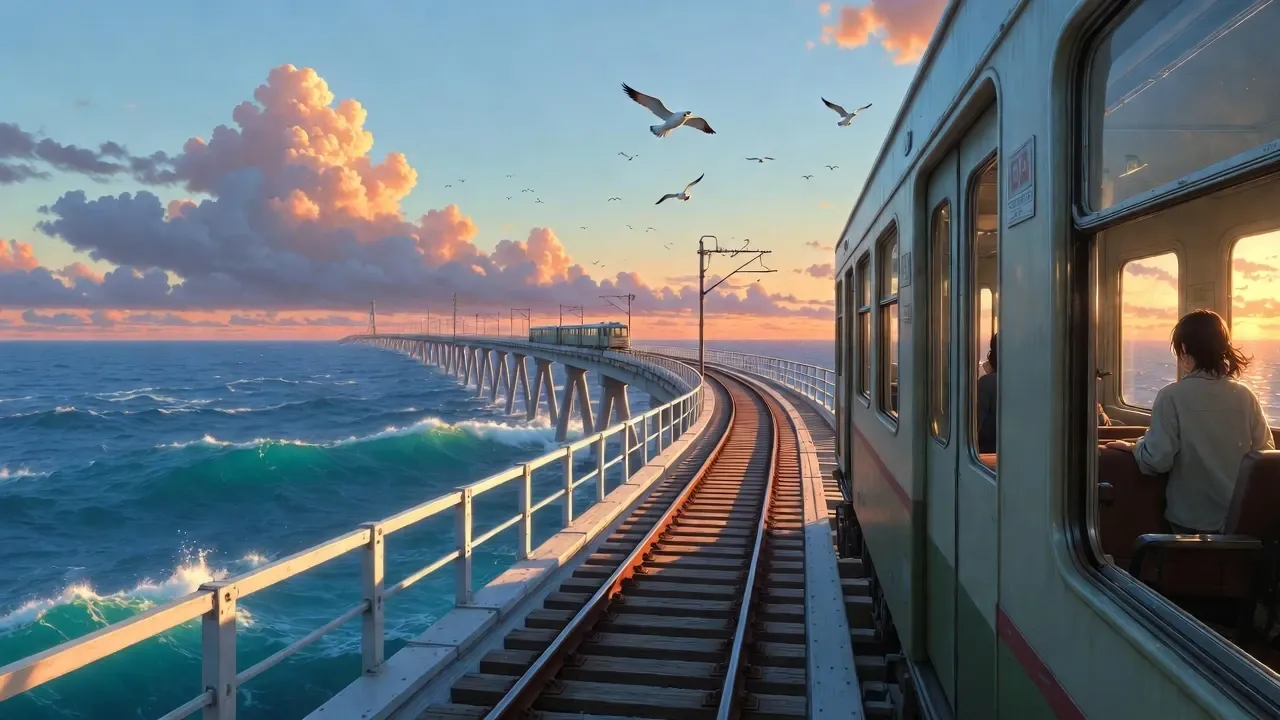
Prompt: A lonely railway bridge stretching above a vast crystal-clear ocean at sunset. Instead of land beneath the tracks, endless blue waves move quietly below, the orange and pink sky. A small train crosses the bridge, a traveler stands near the window, he is looking at the view outside. Seabirds fly beside the train, clouds glow with the final light of the day, and the entire scene feels like a journey toward an unknown future. The image combines ordinary transportation with a surreal natural world, a sense of adventure, distance, and emotional longing. Cinematic anime movie scene, wide-angle composition, dramatic sky, vibrant colors, detailed environment, inspired by Makoto Shinkai.
Model: Grok Imagine
Can You Create Makoto Shinkai-Inspired Animated Videos with AI?
Yes. With PicLumen, you can transform static anime image into animated live scenes with just a few prompts. By adding camera movement and atmospheric effects, still images can become more dynamic.
Here is an example of turning a Makoto Shinkai-inspired AI image into a short cinematic video, and the process is quite easy.
Step 1 Open PicLumen AI Video Generator
Open PicLumen's AI Video Generator and upload the image or video you want to animate. The reference will serve as the foundation for your video, which helps preserve the original composition and visual style.
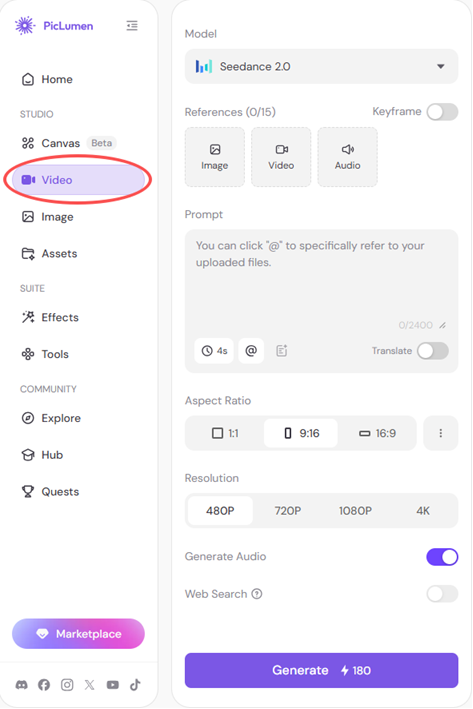
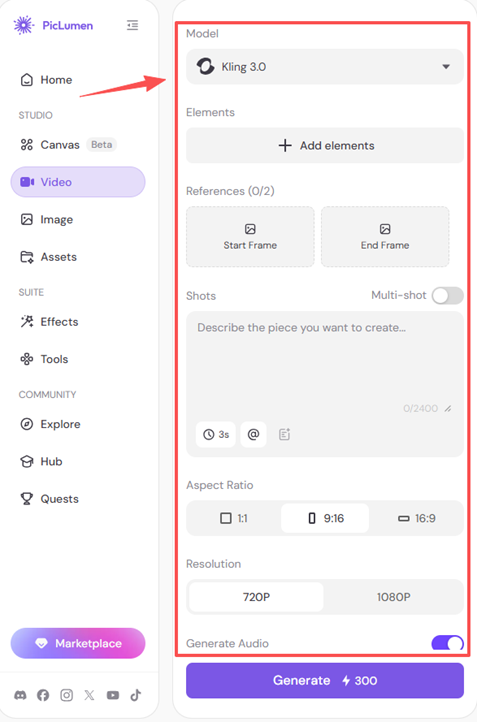
Step 2 Choose a Model and Adjust Your Settings
Select a suitable video model and customize settings based on your creative goals. You can adjust options such as video duration, aspect ratio, and other generation preferences to control the final result.
Step 3 Write Your Prompt and Generate
Describe how you want the image to move. Focus on motion details such as camera movement, weather effects, and environmental change.
For example:
Prompt: A cinematic anime scene brought to life. The camera slowly rises above the rooftop garden, revealing the vast Tokyo skyline below. Morning sunlight breaks through moving clouds, creating changing shadows and golden light across the buildings. Flowers gently move in the wind, birds fly past the camera, and the artist pauses to look at the city horizon. The atmosphere feels like a precious memory captured in time, with a sense of hope, distance, and wonder. Smooth camera movement, realistic environmental animation, dynamic lighting, subtle wind effects, emotional anime film atmosphere.
After generating the video, review the result and refine your prompt to create smoother and better motion.
Try Makoto Shinkai Style Art Now
FAQ
1. Can AI create Makoto Shinkai-style art?
Yes. AI image generators can create artwork inspired by Makoto Shinkai's visual elements. The quality depends largely on your prompt and the AI tool you choose.
2. What is the best AI tool for Makoto Shinkai-inspired art?
PicLumen is a great choice for creating cinematic anime-style artwork. It offers a variety of AI models that help users explore different visual styles and creative ideas.
3. What should I include in a Makoto Shinkai AI prompt?
Focus on more than just "anime style." Include details about the environment, lighting, weather, colors, camera composition, and mood, such as golden sunlight, dramatic clouds, rainy streets, and nostalgic atmosphere.
4. Can I use AI-generated anime art for commercial purposes?
Commercial use depends on PicLumen's current licensing terms, your description plan, and the model used. Avoid generating protected characters, logos, or recognizable scenes from existing films, and review the latest terms before using an image commercially.
5. How can I make AI anime art look more cinematic?
Use detailed descriptions of lighting, composition, and atmosphere. Elements like volumetric light, realistic reflections, wide-angle shots, and emotional storytelling can make images feel more like anime film scenes.