Have you ever gotten tired of jumping between tools? You have to try out different platforms only for one function, then go to another one just because it can't do what you want at a time. Well, I have. So I always want to find a single AI creation platform that could work for all. That's why once I've heard about Magic Hour AI, I was very curious. Last week, I finally got the time to see what it could actually do. It took me four hours to test some of Magic Hour's key features instead of every tool on the platform. I focused on the ones I was most interested in: its Face Swap and lip sync tools. For the Face Swap feature, I specifically tested all three modes: Face Swap, Head Swap, and Body Swap, to see how they performed in different scenarios. Here's what I found.
What is Magic Hour AI?
Magic Hour AI is an all-in-one AI creative platform that bundles video generation, image generation, and a set of specialty tools (like face swap and lip sync) into a single web. It was launched in 2023, went through Y Combinator, and has grown rapidly. According to its official website, it now has more than 3 million creators, over 2,000 teams, and more than 100 AI-powered creation tools.
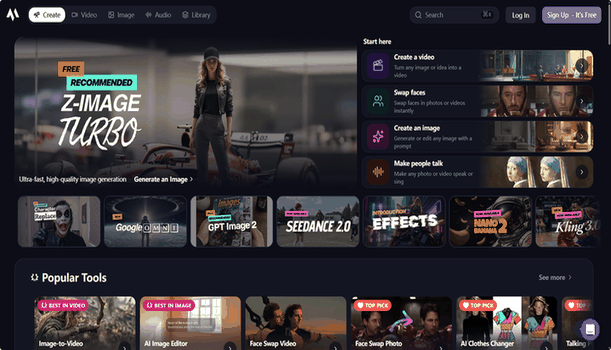
From my testing, it was clear that video creation is the platform's main focus. Features like Text-to-Video, Image-to-Video, Face Swap, and Lip Sync are more prominent on the home page than its image generation tools. Magic Hour AI would be convenient for people who need fresh visual content but don't have the time or budget, like startups or social media marketers. You don't need any editing background to get a usable result out of it.
What can Magic Hour AI do?
After exploring the platform, I found that Magic Hour AI offers many ways of AI video generation. It combines several creation tools into one workspace. Text, images, and existing videos can be turned into new visual content as you wish. You may find your requests easily fulfilled without turning to another platform.
AI Video Generation
AI video creation is Magic Hour AI's main focus. It supports Text-to-Video, Image-to-Video, and Video-to-Video, making it easy to generate short videos, animate images, or restyle existing footage.
AI Image Generation
Magic Hour AI also includes text to image and image to image tools. While these features are less prominent than its video tools, they are useful for creating images that can later be animated into videos.
Specialty Tools
One area where Magic Hour AI stands out is its characteristic editing features. These include: ● Face Swap for replacing a face, head, or body in an image or video. I believe you've seen this function go viral, and you can try your ideas on this platform. ● Lip Sync for matching mouth movements to uploaded audio. ● Talking Photos for turning still portraits into speaking videos. The platform also offers additional tools such as AI Headshot generation and other ready-made templates for common content creation scenarios. From my experience, Magic Hour AI is built with a video-first workflow in mind. While it supports both AI images and videos, its character-focused features(especially Face Swap) are where the platform feels most distinctive. That's why I decided to spend most of my testing time on Face Swap and Lip Sync, which I'll cover in the next section.
How did I review Magic Hour AI?
Rather than trying every tool briefly, I focused on the feature that is widely used by content creators: Face Swap. My goal was to find out whether the results were good enough to use in real projects without spending a lot of time editing them.
How to swap faces?
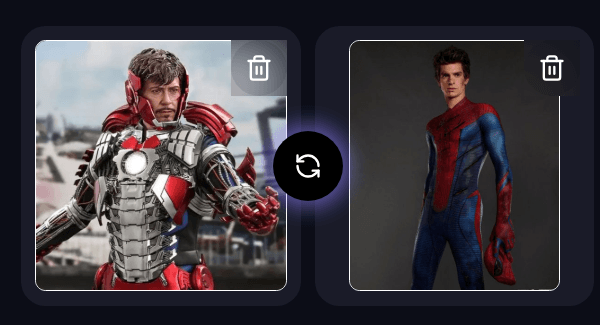
Say I'm a content creator who wants to post a fun, attention-grabbing clip, the kind of face-swap edit that circulates well on social media. For this test, I uploaded two images—one of Iron Man and one of Spider-Man—and used the default Version 1 model in Smart Mode. One thing I liked immediately was that I didn't need to write any prompts. It's very easy to operate.
Test 1: Face Swap I simply entered the Face Swap feature page, uploaded the two images, selected Face, and clicked Generate.
The first result was generated fairly quickly. The facial features blended surprisingly well, and the expression from the original image was preserved. At first glance, the swap looked convincing enough for social media content.
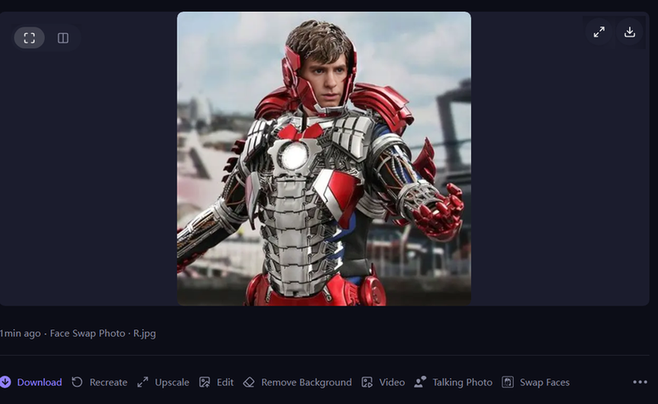
Test 2: Head Swap Since Magic Hour AI also offers Head Swap, I decided to run the same example again.
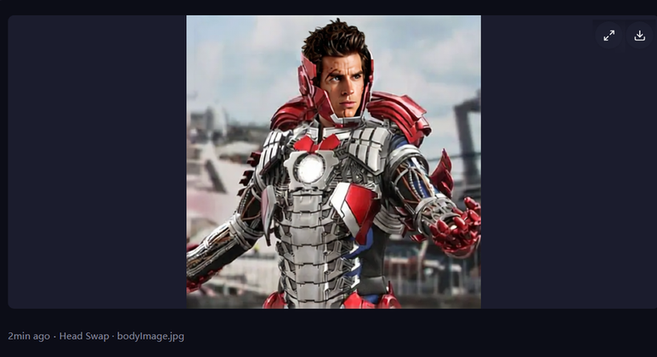
The second result was less convincing. Although the hairstyle changed this time, the transition between the head and the body looked unnatural, and the proportions didn't match very well. Around the neck and hairline, the generated image started to look noticeably artificial. This result image looked like the head was forced into the body. Test 3: Body Swap Finally, I wanted to push the feature a bit further by trying Body Swap using the same pair of superhero images. The model used here was Nano Banana 2
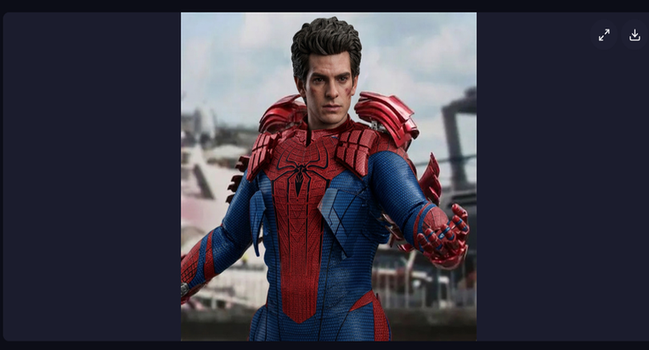
This was the weakest result of the three tests. Instead of simply placing Spider-Man onto Iron Man's body, Magic Hour AI started mixing visual elements from both characters. Spider-Man's iconic red-and-blue suit was partially transformed into armor that closely resembled Iron Man's suit, creating a strange hybrid appearance. Because the clothing design changed so dramatically, the final image looked unnatural and immediately gave away that it was AI-generated.
My Comparison of the Three Modes
Feature | Face Swap | Head Swap | |
|---|---|---|---|
Accuracy | ⭐⭐⭐⭐⭐ Natural face replacement with good blending. | ⭐⭐⭐ Head replacement worked, but the proportions looked off. | ⭐⭐ The clothing and body details were heavily distorted, making the result unrealistic. |
Facial Expression | Expressions were preserved well and looked natural. | Expressions became less convincing, giving the face an unnatural appearance. | Facial expression was acceptable, but the body changes distracted from the overall result. |
Visual Consistency | Hair remained unchanged, but the overall image looked believable. | Visible issues around the neck and hairline made the edit look artificial. | The AI mixed elements of both characters, turning Spider-Man's suit into something resembling Iron Man's armor. |
Generation Speed | Under one minute. | Under one minute. | Under one minute. |
My Verdict | Best choice for realistic face replacement. | Good for casual edits but less convincing. | The weakest mode in my testing and not suitable for realistic results. |
How to Lip Sync?
Since Magic Hour AI also offers a Lip Sync feature, I wanted to see whether it could turn a still image into a natural-looking talking or singing video. For this test, I uploaded a photo of Taylor Swift performing on stage.
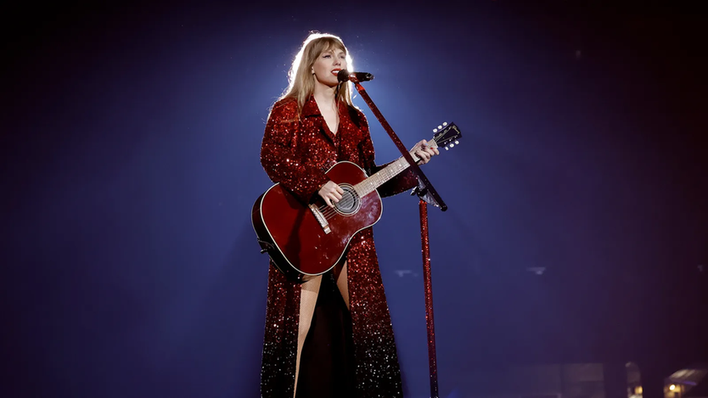
Magic Hour AI provides three ways to generate the accompanying audio: you can upload your own audio file, generate speech from text using built-in AI voices, or clone your own voice. To keep the test simple, I chose one of the built-in voice templates, selected the Taylor Swift voice, and entered a few lines of her song lyrics. The generation process took about 2 minutes, which seemed reasonable. However, I can see the problem immediately: the output video was only one second long, which was impossible considering the amount of text I had entered. To make sure it wasn't caused by the short lyrics, I ran the test again with a much longer section of text. This time, audio generation itself took noticeably longer, around 2 to 3 minutes, and the video generation required another 3 to 4 minutes before the final result was ready.
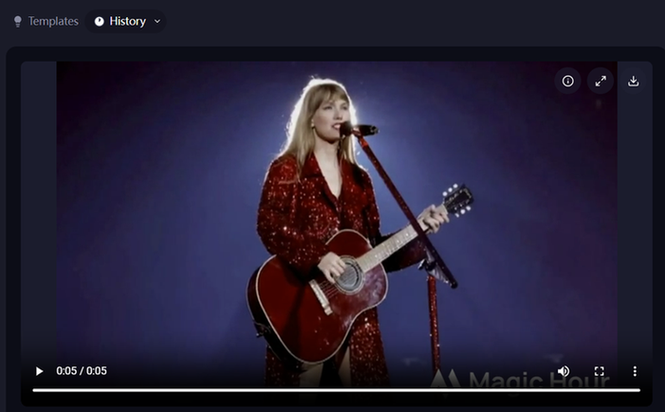
The longer video produced more animation, but the overall quality was mixed. On the positive side, the character didn't just move her lips; she also made small body movements and even strummed the guitar a few times, which made the scene feel more lifelike than I expected. Those extra motions helped the video look less static. However, the lip-syncing itself was less convincing. The mouth movements often didn't match the words being spoken, making the synchronization feel off. The lip animation also looked rather stiff. Another issue I noticed was that the image quality dropped after animation.
My Use Review of Magic Hour AI
After spending a few hours testing Magic Hour AI, I realized that the platform is designed to help users create content as quickly as possible. Almost every tool follows the same workflow: upload your files, choose a model, click Generate, and wait for the result. I didn't need to learn complicated settings before getting started, which made the platform approachable even on my first visit. Many people at the beginner level would appreciate this. From my experience, Magic Hour AI performs best when you're creating fun, shareable content rather than highly polished visual assets. The standard Face Swap feature produced surprisingly natural results with very little effort, while Lip Sync offered an easy way to animate a still image without any video editing skills. The templates also lower the learning curve, making it easy to experiment with different ideas. That being said, I also noticed that the platform gives users limited control over the final output. When a generation wasn't quite right, I couldn't fine-tune specific details. In most cases, my only option was to regenerate the content and hope for a better result, which also meant using more credits. Overall, I think Magic Hour AI is a good choice if you value speed and convenience over precise editing. I would use it for creating social media content, memes, or quick creative concepts. For projects that require realistic character edits or professional-quality videos, I'd still spend time reviewing the output carefully before publishing it.
Magic Hour AI Pricing
Magic Hour AI uses a credit-based system. A new account can get 400 credits, and you can get 100 credits more each day for free.
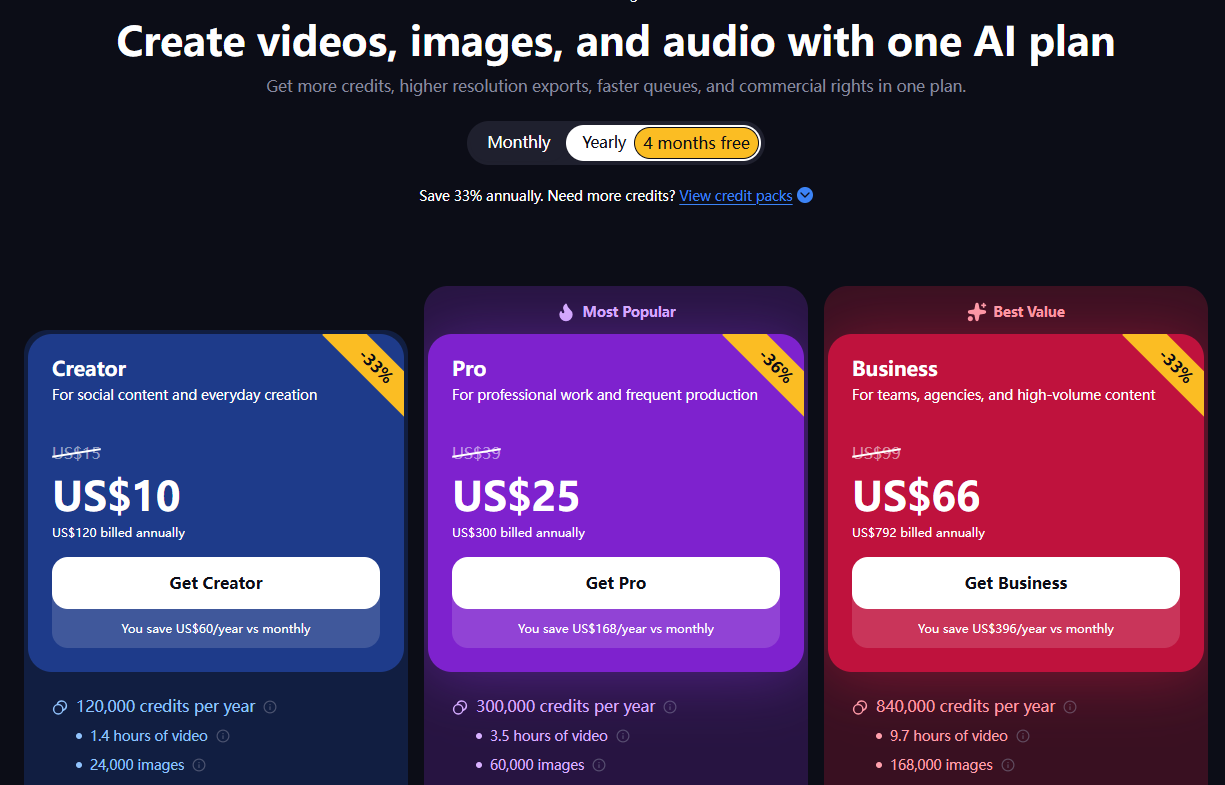
During my testing, I found that video generation consumed credits much faster than I expected, especially when regenerating clips to improve motion consistency. If you create videos only occasionally, the free tier is a reasonable starting point. However, frequent creators will likely need a paid subscription to avoid running into generation limits.
Pros and Cons
Pros | Cons |
|---|---|
Multiple AI creation tools in one platform. I could generate videos, create images, and swap faces without switching between different websites. | No offline or local processing. Everything runs in the browser, so you'll need an internet connection whenever you want to generate or edit content. |
Generous free tier for testing. New users receive free credits, which are enough to explore several core features before deciding whether a paid plan is necessary. | Credits can disappear quickly. Since every regeneration consumes credits, experimenting with multiple versions can use up the free allowance faster than expected. |
Large collection of templates. Magic Hour AI provides plenty of templates for different creative scenarios. | Template customization is limited. This was probably the biggest drawback I noticed. When using a template, I couldn't easily adjust specific details after generation. If the AI produced an awkward expression, unrealistic clothing, or an incorrect composition, there were no editing options available. In most cases, the only solution was to regenerate the entire result and hope the next version looked better. |
Face swap quality is genuinely strong and fast to generate. | Output quality isn't always consistent. Some generations looked much better than others, so I occasionally had to regenerate the same project to get a result I was happy with. |
Easy to get started. Most tools only required uploading images or entering a simple prompt. I didn't need to learn complicated settings before creating my first project. |
Who is Magic Hour AI For
After testing Magic Hour AI, I don't think it's a platform that fits every type of creator. Its biggest strength is helping users produce content quickly with AI rather than offering professional-level editing controls. Here are the groups I think will benefit the most. Best for ● Social creators producing novelty or short-form content; ● Beginners who want prompt-light workflows; ● Creators making face swaps, talking photos, or quick concepts; ● Users who want to test multiple AI effects in one browser platform. Less suitable for ● Professional retouchers needing local control; ● Brands requiring strict character and visual consistency; ● Users producing polished lip-sync content at scale; ● Projects where one incorrect generation cannot simply be regenerated.
What is the Best Magic Hour AI Alternative
After testing Magic Hour AI, I can see why it's popular among creators who focus on AI videos and character-based content. Features like Face Swap, Lip Sync, and Text-to-Video are easy to use, and the template-driven workflow makes it possible to create content in just a few minutes. I also found a few situations where I wanted more flexibility. For example, when I used templates, I couldn't easily edit individual details after generation. If the AI produced an awkward facial expression or an unrealistic body swap, my only real option was to regenerate the entire result. I also found that more complex edits became less consistent, especially when trying Head Swap or Body Swap. If your workflow is similar to mine, creating both images and videos instead of focusing on videos alone, it's worth looking at PicLumen as an alternative. One thing I like about PicLumen is that it supports both AI image generation and AI video generation in the same creative workflow. Instead of moving between separate tools, I can generate an image, refine it, and then turn it into a video within one platform. For creators who regularly produce marketing materials, social media content, or product visuals, that saves both time and effort.
Feature | Magic Hour AI | PicLumen |
|---|---|---|
AI Image Generation | ✅ Text-to-Image, Image-to-Image | ✅ Text-to-Image, Image-to-Image with multiple creative styles |
AI Video Generation | ✅ Text-to-Video, Image-to-Video, Video-to-Video | ✅ Text-to-Video, Image-to-Video |
Workflow | Video-first, template-driven | Image-to-video workflow with flexible creation options |
Creative Flexibility | Relies more on templates with limited post-generation editing | Greater prompt and style flexibility for iterative creation |
Ease of Use | Very beginner-friendly with simple workflows | Easy to use while offering more creative control |
Best For | Face swaps, talking photos, short-form social content | Designers, marketers, content creators, and businesses creating both images and videos |
Magic Hour AI does a good job of simplifying AI video creation, while PicLumen may be a better fit if your creative workflow extends beyond video and you want more flexibility throughout the creation process.
FAQ
Is MagicHour AI good?
Yes, if your main goal is creating AI videos, face swaps, or short social media content. From my testing, it's easy to use and delivers good results for simple projects, though some outputs may need regeneration.
How many videos can I make with Magic Hour AI credits?
There isn't a fixed number. It depends on your subscription plan, the AI model you choose, the video resolution, the clip length, and the feature you're using. More advanced models, higher resolutions, and longer videos typically consume more credits.
Is Magic Hour AI worth it for TIKTOK creators?
I think so. Its Face Swap, Talking Photos, and AI video tools make it easy to create engaging short-form videos without advanced editing skills.
Is it free to swap faces in video?
New users can try Face Swap with the free credits provided by Magic Hour AI. Once those credits are used, you'll need to upgrade or earn more credits, depending on the current plan.
Is there a free alternative to Magic Hour AI?
Yes. If you need both AI image and AI video generation in one platform, PicLumen is worth considering. It offers a different workflow that may suit creators, marketers, and designers working across multiple types of visual content.