I've been using AI image generator as part of my creative workflow for a while now. Whether I'm designing blog covers or simply bringing an idea to life, AI is usually one of the first tools I reach for. The challenge is finding one that actually fits the way I work. Some generators produce beautiful images but struggle with prompt accuracy, while others offer so many settings that creating something simple starts to feel like a full-time job. That's what led me to NightCafe AI. It's often recommended as a platform for creators, with multiple AI models and a large creative community. On paper, it sounded promising, but I wanted to know whether it could handle real creative tasks, not just generate pretty demo images. So I put it through a series of practical tests, including complex prompts, text rendering, photorealism, and image-to-video generation. Here's what I found.
What Is NightCafe AI?
NightCafe AI is an AI image generation platform that combines text-to-image creation, image editing, prompt enhancement, image-to-video generation, and an active creator community in one place. Supporting multiple AI models, it aims to serve everyone from beginners to experienced creators. But instead of relying on the feature list, I wanted to see how it actually performs in real-world use.
How I Tested It
I didn't just type in a basic prompt, look at one picture, and write this review. I've been using AI art tools for a while, so I know where they usually mess up. To see if NightCafe is actually worth your time in 2026, I spent about a week testing it out. I used both the free daily credits and a paid plan to get the full picture. Here is what I actually looked at: • Prompt Adherence: I fed it very detailed, multi-layered prompts to see if it actually listens, or just picks three random words and ignores the rest. • Photorealism & Anatomy: I generated portraits and full-body shots to check skin textures and proportions. I wanted to see if it can actually pass for a real photo or if it still has that obvious glossy AI look. • Video Stability: When turning images into video, does the camera move smoothly, or does the background just melt into a blurry mess?
Putting NightCafe's Core Image Generators to the Test
Text-to-Image: The Complex Prompt Challenge
To see how NightCafe handles heavy lifting, I threw a pretty dense prompt at it to test its grasp of specific art styles and abstract concepts.
.webp)
Here is the exact prompt I used:
Create a serene and dreamy artwork featuring cherry blossoms and the moon in the traditional style of Ukiyo-e, characterized by delicate brushwork and subtle color palettes. Incorporate an ink stamp at the bottom right corner, adding an air of authenticity to the piece. Apply a moderate level of chaos, around 50, to introduce organic and unpredictable elements. Then, amplify the stylization to 750, allowing the artwork to embody a unique blend of traditional and modern aesthetics, with bold lines, vibrant colors, and intricate details, Japanese landscapes, nature, flowers, lunar cycles, artistic expressions, watercolors, woodblock prints.
Honestly? The output was a bit of a letdown. It didn't really stick to the prompt as well as I hoped, and it felt like it ignored a few key instructions. The "traditional style of Ukiyo-e" was pretty underwhelming. Instead of getting that distinct, crisp woodblock print texture, it just gave me a generic, slightly blurry AI watercolor. It looked more like a standard "Japanese aesthetic" filter you'd find on many other basic AI generator, rather than actual Ukiyo-e.
The Text-in-Image Check
Text rendering is usually where AI image generators struggle the most. You often end up with misspelled words or unreadable symbols. I wanted to see how NightCafe handles specific text placement and typography.
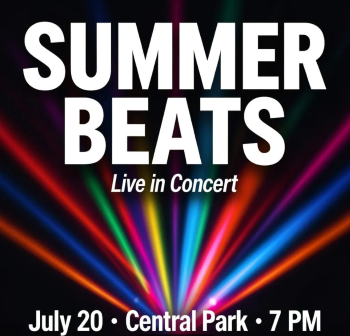
Here is the prompt I used:
An event poster for a music festival. At the top, large bold uppercase: "SUMMER BEATS". Directly below, smaller italic: "Live in Concert". At the bottom, a line of body text: "July 20 · Central Park · 7 PM". Use a clean sans-serif layout, dark background with colorful light rays.
It did a really good job here. All the text was spelled correctly, which is the baseline, but it also actually followed the formatting instructions. "SUMMER BEATS" was large and bold at the top, the italicized subtitle was placed right below it, and the bottom details were clear and readable. It stuck to the clean sans-serif style and kept the text legible against the dark background with light rays. With some post-editing, it looks like a usable poster for me.
The Photorealism Test
Testing photorealism is all about seeing if the AI can break away from that smooth, overly perfect "plastic" look. To test this, I used a prompt specifically designed to mimic a raw, unpolished candid snapshot with harsh lighting.
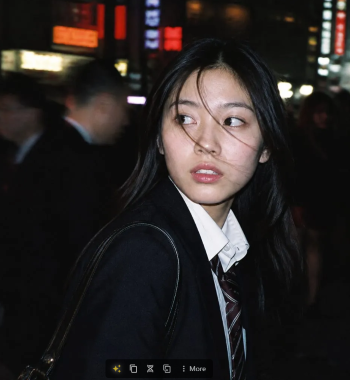
Here is the prompt I used:
A candid flash photography portrait of a young Asian woman with dark hair, messy windblown strands of hair across her face, natural makeup, slightly parted lips. She is looking back over her shoulder, with her gaze turned off to the right side of the frame, looking past the camera lens. She is wearing a school uniform, a white collared shirt, a dark blazer, and a striped tie, with a leather shoulder bag strap over her shoulder. Nighttime city street background, out of focus pedestrians, strong motion blur background, glowing neon signs in the distance. Direct on-camera flash, high contrast, realistic skin texture, film grain, cinematic moody vibe, raw photo, snapshot aesthetic.
The result turned out great. At a quick glance, it's honestly hard to tell this is an AI-generated image. The skin texture looks natural and retains realistic details. What really sold it for me, though, was the lighting. It accurately captured that harsh, direct on-camera flash mixing with the out-of-focus neon lights in the background. It wasn't completely flawless, though. If you zoom in, some of the messy hair strands across her face just melt into her skin. The blurred pedestrians in the background also look a bit warped and unnatural if you look too closely. But honestly, for a raw snapshot aesthetic, these minor quirks are easy to overlook.
Can It Actually Do Video? Testing the Image-to-Video Tools
For this image-to-video test, I uploaded a reference photo of a woman at a baseball game and used the following prompt:
Create a realistic live sports broadcast video clip based on the uploaded first frame. The camera slowly zooms in on the female spectator sitting in the crowd at a baseball game. She does not notice the camera and remains focused on the match.
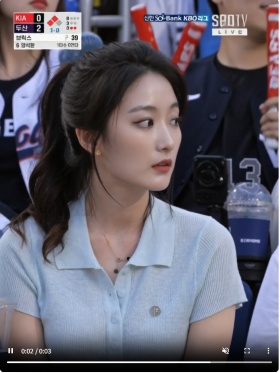
Honestly, the output was surprisingly natural. The camera zoom was smooth and steady, which make the clip feel like a real live sports broadcast. More importantly, the subject stayed consistent. Her face didn't warp, and she actually stayed focused on the game just like the prompt asked, rather than suddenly turning to stare blankly into the camera lens (which AI video loves to do). Even the background crowd and the stadium environment held up well without melting into a blurry mess, which is a common issue with a lot of video models right now.
NightCafe AI Pricing
Pricing is usually the first thing people check, so I'll keep it real and up to date. NightCafe AI offers four paid plans, and the cost changes depending on whether you go monthly, quarterly, or yearly.
Tier | Monthly | Quaterly(SAVE 15%) | Yearly(billed every 12 months, per month equivalent) | Fast Credits/month |
|---|---|---|---|---|
AI Hobbyist | $12.49 | $10.61 | $7.49 | 200 |
AI Enthusiast | $24.99 | $21.24 | $14.99 | 500 |
AI Creator | $39.99 | $33.99 | $23.99 | 850 |
AI Artist | $62.49 | $53.11 | $37.49 | 1,400 |
I've broken down the exact numbers in the table, but here's my honest take on how to choose.
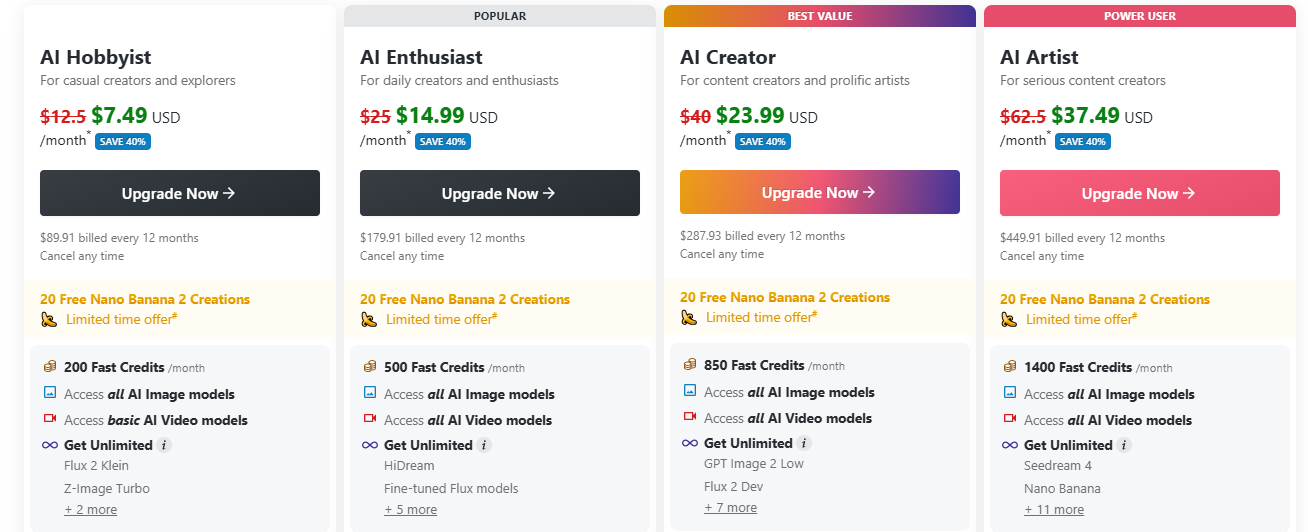
The free daily credits are nice for testing the waters, but they're too limiting for any serious work. If you're a casual user who just needs occasional, watermark-free images, the Hobbyist plan is a solid, budget-friendly choice. For most people, the Enthusiast plan hits the sweet spot. It gives you a comfortable amount of credits to actually experiment and unlocks all the video models. The higher tiers (Creator and Artist) are really only worth it if you're a high-volume creator burning through renders every day and need access to the most premium models. One thing I really appreciate: purchased credits never expire. If you get busy and don't generate anything for a few weeks, your balance just sits there. You don't have to stress about losing them at the end of a billing cycle, which makes paying for a plan feel a lot less risky.
NightCafe AI Review: Pros and Cons
After spending a week pushing NightCafe to its limits, I've got a pretty clear picture of where it shines and where it drops the ball. What I Love : • All-in-one convenience: It packs image generation, video creation, and templates into a single dashboard, so you don't have to jump between different apps. • Great for quick experiments: It's perfect for casual testing and whipping up quick content without a steep learning curve. • Credits never expire: You don't have to stress about losing your paid balance if you get busy and take a month off. What Annoys Me: • Struggles with complex prompts: It tends to ignore abstract modifiers and defaults to a generic look if your instructions are too long or detailed. • Clunky interface: The UI feels a bit dated and cluttered. Finding specific settings or organizing your gallery can sometimes be a headache. • Free tier is too restrictive: The daily free credits are fine for a quick look, but basically useless if you actually want to iterate and refine your images.
NightCafe AI VS. PicLumen: Which Fits Your Creative Workflow
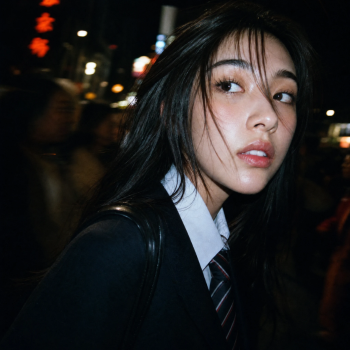
NightCafe definitely deserves its credit. For general AI creation, quick experiments, and everyday content, it's a genuinely reliable workhorse. But every tool has its specific sweet spot. Where NightCafe can sometimes feel a bit limiting is when you need ultra-specific, top-tier model aesthetics straight out of the box, or when you need to integrate AI into a strict commercial design workflow. That's where a platform like PicLumen makes sense as a strong alternative. NightCafe has a great selection of solid models, but PicLumen gives you access to some of the top-tier options like Seedream 5.0 Pro and MidJourney V8.1. To show the difference in raw model performance, I ran the exact same photorealism prompt from my earlier test through PicLumen. Here is what it generated:
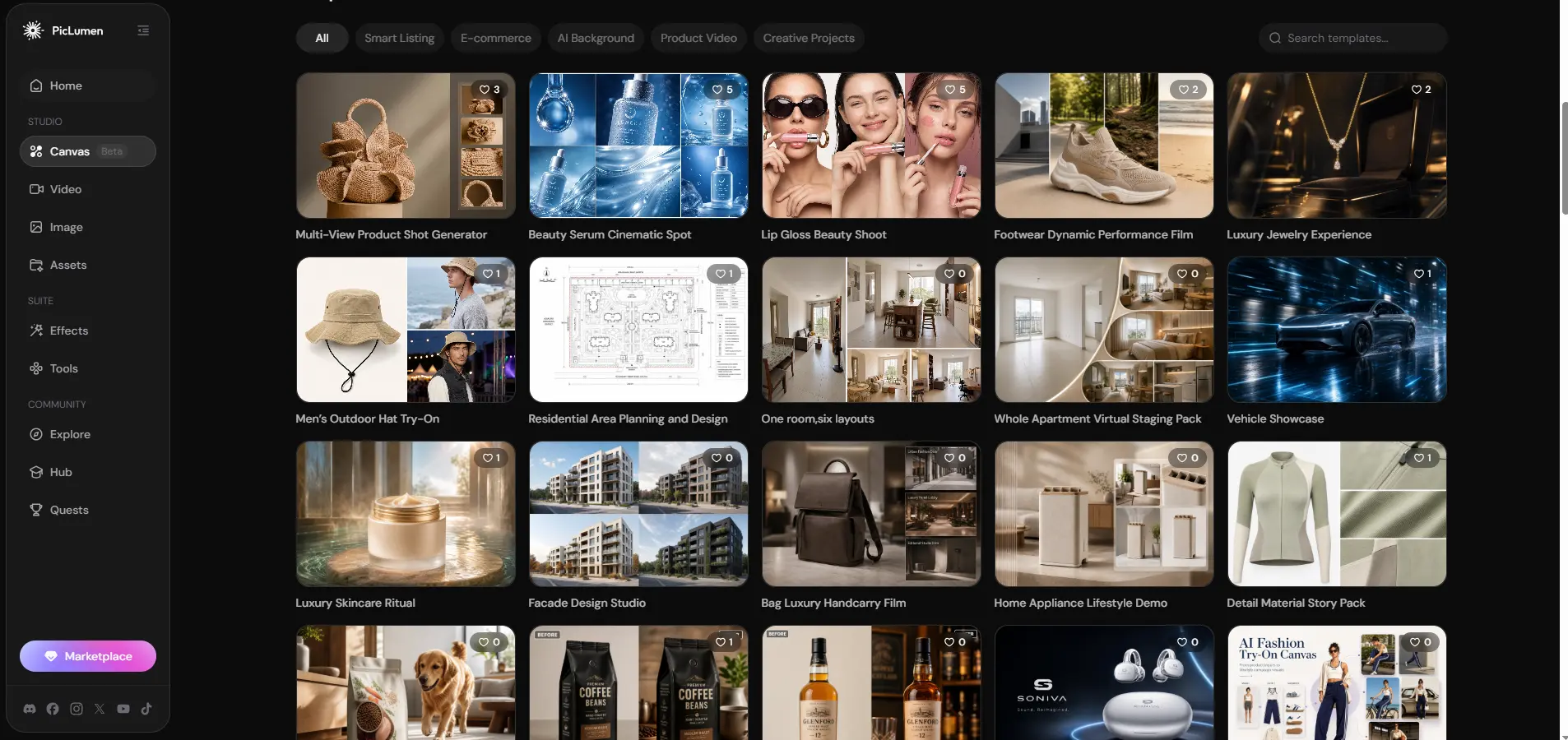
Also, if your work involves marketing or e-commerce, PicLumen's Canvas feature solves a very specific headache. Instead of generating a cool background in NightCafe and then spending an hour in Photoshop masking your product into it, Canvas lets you drop your product in and generates professional promotional scenes with accurate shadows in one click.
Final Verdict: Is NightCafe AI Worth it?
So, is NightCafe actually worth your time and money in 2026? The honest answer is: it depends on what you're trying to do. Who it's for: If you want an all-in-one playground where you can generate images, make quick videos, and create posters with actual readable text, it's definitely worth it. The fact that its text rendering and photorealism are this good makes it a highly reliable tool for casual creators, bloggers, and small business owners. Who should skip it: If you're a prompt-engineering nerd who needs pixel-perfect control over every tiny detail, NightCafe might frustrate you. It tends to ignore overly complex instructions, and the UI can feel a bit cluttered compared to newer platforms. Also, if you plan on churning out high volumes of AI video, your credits will vanish fast, and you might be better off with a more streamlined, focused alternative like PicLumen. The Bottom Line: NightCafe isn't perfect, but it's a solid, reliable workhorse. It gets the job done without making you jump between five different apps. If you just want to create good-looking content without overthinking it, it's a very safe bet.
Frequently Asked Questions
Is NightCafe AI image generator any good?
It heavily depends on the specific model you select. During my testing, it performed really well for photorealism and rendering readable text, but results can definitely vary if you use different models.
Can NightCafe AI generate smooth AI video clips?
In my tests, it handled slow camera zooms and subtle subject movements really well. I didn't test fast-paced action or complex multi-person scenes, though, so the visual stability in those more challenging scenarios might vary.
Is NightCafe AI completely free to use?
No, it uses a freemium model. You get limited daily free credits, but need a paid plan to remove watermarks and unlock video generation.
What is the best NightCafe AI alternative?
PicLumen is a top alternative. It offers a much cleaner interface and better control over specific art styles without requiring overly complex text prompts.