Getting an AI model to produce something decent isn't the hard part anymore. Any halfway-recent model can do that. The hard part is fixing the one thing that's wrong without wrecking everything else. The label on the bottle is misspelled. The headline on the poster is fighting the layout. The face is close — really close — but something about the eyes is off. So you tweak the prompt and hit generate again, and now the lighting's different, the pose has shifted, the background's changed too. The one thing you actually needed fixed? Still wrong. That's the gap Seedream 5.0 Pro is built to close. It's not trying to win on raw output quality alone — it's built around the idea that you should be able to point at a problem and fix just that, then bring in your own reference material, control how text sits on the page, and hand off a clean still to video generation without starting from scratch.
Local Editing: Point at the Problem, Fix Just That
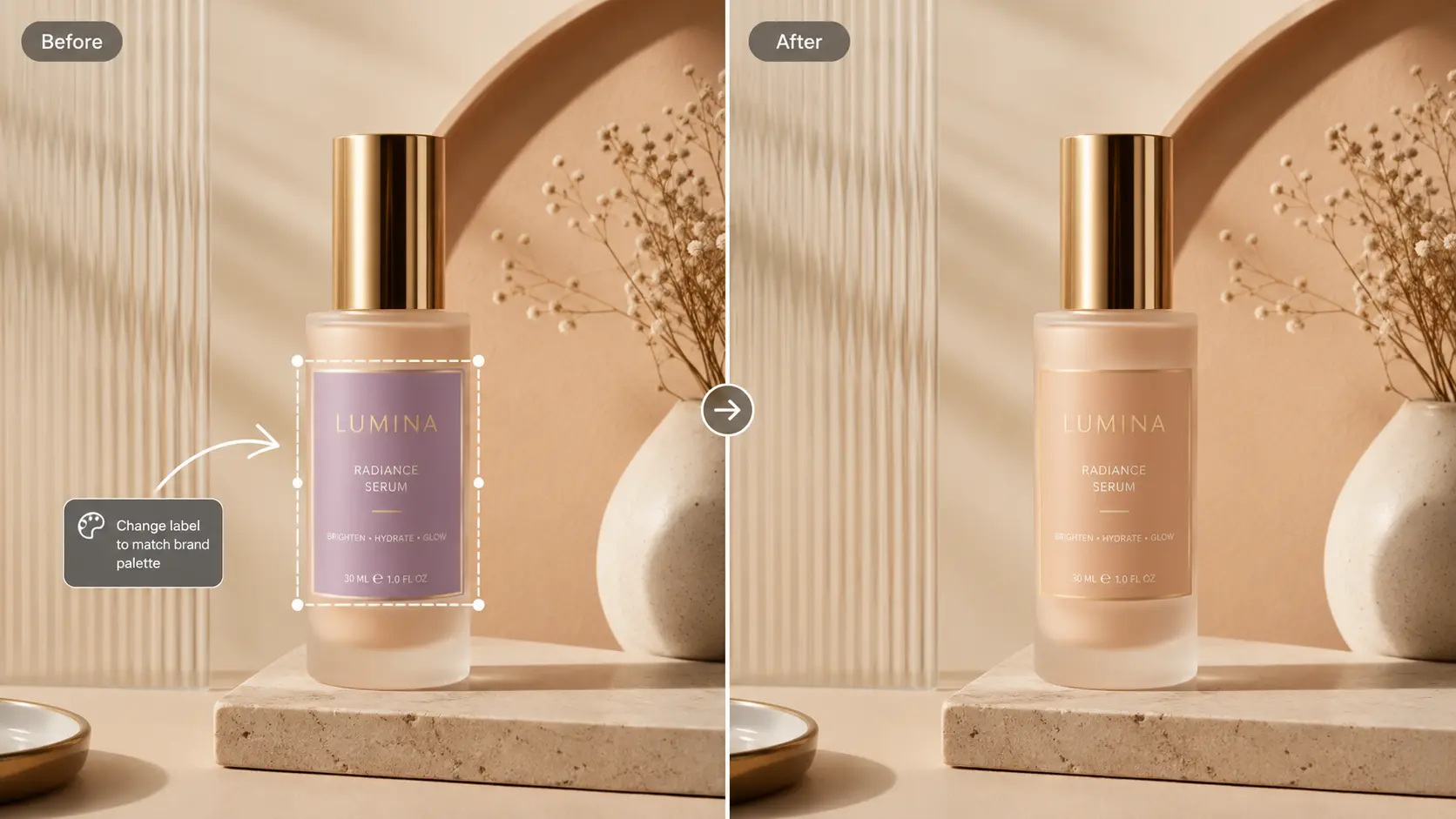
You can mark up an image with selection boxes, color blocks, arrows, or a rough hand-drawn sketch, and the model reads that as an instruction for that region only. Circle the label and ask for a different color. Box the background and ask for warmer light. Draw a quick shape where a hand should go and let the model clean up the pose. You can even flag several unrelated spots in the same image and give each one a different note — one pass, several fixes. This matters because most problems in a generated image aren't global. The image is usually 90% there already. What you need isn't a new image — you need a slightly better version of the one you've got. Seedream 5.0 Pro also picks up rough sketches as compositional intent, so a quick doodle of where things should sit can turn into a finished layout without you having to describe every element in words.
Ten Reference Images, Not One Prompt Trying to Do Everything
Real creative work rarely starts with a single sentence. It starts with a product shot, a fabric swatch, a background you like, a color palette someone approved last week, and a mood board that's been floating around the team's Slack for a month. Seedream 5.0 Pro lets you feed in up to 10 reference images at once, and it can assign different jobs to each one — one defines the product, another the material, another the backdrop, the lighting, the color mood. The hard part isn't accepting 10 images. It's making them look like they belong in the same photograph — consistent shadows, one light source, one camera angle, materials that read as real. That's where this actually earns its keep, especially for product scenes, fashion shoots, and lifestyle campaigns where you're trying to combine assets you already have rather than invent a scene from scratch.

Light, Shadow, and Skin That Don't Look Like AI
There's still a specific look to a lot of AI-generated imagery — a smoothness that reads as synthetic the moment you look closely. Seedream 5.0 Pro puts real effort into fixing that: shadows that actually sit under objects, fabric that has weave and weight, skin that has texture instead of a plastic sheen. It shows up most in beauty and fashion work, portraits, and lifestyle ads — anywhere the image is supposed to pass as a real photo shoot rather than a render. And it pays off downstream too: a base image with believable lighting and material detail is much easier to edit later, because your fixes actually blend in instead of sitting on top like a sticker.

14 Languages, Built In — Not Bolted On
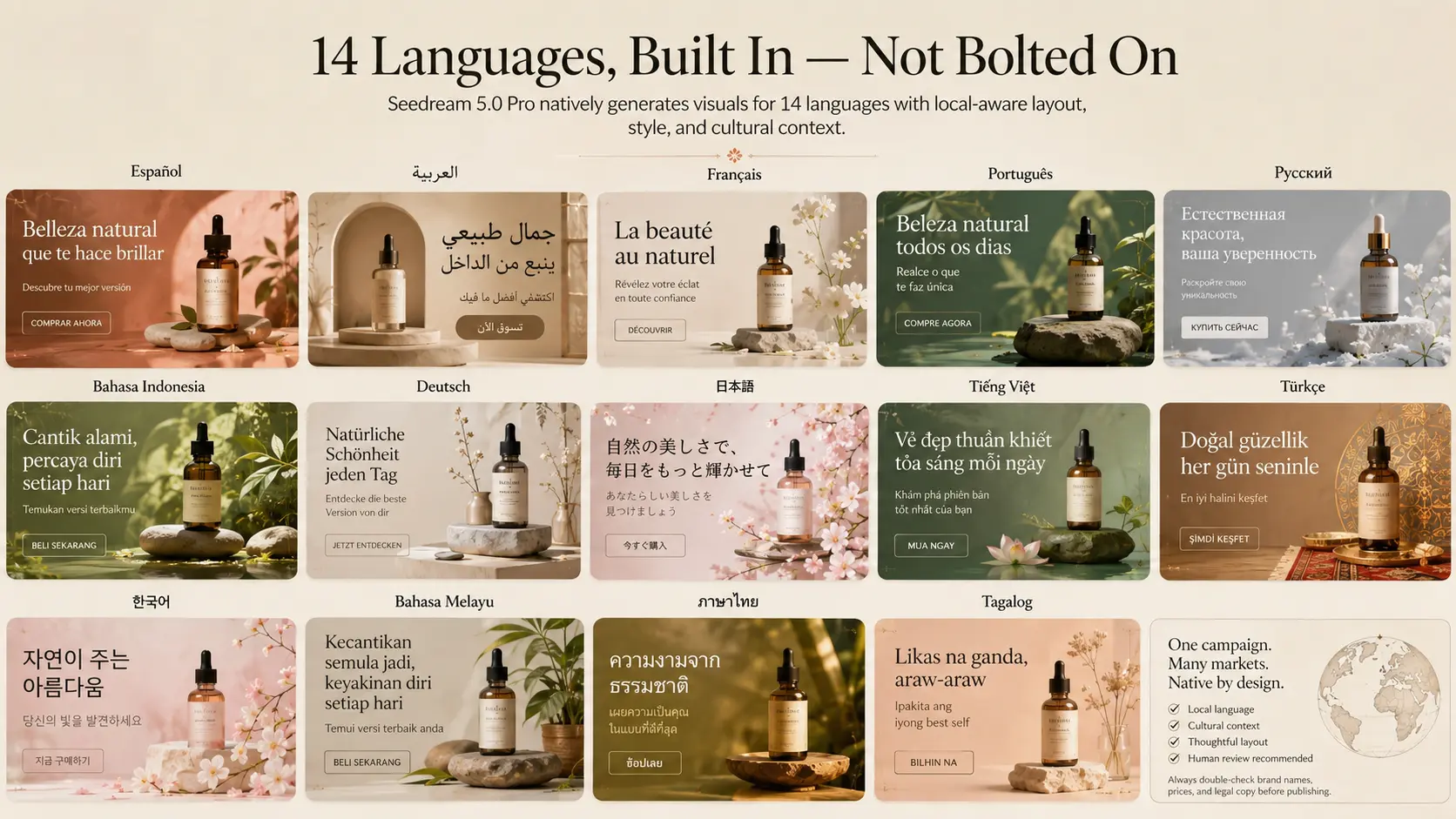
Seedream 5.0 Pro natively generates visuals in Spanish, Arabic, French, Portuguese, Russian, Indonesian, German, Japanese, Vietnamese, Turkish, Korean, Malay, Thai, and Tagalog. Worth being clear about what that actually means: it's not running your English copy through a translator and pasting it onto the layout. A banner made for a Japanese audience and one made for an Arabic-speaking audience shouldn't just be the same template with different characters — the color choices, the composition, the styling all carry different expectations depending on the market. Seedream 5.0 Pro tries to account for that cultural context alongside the language itself, which matters a lot if you're running the same campaign across a handful of regions. One caveat that's true of every AI text tool right now: brand names, prices, and legal copy still need a human to check them before anything goes live.
Text Layout That's Actually Usable for Commercial Work
Text has always been the weak point of AI image generation. You'd get a gorgeous poster with a headline that looked like it had been run through a blender. Seedream 5.0 Pro has clearly put work into this — headlines, selling points, and data callouts come out with a real sense of hierarchy, closer to something a designer would hand off than something a model guessed at. That makes it more usable for e-commerce banners, sale graphics, TVC storyboard frames, and comparison graphics — anywhere the viewer needs to know, in about half a second, what the product is and why they should care.

A Cleaner Handoff Into Seedance
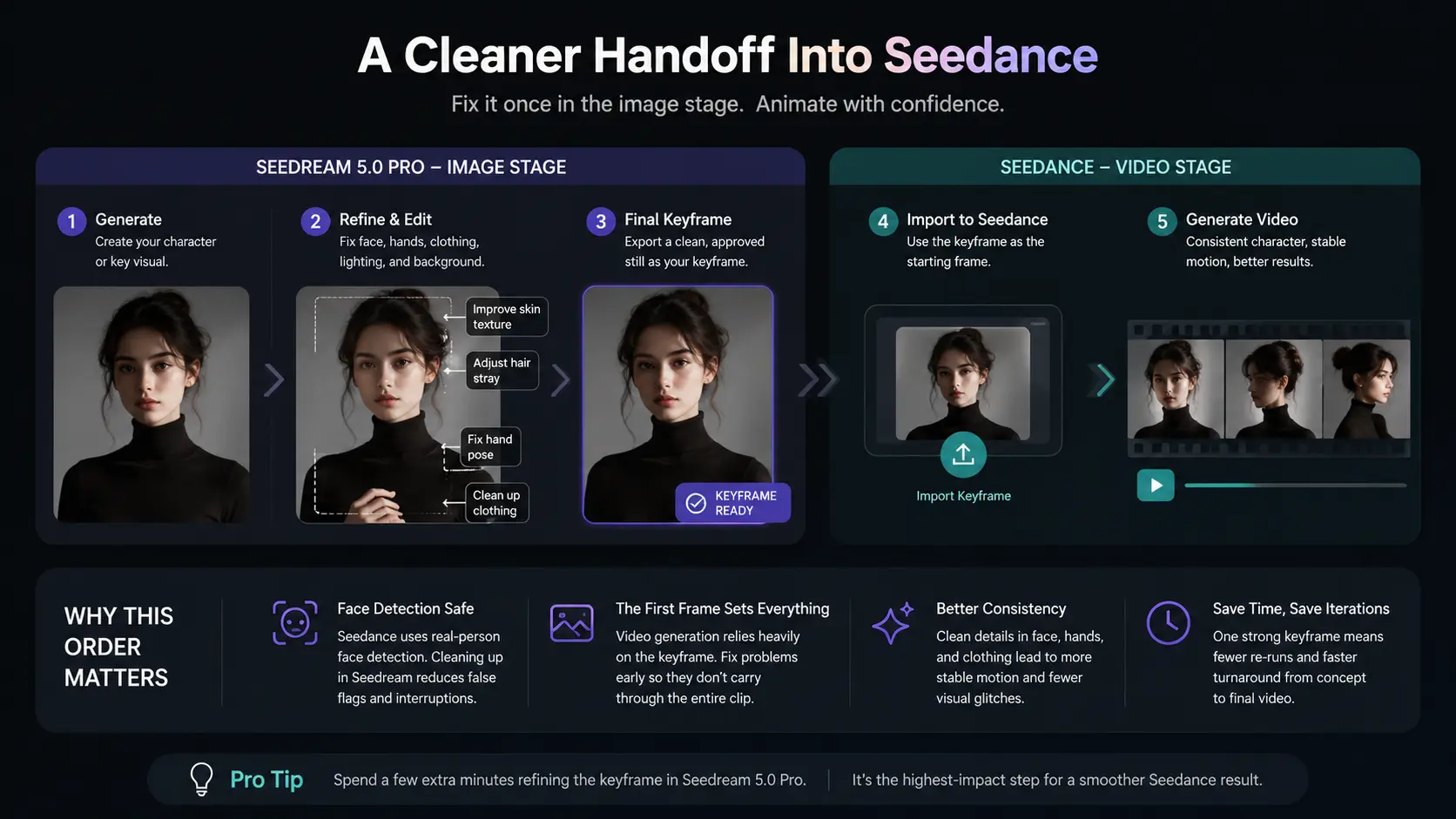
Seedream 5.0 Pro also smooths out the workflow into ByteDance's Seedance video model. Seedance runs real-person face detection, and AI-generated faces can sometimes trip that up mid-pipeline. The fix is straightforward: generate and clean up the character image in Seedream 5.0 Pro first, then bring that corrected still into Seedance as the starting frame. The order matters because video generation leans hard on that first frame — whatever's wrong with the face, hands, or clothing in the still tends to carry all the way through the clip. Fix it once at the image stage, and the animation starts from something you can actually trust.
Seedream 5.0 Pro Is Now Live on PicLumen
Seedream 5.0 Pro is now available on PicLumen, giving you the model inside a broader image-and-video workflow rather than as a standalone tool. A typical run-through looks something like: generate a base image, clean up the details with local editing, spin off localized versions for different markets, prep a keyframe, and carry it straight into Seedance animation — all without switching platforms.
Who This Is Actually For
This is squarely built for people producing content that has to ship — marketers, e-commerce sellers, social creators, localization teams, designers, and anyone making AI video who's tired of fighting with the first frame. If you're just messing around with AI art for fun, a lot of this control will feel like overkill. But if your images need to survive a client review, a legal check, or a launch across five markets, it's exactly the kind of control that saves you the redo.
FAQ
How many reference images can Seedream 5.0 Pro handle?
Up to 10 in a single generation, each one able to guide a different part of the final image.
Which languages does Seedream 5.0 Pro support?
Spanish, Arabic, French, Portuguese, Russian, Indonesian, German, Japanese, Vietnamese, Turkish, Korean, Malay, Thai, and Tagalog.
Can it produce commercial-ready posters?
Yes — it's built with e-commerce banners, product ads, and TVC storyboards specifically in mind.
Does it work with Seedance?
Yes. Generate and correct a character keyframe in Seedream 5.0 Pro, then import it into Seedance for animation.
Is Seedream 5.0 Pro available on PicLumen?
Yes — it's live on PicLumen now, inside the platform's broader image-and-video workflow.