Free Funny Face Filter for Photos
Hot Video Effects
Turn your photos into fun dance clips, surprising transformations, and shareable moments with trending AI video effects.
How to Use the Funny Face Filter
Upload Your Photo
Choose a sharp, well-lit selfie or portrait with the full face in view. A front-facing photo works well for effects like balloon cheeks or a stretched smile because the cheeks and mouth are easy to see.
Add a Prompt (Optional)
Enter a prompt to apply the effect you describe. For example, type “Puff up my cheeks like balloons and give me a tiny pout.” If you leave the prompt field blank, PicLumen automatically applies the preset funny face effect.
Generate and Download
Click Generate and preview your edited photo. If you want a wider grin or a different expression, adjust your prompt and generate another version. Download your favorite to save or share.
Make Funny Faces Easily With AI
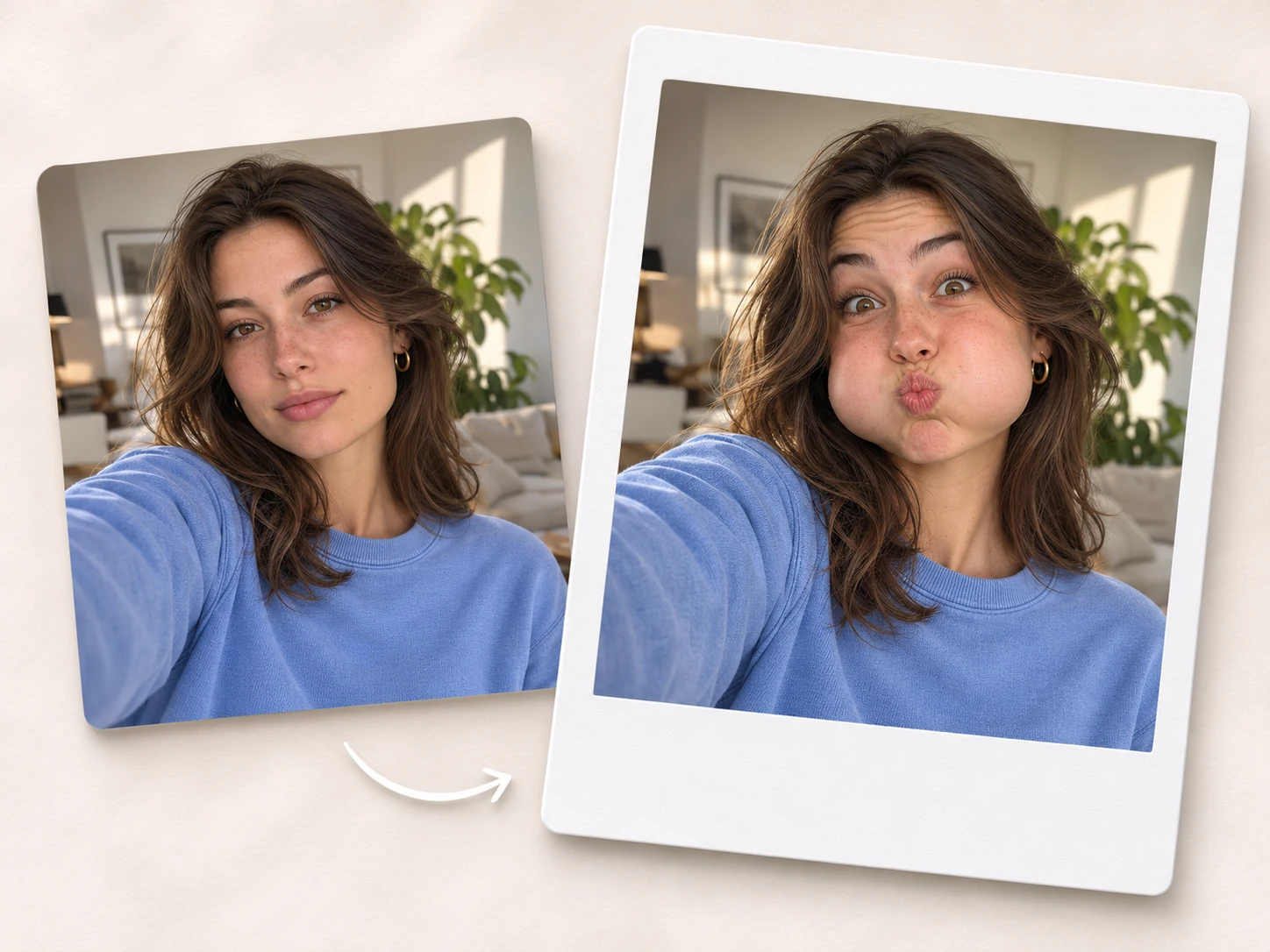
Turn a selfie you already have into a funny face in a few simple steps. Upload your photo to PicLumen, leave the prompt field blank, and click Generate. AI applies the preset funny face effect automatically, so you can see the result without adjusting individual features by hand. Try it on a serious headshot, a surprised snapshot, or a candid photo you almost deleted. Once you find a result that makes you laugh, download it for your next group chat reaction or social post.
Turn Selfies Into Goofy Characters
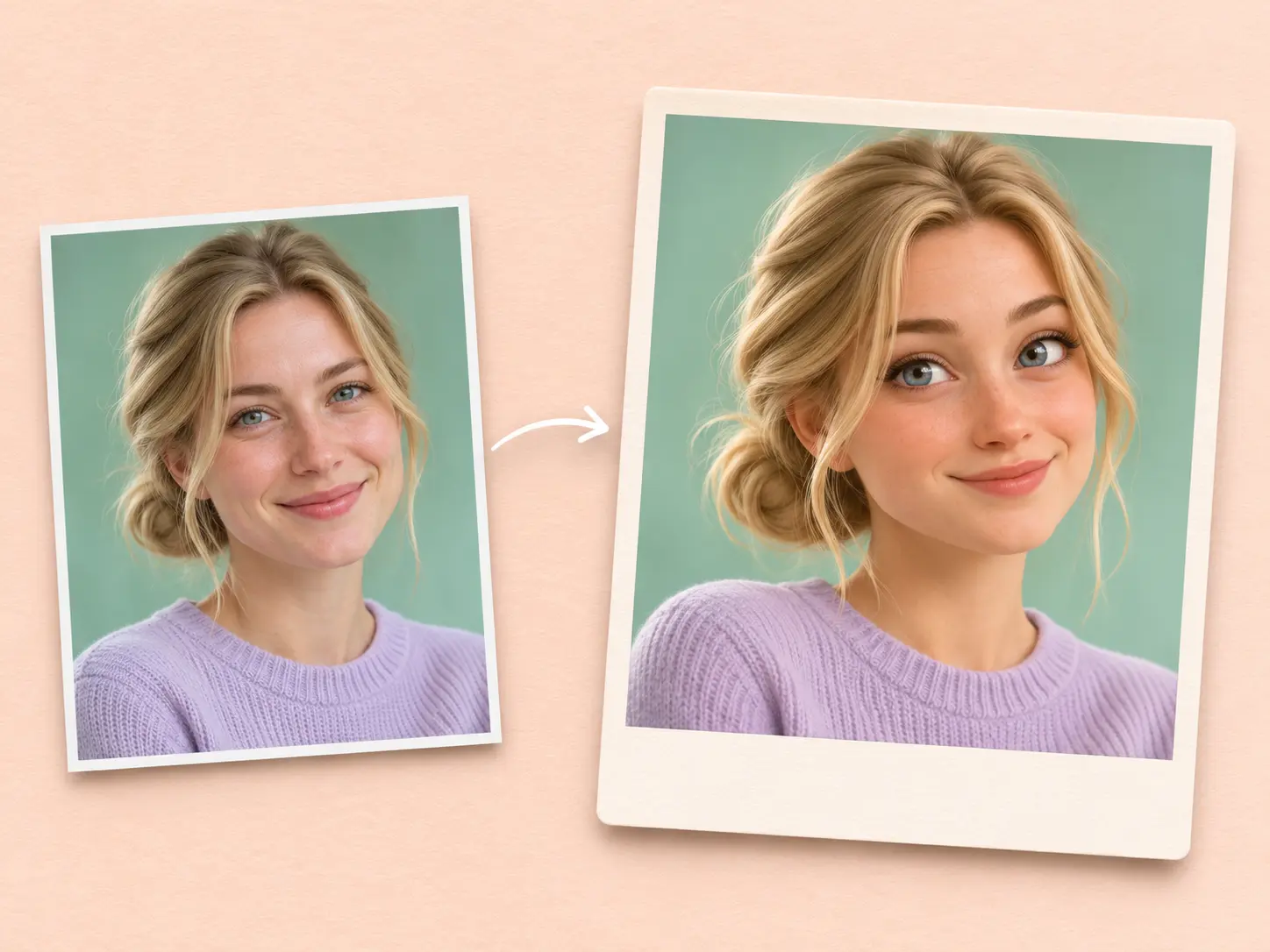
Give a regular selfie the personality of a comic-book character, a frazzled wizard, or a mischievous animal. A bold comic style can turn an everyday expression into a dramatic double take. Bushy brows and a floppy hat can give a portrait the look of a wizard who just misplaced his wand. For an animal-inspired face, try owl eyes and a puzzled head tilt. Think about who the character is and what just happened to them. Those details can give your portrait feel like a scene from a comedy.
Create All Kinds of Funny Faces
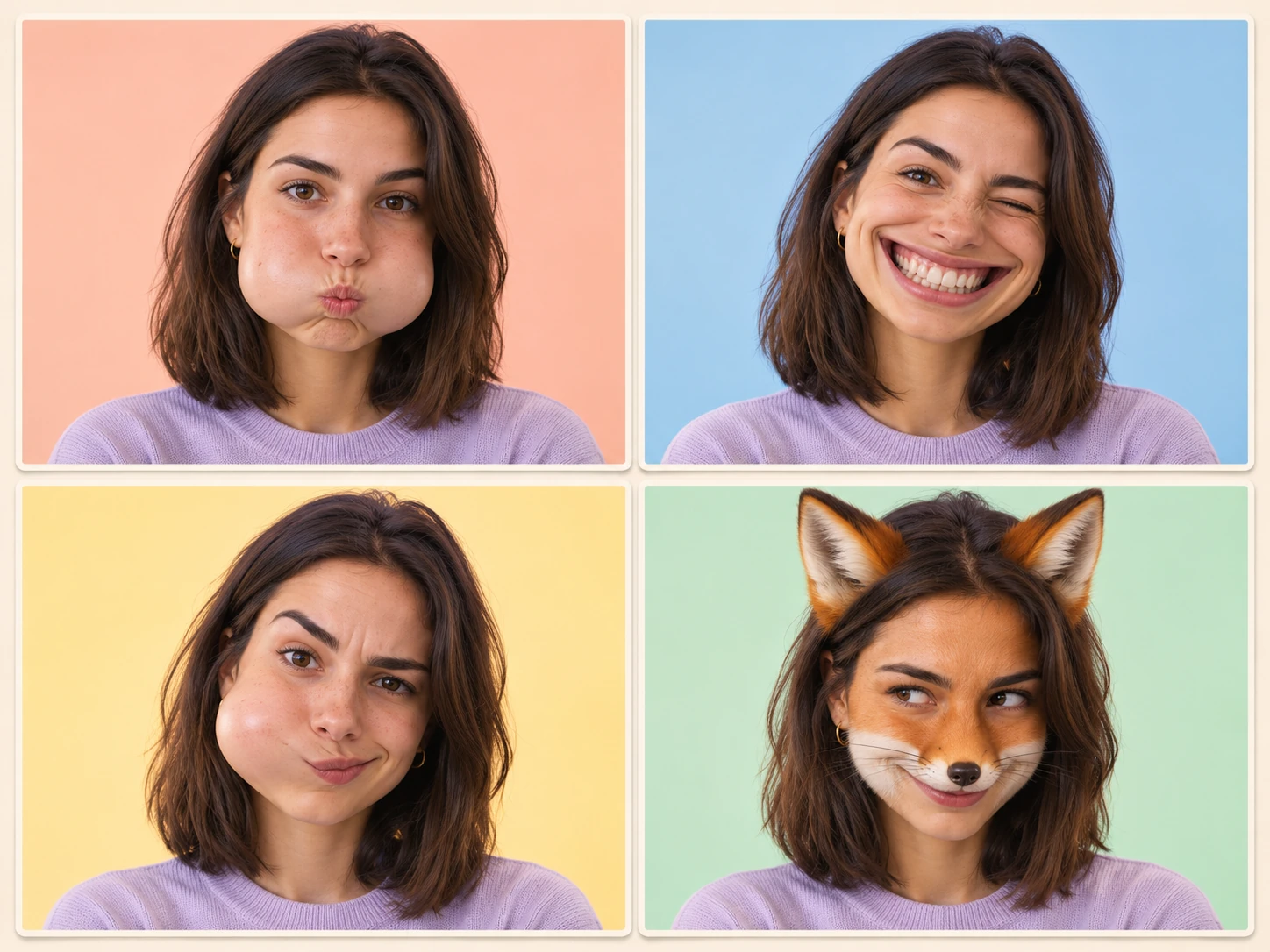
Make one selfie look delighted, confused, or like it’s barely holding in a laugh. Stretch the smile from ear to ear and add a squint for an over-the-top grin. Puff up both cheeks and press the lips into a tiny pout for a balloon-cheek look. You can also reshape facial proportions for a lopsided caricature, with one cheek rounder than the other or a chin that tilts to one side. Mix a few details to create an expression that fits the joke you have in mind.
Get a Custom Effect With a Prompt
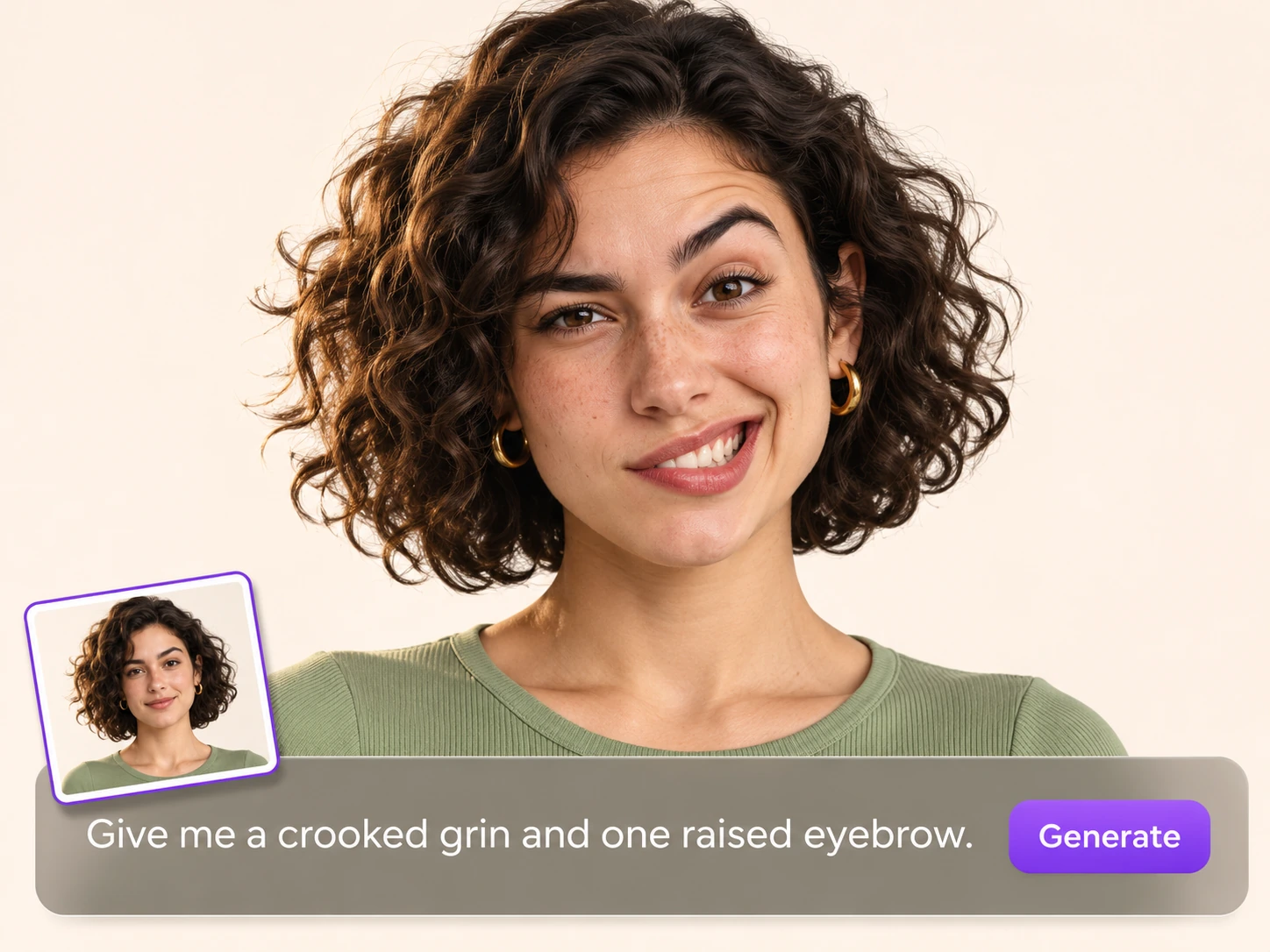
Add a prompt to generate a custom funny face effect based on your description. Tell PicLumen which features to change, how exaggerated they should look, and what expression you want. Try “Give me a slightly crooked grin and one raised eyebrow, like I’m trying to look innocent after sneaking a snack.” You can also specify a style, such as bold comic-book outlines around a stretched smile. Adjust your prompt and generate another version from the same photo when you want to try a different take on the joke.
Where to Use Funny Face Photos
Sometimes the face is the punch line. Use PicLumen’s funny face filter to turn a selfie into a reaction pic for an inside joke, a goofy portrait for a party invite, or a thumbnail that sets up your next comedy clip.
Make Your Own Group Chat Reactions
Turn your best deadpan selfie into a reaction image for the group chat. Try wide eyes for the moment someone drops unexpected news, or give yourself balloon cheeks for when everyone is trying to keep a straight face. Pick an expression that reads on a small screen so the joke lands in a busy thread. Keep a few favorites in your camera roll for the inside jokes that come up again and again, like a dramatic side-eye for the friend who always says they’re five minutes away.
Create Memes for Social Media
Start with a moment your followers recognize, like opening one email and finding a dozen new tasks. Give your face the stretched grin of someone who insists everything is fine. Pair the portrait with a caption like “When the quick question comes with three attachments.” For a carousel, put your original selfie on the first slide and reveal the exaggerated version on the next. Match the framing across the two slides so the stretched smile is the first thing people notice when they swipe.
Design Party Invites That Get a Laugh
Put the host’s face on the invitation and let the expression set the tone for the party. Give a birthday portrait a cartoon grin, or turn the host into a startled wizard for a costume night. Let the face take up most of the design and add the date, location, and dress code underneath so the details are easy to find. You can use the same funny portrait on a welcome sign or a party game card to carry the joke through the event.
Give Your Profile a Playful Update
Use a funny face as an avatar for a gaming account or a community profile. A cartoon version of your selfie gives people a face to associate with your handle. Add a crooked grin, a skeptical eyebrow, or a comically round snout to make the image fit your personality. Try a close crop around the face so the expression stays easy to read in a small profile circle. Go back to the original selfie when you want to make a themed version for a tournament or community event.
Design Thumbnails for Comedy Videos
Set up the joke before anyone presses play. Use a photo of yourself to make a reaction portrait for a skit, a blooper reel, or a parody. For a cooking fail, try puffed cheeks and wide eyes beside a photo of the burnt dish. For a mock tutorial, give yourself the huge grin of someone who’s a little too pleased with a terrible idea. Add the portrait to your thumbnail layout and leave room for the object or scene that explains the joke at a glance.
Add Humor to Brand Posts
Give a familiar face from your business a playful role in your next social post. A coffee shop could use a wide-eyed portrait of its barista to announce a stronger cold brew. A bakery could put its owner’s cartoon grin on a post about the return of a favorite cookie. Include the news in the caption, with the name of the drink or the date the cookies come back. A portrait of someone customers already know can make the announcement feel more personal.
Try These Funny Face Filter Prompts
Cartoon Grin With Oversized Eyes
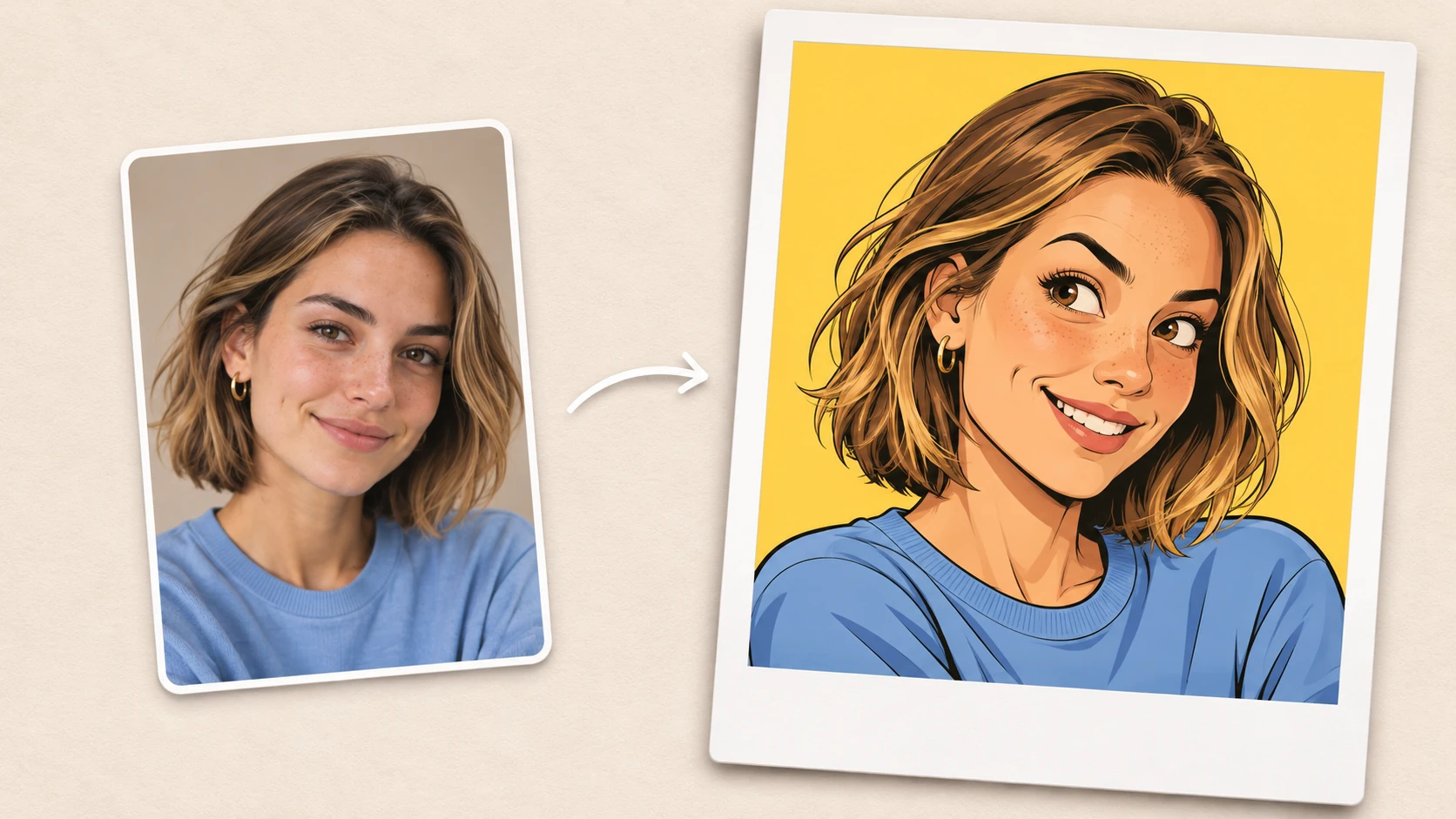
Turn this selfie into a colorful comic-book portrait with oversized eyes and a crooked grin. Raise one eyebrow and pull one corner of the mouth higher for a cheeky expression. Draw the face with bold black outlines, bright blocks of color, and simple shading under the chin. Carry the subject’s hairstyle and head angle into the illustration so the cartoon still feels like them.
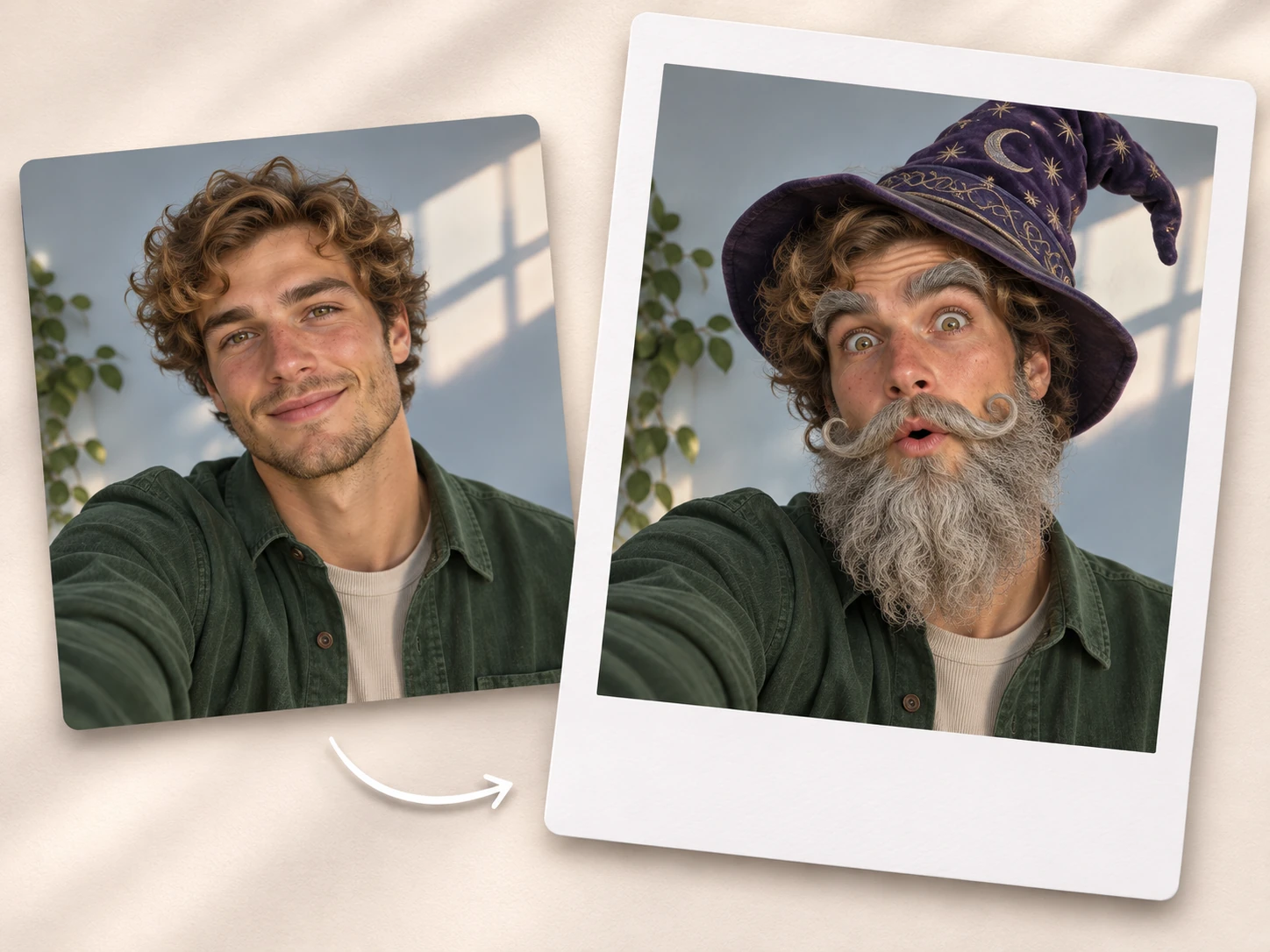
A Wizard’s Spell Gone Wrong
Turn the person in this photo into a flustered wizard whose spell just backfired. Add bushy gray eyebrows, a curled beard, and a pointed hat tipped to one side. Open the wizard’s eyes wide and round their mouth into a surprised O. Scatter a few purple sparks around the hat brim, as if the spell bounced right back at them.
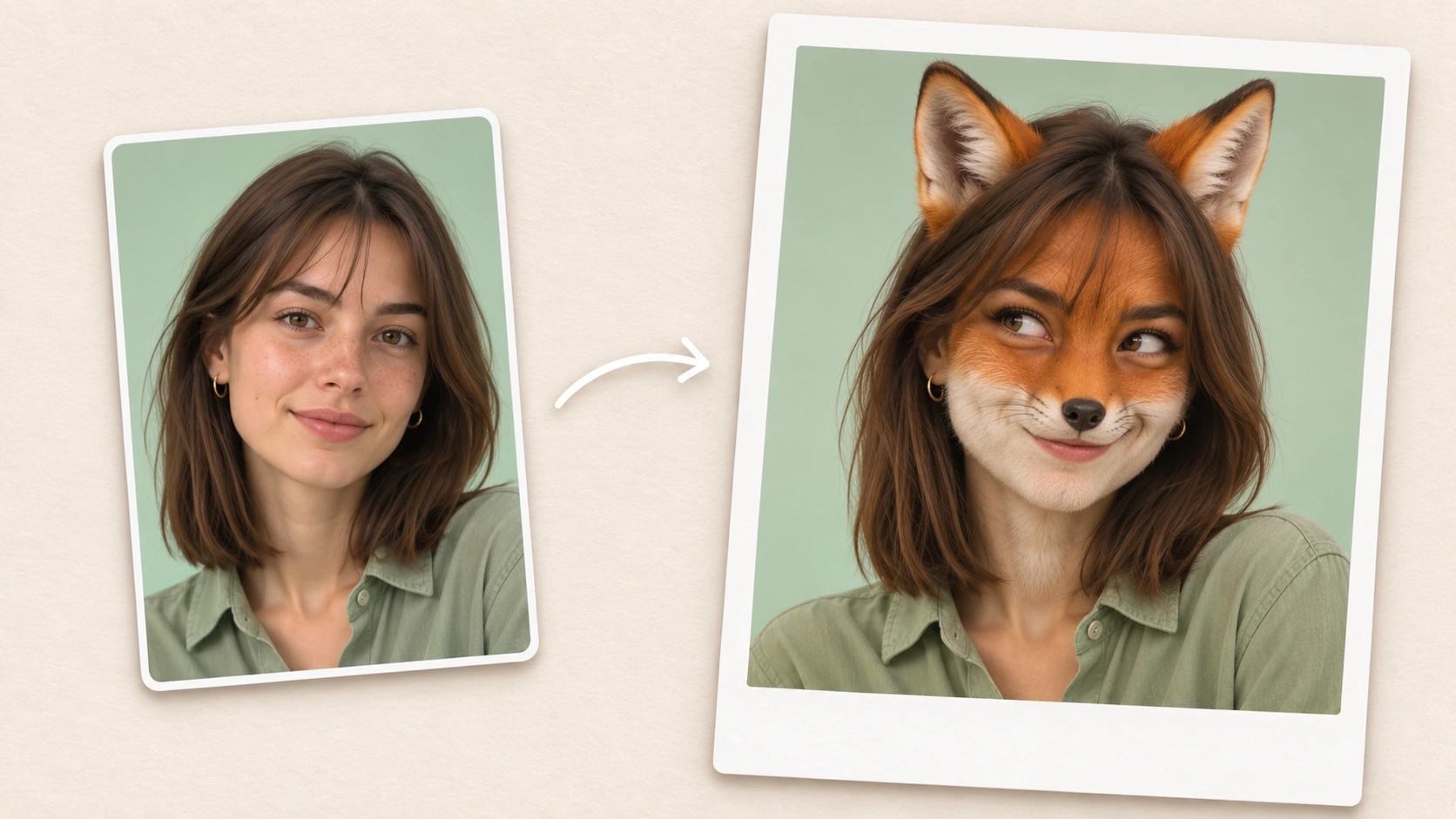
Mischievous Fox Face
Give the subject a fox-inspired face with soft orange fur, a white muzzle, a small black nose, and pointed ears. Direct their gaze to one side and lift one corner of the mouth into a knowing smirk, as if they just got away with stealing a snack. Blend the fur around the cheeks and forehead so the fox features follow the contours of the original face.
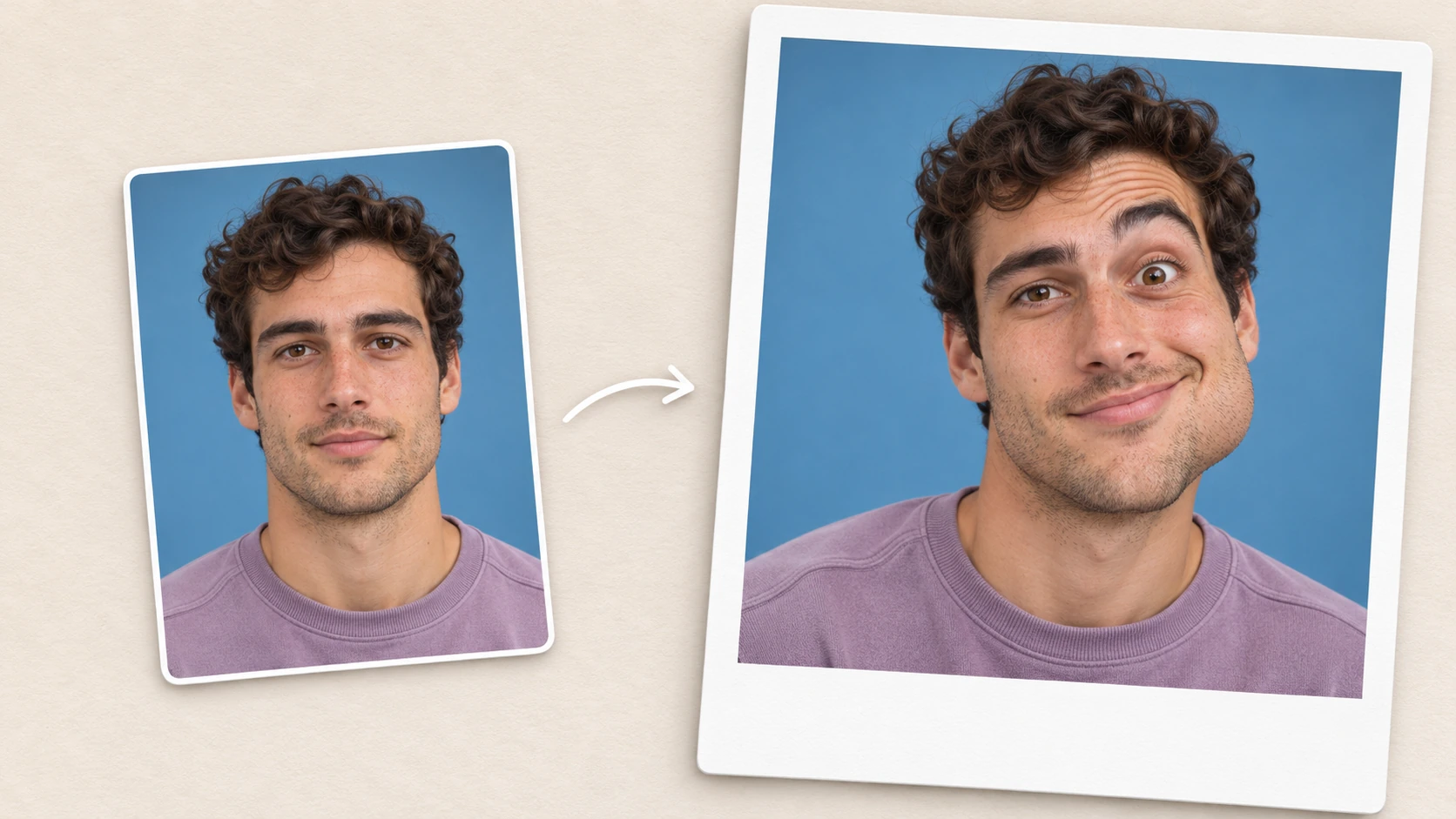
Lopsided Caricature Face Morph
Morph the face into a playful caricature with uneven proportions. Round out one cheek, shift the chin slightly to one side, and raise one eyebrow higher than the other. Lift the corner of the smile on the fuller side of the face and open the opposite eye a little wider. Give the subject a puzzled expression, as if they’re still trying to make sense of what they just heard.
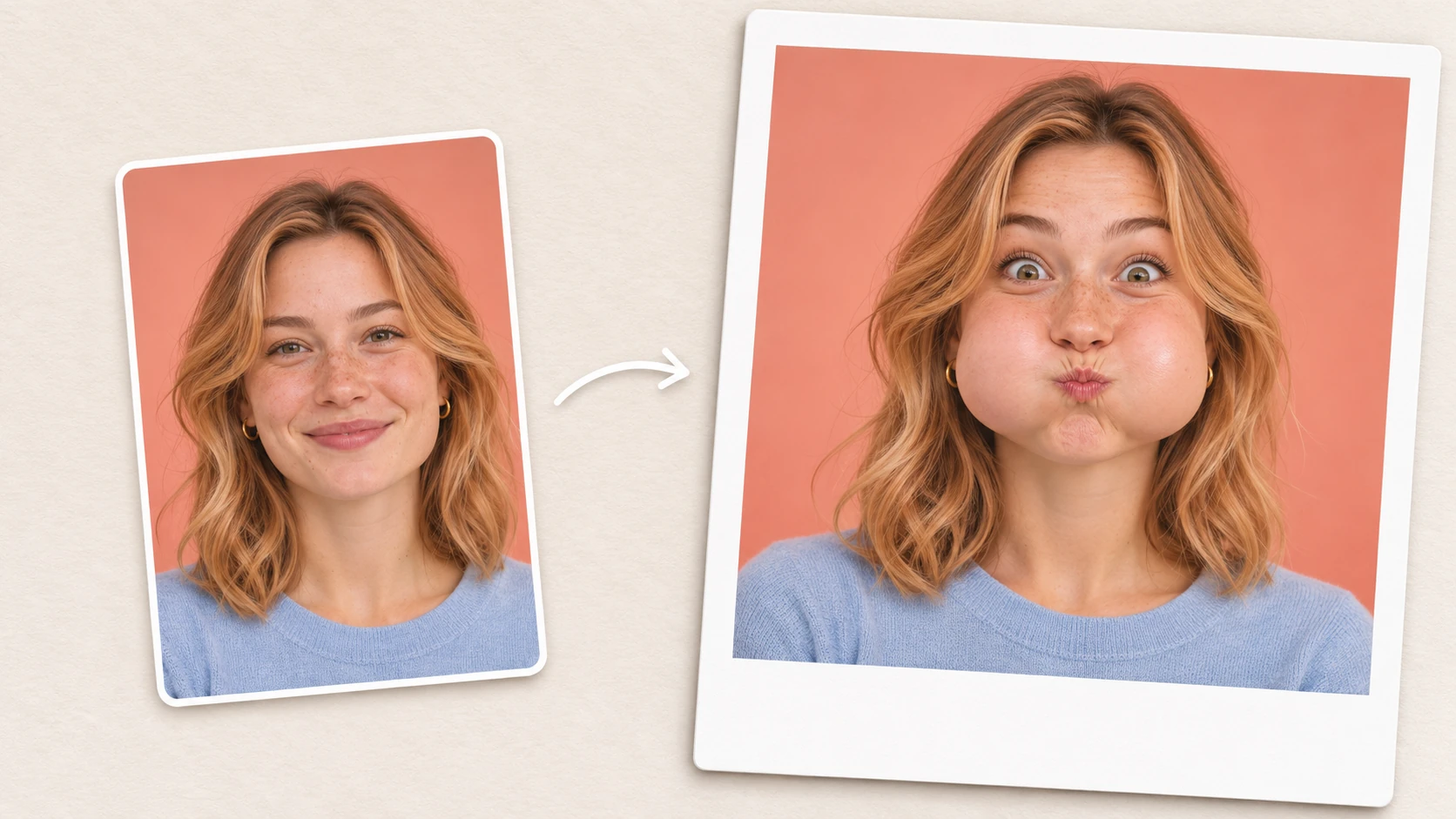
Bubble Cheeks With a Tiny Pout
Puff out both cheeks into round, balloon-like shapes and press the lips together in a tiny pout. Give the subject wide, focused eyes, as if they’re trying their hardest to hold in a laugh. Add soft highlights across the cheeks to bring out their roundness. Frame the face straight on so both puffed cheeks are easy to see.
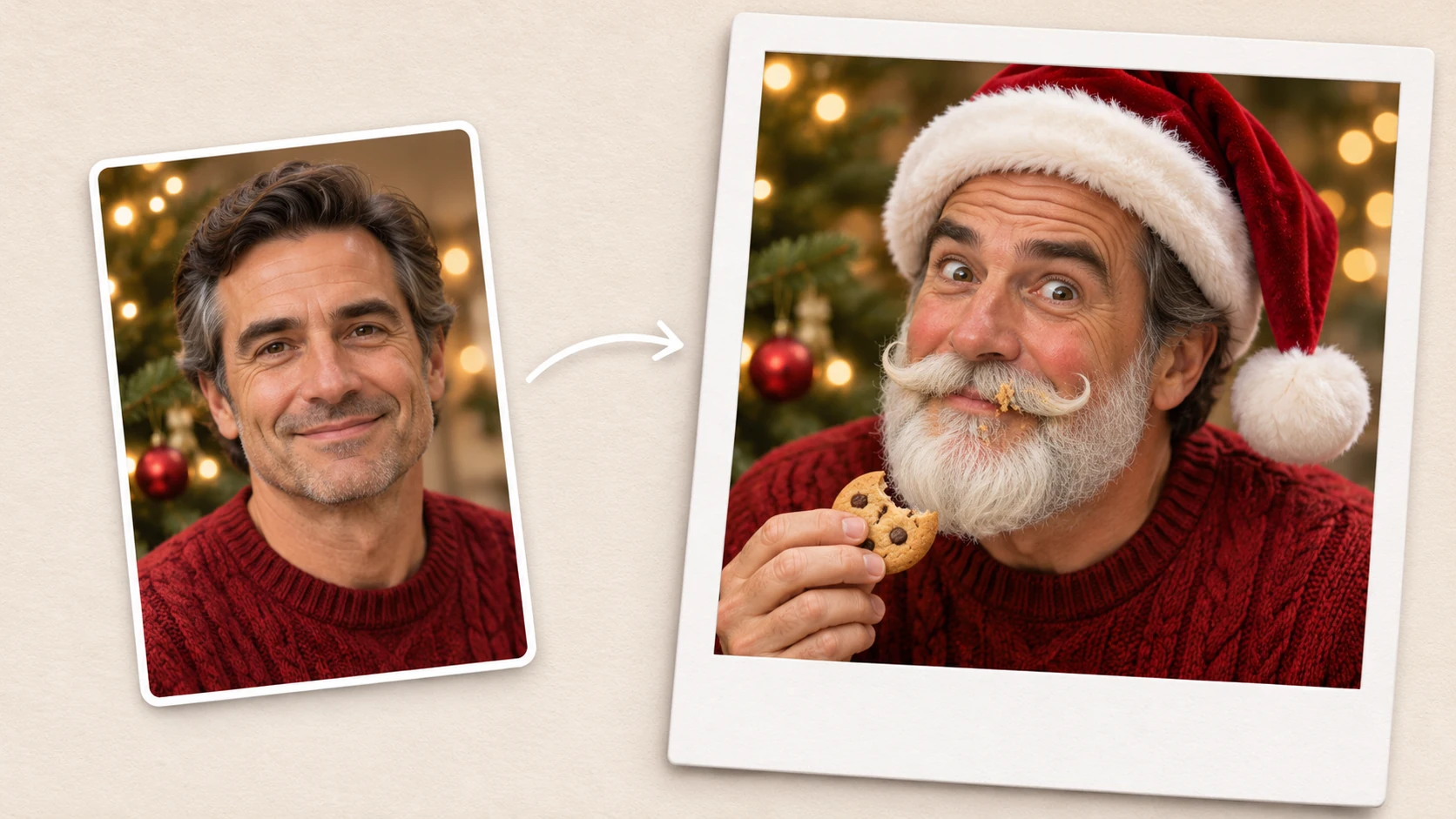
Santa Caught Sneaking Christmas Cookies
Turn the person in this photo into Santa caught sneaking a Christmas cookie. Add a red velvet hat with fluffy white trim, rosy cheeks, and a curled white mustache. Give them wide eyes, one raised eyebrow, and a sheepish grin, as if they’re trying to look innocent. Leave a few cookie crumbs in the mustache and add softly blurred Christmas lights in the background.


Loved by Creators Worldwide
Real feedback from designers, marketers, and hobbyists sharing their PicLumen experience on Trustpilot.
Zaine JuttAmazing 😍😍😍😍😍😍 freee 😍😍
Amazing 😍😍😍😍😍😍 freee 😍😍
Jon JonVery good website
Very good website. Different models, good job
My experience
Itis a really good website n really ideal to use theres only one con and that the AIS sometimes create wrong images but that doesnt happen frequently
 Scottie Grace
Very affordable and high quality
Very affordable and high quality
Ai HackGreat tool
I would really recommend this website to content creation
 Menu Lawrence
Very fantastic app
Very fantastic app. I love it. I will like everyone to use this App
 Fatjon Xhoka
Super app for photo and video
Super app for photo and video
 John Cooper
Best Ai image generating website
Best Ai image generating website
PicLumen is a powerful and completely free AI image generatio
PicLumen is a powerful and completely free AI image generation platform that offers a wide range of features, you can text to images, images to images, image to video, the image quality is very high, the most important, it is totally free, you can get many rewards by creating your jobs, like other's creation, welcome to joint and create your job, a goog platform for making money using the best ai tool
Very Best App For AI Vedioea
Very Best App For AI Vedioea
 Shiva Verma
Best app for video editing
Best app for video editing
 Human Human
Best of all time vry real
Best of all time vry real
FAQs About Funny Face Filter
What is a funny face filter?
A funny face filter changes the appearance of a face in a photo for a comic effect. It can exaggerate features like the cheeks and mouth, reshape facial proportions, or turn a portrait into a playful character.
Do I need to write a prompt?
A prompt is optional. You can generate a funny face from your photo alone. Add a short description when you want a specific expression or character style.
What kind of photo works best?
Choose a sharp, well-lit selfie or portrait with the eyes, cheeks, and mouth clearly visible. A front-facing photo is a good starting point for effects like puffed cheeks or a stretched smile.
How do I make the effect more subtle?
Ask for a small change to one feature, such as a slightly crooked smile or gently puffed cheeks. Words like “slightly” and “subtle” help describe how pronounced you want the effect to be.