Making a movie trailer used to require a film crew, actors, and a budget of thousands of dollars. Today, with PicLumen AI movie trailer generator, you can create a cinematic, professional-looking trailer from a single laptop.
To make an AI movie trailer from scratch, follow six steps:
Develop your story concept, establish a consistent main character, plan a shot list and storyboard, generate key frames, turn them into video clips with AI video generators, and edit everything into a final cut with music and text.
Whether you want to promote a book, pitch a film idea, or just have fun experimenting, this guide walks you through the complete process of making an AI movie trailer from scratch.
What Makes a Trailer Hook Audiences?
A good movie trailer has one job: to make people want to watch the movie. Great trailers tend to share three qualities, and these apply whether the trailer is made in a studio or with AI. (An AI movie trailer works the same way, except the visuals come from AI tools instead of a camera: you generate scenes from text prompts and reference images, then turn them into motion with AI video generators.)
Hook in the first 3 seconds. Open with one bold visual or line — if viewers aren't grabbed immediately, they scroll away.
Tease, don't reveal. Show one core conflict, never the ending. Leave viewers with a question they need answered.
Pacing that keeps viewers engaged. A good trailer mixes slow, tense moments with fast cuts, so the energy rises and falls instead of staying flat.
Why Make a Movie Trailer with AI? 5 Benefits
Not sure whether an AI movie trailer is worth your time? Here are the biggest advantages for creators at every level.
Time efficiency — idea to trailer in hours
A traditional trailer takes weeks of shooting and editing. With PicLumen AI movie trailer generator, you can go from concept to finished 30-second trailer in a single afternoon.
No crew, actors, or equipment needed
AI replaces the camera, the set, and the cast. If you can describe a scene in words, you can generate it visually.
No editing experience required
PicLumen is super beginner-friendly and it handles generation and assembly for you. The workflow in this guide will give you a clear path even if you've never edited a video.
Cinematic quality at a fraction of the cost
With the right prompts, PicLumen output can look like a studio production. And the cost is really low when compared to live shooting.
Endless iteration with zero risk
Don't like a scene? Regenerate it. Change the mood, lighting, or pacing and compare versions in minutes. AI lets you experiment fearlessly, since the only cost is a few credits.
How to Make an AI Movie Trailer from Scratch: 6 Steps
Step 1 Develop Your Broader Movie Concept
Before you generate the video, it's always important to first have an idea in mind. A clear concept keeps every later step on track and could potentially save you hours of wasted time. You could start with the basics:
Element | What to define | Example |
Genre | Fantasy, sci-fi, romance, thriller… | Sci-fi adventure |
Main character | Who is the story centered around? | A teenage girl who owns a mysterious smartwatch |
Core conflict | What major event or problem drives the story? | The protagonist, who was about to be late for an important date, used her magic watch to teleport and it went wrong. |
Logline | One sentence summarizing the whole story | A girl's smartwatch glitches and teleports her across the world — now she must get back before it runs out of power. |
Step 2 Establish a Consistent Character Foundation
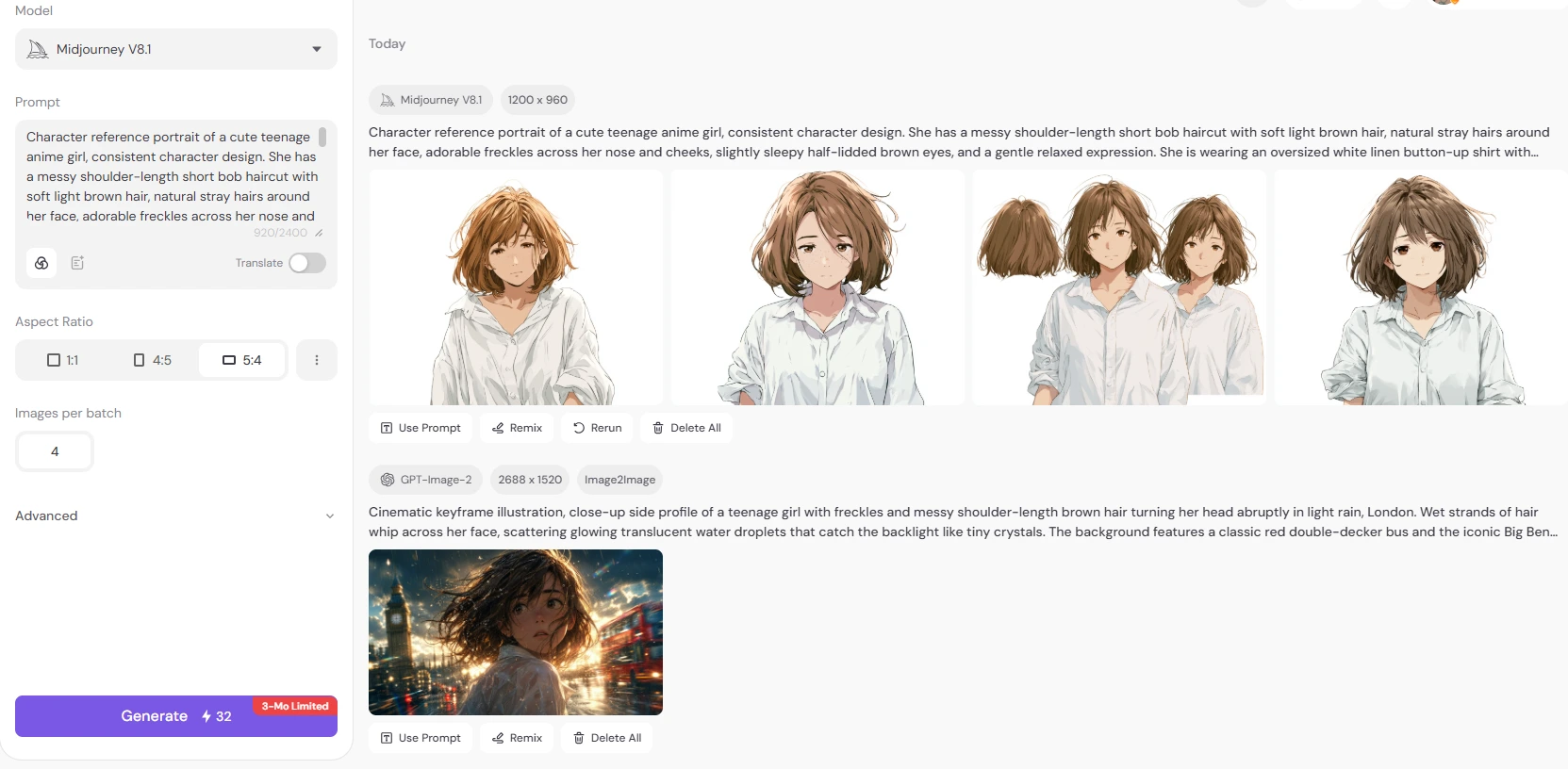
A consistent character is one of the biggest challenges in AI-generated videos. You should start by generating your lead character to establish the visual anchor of your trailer. Use PicLumen AI image generator to generate your character visuals first and keep them consistent throughout the trailer.
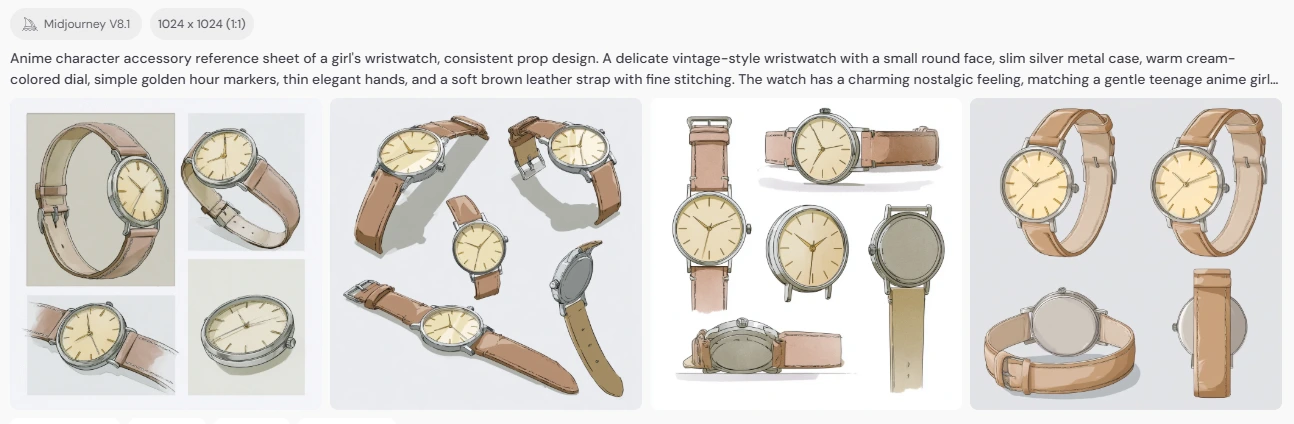
Also, if there's any element that repeatedly appears on the trailer, be it a watch, a handbag, or a jacket, make sure to generate their images from multiple angles so the video-generating models could ensure the consistency.
Step 3 Create a Shot List and Storyboard
The number of shots in a trailer depends entirely on your editing style. A fast-paced action trailer is built from many quick cuts, while a slow, moody teaser works better with fewer, longer shots. Before generating videos, break the trailer into a shot-by-shot plan according to your needs.
For each shot, you need to specify:
Scene: Where does the action take place?
Subject: Who or what appears on the frame?
Camera movement: Close-up, wide shot, tracking shot, bird-eyes view, etc.
Example:
Time | Visual Description | Camera & Lighting |
0:00–0:02 | Mountain cabin at sunrise. The girl (messy bob, freckles, wrinkled white shirt) wakes up late, checks her smartwatch, and realises she's about to miss her date — panic hits. | Wide shot with slow push‑in. Warm golden morning light, volumetric god rays through window. Cool blue outside vs. warm amber inside. |
0:02–0:04 | Close‑up of the watch (silver case, blue strap). Screen shows map "2h 15min", and timer “15:00”. She frantically taps it – blue‑white teleport energy bursts out with particles. | Macro close‑up, shallow DOF. Cold blue screen glow vs. warm ambient. Sudden bright flash and particle effects. |
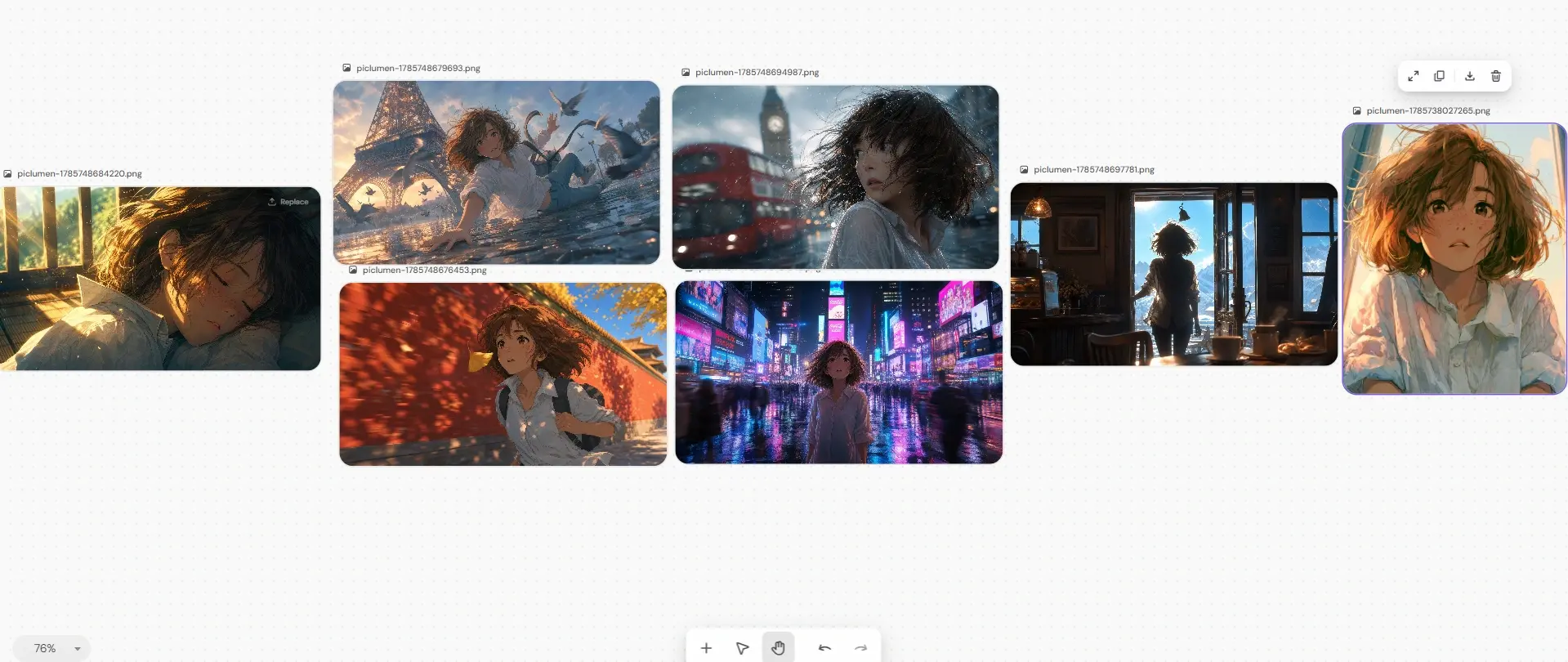
0:04–0:12 | Teleport chaos: rapid jumps to Paris (Eiffel Tower, wet cobbles), London (rain, Big Ben bokeh), NYC (neon Times Square), Beijing (Forbidden City red wall). She looks shocked and more anxious each time, desperately tapping to escape. | Fast whip pans and abrupt cuts. Distinct palettes: Paris blue‑orange, London cool grey with red, NYC vivid neon purple/cyan, Beijing red‑gold sunset. Shaky, dynamic motion. |
0:12–0:15 | Final landing at a peaceful mountaintop café above the clouds. Chaos fades to warm sunlight. She pushes open the door, steps in, sits down, and smiles with relief. | Over‑the‑shoulder silhouette (extreme backlight), then medium shot from opposite seat. Warm golden interior, soft bokeh, ending with gentle rack focus to blur. |
Step 4 Generate and Upload Key Frames
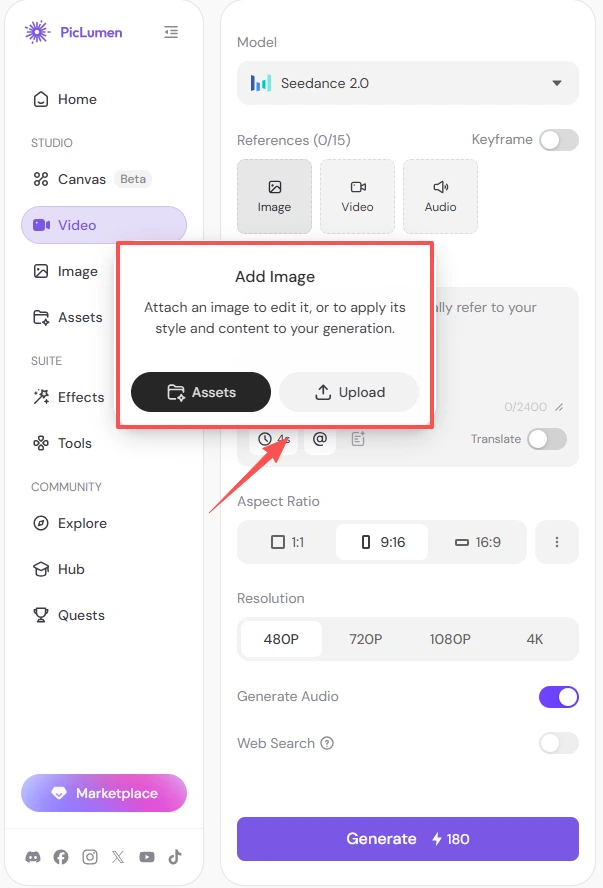
Key frames are still images that define the look of your trailer. To have a better control over how the trailer is going to look like, generate and upload your key frames as reference photos.
Why key frames matter:
They give AI video tools a clear visual instruction instead of a guess
They keep lighting, color grading, and composition consistent across clips
They help maintain video consistency.
Step 5 Turn Images into Video
Now the fun part. Feed your key frame into PicLumen AI movie trailer generator and write an effective prompt.
Describe in your prompts:
Character actions — what the character does
Camera movement — push-in, pan, tracking, aerial
Environmental changes — weather, light shifts, time of day
Cinematic effects — motion blur, lens flare, film grain, slow motion
The complete prompt formula:
[Camera angle/movement] + [subject & appearance] + [action] + [environment] + [lighting/atmosphere] + [cinematic style] + [film effects]
You can ask for a long clip at once, but the result will be far more controllable if you break the trailer into individual shots. A 5-15 second clip per shot is the sweet spot for most AI video tools.
Step 6 Edit and Polish the Final AI Movie Trailer
The final step is combining all generated clips into a complete trailer.
Use a video editor to:
Arrange clips according to your storyboard
Synchronize cuts with music
Add title cards and cinematic text
Adjust colors and pacing
Add final sound effects
For beginners: a 30–60 second trailer is a good starting point. Shorter trailers are easier to keep visually consistent while still creating a strong cinematic impact.
Generate AI Movie Trailer on PicLumenCommon Mistakes to Avoid (and How to Fix Them)
Here are some common mistakes when making AI movie trailer and ways to avoid them:
Mistake | Fix |
Character face changes between shots | Always upload the same character reference image + repeat the description in every prompt |
One long video instead of short shots | Generate 5-15 second clips per shot and assemble them |
Vague, poetic prompts | Use the prompt formula: angle + subject + action + environment + lighting + style |
Skipping the storyboard | Plan every shot's timing before generating — it saves hours of retries |
Ignoring sound design | Music and sound effects do 50% of the "cinematic" work — don't skip them |
FAQ
1. How long should an AI movie trailer be?
For beginners, 20-60 seconds is ideal. It's short enough to stay visually consistent but long enough to build a story arc and cinematic impact.
2. How do I keep characters consistent across AI-generated shots?
Generate your character from multiple angles first, upload those images as references for every video prompt, and repeat the same physical description in every prompt.
3. Can I use an AI movie trailer for commercial purposes?
Yes, commercial use is allowed for paid subscribers. You may only use content you generated yourself, not others' public images, and you bear full legal responsibility for originality and non-infringement.
4. What is a key frame and why do I need it?
A key frame is a still image that defines the look of a scene. Uploading it as a reference tells the AI video generator exactly what the scene should look like, which dramatically improves consistency and reduces random results.
5. What resolution and aspect ratio should I use for an AI movie trailer?
Use 16:9 at 1080p for YouTube and standard screens. If you plan to post to TikTok or Reels, generate vertical 9:16 versions.
.png)

 (1)_compressed.jpg)