Let's be real: "Agent" is the biggest buzzword in AI right now. Every time a new tool drops, it slaps "AI Agent" on the homepage and promises to replace your entire creative team. So when Lovart AI launched, claiming to be the world's first "AI Design Agent", my hype radar immediately went up. As someone who spends way too much time bouncing between Midjourney for raw images, Photoshop to fix weird AI artifacts, and Premiere for quick videos, the idea of doing it all in one chat box sounded amazing. Or, at the very least, like a really good marketing pitch. I needed to know: is Lovart actually a capable digital junior designer that can speed up my commercial workflow, or is it just a fancy wrapper around existing models with a catchy name? I spent the last day throwing actual commercial and promotional briefs at it. Here is my unfiltered take on whether it actually lives up to the hype.
What Is Lovart AI?
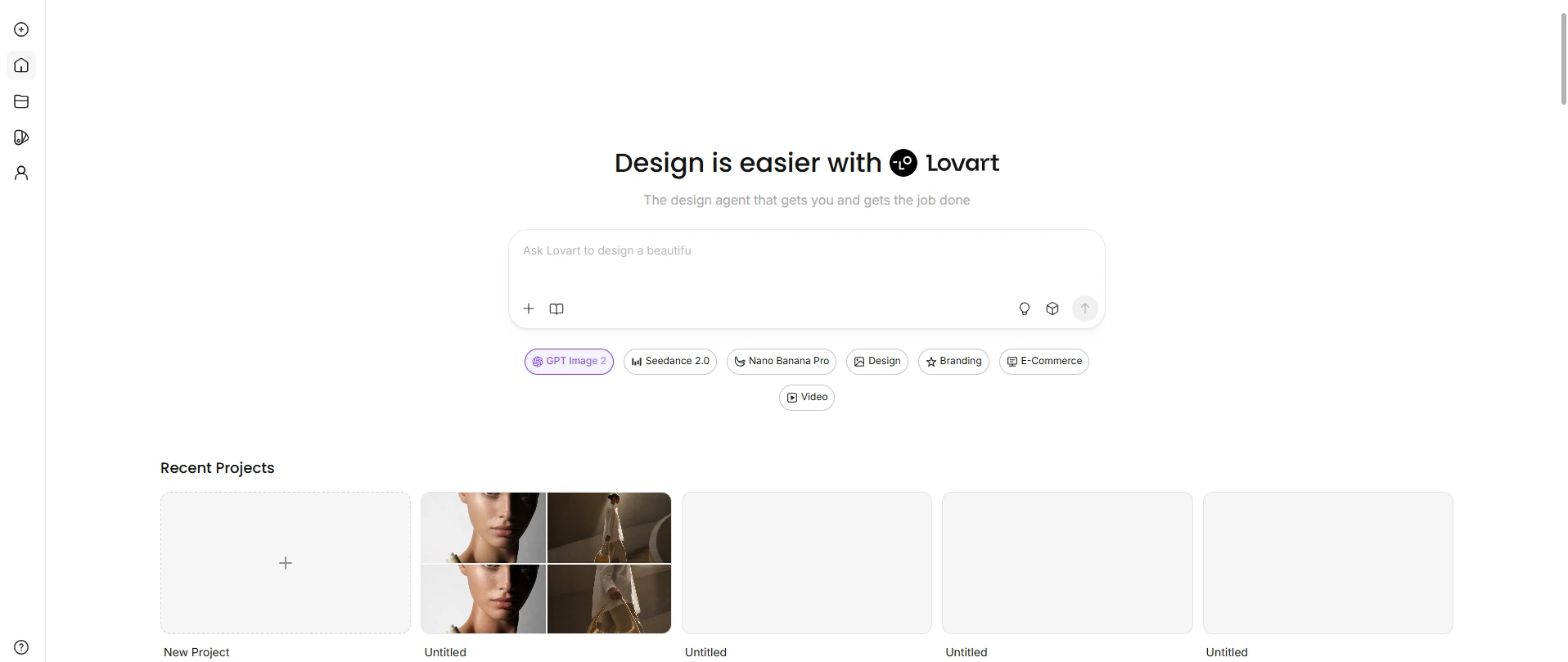
Unlike standard AI tools that just spit out some flat images and call it a day, Lovart AI tries to act like an actual junior designer. Developed by the Chinese tech firm Liblib, it's built as an "AI design agent." The core experience happens on an infinite "ChatCanvas." You chat to generate a base design, tap directly on elements to edit them (like swapping a product's color without manual Photoshop masking), and tune the layers. Under the hood, it routes tasks to heavy-hitting models like Midjourney, GPT-4o, and Kling AI, so you don't have to jump between a dozen different apps. On paper, it sounds like the ultimate cheat code for commercial workflows. But is it a brilliant design partner, or just a fancy wrapper with a catchy name? Let's look at how I put it to the test.
How I Tested It
To see if Lovart could actually handle professional commercial work, I put myself in the shoes of an in-house designer for a luxury brand. I ran it through a mock production workflow and judged it based on five practical questions: • Can it capture a minimalist luxury vibe, or does it default to a cheap, "AI plastic" look? • Can it generate elegant, readable text for posters, or does it still spit out gibberish? • Can it seamlessly integrate a real product photo into a new scene with accurate lighting and shadows? • If I ask for a minor tweak, does it edit the specific layer or just regenerate everything? • Does it produce smooth, cinematic promo clips, or just choppy, morphing slideshows? I treated every prompt like a real agency brief. Here is how it actually held up.
Testing Lovart's Image Design Workflow
Text-to-Image: The Base Product Shot
Before designing any posters or shooting video ads, I needed a clean, flawless base image of the product. I asked Lovart to generate a minimalist light camel suede hobo bag on a pure white background. Here is the exact prompt I used:
A minimalist light camel suede hobo bag, soft matte suede texture, seamless integrated wide shoulder strap, U-shaped curved bottom, monochrome light sand color, no hardware, no zipper, no logo, simple stitching lines, studio photography, pure white background.
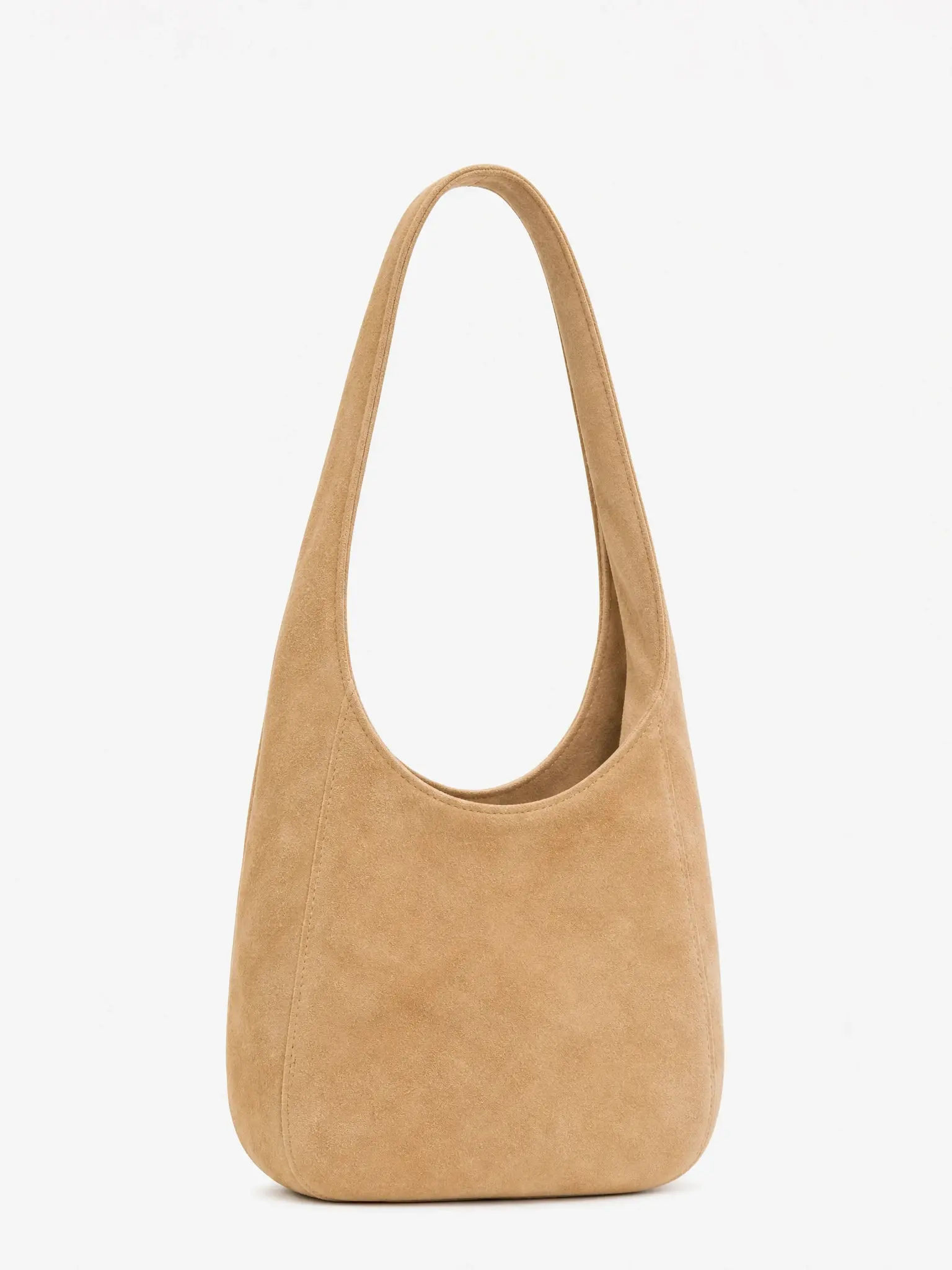
The overall aesthetic was spot on. It perfectly captured that high-end, editorial luxury vibe I was looking for. The material and lighting are excellent. It also respected the negative prompts surprisingly well—no random zippers, hardware, or logos popped up, and the U-shaped bottom kept its natural structure without warping. As a base product shot, it's highly usable. It gets you 90% of the way there. But for strict commercial use, you may still need a quick pass in Photoshop.
Image-to-Image: The Product Photography Test
Next, I took the hobo bag I just generated and used it as a reference photo to create some promotional lifestyle shots. This is usually where AI tools struggle with spatial logic. For my first attempt, I wanted a high-end editorial vibe:
A tall, slender female model with a sleek low bun, walking down a sweeping minimalist concrete staircase inside a contemporary art museum. A single dramatic beam of sunlight streams through a high clerestory window, striking the edges of the bag (the reference photo) she carries loosely at her side.
The Results (Attempt 1)

The texture and overall vibe were fantastic. It perfectly captured that luxurious, minimalist museum aesthetic. However, as is typical with AI, the bag itself got a bit lost in the scene and wasn't the main focus of the shot. So, I tried to force a product-centric composition with a follow-up prompt:
the bag occupies the entire lower one-third of the frame, with the model walking behind it, product-centric close-up composition
The Results (Attempt 2)
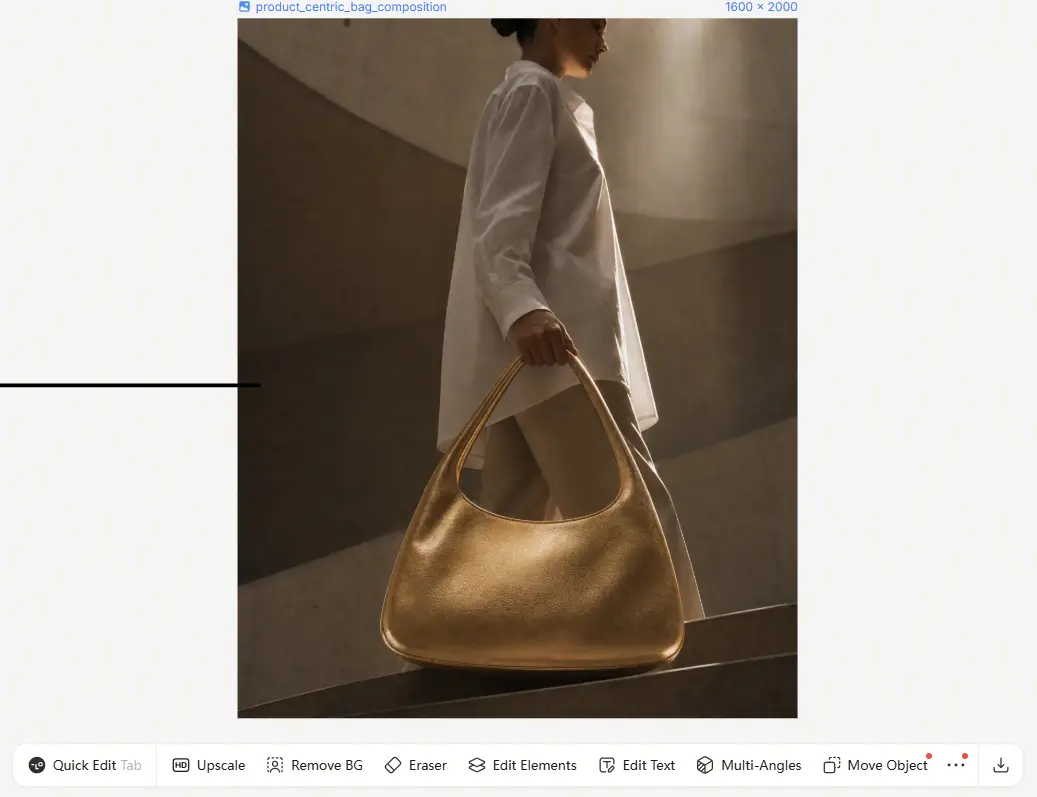
This is where the physics engine fell apart. While it successfully made the bag more prominent, it just broke the spatial logic. The bag's proportions stretched out and became unnaturally wide, and the model somehow ended up walking behind the concrete stairs. To see if it could handle a more controlled, standard commercial setup, I did one final test. I uploaded a reference photo of a skincare bottle and asked it to generate a beauty ad that also included the text "Mini Skincare" (a fictional brand name).
A sophisticated female model with sleek, pulled-back hair, gazing directly at the camera with an intense, confident gaze. Extreme close-up portrait, holding a luxury skincare bottle against her collarbone. Minimalist studio photography, solid pure white or charcoal grey gradient background.
The Results (Attempt 3)
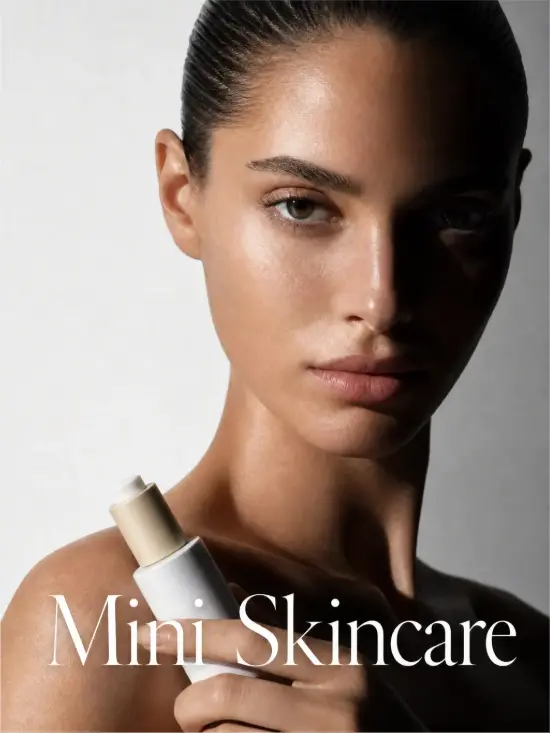
This one was a massive win. The dramatic side lighting and shadows looked incredibly natural, and the skin texture was flawless without looking plastic. More importantly, it nailed the product placement. The bottle was the perfect size and positioned exactly against the collarbone. It also rendered the "Mini Skincare" text cleanly without any typos.
The Takeaway: Lovart is excellent at generating the right mood, lighting, and high-end textures for promo shots. But when you try to strictly dictate camera angles and foreground/background relationships, it still struggles with real-world logic. For final commercial use, you'll likely need to generate a few variations or do some minor inpainting to fix these spatial quirks.
Lovart Image to Video Tools Review
AI tools' image to video feature is usually where things turn into a melted, morphing nightmare. To see if Lovart could handle a high-end commercial B-roll shot, I used a lifestyle image featuring the hobo bag as my starting frame and gave it a highly detailed prompt with specific micro-actions and camera movements.
This is the reference photo.

Here is the prompt I used:
Starting from the given image, the woman slowly closes the vintage book with both hands, then gently lowers it into the open handbag resting beside her on the warm limestone. As she places the book inside, her hand lingers for a moment, adjusting the bag's strap naturally. Simultaneously, the camera performs a slow, smooth dolly-in (zoom forward), gradually bringing the bag and the book into the central foreground.
The Results

Honestly, I fully expected the bag to morph into a puddle of suede or the camera pan to make the background melt. But it actually pulled it off beautifully. The texture of the bag and the skin remained incredibly natural throughout the 6-second clip. The slow dolly-in was smooth, and it handled the subtle shifting of the golden-hour shadows without flickering. It felt like a genuine, serene candid moment rather than a choppy AI slideshow.
Lovart AI Pricing
Plan | Monthly (Month to Month) | Annual Total (Paid Yearly) | Equivalent Monthly (Annual/12) | Monthly Credits |
|---|---|---|---|---|
Starter | $19/mo | $192/yr | $16/mo | 2,000 |
Basic | $32/mo | $276/yr | $23/mo | 3,500 |
Pro | $79/mo | $336/yr | $28/mo | 11,000 |
Ultimate | $169/mo | $828/yr | $69/mo | 27,000 |
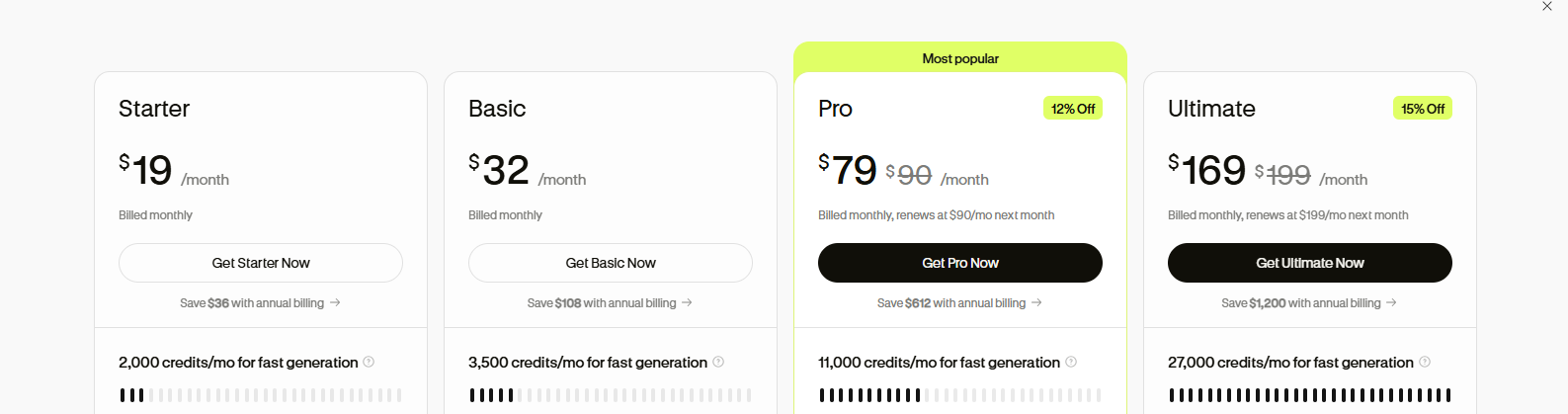
Lovart Starter is enough for occasional testing. Regular users will get more value from a paid plan, especially when they also need more credits, all model access, and annual discounts that cut the monthly cost significantly. For most solo creators, Basic feels like the better buy. It covers the credits and tools most freelancers actually use—3,500 credits per month and full model unlock—without charging for high volume capacity you don't need. Pro and Ultimate are more suitable for agencies or teams managing multiple campaigns. The extra cost adds far more credits and premium model tiers, but most individual users will not need them. My take: go with Basic if Lovart is already part of your weekly workflow. Don't subscribe only for the AI agent hype, since the outputs can still needs hands-on correction.
Lovart AI Review: Pros and Cons
After putting Lovart through a full mock commercial workflow, here is the unfiltered breakdown of where it actually delivers and where it falls short.
What I Love (Pros): • Top-tier commercial aesthetics: It genuinely understands high-end lighting, textures (like matte suede), and minimalist vibes right out of the box. • Intuitive ChatCanvas: The "Talk, Tab, and Tune" workflow makes tweaking specific layers and elements much faster than re-prompting from scratch. • Highly stable video generation: Stable video generation, with natural slow-motion and texture rendering.
What Annoys Me (Cons): • Breaks spatial logic easily: Struggles with complex foreground-background spatial logic. • Overhyped "Agent" label: It markets itself as ai design agent, but underneath, it’s mostly just a smart wrapper orchestrating existing models like GPT-4o.
Lovart AI VS. PicLumen: Which One Fits Your Workflow Better
While both Lovart and PicLumen feature collaborative canvas for visual creation, they cater to distinct creative needs and skill levels. Here is how they stack up:
Feature / Criteria | Lovart | PicLumen |
|---|---|---|
Workflow Style | ChatCanvas: Chat-based briefing & project layout | Canvas: Node-based image & video workflow |
Core Strengths | Multi-asset design projects & brand visual consistency | Multi-model choices, Image-to-Video generation, & template hub |
User Experience | Tailored for users with prior AI design experience | Simple & intuitive interface, extremely beginner-friendly |
Community & Inspiration | Focused on brand assets & project management | Rich templates, prompts, & community ideas |
Best Used For | Commercial ad creatives, product design, & brand systems | Quick concept design, social media visuals, & AI video creation |
Final Verdict: Is Lovart AI Worth it?
Lovart AI is one of the more interesting AI design tools I've tested recently. But is it worth your money and time in 2026? My answer is: it depends on what you want.
Who it's for: • Designers creating product visuals and brand assets • E-commerce sellers producing marketing content • Creative teams looking for an AI-assisted design workflow
Who should skip it: • Anyone expecting an AI agent to handle entire projects on its own • Beginners looking for the simplest possible workflow
Overall, I'd recommend Lovart if your work revolves around commercial design and you like the idea of an AI chat canvas. Just don't expect it to become your entire design team overnight.
Frequently Asked Questions
Is Lovart AI actually an AI design agent?
Yes. While "agent" is a popular buzzword, Lovart actually functions like one. Through its ChatCanvas, it could break down design briefs, create complete brand asset sets, and edit layouts dynamically through multi-step chat instructions.
Can Lovart AI handle real design tasks, not just image generation?
To some extent, yes. It can help with idea generation and creating design assets. However, it still works best as a creative assistant rather than a complete replacement for a human designer.
Is Lovart AI completely free to use?
No, Lovart AI offers a freemium plan with limited free credits. Paid plans are needed for higher usage limits and access to more features.
What is the best Lovart AI alternative?
PicLumen is a strong alternative, especially with its Canvas feature that offers more flexible image editing and creative control. It allows users to refine designs directly on the canvas instead of relying only on text prompts.
Can I use Lovart-generated images for commercial purposes?
Yes. Lovart's paid plans include commercial usage rights tailored for e-commerce and ads. Just make sure to check your specific plan tier and their latest Terms of Service to be safe.