MAGI-2 is Sand.ai's video model for creating scenes from text, images, and other reference material. It can generate up to 30 seconds of 1080p video with sound, with controls for shot timing and changes to existing footage.
For a closer look at its character work, we reviewed a 10-second portrait animation. The brief asks a woman to hear bad news, regain her composure, and attempt a reassuring smile. Her changing gaze, brow tension, and lip movement give us specific details to examine.
What Can MAGI-2 Do?
MAGI-2 supports text-to-video and reference-guided generation. Images, video, and audio can help describe the appearance, movement, or sound of a scene.
Feature | Published specification |
Video length | Up to 30 seconds |
Output | 1080p, 25 fps |
Audio | Generated alongside the video |
References | Up to 10 images, 5 videos, and 5 audio clips per native request |
Direction | Timeline and shot-cut control |
Editing | Targeted changes to existing video |
These specifications come from Sand.ai’s launch announcement and API documentation. The video references can total up to 30 seconds per request; audio references have a separate 30-second total.
For a character scene, a portrait can establish appearance while the prompt describes the reaction. For a sequence with several shots, the prompt can lay out their order and camera direction. Available controls depend on the service running the model.
Sand.ai describes the full release as a 480B-parameter model with about 28B active parameters. Its 1080p pipeline includes an upscaling stage.
How Can You Use MAGI-2?
Sand.ai's website directs creators to MAGI-2 on VidMuse. Higgsfield also lists MAGI-2 in its hosted API catalog.
For a first attempt:
1. Choose a starting point. Describe a scene from text, or add a reference image if the selected mode supports it.
2. Write the action. State what the subject does, how the camera moves, and whether the scene needs dialogue or other sound.
3. Set the available output options. Check duration, aspect ratio, resolution, and the displayed charge before generating.
Start with a scene that has a clear result to check: a turn toward the camera, a product reveal, or a short reaction. It is easier to see what needs changing when the first clip has one main action.
Developers can use Sand.ai’s API documentation. Its pricing page currently notes that account top-up is not yet supported, so confirm access before planning a production workflow.
How Much Does MAGI-2 Cost?
Sand.ai lists MAGI-2 API generation at $0.08 per second for 1080p output. At that rate:
Requested length | API cost estimate |
5 seconds | $0.40 |
10 seconds | $0.80 |
30 seconds | $2.40 |
The rate was checked on November 25, 2026, against the official pricing page. Hosted subscriptions and credit packs may charge differently.
Allow room for another take. A 10-second request may cost $0.80 at the listed API rate, but the first result may still need a different expression, camera move, or ending. The actual charges and retry histories for the clips in this article were not provided.
A Closer Look at MAGI-2's Facial Acting
The MAGI-2 clip follows the main emotional sequence in the prompt: a small smile fades, the eyes widen, the gaze drops, and a smile returns. The face and pink makeup stay recognizable through those changes.
We first generated a front-facing portrait in PicLumen using Seedream 5.0 Pro. The woman has pink pearlescent eyeshadow, reflective blush, and glossy lips.
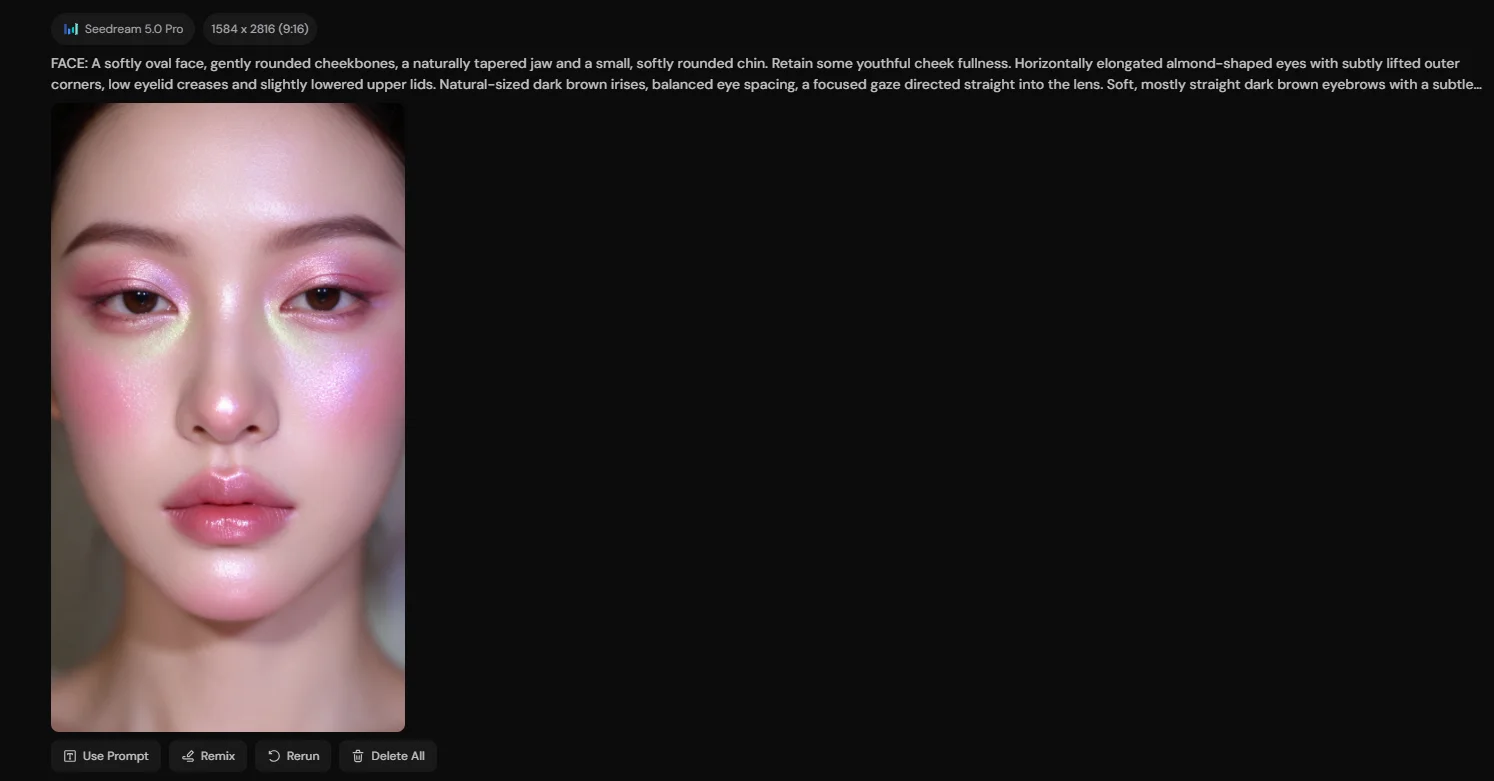
We then used this image as the reference for the video test, with a prompt asking for a continuous close-up, minimal head movement, and a slow camera push-in. The performance was divided into four stages:
Time | Direction |
0–2 seconds | Quiet anticipation and a faint smile |
2–4 seconds | The smile fades as the news sinks in |
4–7 seconds | Hurt, a lowered gaze, and an effort to recover |
7–10 seconds | A fragile smile with sadness still in the eyes |
The Middle of the Scene Is the Strongest Part
The smile starts fading before two seconds. Her eyes open wider and her lips part. Around four to five seconds, the gaze lowers and the brows draw together. Near six seconds, she presses her lips, then looks forward again.
That combination gives the reaction more shape than a simple change from smiling to frowning. The eyes, brows, and mouth contribute at different points. The lowered gaze and lip press are especially clear.
The Ending Loses Some of the Requested Sadness
From about 7.4 seconds, the mouth corners lift into a smile. It is a clear ending action, but the hurt beneath it is less convincing. Some frames look calm or gently pleased.
The prompt asked for someone trying to reassure another person while still upset. A returning smile meets part of that instruction. The remaining sadness needs to be visible in the eyes, brow, and pause as well.
The requested swallow and almost imperceptible lip tremble were also difficult to confirm. Strong eye and makeup highlights made added moisture hard to distinguish. Those details should remain open in the review rather than being counted as completed.
The Face and Makeup Hold Together
The main facial features, pink eye makeup, blush, and lip gloss remain consistent in the inspected frames. Small changes in the reflected light follow the expression and framing.
This is a polished beauty portrait, so it offers limited evidence about natural skin texture. The useful observation is that the makeup remains recognizable while the face moves.
The Prompt Used for This Clip
A 10-second cinematic acting close-up, using the woman in the reference image. One continuous take. She silently receives emotionally devastating news from someone just beside the camera. Her performance is intimate, restrained, and believable.
0–2 seconds: She looks toward the unseen person with quiet anticipation. Her eyes are attentive, her lips relaxed with the faintest hint of a smile.
2–4 seconds: As the news sinks in, her smile fades. Her gaze briefly freezes, her eyes widen slightly, and her lips part on a small, interrupted breath. Her brows subtly draw together.
4–7 seconds: Shock gives way to hurt. Her gaze drops, her lower eyelids tighten, and moisture gathers along her eyes without tears falling. Her lower lip trembles almost imperceptibly. She presses her lips together and swallows, trying to regain composure.
7–10 seconds: She looks back toward the person and attempts a fragile, reassuring smile. The corners of her mouth lift slightly, but sadness remains in her eyes. She releases a slow breath and holds this bittersweet expression.
Let each emotion develop smoothly from the previous one. Coordinate her gaze, eyelids, brows, cheeks, lips, jaw tension, and breathing as a unified performance. Keep head movement minimal so the facial details remain clearly visible.
Preserve her identity, facial proportions, pink pearlescent makeup, glossy lips, and natural skin texture throughout. Soft directional cinematic lighting, subtle shadows, shallow depth of field, a still background, and a very slow camera push-in. No dialogue, cuts, exaggerated crying, abrupt expression changes, facial warping, or makeup flicker. Exclude all interface elements and text.
How Does MAGI-2 Compare with Seedance 2.5 on PicLumen?
The same portrait and prompt were also used with Seedance 2.5 on PicLumen, with 1080p and 10 seconds selected. This gives us another interpretation of the same reaction.
Both clips follow the requested order. The differences are in the smaller choices:
Moment | MAGI-2 | Seedance 2.5 on PicLumen |
Surprise | Eyes widen and lips part | A more open mouth around 2.5 seconds |
Holding back emotion | More visible brow tension around 4–5 seconds | An earlier, more sustained lip press around 5.2–6 seconds |
Returning smile | A clear smile held toward the ending | A smaller smile at first, followed by more lip movement |
Appearance | Face and makeup remain recognizable | Face and makeup remain recognizable |
MAGI-2's brow movement makes the middle of its reaction look more troubled. Seedance 2.5's held lip press suggests an effort to keep composure. Its smaller smile initially stays closer to the restrained direction, though the lips part again later.
The final "smiling through sadness" is not fully clear in either result. For a short film, the choice would depend on the surrounding shots: one take may suit visible distress, while another may suit a quieter response.
Comparison note: We reviewed one creator-supplied result from each model, using frames sampled throughout the clips and selected matching-time images. Both files are 1920 × 1080; MAGI-2 is 25 fps and 10.000 seconds, while the Seedance file is 24 fps and approximately 10.042 seconds. Seeds and prompt-enhancement settings were not provided. Audio was not assessed.
Is MAGI-2 Worth Trying for AI Video Generation?
For a close-up reaction, this result gives a useful reason to try MAGI-2. It carries several expression changes through one shot while keeping the portrait recognizable. The middle section has enough detail to work as a reaction insert.
A scene built around an ambiguous emotion needs more attention. If the character is hiding grief or offering reassurance, check the final expression on its own and in the edit. A technically clean smile may still change the meaning of the scene.
The same brief is easy to revisit on PicLumen with Seedance 2.5. Keep the portrait and prompt fixed, compare the reactions, and choose the take that fits the story.
FAQs
Can I try MAGI-2 for free?
VidMuse advertises a free trial entry for MAGI-2. Check the allowance and account conditions before generating; the public page does not establish unlimited free use. Sand.ai’s API is separately priced at $0.08 per second for 1080p output.
Can I upload my own photo to MAGI-2?
Yes. MAGI-2 accepts image references, and the acting example in this article starts from a portrait. Describe what should move and which features should stay the same. In this result, the face and makeup remain recognizable while the gaze and mouth change.
How long can I make a MAGI-2 video?
Sand.ai states that MAGI-2 can generate up to 30 seconds at 1080p and 25 fps. The duration options available to an individual account can vary by service. The example reviewed here was requested at 10 seconds.
Can I download the full MAGI-2 model?
Sand.ai’s full-model launch announcement lists an open-source release as a future step. MAGI-2 Preview already has a separate public repository. Check the release name before downloading; Preview is an earlier model with different specifications.
Should I choose MAGI-2 or Seedance 2.5 for a reaction shot?
In this pair of clips, MAGI-2 gives the middle reaction more visible brow tension. Seedance 2.5 holds the lip press longer and begins the ending with a smaller smile. Choose the take whose expression fits the surrounding scene. This comparison covers one result from each model.
How can I recreate thi
s test on PicLumen?
Choose Seedance 2.5, upload a portrait, paste the prompt from this article, and select the available 1080p and 10-second settings. Check the smile, gaze, lip movement, and final expression against the prompt. Keep each result so you can compare takes without relying on memory.